Title here
Summary here
A from-scratch walkthrough of the pattern behind every LLM chatbot: one function that sends a message plus conversation history to a chat-completion API, a persona set by a system prompt, and a loop that keeps the conversation going.

Type a question into ChatGPT and it feels like magic: the model just remembers what you said three messages ago. It doesn’t. Every single request you send is stateless — the model has no memory of your last message unless your code hands it back. What looks like conversation is really a Python program re-sending the whole transcript, every single time.
That’s the part beginners usually get wrong first: they call the API once, get a great reply, then can’t figure out why the second message seems to have amnesia. This post builds the actual mental model behind an LLM chatbot, then walks through a minimal command-line client — sending a message and its history, reading the reply back out, and giving the bot a fixed persona with a system prompt — using the same request shape as the official openai Python client. You’ll need your own API key from a provider (OpenAI’s or another vendor’s) to run it against a live model; everything here is verified against a small local stand-in for that client so the logic is proven correct even without one.
A chat-completion API call is a single, stateless round trip: you send a list of messages, you get one message back. There is no session, no server-side conversation object, no “continue where we left off.” Three ideas make the whole thing click:
"system" sets the assistant’s behavior and persona for the whole conversation. "user" is what the human typed. "assistant" is what the model replied. You send all of them as one ordered list."assistant" turn before the next round trip.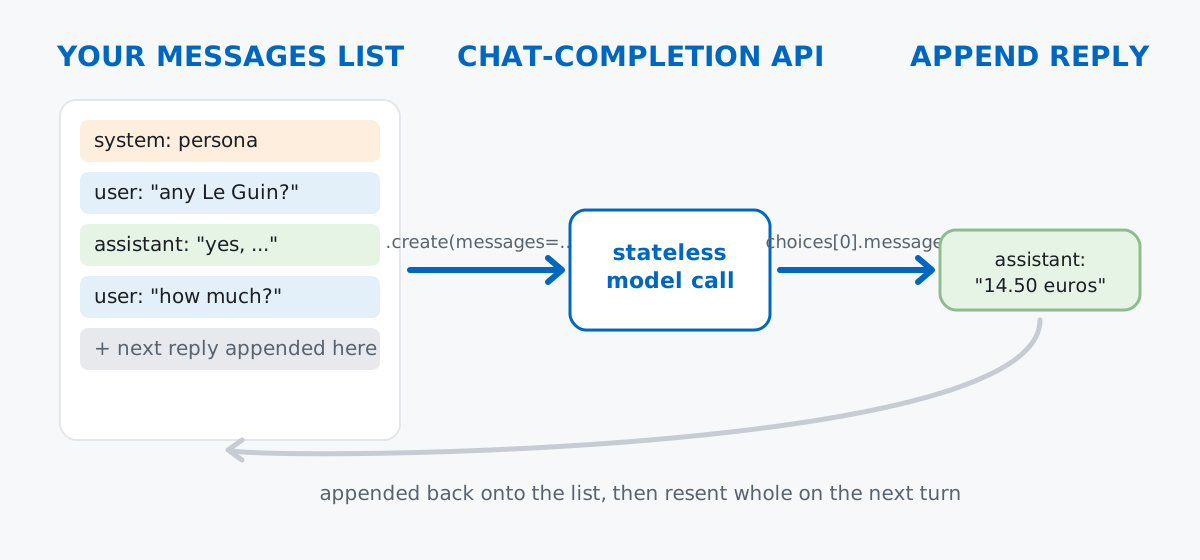
That’s it. A “conversation” is nothing more than a Python list that you keep appending to and re-sending. Everything below is really just that idea, dressed up in real code.
We’ll use the official openai Python package to get the request and response shapes right — the same client.chat.completions.create(...) call, the same messages list format, the same response object — even though this post can’t make a live call in the environment it was written in. Install it and set your key as an environment variable, never as a literal string in code:
pip install openai
export OPENAI_API_KEY="your-key-here"
import os
from openai import OpenAI
client = OpenAI(api_key=os.environ.get("OPENAI_API_KEY"))
MODEL = "gpt-4o-mini"Reading the key from os.environ.get(...) rather than hardcoding it means the key never ends up in your source control history. (The OpenAI API reference documents the full chat.completions.create parameter list and response schema if you want the complete picture beyond what this post covers — the same request shape applies if you swap in another provider’s client, since most now follow this same messages-list convention.)
The smallest possible call is a messages list with a single "user" entry:
messages = [
    {"role": "user", "content": "Do you have any Ursula K. Le Guin novels?"}
]

response = client.chat.completions.create(
    model=MODEL,
    messages=messages,
    temperature=0.7,
)

reply = response.choices[0].message.content
print(reply)
That last line is the part people get wrong on the first try. The response isn’t a string — it’s an object whose actual reply text is nested inside response.choices[0].message.content. choices is a list because you can ask the API for more than one candidate reply at once (rare in a chatbot; common when you want the model to brainstorm variations), so even with the default single reply, you still have to index into [0].
Since this environment has no live key to call against, the verification below uses a small local stand-in for the client — same attribute path, same object shape, a scripted reply instead of a real model. Everything downstream (building the list, reading .choices[0].message.content, appending turns) is exercised for real against it, which is what actually proves the loop logic is correct; only the words in the reply are illustrative:
# mock_client.chat.completions.create(...) built to mirror the real
# openai.types.chat.ChatCompletion shape: .choices[0].message.content
response = mock_client.chat.completions.create(model=MODEL, messages=messages, temperature=0.7)
print(response.choices[0].message.content)
[mock reply 1] Sure, I can help you find a book.The [mock reply 1] prefix is there on purpose — it’s a scripted placeholder from the verification stub, not a real model output, and it confirms the attribute chain (.choices[0].message.content) resolves exactly the way the real SDK’s response does.
A "system" message sets the tone and constraints for everything that follows. It goes first in the list, and the model treats it as an instruction rather than something to respond to directly:
SYSTEM_PROMPT = (
    "You are Nora, a terse, helpful assistant for a small bookshop's website. "
    "Keep answers under three sentences."
)

messages = [
    {"role": "system", "content": SYSTEM_PROMPT},
    {"role": "user", "content": "Do you have any Ursula K. Le Guin novels?"},
]
Notice the system message uses the same dictionary shape as every other turn — role and content — it’s just first in line and carries a different role name. This is the whole “persona” pattern: no special API, no separate configuration object, just one string at the front of the list that every later reply is generated in the context of.
Now put memory and persona together. Each turn: append the user’s message, send the whole history, read the reply, append it back:
def run_turn(client, history, user_text, model=MODEL):
    """Append a user turn, call the model, append the reply, return the reply text."""
    history.append({"role": "user", "content": user_text})
    response = client.chat.completions.create(
        model=model,
        messages=history,
        temperature=0.7,
    )
    reply_text = response.choices[0].message.content
    history.append({"role": "assistant", "content": reply_text})
    return reply_text
Run three turns through it against the verification stub, with each scripted reply standing in for what a live model would return:
history = [{"role": "system", "content": SYSTEM_PROMPT}]
turns = [
    "Do you have any Ursula K. Le Guin novels?",
    "How much is it?",
    "Can you hold a copy for me?",
]

for turn in turns:
    reply_text = run_turn(mock_client, history, turn)
    print(f"user: {turn}")
    print(f"assistant: {reply_text}")

print("final history length (messages):", len(history))
print("roles in order:", [m["role"] for m in history])
user: Do you have any Ursula K. Le Guin novels?
assistant: [mock reply] Yes — we have 'The Left Hand of Darkness' in stock.
user: How much is it?
assistant: [mock reply] It's currently 14.50 euros, paperback.
user: Can you hold a copy for me?
assistant: [mock reply] I can hold a copy at the counter until Friday.
final history length (messages): 7
roles in order: ['system', 'user', 'assistant', 'user', 'assistant', 'user', 'assistant']Read the role list right to left: one system entry, then three alternating user/assistant pairs — six turns plus the persona, seven messages total. Notice the second reply (“How much is it?”) only makes sense because the first exchange about Le Guin is still sitting in history — the model has no idea “it” refers to a book unless the earlier turns are resent alongside the new question. That’s the stateless-API idea from the mental model made concrete: nothing was remembered by the API, everything was resent by the loop.
Wrapping this in a real command-line loop is just swapping the scripted turns list for input():
history = [{"role": "system", "content": SYSTEM_PROMPT}]
print("Chat with Nora (type 'quit' to exit)")
while True:
    user_text = input("you: ")
    if user_text.strip().lower() == "quit":
        break
    reply_text = run_turn(client, history, user_text)  # real client here
    print(f"nora: {reply_text}")
Nothing else changes — run_turn doesn’t care whether the user’s text came from a hardcoded list or the keyboard.
Network calls fail — rate limits, timeouts, an expired key. A chatbot loop should catch that without corrupting the conversation history:
def safe_run_turn(client, history, user_text, model=MODEL):
    history.append({"role": "user", "content": user_text})
    try:
        response = client.chat.completions.create(
            model=model,
            messages=history,
            temperature=0.7,
        )
    except Exception as exc:
        history.pop()  # roll back the unanswered user turn
        return f"(error talking to the model: {exc})"
    reply_text = response.choices[0].message.content
    history.append({"role": "assistant", "content": reply_text})
    return reply_text
Verified against a stand-in client rigged to always raise, to confirm the rollback actually fires:
err_history = [{"role": "system", "content": SYSTEM_PROMPT}]
result = safe_run_turn(raising_client, err_history, "Are you open on Sundays?")
print("result:", result)
print("history length after failed call:", len(err_history))
result: (error talking to the model: mock: request timed out)
history length after failed call: 1History length staying at 1 — just the system prompt — is the detail that matters. Without the history.pop() in the except block, a failed call would leave a dangling user message with no matching assistant reply, and every request after it would resend a broken transcript.
Unbounded history eventually breaks the request. Chat-completion APIs cap how many tokens (roughly, word-pieces) a single request can contain, counting the entire resent history plus the new reply. A long-running chatbot that never trims its list will eventually throw an error mid-conversation, not gracefully — and cost more per call along the way, since you pay to resend every earlier turn too.
temperature is not on/off — it’s a dial. temperature=0 pushes the model toward its most likely next tokens every time, which is close to deterministic and useful for anything needing consistency (data extraction, classification-style prompts). Higher values (0.7–1.0) sample more freely and are better for open-ended conversation. There is no single correct value — pick it based on whether you want the same good answer every time or varied plausible answers.
A system prompt is a strong suggestion, not a hard rule. It shapes tone and default behavior reliably for ordinary conversation, but it is not a security boundary — a sufficiently adversarial user message can still push a model to ignore parts of it. If you’re building something where “never do X” truly cannot fail, that check belongs in your own code around the API call, not solely in the system prompt text.
Here’s the trim from the earlier gotcha, verified end to end — keep the system prompt plus only the most recent few turns:
def trim_history(history, keep_last_n_turns=3):
    """Keep the system prompt plus the last N user/assistant turn-pairs."""
    system_msgs = [m for m in history if m["role"] == "system"]
    other_msgs = [m for m in history if m["role"] != "system"]
    trimmed = other_msgs[-(keep_last_n_turns * 2):]
    return system_msgs + trimmed

# history built from 6 simulated turns (13 messages: 1 system + 12 turn messages)
trimmed = trim_history(long_history, keep_last_n_turns=3)
print("before trim:", len(long_history))
print("after trim (keep last 3 turns):", len(trimmed))
before trim: 13
after trim (keep last 3 turns): 77 is 1 system message plus 3 kept turn-pairs (3 * 2 = 6). This is a blunt strategy — it drops old context outright rather than summarizing it — but it’s enough to keep a long-running command-line chatbot from ever exceeding the request limit.
Every LLM chatbot, however polished, is this same pattern underneath:
messages list with role/content pairs is the entire conversation state — the API itself is stateless."system" first, then alternating "user"/"assistant" — the persona goes in once, at the front, and shapes every reply after it.response.choices[0].message.content is where the actual reply text lives inside the response object.If you want to go further than a single API call — structured outputs, giving the model tools it can call, retrieval over your own documents, and multi-step agents — the Working with LLMs in Python module in our free Generative AI & LLM Engineering course picks up exactly where this post leaves off, and the Agent Foundations module in our AI Agents course shows what a chatbot looks like once it can take actions, not just talk.
 Software Engineering
The Single Responsibility Principle: One Class, One Reason to Change
The Single Responsibility Principle says a class should have only one reason to change. See it in action: take a Python AuthService that also owns its logging, find why that's a problem, and refactor it into clean, focused classes.
Read article
Software Engineering
The Single Responsibility Principle: One Class, One Reason to Change
The Single Responsibility Principle says a class should have only one reason to change. See it in action: take a Python AuthService that also owns its logging, find why that's a problem, and refactor it into clean, focused classes.
Read article
 Python
Cleaning Messy Data with Pandas: A Practical Guide
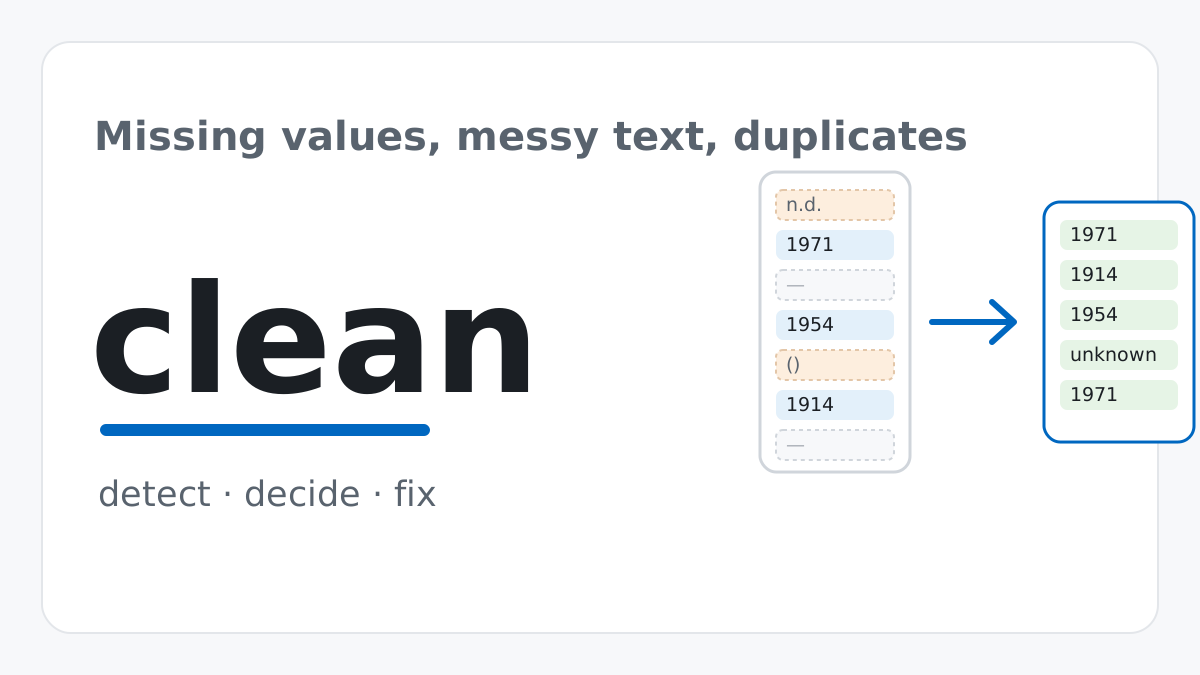
Real datasets are never as clean as tutorial datasets. This guide builds a detect-decide-fix workflow for pandas, then applies it to a real, freely-licensed museum collection dataset — missing values, disguised placeholders, inconsistent text, duplicates, and messy dates included.
Read article
Python
Cleaning Messy Data with Pandas: A Practical Guide
Real datasets are never as clean as tutorial datasets. This guide builds a detect-decide-fix workflow for pandas, then applies it to a real, freely-licensed museum collection dataset — missing values, disguised placeholders, inconsistent text, duplicates, and messy dates included.
Read article