Title here
Summary here
Real datasets are never as clean as tutorial datasets. This guide builds a detect-decide-fix workflow for pandas, then applies it to a real, freely-licensed museum collection dataset — missing values, disguised placeholders, inconsistent text, duplicates, and messy dates included.

Every dataset you download is lying to you a little. Not maliciously — a spreadsheet that’s been edited by a dozen people over a decade will always end up with a blank cell here, a typo’d category there, and a date typed three different ways depending on who was filling it in that day. The real question isn’t “how do I clean this data” so much as “how do I decide what to do with each kind of mess I find,” because dropping a row and filling it in are both correct answers, just to different problems.
This is where a lot of people freeze up: .dropna() feels like the safe default, but a careless one can silently throw away a third of your dataset, and you won’t notice until a chart looks wrong three steps later. This guide gives you a small mental model for making that call deliberately, then walks it through a real, messy museum collection dataset — missing values, inconsistent text, duplicate rows, and dates written half a dozen different ways.
Cleaning is not one operation, it’s a loop you run once per problem you find, and it only has three steps:
.info(), .isna(), .value_counts(), and .duplicated(), not by scrolling through rows.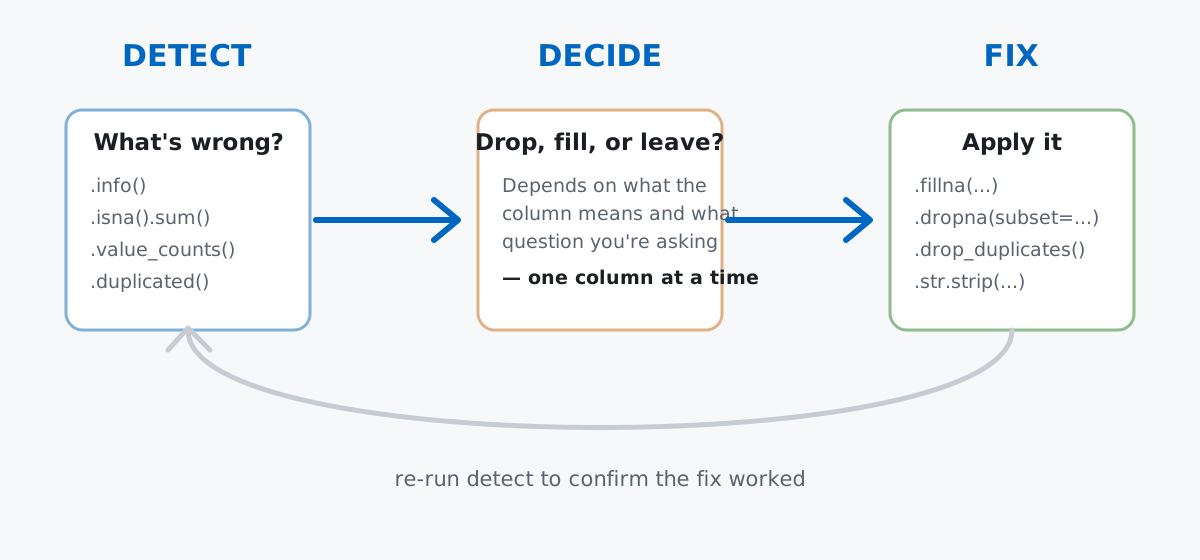
Notice this loop never says “drop everything with a missing value” — that’s a single, specific decision you might make for one column and reject for another. Keep the three steps separate in your head and the rest of this post is just applying them, one column at a time.
Toy datasets clean up too easily to teach anything. For real mess, this post uses a sample of the Museum of Modern Art’s own collection data — the museum publishes metadata for its full collection (title, artist, nationality, medium, acquisition date, and more) as an open dataset on GitHub, released into the public domain under a CC0 license. It’s genuinely messy in the ways real catalog data is: missing attributions, inconsistent formatting inherited from decades of paper records, and dates written as anything from a plain year to "c. 1963, assembled 1964–65".
Data: a 313-row sample of MoMA’s Artworks.csv collection dataset (CC0-1.0), via github.com/MuseumofModernArt/collection, vendored at /datasets/blog/cleaning-messy-data-with-pandas/moma-artworks-sample.csv. The sample was drawn with a fixed seed so these numbers are reproducible, and deliberately includes a mix of missing values, disguised placeholders, and duplicate-looking rows to give the cleaning steps something real to do.
import pandas as pd

art = pd.read_csv(
    "https://datatweets.com/datasets/blog/cleaning-messy-data-with-pandas/moma-artworks-sample.csv"
)
art.shape
(313, 8)art.columns.tolist()['Title', 'Artist', 'Nationality', 'Gender', 'Date', 'Medium', 'Department', 'DateAcquired']313 artworks, 8 columns. (The outputs in this post come from pandas 3.0 — the general approach also works on pandas 2.x, though a couple of the exact warning behaviors near the end are pandas 3.0-specific, and called out where it matters.)
.info() and .isna().sum()Before touching anything, find out what you’re actually dealing with:
art[["Title", "Artist", "Nationality", "Gender", "Date"]].head(3) Title ... Date
0 9 Bilder (9 Pictures) ... 1971
1 Patriotic propaganda postcard with verse by Vl... ... 1914
2 County Clare, Ireland ... 1954
[3 rows x 5 columns]art.info()<class 'pandas.DataFrame'>
RangeIndex: 313 entries, 0 to 312
Data columns (total 8 columns):
# Column Non-Null Count Dtype
--- ------ -------------- -----
0 Title 313 non-null str
1 Artist 307 non-null str
2 Nationality 307 non-null str
3 Gender 307 non-null str
4 Date 308 non-null str
5 Medium 275 non-null str
6 Department 313 non-null str
7 DateAcquired 298 non-null str
dtypes: str(8)
memory usage: 19.7 KB.info() gives you the shape of the problem at a glance: every column is loaded as plain text (more on that later), and five of the eight columns have gaps. But it collapses each column to one number — you still need .isna().sum() for the exact counts you’ll act on:
art.isna().sum()Title 0
Artist 6
Nationality 6
Gender 6
Date 5
Medium 38
Department 0
DateAcquired 15
dtype: int64And one more detection pass before deciding anything — are any rows exact duplicates of each other?
print(art.duplicated().sum())12Twelve full-row duplicates already, using nothing more than the default settings. Keep that number in mind; it’s about to get bigger once we start comparing rows more loosely.
Artist is missing for 6 rows — but “missing” isn’t the whole story here. MoMA’s own cataloguers already have a label for artworks with no known creator:
print("true NaN Artist:", art["Artist"].isna().sum())
print("'Unknown artist' string:", (art["Artist"] == "Unknown artist").sum())
true NaN Artist: 6
'Unknown artist' string: 6Six rows are genuinely blank, and a separate six already say "Unknown artist" in plain text. Those mean the same thing to a human, but .isna() only sees the first group. Grouping or counting by Artist right now would quietly split “unknown” into two different buckets. The fix is to fold the true blanks into the museum’s own convention rather than inventing a new label:
art["Artist"] = art["Artist"].fillna("Unknown artist")
print((art["Artist"] == "Unknown artist").sum())12Medium (the material and technique — “gelatin silver print,” “pencil on paper”) is a different kind of decision. Nearly one in eight rows is missing it:
print(art["Medium"].isna().sum())38Dropping those rows would work, but it throws away real artworks just because one descriptive field is blank:
len(art), len(art.dropna(subset=["Medium"]))(313, 275)That’s 38 artworks gone — a meaningful chunk of the sample — for a field that doesn’t affect most other questions you’d ask of this data (which department has the most acquisitions, which decade an artist was most active). Filling with an explicit placeholder keeps every row and makes the gap visible instead of silently absent:
art["Medium"] = art["Medium"].fillna("not recorded")
print(art["Medium"].isna().sum())0Same missing-value problem, two different fixes, because the two columns answer different questions. That’s the “decide” step doing its job — see pandas’ user guide on working with missing data for the full menu of fillna strategies (forward-fill, interpolation, per-group fill) beyond the two used here.
.value_counts() and .strNationality and Gender both come wrapped in parentheses, straight from how MoMA’s source records store them:
art["Nationality"].value_counts(dropna=False).head(8)Nationality
(American) 154
(French) 40
() 26
(German) 23
(British) 13
(Italian) 9
NaN 6
(Chilean) 6
Name: count, dtype: int64art["Gender"].value_counts(dropna=False)Gender
(male) 242
(female) 38
() 26
NaN 6
(non-binary) 1
Name: count, dtype: int64.value_counts() is the right detection tool for text columns — it surfaces exactly this kind of thing: an empty "()" sitting right next to NaN, both meaning “unknown,” neither one obviously “missing” until you look. Strip the parentheses with .str.strip(), and collapse both flavors of unknown into one label:
art["Nationality"] = art["Nationality"].fillna("()").str.strip("()")
art["Nationality"] = art["Nationality"].replace("", "unknown")

art["Gender"] = art["Gender"].fillna("()").str.strip("()")
art["Gender"] = art["Gender"].replace("", "unknown")

art["Nationality"].value_counts().head(8)
Nationality
American 154
French 40
unknown 32
German 23
British 13
Italian 9
Chilean 6
Dutch 5
Name: count, dtype: int64art["Gender"].value_counts()Gender
male 242
female 38
unknown 32
non-binary 1
Name: count, dtype: int64unknown now correctly reads as 32 (26 empty parens plus 6 true NaN) for both columns — one clean category instead of two disguised ones. That’s the pattern worth remembering: any time you see a .str column, run .value_counts() on it before you trust it. Typos, casing differences, and placeholder values almost always show up there first.
.duplicated()Earlier, .duplicated() with default settings found 12 exact-duplicate rows. But two rows can describe the same artwork without matching on every single column — DateAcquired or a formatting quirk in Nationality can differ even when the artwork is clearly the same print catalogued twice. Comparing on a meaningful subset of columns catches more:
subset_cols = ["Title", "Artist", "Date", "Medium"]
dup_mask = art.duplicated(subset=subset_cols, keep=False)
print(dup_mask.sum())26art.loc[dup_mask, subset_cols].sort_values(subset_cols).head(6) Title ... Medium
0 9 Bilder (9 Pictures) ... Staple-bound book of half-tone photographs, 12...
236 9 Bilder (9 Pictures) ... Staple-bound book of half-tone photographs, 12...
69 Gift 13: Paper Cutting (Kindergarten material ... ... Various materials
96 Gift 13: Paper Cutting (Kindergarten material ... ... Various materials
110 Medals, New York ... Gelatin silver print
278 Medals, New York ... Gelatin silver print
[6 rows x 4 columns]More than double the count from the strict full-row check — the choice of subset is doing real work here. keep=False marks every row in a duplicate group so you can inspect them before deciding, rather than blindly deleting. Once you’re satisfied the matches are genuine, drop_duplicates keeps the first occurrence of each group and removes the rest:
before = len(art)
art = art.drop_duplicates(subset=subset_cols, keep="first")
before, len(art)
(313, 299)14 rows removed — 2 more than the naive full-row check found, because a couple of those “duplicate” pairs differed only in Nationality formatting or DateAcquired, not in what artwork they actually describe.
pd.to_datetime on a Column That Resists ItDateAcquired (when the museum acquired the piece) is already a clean, consistent format:
art["DateAcquired"] = pd.to_datetime(art["DateAcquired"], errors="coerce")
print(art["DateAcquired"].isna().sum(), "missing, out of", len(art))
print(art["DateAcquired"].dtype)
14 missing, out of 299
datetime64[us]14 missing values, matching the 15 minus one lost to deduplication — no surprises, because acquisition dates are entered by the museum’s own registrar in one system. Date (when the artwork was made) is a different story, because it’s transcribed from a century of catalog cards, wall labels, and artist statements:
art["Date"].sample(8, random_state=42).tolist()['(1946)', '1931', '1991', 'c. 1927', '1893-1903', '1925, published 1926', '1910', '1981']A plain year, a parenthesized year, an approximate year ("c." for circa), a date range, and a compound date all sitting in the same column. Asking pd.to_datetime to parse it as a single 4-digit year is a reasonable first guess — and it mostly fails:
parsed_year = pd.to_datetime(art["Date"], format="%Y", errors="coerce")
print(parsed_year.isna().sum())121121 out of 299 rows — errors="coerce" at least turns unparseable values into NaT instead of crashing, but that’s still two in five rows lost. For this dataset, a full calendar date is more precision than the source data actually has anyway; what you usually want is just the year. A regular expression pulling the first 4-digit number out of the string recovers almost everything:
year = art["Date"].str.extract(r"(\d{4})")[0]
art["year_made"] = pd.to_numeric(year, errors="coerce")
print(art["year_made"].isna().sum())23art["year_made"].describe()count 276.000000
mean 1952.630435
std 33.907055
min 1849.000000
25% 1927.750000
50% 1953.000000
75% 1977.250000
max 2023.000000
Name: year_made, dtype: float64Down to 23 unrecoverable rows — the ones genuinely marked "n.d." (“no date,” the archival convention for “we don’t know”) or similarly undated, which no amount of regex can fix, because the information was never recorded in the first place. That’s a real limit worth knowing rather than working around: some missing values are missing at the source, and no cleaning step invents data that was never captured. to_datetime has plenty more options than the plain format= string used here if your own dates need them.
A bare .dropna() drops a row if any column has a gap — not just the one you’re worried about.
before = len(art)
after = len(art.dropna())
before, after
(299, 263)36 rows gone, over a tenth of what’s left, even though most of those rows are only missing something harmless like DateAcquired. Always pass subset=[...] unless you genuinely mean “drop a row for any gap anywhere.”
Missing and “recorded as unknown” are not the same story, and .isna() only catches one of them.
print("truly blank:", art["Date"].isna().sum())
print("literal 'n.d.':", (art["Date"] == "n.d.").sum())
truly blank: 5
literal 'n.d.': 17Five rows are truly blank cells; seventeen more say "n.d." in plain text and would sail right past a .isna().sum() check. Before you trust a missing-value count, run .value_counts() on the column too and look for suspiciously common placeholder strings — "n.d.", "unknown", "N/A", even a lone dash. Treating a placeholder and a genuinely absent value as the same thing (or, just as easily, missing one because you only checked the other) skews whatever you compute next.
Chained assignment on a filtered slice doesn’t update your DataFrame — and in pandas 3.0, it tells you so.
import warnings

with warnings.catch_warnings(record=True) as caught:
    warnings.simplefilter("always")
    art[art["Department"] == "Photography"]["Medium"] = "RETOUCHED"

print(caught[0].category.__name__)ChainedAssignmentErrorprint((art["Medium"] == "RETOUCHED").any())FalseThe assignment silently does nothing to art — pandas 3.0 raises a ChainedAssignmentError warning explaining exactly why: art[mask]["Medium"] builds a temporary copy, and setting a value on a copy never reaches the original. The fix is to make the copy explicit and assign into it directly, or use .loc in one step:
photos = art[art["Department"] == "Photography"].copy()
photos["Medium"] = photos["Medium"].str.upper()
photos["Medium"].head(3).tolist()
['GELATIN SILVER PRINT', 'GELATIN SILVER PRINT', 'GELATIN SILVER PRINT'].copy() says “I mean to work on an independent DataFrame,” which is exactly what you want when you’re building a filtered subset on purpose.
Every cleaning decision in this post came from the same loop:
.info(), .isna().sum(), .value_counts(), and .duplicated() — never assume, always count.Artist, Nationality, Gender) or when dropping would cost you real rows for a non-essential field (Medium), or accept a smaller-but-honest recovery when the source data itself has a hard limit (Date’s 23 truly undated rows).Nationality is what revealed the empty-parens-versus-NaN gotcha in the first place.None of this required a library beyond pandas itself, and the whole workflow scales down to a five-column CSV or up to a real production pipeline without changing shape.
Once your data is actually clean, grouping and aggregating it is the natural next step — our guide to pandas GroupBy picks up exactly there with the same split-apply-combine dataset approach. If you want the fuller course context — reading data, selecting rows, handling missing data, duplicates, and dtypes as a connected sequence rather than one blog post — the Handling Missing Data and Duplicates & Outliers lessons in our free Python for Data Analytics course cover this material in depth, with exercises.
 Python
Build an AI Chatbot in Python: A Command-Line LLM Client
A from-scratch walkthrough of the pattern behind every LLM chatbot: one function that sends a message plus conversation history to a chat-completion API, a persona set by a system prompt, and a loop that keeps the conversation going.
Read article
Python
Build an AI Chatbot in Python: A Command-Line LLM Client
A from-scratch walkthrough of the pattern behind every LLM chatbot: one function that sends a message plus conversation history to a chat-completion API, a persona set by a system prompt, and a loop that keeps the conversation going.
Read article
 Software Engineering
The Single Responsibility Principle: One Class, One Reason to Change
The Single Responsibility Principle says a class should have only one reason to change. See it in action: take a Python AuthService that also owns its logging, find why that's a problem, and refactor it into clean, focused classes.
Read article
Software Engineering
The Single Responsibility Principle: One Class, One Reason to Change
The Single Responsibility Principle says a class should have only one reason to change. See it in action: take a Python AuthService that also owns its logging, find why that's a problem, and refactor it into clean, focused classes.
Read article