Title here
Summary here
A complete first pass at supervised learning: explore a real health dataset with pandas, chart a relationship with matplotlib, split it honestly, and train and grade a scikit-learn regression model.

“Given some numbers I already have about something, can I predict a number I don’t have yet?” That question — not “what is machine learning” — is the one that actually gets answered the first time you train a model. A patient’s baseline health measurements predicting how their condition progresses. A house’s size and location predicting its price. The mechanics are the same no matter what the numbers describe.
The confusing part isn’t the idea, it’s the vocabulary that shows up all at once: fit, predict, train_test_split, features, targets. It’s easy to copy-paste your way through a tutorial without ever building a mental model of what those pieces are actually doing to your data. (If you’ve already trained a text classifier with spaCy, the shape of this will feel familiar — our post on text classification with spaCy walks through the same fit-then-evaluate rhythm for labeled text instead of numbers.) This guide builds that mental model first, then walks through a real, reproducible example end to end: load and explore data with pandas, visualize it with matplotlib, and train and grade a model with scikit-learn.
Every supervised learning problem, regardless of the algorithm, follows the same four-step discipline:
The entire discipline of machine learning is making sure step 4 is an honest quiz. A model that got to peek at the answers during step 2 will look brilliant and then fail the moment it meets real, new data. Keep this model in mind — features go in, a fitted relationship comes out, and every claim about how “good” a model is only means something if it was graded on examples it never studied.
Rather than downloading anything, we’ll use a dataset that ships with scikit-learn itself, so your numbers will match mine exactly with nothing more than pip install scikit-learn. Imagine you work with a small diabetes research clinic that wants a quick, defensible way to flag which patients are likely to see their condition progress the most over the next year, using only the measurements already in each patient’s chart.
Data: the diabetes dataset bundled with scikit-learn (originally from Efron, Hastie, Johnstone & Tibshirani’s 2004 “Least Angle Regression” paper; public research data, redistributed under scikit-learn’s BSD license), loaded via load_diabetes().
import pandas as pd
from sklearn.datasets import load_diabetes

diabetes = load_diabetes(as_frame=True)
df = diabetes.frame
df[["age", "sex", "bmi", "bp", "s1", "target"]].head()
age sex bmi bp s1 target
0 0.038076 0.050680 0.061696 0.021872 -0.044223 151.0
1 -0.001882 -0.044642 -0.051474 -0.026328 -0.008449 75.0
2 0.085299 0.050680 0.044451 -0.005670 -0.045599 141.0
3 -0.089063 -0.044642 -0.011595 -0.036656 0.012191 206.0
4 0.005383 -0.044642 -0.036385 0.021872 0.003935 135.0Notice the feature values don’t look like real ages or blood pressures — they’re small floats centered on zero. That’s not missing or corrupted data: scikit-learn ships this dataset with every one of its ten baseline features (age, sex, bmi, average blood pressure bp, and six blood serum measurements s1 through s6) already mean-centered and scaled by their standard deviation, computed across all 442 patients before the train/test split even exists. Keep that detail in mind — it becomes relevant again in the gotchas section. target is untouched: a quantitative measure of disease progression one year after the baseline measurements were taken, on a continuous scale that runs from 25 to 346 in this data.
df.shape(442, 11)442 patients, 10 features, 1 target column. Small enough to explore by hand, real enough that the relationships are worth predicting. (The outputs in this post come from pandas 3.0, scikit-learn 1.9, and matplotlib 3.11.)
df[["age", "bmi", "bp", "target"]].describe().round(3) age bmi bp target
count 442.000 442.000 442.000 442.000
mean -0.000 -0.000 -0.000 152.133
std 0.048 0.048 0.048 77.093
min -0.107 -0.090 -0.112 25.000
25% -0.037 -0.034 -0.037 87.000
50% 0.005 -0.007 -0.006 140.500
75% 0.038 0.031 0.036 211.500
max 0.111 0.171 0.132 346.000The feature columns all share the same near-zero mean and tiny standard deviation — that’s the scaling described above. target, on the other hand, has a real mean of about 152 and ranges from 25 to 346. Predicting that number is the job.
Before training anything, it’s worth asking which features actually move together with the target. corr() gives every feature’s linear correlation with target in one line:
df.corr(numeric_only=True)["target"].sort_values(ascending=False)target 1.000000
bmi 0.586450
s5 0.565883
bp 0.441482
s4 0.430453
s6 0.382483
s1 0.212022
age 0.187889
s2 0.174054
sex 0.043062
s3 -0.394789
Name: target, dtype: float64bmi (body mass index) has the strongest relationship with disease progression, narrowly ahead of s5. That’s a reasonable place to start exploring visually before handing all ten features to a model.
matplotlibGrouping patients into BMI bands makes the relationship easy to see. pd.qcut splits bmi into three equal-sized groups by rank:
df["bmi_group"] = pd.qcut(df["bmi"], q=3, labels=["Low BMI", "Medium BMI", "High BMI"])
bmi_summary = df.groupby("bmi_group", observed=True)["target"].mean().round(1)
bmi_summary
bmi_group
Low BMI 105.8
Medium BMI 145.0
High BMI 207.7
Name: target, dtype: float64import matplotlib.pyplot as plt
fig, ax = plt.subplots(figsize=(6, 4))
bmi_summary.plot(kind="bar", ax=ax, color="#0067c0")
ax.set_ylabel("Average disease progression score")
ax.set_title("Disease progression by baseline BMI group")
fig.tight_layout()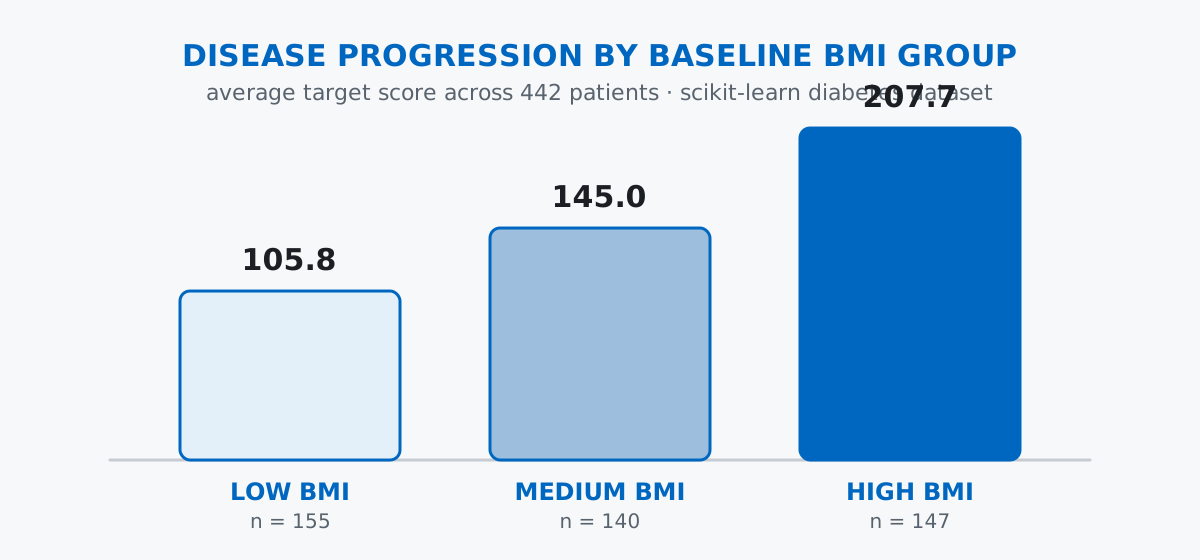
Average disease progression roughly doubles between the lowest and highest BMI groups — 105.8 up to 207.7. That’s a real, sizeable relationship, and exactly the kind of pattern a model like linear regression is built to quantify precisely instead of eyeballing in three buckets.
Before fitting anything, set aside a slice of patients the model will never see during training. scikit-learn’s train_test_split does the splitting and the shuffling in one call:
from sklearn.model_selection import train_test_split

X = df.drop(columns=["target", "bmi_group"])
y = df["target"]

X_train, X_test, y_train, y_test = train_test_split(X, y, test_size=0.2, random_state=42)
X_train.shape, X_test.shape
((353, 10), (89, 10))X holds the ten feature columns (the “study material”), y holds target (the “answer key”). test_size=0.2 reserves 20% — 89 of the 442 patients — as the quiz set, and random_state=42 makes the split reproducible: rerun this and you’ll get the same 353/89 split every time.
fitWith bmi showing the strongest single relationship but several other features also correlated with target, a plain linear regression across all ten features is a sensible first model — it learns one weight per feature and adds them together.
from sklearn.linear_model import LinearRegression

model = LinearRegression()
model.fit(X_train, y_train)LinearRegression()That’s the entire study step. fit looked at all 353 training patients’ features and their real disease-progression scores, and worked out the linear combination of features that best predicts the score. Nothing has been asked about the 89 held-out patients yet.
predictNow hand the model the test set’s features — and only the features, never y_test — and ask it to guess:
y_pred = model.predict(X_test)

preview = pd.DataFrame({
    "actual": y_test.values[:5],
    "predicted": y_pred[:5].round(1),
})
preview
actual predicted
0 219.0 139.5
1 70.0 179.5
2 202.0 134.0
3 230.0 291.4
4 111.0 123.8Some guesses land close (row 4: 111 vs. 123.8), some are far off (row 3: 230 vs. 291.4). That’s expected — the interesting question isn’t whether any single guess is right, it’s how good the guesses are on average across all 89 patients.
scikit-learn ships metrics for exactly this. R² (the coefficient of determination) and mean absolute error answer different questions:
from sklearn.metrics import r2_score, mean_absolute_error

r2 = r2_score(y_test, y_pred)
mae = mean_absolute_error(y_test, y_pred)
print(f"R2: {r2:.3f}")
print(f"MAE: {mae:.2f}")
R2: 0.453
MAE: 42.79R² of 0.453 means the model explains about 45% of the variation in disease progression across the test patients — the remaining 55% comes from things the model doesn’t see (other health factors, measurement noise, or genuine unpredictability). MAE of 42.79 is in the target’s own units: on average, a prediction is off by about 43 points on a scale where the test set’s patients average 145.8. Read together, they say the model has found a real but partial signal — useful for flagging patients worth a closer look, not precise enough to replace a clinician’s judgment.
Grading yourself on the practice test flatters you. It’s tempting to check model.score() against the data you just trained on. Compare that to the honest test score and the gap is immediate:
y_train_pred = model.predict(X_train)
r2_train = r2_score(y_train, y_train_pred)
print(f"R2 on training data: {r2_train:.3f}")
print(f"R2 on test data:     {r2:.3f}")
R2 on training data: 0.528
R2 on test data: 0.4530.528 versus 0.453 — the model looks noticeably better on the data it already memorized patterns from. Always report the test-set number; the training-set number tells you almost nothing about how the model will do on a new patient.
Fitting a transformer on the whole dataset before splitting leaks the test set into training. Any preprocessing step that learns statistics from your data — a scaler, an imputer — must be fit on the training set only, never on the full dataset before the split:
from sklearn.preprocessing import StandardScaler

leaky_scaler = StandardScaler().fit(X)          # sees all 442 rows, test included
honest_scaler = StandardScaler().fit(X_train)   # sees only the 353 training rows

print("bmi mean seen by leaky scaler (all 442 rows):            ", round(leaky_scaler.mean_[2], 6))
print("bmi mean seen by honest scaler (only 353 training rows): ", round(honest_scaler.mean_[2], 6))
print("bmi std seen by leaky scaler (all 442 rows):              ", round(leaky_scaler.scale_[2], 6))
print("bmi std seen by honest scaler (only 353 training rows):   ", round(honest_scaler.scale_[2], 6))
bmi mean seen by leaky scaler (all 442 rows): -0.0
bmi mean seen by honest scaler (only 353 training rows): 0.001736
bmi std seen by leaky scaler (all 442 rows): 0.047565
bmi std seen by honest scaler (only 353 training rows): 0.047208The gap looks tiny here only because this particular dataset’s features were already globally centered and scaled before it was published, as described earlier — with already-near-zero values, there isn’t much room left for the leak to move. Swap in a real, unscaled dataset (prices in euros, ages in years, page views in the thousands) and the same mistake shifts what “zero” and “one standard deviation” mean between train and test by a lot, quietly inflating your test score. The fix is always the same: split first, fit any transformer on the training portion only, then apply it to both sets.
R² is not a percentage of correct guesses. It’s easy to read “R² = 0.453” as “45% of predictions were right.” It means the model accounts for 45% of the variance in the target — a statement about how much of the spread in disease-progression scores is explained by the model, not about how many individual guesses landed on the exact right number. For a sense of typical error in real units, look at MAE instead: 42.79 points, on a target that averages 145.8 in the test set.
The mental model holds regardless of the algorithm: split your labeled data, fit on the training half, predict on the half the model never saw, and evaluate honestly. Mapped onto the tools:
pandas (corr, groupby) → explore which features actually relate to your target, before you model anythingmatplotlib → visualize a relationship you’re about to ask a model to quantifytrain_test_split → hold out an honest quiz set the model never studies frommodel.fit() → learn the relationship from the training setmodel.predict() → generate guesses on data the model has never seenr2_score / mean_absolute_error → grade those guesses without flattering yourselfIf you want to go deeper than one linear regression — the full supervised learning workflow, k-nearest neighbors, hyperparameter tuning, and a guided project with a real dataset — the Machine Learning Workflow lesson in our free Machine Learning course picks up exactly where this post leaves off.
 Python
Build an AI Chatbot in Python: A Command-Line LLM Client
A from-scratch walkthrough of the pattern behind every LLM chatbot: one function that sends a message plus conversation history to a chat-completion API, a persona set by a system prompt, and a loop that keeps the conversation going.
Read article
Python
Build an AI Chatbot in Python: A Command-Line LLM Client
A from-scratch walkthrough of the pattern behind every LLM chatbot: one function that sends a message plus conversation history to a chat-completion API, a persona set by a system prompt, and a loop that keeps the conversation going.
Read article
 Software Engineering
The Single Responsibility Principle: One Class, One Reason to Change
The Single Responsibility Principle says a class should have only one reason to change. See it in action: take a Python AuthService that also owns its logging, find why that's a problem, and refactor it into clean, focused classes.
Read article
Software Engineering
The Single Responsibility Principle: One Class, One Reason to Change
The Single Responsibility Principle says a class should have only one reason to change. See it in action: take a Python AuthService that also owns its logging, find why that's a problem, and refactor it into clean, focused classes.
Read article