Title here
Summary here
Connecting to Postgres from Python is the easy part. This guide builds a table with psycopg2, loads a CSV row by row and then in bulk with COPY, and measures the real speed difference between them on 8,000 rows.

Opening a CSV in pandas is one thing. Getting it into a real database that other people and other programs can query at the same time is a different problem, because now you have a server to talk to, a network round trip on every command, and a lot more data than you’d want to type by hand. If you’ve only worked with SQLite so far — a database that’s just a file on disk — our post on pandas and SQLite covers that lighter-weight bridge. This post is about PostgreSQL, a client-server database, and specifically about how you get a CSV file into it without waiting around.
The code that inserts one row at a time is the code almost everyone writes first, because it reads the most naturally: open a connection, loop over the rows, run an INSERT for each one. It also works — right up until the CSV has thousands of rows and the loop that took a fraction of a second in testing now visibly grinds. This is where people either shrug and accept it, or discover COPY and never write a row-by-row loader again. This post builds the mental model first, then measures the difference on a real dataset so the speedup isn’t just a claim.
Every command your Python program sends to a PostgreSQL server — even on your own laptop — is a round trip: your process sends a message, the server does the work, and a reply comes back before your code moves on. Two facts follow from that:
INSERT is one round trip per row. Loop over 8,000 CSV rows and call .execute() 8,000 times, and you’ve asked the server 8,000 separate questions, each waiting on the network and the server’s own bookkeeping (parsing the statement, planning it, writing it) before the next one can start.COPY is one round trip for the entire file. Instead of describing each row as its own statement, you hand the server a stream of raw rows and say “load all of this” — one command, one trip, and the server reads the stream directly into the table.INSERT statement (psycopg2’s execute_values does this for you) and cut the round trips without switching to COPY’s bulk-load format.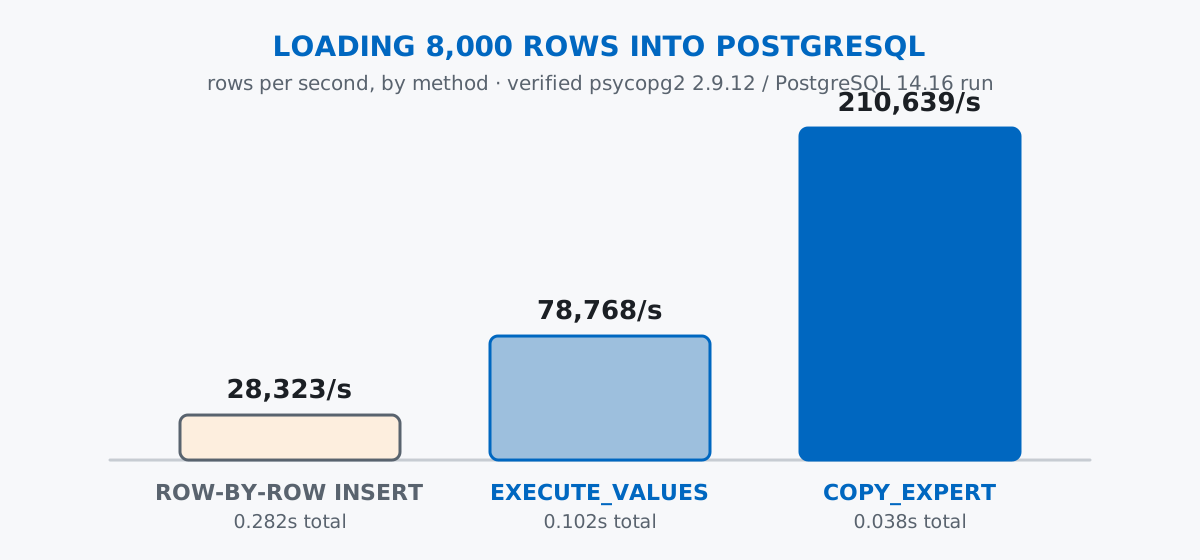
Keep that round-trip idea in mind for everything below: every technique in this post is really just a different answer to “how many trips to the server does loading this file take?”
Imagine a city that instruments its street parking meters and streams every completed parking session — which meter, which zone, how long, how much was paid — into a central database for billing and reporting. That’s the CSV this post loads: a seeded, synthetic set of parking sessions across five zones, so your numbers match mine exactly.
import csv
import numpy as np

rng = np.random.default_rng(42)
n = 8000

zones = ["Downtown", "Riverside", "Old Town", "Stadium District", "Harbor View"]
zone_weights = [0.35, 0.2, 0.2, 0.15, 0.1]
payment_methods = ["card", "mobile_app", "coin"]
payment_weights = [0.55, 0.35, 0.10]

meter_ids = rng.integers(1000, 1200, size=n)
zone_choices = rng.choice(zones, size=n, p=zone_weights)
payment_choices = rng.choice(payment_methods, size=n, p=payment_weights)
duration_minutes = rng.integers(5, 181, size=n)
amount_paid = np.round(duration_minutes * 0.07, 2)

start_days = rng.integers(1, 29, size=n)
start_hours = rng.integers(6, 22, size=n)
start_minutes = rng.integers(0, 60, size=n)

with open("parking_sessions.csv", "w", newline="") as f:
    writer = csv.writer(f)
    writer.writerow(["meter_id", "zone", "session_start", "duration_minutes", "amount_paid", "payment_method"])
    for i in range(n):
        session_start = f"2026-06-{start_days[i]:02d} {start_hours[i]:02d}:{start_minutes[i]:02d}:00"
        writer.writerow([
            int(meter_ids[i]), zone_choices[i], session_start,
            int(duration_minutes[i]), float(amount_paid[i]), payment_choices[i],
        ])

print(f"wrote {n} rows")
wrote 8000 rowsThat’s a real file on disk now — 8,000 rows, about 410 KB. Peeking at the first few lines confirms the shape:
meter_id,zone,session_start,duration_minutes,amount_paid,payment_method
1017,Old Town,2026-06-06 07:30:00,163,11.41,card
1154,Riverside,2026-06-22 16:09:00,135,9.45,card
1130,Stadium District,2026-06-10 16:18:00,41,2.87,card
(This dataset is an original synthetic scenario built for this post — a fictional city’s parking-meter feed — generated with a fixed random seed so the CSV and every number that follows are exactly reproducible.)
psycopg2psycopg2 is the most widely used PostgreSQL driver for Python. A connection string (or a set of keyword arguments) is all it needs to reach a running server:
import psycopg2

with psycopg2.connect("dbname=blogdemo user=postgres host=127.0.0.1 port=5433") as conn:
    with conn.cursor() as cur:
        cur.execute("DROP TABLE IF EXISTS parking_sessions;")
        cur.execute("""
            CREATE TABLE parking_sessions (
                id SERIAL PRIMARY KEY,
                meter_id INTEGER NOT NULL,
                zone TEXT NOT NULL,
                session_start TIMESTAMP NOT NULL,
                duration_minutes INTEGER NOT NULL,
                amount_paid NUMERIC(6, 2) NOT NULL,
                payment_method TEXT NOT NULL
            );
        """)
    conn.commit()
    with conn.cursor() as cur:
        cur.execute("SELECT count(*) FROM parking_sessions;")
        print("rows right after CREATE TABLE:", cur.fetchone()[0])
rows right after CREATE TABLE: 0Using psycopg2.connect() as a context manager and wrapping each unit of work in its own cursor() context manager closes both automatically. SERIAL PRIMARY KEY gives every row an auto-incrementing ID, and the rest of the columns mirror the CSV’s shape — NUMERIC(6, 2) for money, so amounts round to the cent instead of drifting the way floating point can. (See psycopg2’s official documentation for the full connection and cursor API — this post only uses a small slice of it.) An empty table, ready to be filled, is exactly what a fresh CREATE TABLE should produce.
INSERT, One Row at a TimeThis is the version everyone reaches for first — read the CSV into memory, then loop and execute one INSERT per row:
import csv
import time

with open("parking_sessions.csv") as f:
    rows = list(csv.DictReader(f))

with psycopg2.connect("dbname=blogdemo user=postgres host=127.0.0.1 port=5433") as conn:
    start = time.perf_counter()
    with conn.cursor() as cur:
        for row in rows:
            cur.execute(
                """
                INSERT INTO parking_sessions
                    (meter_id, zone, session_start, duration_minutes, amount_paid, payment_method)
                VALUES (%s, %s, %s, %s, %s, %s)
                """,
                (row["meter_id"], row["zone"], row["session_start"],
                 row["duration_minutes"], row["amount_paid"], row["payment_method"]),
            )
    conn.commit()
    naive_elapsed = time.perf_counter() - start

print(f"row-by-row INSERT: {len(rows)} rows in {naive_elapsed:.3f} seconds")
row-by-row INSERT: 8000 rows in 0.282 secondsThat’s 0.035 milliseconds per row, which sounds tiny until you multiply it by a CSV with a million rows instead of eight thousand — the loop that felt instant here would take over half a minute, and that’s on a local database with no network latency at all. The %s placeholders aren’t string formatting; psycopg2 fills them in safely on the server side, which is the same mechanism the parameterized-queries section below relies on.
copy_expert and PostgreSQL’s COPYCOPY is a PostgreSQL command built specifically for moving data in and out of tables in bulk, and psycopg2 exposes it through copy_expert, which streams a file-like object straight to the server:
with psycopg2.connect("dbname=blogdemo user=postgres host=127.0.0.1 port=5433") as conn:
    with conn.cursor() as cur:
        cur.execute("TRUNCATE parking_sessions RESTART IDENTITY;")
    conn.commit()

    start = time.perf_counter()
    with conn.cursor() as cur, open("parking_sessions.csv") as f:
        cur.copy_expert(
            """
            COPY parking_sessions (meter_id, zone, session_start, duration_minutes, amount_paid, payment_method)
            FROM STDIN WITH (FORMAT csv, HEADER true)
            """,
            f,
        )
    conn.commit()
    copy_elapsed = time.perf_counter() - start

print(f"copy_expert COPY: 8000 rows in {copy_elapsed:.3f} seconds")
print(f"speedup: {naive_elapsed / copy_elapsed:.1f}x faster than row-by-row INSERT")
copy_expert COPY: 8000 rows in 0.038 seconds
speedup: 7.4x faster than row-by-row INSERTSame 8,000 rows, same table, same machine — 7.4 times faster, measured, not estimated. FORMAT csv tells Postgres to parse the stream as CSV instead of its own native text format, and HEADER true tells it the first line is column names, not data (more on that in the gotchas section, because forgetting it is a classic mistake). Notice there’s no Python loop at all here — the file object is handed straight to the server, which does its own fast, C-level CSV parsing on the other end.
For a middle ground between the two, psycopg2.extras.execute_values batches many rows into a single INSERT statement without switching to COPY’s format at all:
import psycopg2.extras

with psycopg2.connect("dbname=blogdemo user=postgres host=127.0.0.1 port=5433") as conn:
    with conn.cursor() as cur:
        cur.execute("TRUNCATE parking_sessions RESTART IDENTITY;")
    conn.commit()

    values = [
        (row["meter_id"], row["zone"], row["session_start"],
         row["duration_minutes"], row["amount_paid"], row["payment_method"])
        for row in rows
    ]

    start = time.perf_counter()
    with conn.cursor() as cur:
        psycopg2.extras.execute_values(
            cur,
            """
            INSERT INTO parking_sessions
                (meter_id, zone, session_start, duration_minutes, amount_paid, payment_method)
            VALUES %s
            """,
            values,
        )
    conn.commit()
    batched_elapsed = time.perf_counter() - start

print(f"execute_values batched INSERT: 8000 rows in {batched_elapsed:.3f} seconds")
execute_values batched INSERT: 8000 rows in 0.102 secondsBatching alone gets you most of the way — 2.8 times faster than the naive loop — by turning 8,000 round trips into a handful of larger ones. But copy_expert is still 2.7 times faster than that, because COPY’s wire format and server-side parsing were purpose-built for exactly this job. If you’re loading a file and don’t need row-by-row error handling, reach for copy_expert first; execute_values is the better fit when the rows are coming from Python objects you’ve already built or transformed in memory, not a file sitting on disk.
pandas.to_sql()If you’re already holding the data in a pandas DataFrame — say, after cleaning or joining it — DataFrame.to_sql() with a SQLAlchemy engine is often the more convenient choice than hand-rolling any of the above, because it also generates the CREATE TABLE statement for you from the DataFrame’s dtypes. It’s not the fastest option by default (it issues batched INSERTs under the hood, in the same family as execute_values), but passing method="multi" closes most of the gap with hand-written batching, and for a one-off script or a small-to-medium table, “convenient and fast enough” beats “fastest and more code to maintain.” Reach for copy_expert specifically when you’re loading a large file from disk and the extra speed is worth the slightly lower-level API.
The same rule from working with SQLite applies here without exception: never build a SQL string by formatting a value into it yourself. The %s placeholders used throughout this post aren’t cosmetic — they’re what stops a value like zone’s contents from being interpreted as SQL instead of data:
with psycopg2.connect("dbname=blogdemo user=postgres host=127.0.0.1 port=5433") as conn:
    with conn.cursor() as cur:
        malicious_input = "Downtown' OR '1'='1"
        cur.execute("SELECT count(*) FROM parking_sessions WHERE zone = %s;", (malicious_input,))
        print("sessions matching malicious string:", cur.fetchone()[0])
sessions matching malicious string: 0Passed as a parameter, that string is compared as a single literal value against zone and correctly matches nothing — the same protection read_sql_query’s params argument gives you in SQLite. copy_expert and execute_values are safe by construction the same way: the data never passes through Python’s own string formatting on its way into the query.
Nothing is saved until you call commit(). psycopg2 opens every connection inside a transaction, and none of your writes are visible to other connections — or safe from a crash — until you commit:
conn_a = psycopg2.connect("dbname=blogdemo user=postgres host=127.0.0.1 port=5433")
with conn_a.cursor() as cur:
    cur.execute("TRUNCATE parking_sessions RESTART IDENTITY;")
    cur.execute(
        "INSERT INTO parking_sessions (meter_id, zone, session_start, duration_minutes, amount_paid, payment_method) "
        "VALUES (1042, 'Downtown', '2026-06-15 09:00:00', 30, 2.10, 'card');"
    )
# no conn_a.commit() here
conn_a.close()

conn_b = psycopg2.connect("dbname=blogdemo user=postgres host=127.0.0.1 port=5433")
with conn_b.cursor() as cur:
    cur.execute("SELECT count(*) FROM parking_sessions;")
    print("rows visible from a second connection:", cur.fetchone()[0])
rows visible from a second connection: 0Closing the connection without committing silently discards the insert — no error, no warning, just data that was never really there. Using with psycopg2.connect(...) as conn: (as every other example in this post does) commits automatically when the block exits without an exception, which is why it’s the safer default.
Forgetting HEADER true loads the header row as data — and usually errors immediately. If your CSV has a header line and you tell COPY FORMAT csv without also saying HEADER true, Postgres tries to insert "meter_id", "zone", and so on as if they were an actual row:
with psycopg2.connect("dbname=blogdemo user=postgres host=127.0.0.1 port=5433") as conn:
    with conn.cursor() as cur:
        cur.execute("TRUNCATE parking_sessions RESTART IDENTITY;")
    conn.commit()
    with conn.cursor() as cur, open("parking_sessions.csv") as f:
        try:
            cur.copy_expert(
                "COPY parking_sessions (meter_id, zone, session_start, duration_minutes, amount_paid, payment_method) "
                "FROM STDIN WITH (FORMAT csv)",
                f,
            )
            conn.commit()
        except Exception as exc:
            conn.rollback()
            print(f"{type(exc).__name__}: {exc}".strip())
InvalidTextRepresentation: invalid input syntax for type integer: "meter_id"
CONTEXT: COPY parking_sessions, line 1, column meter_id: "meter_id"Here it’s loud, because meter_id is typed INTEGER and the literal text "meter_id" can’t become one. If every column in your table happened to be TEXT, this mistake would fail silently instead — an extra row full of column names sitting in your data — which is the more dangerous version of the same bug.
Building COPY or INSERT statements with string formatting is exactly the same injection risk as any other SQL. It’s tempting to think COPY’s file-based syntax is somehow different from a normal query, but the SQL text itself — table name, column list, options — is still just a string you’re sending to the server. Never build that string by interpolating anything that came from outside your own code; the rows flowing through COPY go through Postgres’s binary/CSV protocol safely, but the command wrapping them is ordinary SQL like everything else in this post.
Loading a CSV into PostgreSQL comes down to how many round trips the job takes:
INSERT → simplest code, one round trip per row — fine for small files or one-off scriptsexecute_values → batches many rows into one INSERT, a solid middle ground when data is already in Python objectscopy_expert / COPY → one round trip for the whole file, the fastest option for loading data straight from diskpandas.to_sql() → most convenient when the data is already a DataFrame and raw speed isn’t the priorityOn this post’s 8,000-row file, that ranking held up exactly: 0.282 seconds for row-by-row INSERT, 0.102 seconds for execute_values, and 0.038 seconds for copy_expert — a 7.4x spread between the naive and the fast version of the same load.
If you want to go deeper into PostgreSQL specifically — data types, prepared statements against SQL injection, and more on COPY and user/database management — the Loading and Copying Data lesson in our free SQL & Databases course picks up exactly where this post leaves off, and our pandas and SQLite guide covers the lighter-weight, single-file version of moving data between Python and a database.
 Python
Build an AI Chatbot in Python: A Command-Line LLM Client
A from-scratch walkthrough of the pattern behind every LLM chatbot: one function that sends a message plus conversation history to a chat-completion API, a persona set by a system prompt, and a loop that keeps the conversation going.
Read article
Python
Build an AI Chatbot in Python: A Command-Line LLM Client
A from-scratch walkthrough of the pattern behind every LLM chatbot: one function that sends a message plus conversation history to a chat-completion API, a persona set by a system prompt, and a loop that keeps the conversation going.
Read article
 Software Engineering
The Single Responsibility Principle: One Class, One Reason to Change
The Single Responsibility Principle says a class should have only one reason to change. See it in action: take a Python AuthService that also owns its logging, find why that's a problem, and refactor it into clean, focused classes.
Read article
Software Engineering
The Single Responsibility Principle: One Class, One Reason to Change
The Single Responsibility Principle says a class should have only one reason to change. See it in action: take a Python AuthService that also owns its logging, find why that's a problem, and refactor it into clean, focused classes.
Read article