Title here
Summary here
Outgrown venv and requirements.txt? Poetry handles dependencies, virtual environments, lockfiles, and packaging from a single pyproject.toml. A practical, end-to-end guide with real commands.

In A Complete Guide to Python Virtual Environments, you learned to isolate each project with venv and pin its packages in a requirements.txt. That combination is solid, and for small scripts it is all you need. But as projects grow, the manual juggling starts to show its seams: requirements.txt doesn’t record why a package is installed or separate your test tools from your runtime ones, it doesn’t lock the versions of your dependencies’ dependencies, and it has nothing to say about building or publishing your project.
Poetry replaces that whole patchwork with a single tool and a single file. It manages your virtual environment, resolves and locks dependencies, separates development tools from runtime ones, and builds and publishes your package — all driven by one pyproject.toml. This guide walks through the entire workflow with real commands.
(Prefer something newer and faster? See its modern rival in Fast, All-in-One Python Project Management with uv. The two solve the same problem in different styles.)
Poetry sits on top of the standard Python packaging file, pyproject.toml, and takes over four jobs that used to need four different tools:
poetry add and poetry remove edit pyproject.toml for you and resolve compatible versions.poetry.lock file that pins every package in your dependency tree to an exact version, so installs are perfectly reproducible.poetry build and poetry publish turn your project into a distributable package on PyPI.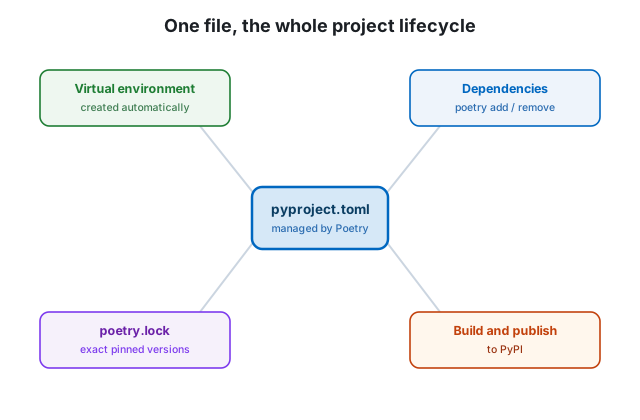
This guide uses Poetry 2.x, the current major series, which builds on the standardized [project] table from PEP 621.
The recommended way to install Poetry is with its official installer, which keeps Poetry isolated from your projects’ environments:
# macOS / Linux
curl -sSL https://install.python-poetry.org | python3 -
# Windows (PowerShell)
(Invoke-WebRequest -Uri https://install.python-poetry.org -UseBasicParsing).Content | py -If you already use pipx for installing command-line tools, pipx install poetry works just as well. Confirm the install:
poetry --version
# Poetry (version 2.x.x)
Don’t pip install Poetry into your project
Install Poetry once, globally, with the official installer or pipx — not with pip install poetry inside a project environment. Poetry manages environments; it should live outside the ones it manages.
For a brand-new project, poetry new scaffolds a sensible structure for you:
poetry new weather-reportThat creates a folder with a src/ layout, a tests directory, and a ready-to-edit pyproject.toml:
weather-report/
├── pyproject.toml
├── README.md
├── src/
│   └── weather_report/
│       └── __init__.py
└── tests/
If you already have a folder and just want to add Poetry to it, run poetry init instead and answer its prompts. Either way, the heart of the project is pyproject.toml, which starts out looking roughly like this:
[project]
name = "weather-report"
version = "0.1.0"
description = ""
readme = "README.md"
requires-python = ">=3.9"
dependencies = []

[build-system]
requires = ["poetry-core>=2.0.0"]
build-backend = "poetry.core.masonry.api"
The [project] table is the standard, tool-agnostic way to describe a Python project, and Poetry 2.x reads and writes it directly.
This is where Poetry shines. Instead of editing files and running pip install separately, you describe what you want and let Poetry do the rest:
poetry add requestsThat one command resolves a compatible version, installs it into the project’s virtual environment, records it in pyproject.toml, and updates poetry.lock. You can be specific about versions, too:
poetry add "httpx>=0.27"      # a minimum version
poetry add "pandas@^2.2"      # compatible with 2.2.x and later 2.x
Removing a package is just as clean — it pulls the dependency out of every file and uninstalls anything no longer needed:
poetry remove requestsNot every dependency belongs in production. Your test runner, linter, and formatter are needed while you develop, but not when someone installs your package. Poetry models this with dependency groups:
poetry add --group dev pytest ruffThese land in a separate dev group in pyproject.toml. When you deploy, you can install only what runtime needs and skip the development tools entirely:
poetry install --without devThis separation is something a flat requirements.txt simply cannot express.
When Poetry resolves your dependencies, it records the result in poetry.lock — the exact version of every package, including the dependencies of your dependencies, with content hashes. Commit this file. It is what guarantees that you, your teammate, and your production server all install byte-for-byte the same packages.
To install a project from its lockfile — the command a new contributor or a CI pipeline runs first — use:
poetry installIf the lockfile exists, Poetry installs exactly what it specifies. To install and remove anything in the environment that isn’t in the lockfile (giving you a perfectly clean, matching environment), use:
poetry syncCommit pyproject.toml and poetry.lock; ignore the environment
Keep both pyproject.toml and poetry.lock in version control — together they fully describe your project. Poetry stores the actual virtual environment elsewhere (in a cache directory) by default. If you configure Poetry to create an in-project .venv/, add .venv/ to .gitignore.
Because Poetry manages the virtual environment for you, you don’t have to activate it. The simplest way to run something inside the environment is poetry run:
poetry run python -c "import weather_report; print(weather_report.__name__)"
poetry run pytest  # once you have tests
If you’d rather work in an activated shell for a while, Poetry 2.x gives you a command that prints the right activation line for your platform:
poetry env activateOn macOS or Linux, you can feed that output back to your shell:
eval "$(poetry env activate)"poetry shell moved to a plugin
If you used older Poetry, you may reach for poetry shell. In Poetry 2.0 that command was moved out of the core into an optional plugin. Use poetry run for one-off commands, use poetry env activate with your shell’s activation syntax, or install the poetry-plugin-shell plugin if you want the old behavior back.
Poetry makes it easy to see what’s outdated and to upgrade within the limits you set in pyproject.toml:
poetry show --outdated      # what has newer versions available
poetry show --tree          # the full dependency tree, visually
poetry update               # upgrade dependencies within their constraints and re-lock
poetry update respects the version rules you declared, then rewrites poetry.lock. To jump a package to a new major version beyond its current constraint, change it explicitly with poetry add package@latest.
When your project is a library you want to share, Poetry turns it into a publishable package in two commands:
poetry build      # creates a wheel and a source distribution in dist/
poetry publish    # uploads them to PyPI (use --build to do both at once)
For testing your release process, you can configure and target the TestPyPI repository first. This build-and-publish capability is the piece that pip and requirements.txt never had — with Poetry, the same file that manages your dependencies also defines your package.
Poetry is an excellent fit when:
It is mature, widely adopted, and well documented, with a large plugin ecosystem. The main thing to be aware of is that dependency resolution on large projects can be slower than newer tools — which is exactly the gap that uv was built to close. If raw speed and an all-in-one Rust-based toolchain appeal to you, read that guide next and compare.
pyproject.toml.pip inside a project.poetry new / poetry init to start, then poetry add / poetry remove to manage dependencies, with --group dev for development-only tools.pyproject.toml and poetry.lock; reproduce an environment with poetry install (or poetry sync for an exact match).poetry run, and ship libraries with poetry build and poetry publish.Poetry is a big step up from manual venv plus requirements.txt for any project you intend to keep. If you’re choosing your tooling for 2026, also weigh it against uv — and if you want to strengthen the Python fundamentals underneath all of this, our free Python for Data Analytics course is the place to start.
 Python
Fast, All-in-One Python Project Management with uv
uv is a single, blazing-fast tool that handles virtual environments, dependencies, lockfiles, Python versions, and packaging. A practical guide to the toolchain replacing pip, venv, and pyenv.
Read article
Python
Fast, All-in-One Python Project Management with uv
uv is a single, blazing-fast tool that handles virtual environments, dependencies, lockfiles, Python versions, and packaging. A practical guide to the toolchain replacing pip, venv, and pyenv.
Read article
 Python
A Complete Guide to Python Virtual Environments
Stop fighting dependency conflicts. Learn what virtual environments are, why they matter, and how to create, activate, and share them with venv, pip, and requirements.txt — step by step.
Read article
Python
A Complete Guide to Python Virtual Environments
Stop fighting dependency conflicts. Learn what virtual environments are, why they matter, and how to create, activate, and share them with venv, pip, and requirements.txt — step by step.
Read article