Title here
Summary here
Real JSON is rarely a flat table. This guide builds a tree-to-table mental model for pandas' JSON tools, then works through json_normalize on nested records and reading JSON Lines files with lines=True and chunksize so a file far bigger than memory still processes cleanly.

A CSV file is already a table — rows and columns, nothing to decide. JSON almost never arrives that way. An order from an e-commerce API comes with a customer object nested inside it and a list of line items nested inside that, and before you can plot or group anything, you have to answer a question CSV never asks: how do I turn this shape into a table at all? (If you haven’t seen basic JSON parsing yet — json.load on a small file — our post on reading files in Python covers that first; this post picks up exactly where it leaves off, with pandas and data too large to treat as one object.)
There’s a second question people skip just as often: what happens when the JSON is a file too large to load as one object in memory? This is where people reach for pd.read_json on a multi-gigabyte file, watch their machine grind to a halt, and assume pandas “isn’t built for JSON.” It is — you’re just missing two tools: json_normalize for nested structure, and JSON Lines with chunked reading for scale. This guide builds the mental model first, then works through both on data you can reproduce yourself.
A DataFrame is a table: fixed columns, one flat value per cell. JSON is a tree: objects can contain objects, and objects can contain lists of more objects, nested as deep as whoever wrote the API felt like going. Every tool in this post exists to answer one question, over and over: given this tree, which nodes become columns, and which nodes become rows?
customer with a name inside it becomes a column called customer.name.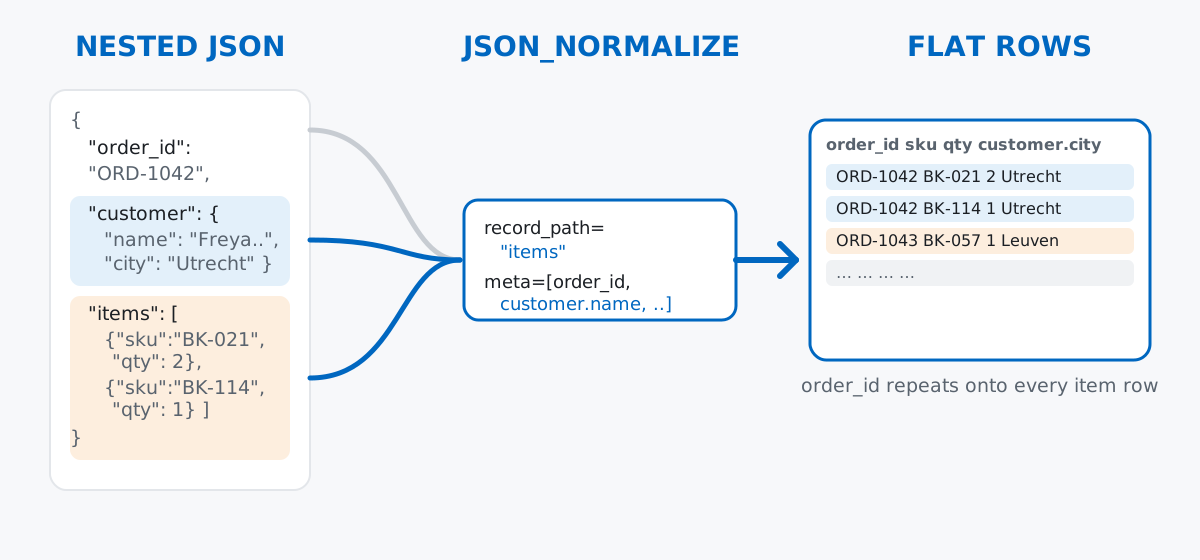
Keep this in mind and pd.json_normalize’s two main arguments stop looking arbitrary: meta says which of the record’s own fields to carry along, and record_path says which nested list to explode into rows. Everything else in this post is just applying that idea.
Say you run a small independent bookshop and your storefront platform exports each order as a JSON object: an order ID and timestamp at the top, a nested customer object, and a nested list of items, since one order can contain several books. Six orders, hand-written so you can see the exact shape before any pandas is involved:
import json
from pathlib import Path

orders = [
    {
        "order_id": "ORD-1042",
        "ordered_at": "2026-06-18T14:32:00",
        "status": "shipped",
        "customer": {"name": "Freya Lindqvist", "email": "[email protected]", "city": "Utrecht"},
        "items": [
            {"sku": "BK-021", "title": "The Quiet Atlas", "qty": 2, "unit_price": 12.5},
            {"sku": "BK-114", "title": "Salt and Static", "qty": 1, "unit_price": 22.0},
        ],
    },
    {
        "order_id": "ORD-1043",
        "ordered_at": "2026-06-18T15:05:00",
        "status": "shipped",
        "customer": {"name": "Amir Kassab", "email": "[email protected]", "city": "Leuven"},
        "items": [{"sku": "BK-057", "title": "Nine Small Rivers", "qty": 1, "unit_price": 18.0}],
    },
    # ... 4 more orders, same shape
]

work_dir = Path("shopfiles")
work_dir.mkdir(exist_ok=True)
orders_path = work_dir / "orders.json"
orders_path.write_text(json.dumps(orders, indent=2), encoding="utf-8")
print("wrote", orders_path.name, "with", len(orders), "orders")
wrote orders.json with 6 ordersData: an original, hand-written example (no external dataset — see the note near the JSON Lines section below for why). Each of the 6 orders has the same shape: three flat fields, one nested object, one nested list of 1-3 items — a small but genuinely nested tree, which is exactly what makes json_normalize worth using instead of hand-rolled loops.
pd.read_jsonThe obvious first move is pd.read_json, and it works, in the sense that it doesn’t error:
naive = pd.read_json(orders_path)
print(naive.dtypes)
print()
print("naive.loc[0, 'customer'] ->", naive.loc[0, "customer"])
print("naive.loc[0, 'items']    ->", naive.loc[0, "items"])
order_id str
ordered_at datetime64[us]
status str
customer object
items object
dtype: object
naive.loc[0, 'customer'] -> {'name': 'Freya Lindqvist', 'email': '[email protected]', 'city': 'Utrecht'}
naive.loc[0, 'items'] -> [{'sku': 'BK-021', 'title': 'The Quiet Atlas', 'qty': 2, 'unit_price': 12.5}, {'sku': 'BK-114', 'title': 'Salt and Static', 'qty': 1, 'unit_price': 22.0}]pd.read_json gives you one row per order, but it doesn’t flatten anything. customer and items both come back with dtype: object, which in this case means “a plain Python dict” and “a plain Python list of dicts,” sitting inside a DataFrame cell exactly as they were in the JSON. You could write a loop to pull customer["name"] out of every row yourself — but that’s what json_normalize is for.
json_normalizepd.json_normalize takes the parsed JSON (a list of dicts, not a file path) and flattens nested objects into dot-notation columns automatically:
with open(orders_path, encoding="utf-8") as f:
    raw_orders = json.load(f)

orders_flat = pd.json_normalize(raw_orders)
print(orders_flat.columns.tolist())
print()
print(orders_flat[["order_id", "customer.name", "customer.city", "status"]])
['order_id', 'ordered_at', 'status', 'items', 'customer.name', 'customer.email', 'customer.city']
order_id customer.name customer.city status
0 ORD-1042 Freya Lindqvist Utrecht shipped
1 ORD-1043 Amir Kassab Leuven shipped
2 ORD-1044 Ines Faro Utrecht processing
3 ORD-1045 Marek Wysocki Ghent cancelled
4 ORD-1046 Freya Lindqvist Utrecht shipped
5 ORD-1047 Sanne de Groot Leuven shippedNotice customer disappeared and became three separate columns — customer.name, customer.email, customer.city — exactly rule 2 from the mental model. But items is still there, untouched, still a list of dicts in every cell. json_normalize flattens nested objects by default; it leaves nested lists alone until you tell it what to do with them, which is rule 3.
record_path and metaTo turn items into real rows, pass record_path="items" — the nested list to explode — and meta=[...] — which of the surrounding order’s fields to repeat onto every resulting row, including reaching into the nested customer object with a ["customer", "name"]-style path:
line_items = pd.json_normalize(
    raw_orders,
    record_path="items",
    meta=["order_id", "ordered_at", "status", ["customer", "name"], ["customer", "city"]],
)
print(line_items.shape)
print()
display_cols = ["order_id", "sku", "title", "qty", "unit_price", "customer.name", "customer.city"]
print(line_items[display_cols].head(6).to_string())
(10, 9)
order_id sku title qty unit_price customer.name customer.city
0 ORD-1042 BK-021 The Quiet Atlas 2 12.50 Freya Lindqvist Utrecht
1 ORD-1042 BK-114 Salt and Static 1 22.00 Freya Lindqvist Utrecht
2 ORD-1043 BK-057 Nine Small Rivers 1 18.00 Amir Kassab Leuven
3 ORD-1044 BK-021 The Quiet Atlas 1 12.50 Ines Faro Utrecht
4 ORD-1044 BK-088 Loud Furniture 1 15.75 Ines Faro Utrecht
5 ORD-1044 BK-114 Salt and Static 1 22.00 Ines Faro UtrechtSix orders became 10 rows — one per line item — and every row still knows which order and which customer it belongs to, because meta repeated those fields onto each exploded row. This is now an ordinary flat DataFrame, so ordinary pandas works on it directly:
line_items["line_total"] = (line_items["qty"] * line_items["unit_price"]).round(2)
revenue_by_city = line_items.groupby("customer.city")["line_total"].sum().sort_values(ascending=False)
print(revenue_by_city)
customer.city
Utrecht 144.5
Leuven 48.5
Ghent 36.0
Name: line_total, dtype: float64That’s a per-city revenue summary computed on data that started life three levels deep inside a JSON tree, with no manual loop. The official json_normalize and read_json documentation covers additional options like sep (to change the . in column names) and errors (for records missing a meta field), if you need them. (The outputs in this post come from pandas 3.0 — everything shown also works on pandas 2.x.)
Everything above assumed the whole file fits comfortably in memory as one parsed object — six orders, no problem. But the bookshop’s site also logs every page view, cart add, and purchase as an event, and that log grows continuously. Shipping it as one giant JSON array ([{...}, {...}, ..., {...}]) has two real problems: you can’t append a new event without re-parsing and re-writing the entire array to keep the brackets and commas valid, and you can’t read record 1 without technically parsing through to the closing ].
JSON Lines (.jsonl, sometimes .ndjson) solves both problems with one rule: one complete, independent JSON object per line, no enclosing brackets, no commas between records. A new event is just a line appended to the end of the file. A reader can process record 1 the moment it hits the first newline, without knowing or caring how many more lines follow.
For a real demonstration of scale, this generates a seeded synthetic event log — the teaching point here is the technique for handling a file too big to load naively, not a specific real dataset, so a generated file serves it better than searching for one:
import numpy as np

rng = np.random.default_rng(42)
n_events = 6000
event_types = np.array(["page_view", "add_to_cart", "purchase"])
event_probs = [0.72, 0.20, 0.08]
skus = np.array(["BK-021", "BK-057", "BK-088", "BK-114", "BK-142", "BK-190"])
unit_prices = {"BK-021": 12.5, "BK-057": 18.0, "BK-088": 15.75, "BK-114": 22.0, "BK-142": 9.9, "BK-190": 27.5}

events_path = work_dir / "site_events.jsonl"
with open(events_path, "w", encoding="utf-8") as f:
    for i in range(n_events):
        etype = str(rng.choice(event_types, p=event_probs))
        sku = str(rng.choice(skus))
        record = {"event_id": i + 1, "session_id": f"S-{rng.integers(1000, 1999)}", "event_type": etype, "sku": sku}
        if etype in ("add_to_cart", "purchase"):
            qty = int(rng.integers(1, 3))
            record["qty"] = qty
            record["value"] = round(qty * unit_prices[sku], 2)
        f.write(json.dumps(record) + "\n")

size_kb = events_path.stat().st_size / 1024
with open(events_path, encoding="utf-8") as f:
    line_count = sum(1 for _ in f)
print(f"wrote {events_path.name}: {line_count} lines, {size_kb:.1f} KB")
wrote site_events.jsonl: 6000 lines, 550.9 KB
{"event_id": 1, "session_id": "S-1438", "event_type": "add_to_cart", "sku": "BK-114", "qty": 1, "value": 22.0}
{"event_id": 2, "session_id": "S-1201", "event_type": "page_view", "sku": "BK-190"}
{"event_id": 3, "session_id": "S-1735", "event_type": "purchase", "sku": "BK-021", "qty": 2, "value": 25.0}6,000 lines on disk, and notice line 2 has fewer keys than lines 1 and 3 — page_view events have no qty or value. That’s a normal, valid JSON Lines file: each line is independently valid JSON, and lines don’t need identical shapes, unlike a CSV’s fixed columns.
lines=TruePass lines=True and pd.read_json reads the whole file, one JSON object per row:
events = pd.read_json(events_path, lines=True)
print(events.shape)
print()
print(events.dtypes)
(6000, 6)
event_id int64
session_id str
event_type str
sku str
qty float64
value float64
dtype: objectAll 6,000 rows loaded fine here because the file is small enough — but lines=True alone still loads the entire file into one DataFrame before handing it back, no better than the plain JSON array from before for a file too big for memory. The fix is the next section. qty and value came back as float64, not int64 — pandas had to accommodate the missing values on page_view rows, and NaN forces a float column even where every present value is a whole number.
chunksizeAdd chunksize=, and pd.read_json(..., lines=True, chunksize=N) stops returning a DataFrame and instead returns an iterator — something you loop over, where each step hands you the next N rows as their own small DataFrame and then lets them be garbage-collected. The file itself is read incrementally as you iterate, not all at once up front. Aggregating a result across the whole file means accumulating into a running total as you go, not stitching the pieces back into one big DataFrame afterward:
chunk_size = 500
n_chunks = 0
total_rows_seen = 0
purchase_value_by_sku = {}
event_type_counts = {"page_view": 0, "add_to_cart": 0, "purchase": 0}

for chunk in pd.read_json(events_path, lines=True, chunksize=chunk_size):
    n_chunks += 1
    total_rows_seen += len(chunk)

    counts = chunk["event_type"].value_counts()
    for etype, c in counts.items():
        event_type_counts[etype] = event_type_counts.get(etype, 0) + int(c)

    purchases = chunk[chunk["event_type"] == "purchase"]
    if len(purchases):
        by_sku = purchases.groupby("sku")["value"].sum()
        for sku, v in by_sku.items():
            purchase_value_by_sku[sku] = purchase_value_by_sku.get(sku, 0) + float(v)

print(f"processed {n_chunks} chunks, {total_rows_seen} rows total, "
      f"largest single chunk in memory at once: {chunk_size} rows")
print()
print("event_type_counts:", event_type_counts)
print()
purchase_totals = pd.Series(purchase_value_by_sku).sort_values(ascending=False).round(2)
print(purchase_totals)
processed 12 chunks, 6000 rows total, largest single chunk in memory at once: 500 rows
event_type_counts: {'page_view': 4344, 'add_to_cart': 1173, 'purchase': 483}
BK-114 3102.00
BK-057 2286.00
BK-088 2031.75
BK-190 1897.50
BK-021 1650.00
BK-142 1287.00
dtype: float64Twelve chunks of 500 rows each, and at no point did the program hold more than 500 rows of site_events.jsonl at once — only two small running totals (event_type_counts and purchase_value_by_sku), which stay tiny no matter how long the file gets. The final numbers match a direct, whole-file computation exactly, which is worth checking once so you trust the pattern:
direct_check = events[events["event_type"] == "purchase"].groupby("sku")["value"].sum().sort_values(ascending=False).round(2)
print("matches direct computation:", purchase_totals.equals(direct_check))
matches direct computation: TrueSame answer, two very different memory profiles. On this 6,000-line file the difference doesn’t matter. On a file with 60 million lines, it’s the difference between a script that finishes and one that OOMs.
json_normalize on deeply nested data can quietly produce a very wide DataFrame. By default it flattens every level it finds — a real API response nested five or six levels deep can turn into a DataFrame with hundreds of columns, most of them barely used. The max_level argument caps how deep it goes:
level0 = pd.json_normalize(raw_orders, max_level=0)
print(level0.columns.tolist())
print(level0.loc[0, "customer"])
['order_id', 'ordered_at', 'status', 'customer', 'items']
{'name': 'Freya Lindqvist', 'email': '[email protected]', 'city': 'Utrecht'}With max_level=0, customer stays a single object column instead of exploding into three — compare that to the unlimited-depth call earlier, which produced customer.name, customer.email, and customer.city as separate columns. On real nested data, start with a shallow max_level to see the shape before deciding how far to flatten.
lines=True requires a genuine one-object-per-line file — not a JSON array that happens to contain newlines. A pretty-printed array (json.dumps(data, indent=2)) has newlines all over it, but it’s still one big array, not one object per line, and lines=True will fail trying to parse each individual line as a complete JSON value:
try:
    pd.read_json(pretty_array_path, lines=True)
except ValueError as e:
    print(f"{type(e).__name__}: {e}")
ValueError: Expected object or valueIf you see that error, check the file’s actual format before assuming lines=True is broken — nine times out of ten, the file is a regular indented JSON array, and the fix is lines=False (the default), not a different flag.
Concatenating every chunk back into one DataFrame defeats the entire point of chunking. It’s tempting to write pd.concat(pd.read_json(path, lines=True, chunksize=N), ignore_index=True) because it’s short — but that forces every chunk to exist in memory simultaneously to build the concatenated result, which is exactly the full-file load chunksize was meant to avoid:
reassembled = pd.concat(pd.read_json(events_path, lines=True, chunksize=chunk_size), ignore_index=True)
print("reassembled shape:", reassembled.shape)
reassembled shape: (6000, 6)That line works, and on this toy file it’s harmless. But if the whole reason you reached for chunksize was a file too big to hold in memory as one DataFrame, pd.concat on all the chunks silently reconstructs the exact thing you were avoiding. If you truly need memory efficiency, the aggregation has to stay incremental — running sums, counts, or a groupby you merge chunk by chunk — the way the chunksize loop above does it.
Pandas’ JSON tools map directly onto the tree-to-table mental model:
pd.read_json → one row per top-level record, nested objects and lists left as raw Python values in the cellspd.json_normalize → flattens nested objects into dot-notation columns automatically (max_level controls how deep)record_path + meta → explodes a nested list of objects into its own rows, repeating the parent record’s fields onto each onelines=True → reads a JSON Lines file, one object per line, no enclosing arraychunksize= → turns that read into an iterator, so you process and aggregate a file far larger than memory in fixed-size piecesOnce you’re comfortable turning nested JSON into a flat table, the rest is ordinary pandas — the DataFrames and Reading Data lessons in our free Python for Data Analytics course cover read_json alongside CSV and Excel loading as part of a fuller data-ingestion workflow, and our guide to pandas GroupBy picks up right where the line-item aggregation in this post leaves off.
 Python
Build an AI Chatbot in Python: A Command-Line LLM Client
A from-scratch walkthrough of the pattern behind every LLM chatbot: one function that sends a message plus conversation history to a chat-completion API, a persona set by a system prompt, and a loop that keeps the conversation going.
Read article
Python
Build an AI Chatbot in Python: A Command-Line LLM Client
A from-scratch walkthrough of the pattern behind every LLM chatbot: one function that sends a message plus conversation history to a chat-completion API, a persona set by a system prompt, and a loop that keeps the conversation going.
Read article
 Software Engineering
The Single Responsibility Principle: One Class, One Reason to Change
The Single Responsibility Principle says a class should have only one reason to change. See it in action: take a Python AuthService that also owns its logging, find why that's a problem, and refactor it into clean, focused classes.
Read article
Software Engineering
The Single Responsibility Principle: One Class, One Reason to Change
The Single Responsibility Principle says a class should have only one reason to change. See it in action: take a Python AuthService that also owns its logging, find why that's a problem, and refactor it into clean, focused classes.
Read article