Title here
Summary here
Every 'per-group' question in Pandas goes through groupby. This guide builds the split-apply-combine mental model, then works through agg, named aggregations, multi-column grouping, transform, and filter on a small dataset you can regenerate yourself.

Almost every interesting question you can ask of a dataset is a per-group question. Not “what’s the total revenue?” but “what’s the revenue per city?” Not “what’s the average order?” but “what’s the average order per product?” In Pandas, all of those questions go through one method: groupby().
groupby is also where a lot of people quietly lose confidence in Pandas. The method returns a strange lazy object instead of data, the results sometimes come back with weird indexes, and there are three different ways (agg, transform, filter) to do what looks like the same thing. (If some of that indexing confusion sounds familiar, our post on common Pandas gotchas covers the related traps.) This guide builds the mental model first, then works through each tool on a small dataset you can regenerate on your own machine.
Every groupby operation, no matter how complicated it looks, is three steps:
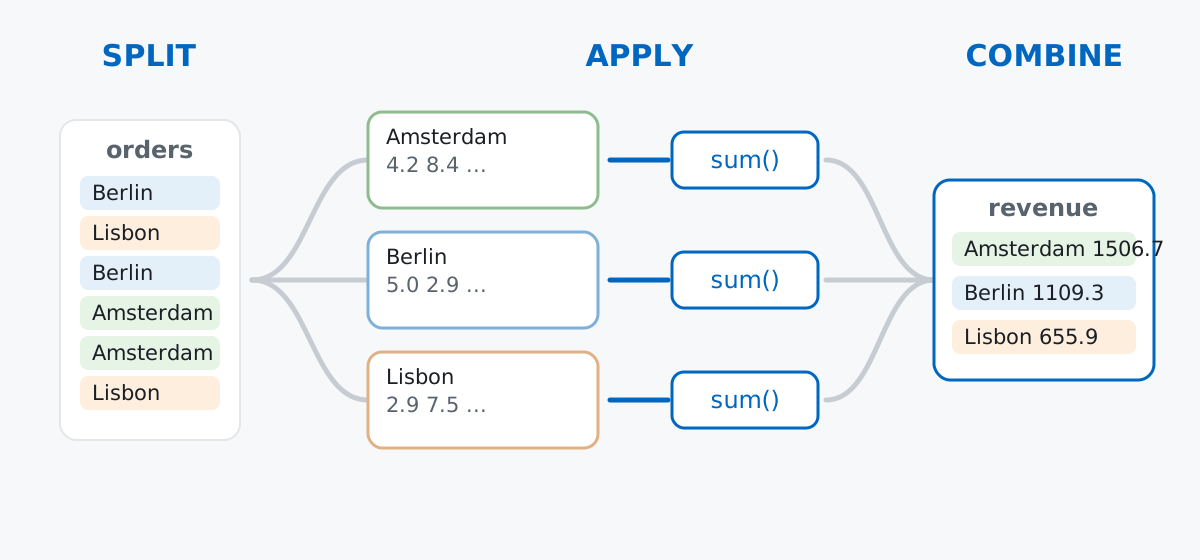
You only ever write the apply step. Pandas handles the splitting and combining for you — which is exactly why the syntax feels terse: orders.groupby("city")["revenue"].sum() is a full split-apply-combine pipeline in one line.
Keep this model in mind, because the difference between agg, transform, and filter is only in the combine step: agg returns one row per group, transform returns one value per original row, and filter returns the surviving original rows.
Rather than downloading anything, let’s generate a dataset with a fixed seed so your numbers match mine exactly. Imagine a small coffee chain with shops in three cities, selling five items:
import numpy as np
import pandas as pd

rng = np.random.default_rng(42)
n = 500

menu = {
    "espresso": ("drink", 2.50),
    "latte": ("drink", 3.80),
    "flat white": ("drink", 4.20),
    "croissant": ("food", 2.90),
    "banana bread": ("food", 3.40),
}

items = rng.choice(list(menu), size=n)
orders = pd.DataFrame({
    "city": rng.choice(["Amsterdam", "Berlin", "Lisbon"], size=n, p=[0.45, 0.35, 0.20]),
    "item": items,
    "category": [menu[i][0] for i in items],
    "quantity": rng.integers(1, 4, size=n),
})
orders["revenue"] = (orders["quantity"] * orders["item"].map(lambda i: menu[i][1])).round(2)

orders.head()
city item category quantity revenue
0 Berlin espresso drink 2 5.0
1 Lisbon croissant food 1 2.9
2 Berlin croissant food 1 2.9
3 Amsterdam flat white drink 1 4.2
4 Amsterdam flat white drink 2 8.4Five hundred orders, five columns. (The outputs in this post come from pandas 3.0 — everything shown also works on pandas 2.x.)
Revenue per city — the classic:
orders.groupby("city")["revenue"].sum()city
Amsterdam 1506.7
Berlin 1109.3
Lisbon 655.9
Name: revenue, dtype: float64Read it right to left: take the revenue column, within each city group, and sum it. The result is a Series whose index is the group keys. That index placement surprises people, and we’ll deal with it properly in a moment.
groupby() Actually ReturnsIf you stop halfway, you don’t get data:
g = orders.groupby("city")
g
<pandas.api.typing.DataFrameGroupBy object at 0x10c74bd90>Nothing has been computed yet. A DataFrameGroupBy object is a plan — it knows how the rows split, and it waits for you to say what to apply. (The official groupby user guide has the full list of what these objects support, if you want to go deeper than this post.) It’s still useful on its own, though:
g.size()city
Amsterdam 222
Berlin 177
Lisbon 101
dtype: int64And you can pull out one group as a regular DataFrame when you want to inspect it:
g.get_group("Lisbon").head(3) city item category quantity revenue
1 Lisbon croissant food 1 2.9
6 Lisbon espresso drink 3 7.5
11 Lisbon banana bread food 1 3.4Notice the original row labels (1, 6, 11) are preserved — get_group is literally the “split” step, handed back to you.
aggOne aggregation per group is rarely enough. agg takes a list:
orders.groupby("city")["revenue"].agg(["sum", "mean", "count"]) sum mean count
city
Amsterdam 1506.7 6.786937 222
Berlin 1109.3 6.267232 177
Lisbon 655.9 6.494059 101Better still, named aggregations let you aggregate different columns and name the outputs in one call. This is the form I reach for in real analysis code, because the result is self-documenting:
orders.groupby("city").agg(
    total_revenue=("revenue", "sum"),
    avg_order=("revenue", "mean"),
    orders=("revenue", "count"),
).round(2)
total_revenue avg_order orders
city
Amsterdam 1506.7 6.79 222
Berlin 1109.3 6.27 177
Lisbon 655.9 6.49 101Each keyword argument is new_column_name=(source_column, function). No renaming step afterwards, no guessing what sum referred to.
Pass a list of columns and the groups become every observed combination:
orders.groupby(["city", "category"])["revenue"].sum()city category
Amsterdam drink 927.3
food 579.4
Berlin drink 746.3
food 363.0
Lisbon drink 427.1
food 228.8
Name: revenue, dtype: float64That result has a two-level MultiIndex, which is powerful but awkward if you just want a flat table to keep working with. You have two good options. If you want a plain DataFrame, ask for it up front:
orders.groupby(["city", "category"], as_index=False)["revenue"].sum() city category revenue
0 Amsterdam drink 927.3
1 Amsterdam food 579.4
2 Berlin drink 746.3
3 Berlin food 363.0
4 Lisbon drink 427.1
5 Lisbon food 228.8And if you want a comparison grid — cities as rows, categories as columns — unstack() pivots the inner index level into columns:
orders.groupby(["city", "category"])["revenue"].sum().unstack()category drink food
city
Amsterdam 927.3 579.4
Berlin 746.3 363.0
Lisbon 427.1 228.8transform: Group Results at Row LevelHere’s the one that unlocks a whole class of problems. agg collapses each group to one row. But sometimes you want the group-level number attached to every original row — for example, “what share of its city’s revenue is this order?” That’s transform:
orders["city_revenue"] = orders.groupby("city")["revenue"].transform("sum")
orders["pct_of_city"] = (orders["revenue"] / orders["city_revenue"] * 100).round(2)

orders[["city", "item", "revenue", "city_revenue", "pct_of_city"]].head()
city item revenue city_revenue pct_of_city
0 Berlin espresso 5.0 1109.3 0.45
1 Lisbon croissant 2.9 655.9 0.44
2 Berlin croissant 2.9 1109.3 0.26
3 Amsterdam flat white 4.2 1506.7 0.28
4 Amsterdam flat white 8.4 1506.7 0.56Same split, same sum — but the combine step broadcasts each group’s total back onto its rows, so the result is exactly as long as the original DataFrame and can be assigned straight into a new column. Any time you catch yourself computing an aggregate and then merging it back onto the original table, transform does it in one step.
filter: Keep or Drop Whole GroupsThe third combine flavor: filter runs a test per group and keeps the original rows of the groups that pass. Which items have an average order value above €8?
big = orders.groupby("item").filter(lambda grp: grp["revenue"].mean() > 8)
big["item"].unique()
<StringArray>
['flat white']
Length: 1, dtype: strOnly the flat white makes the cut, and big contains its complete, unaggregated order rows — ready for further analysis. The lambda receives each group as a DataFrame and must return a single True or False.
Groups come back sorted. By default, groupby sorts group keys alphabetically, not by first appearance. If you don’t need sorting, sort=False keeps encounter order and can be faster on large data:
orders.groupby("city", sort=False)["revenue"].sum()city
Berlin 1109.3
Lisbon 655.9
Amsterdam 1506.7
Name: revenue, dtype: float64Missing keys silently vanish. Rows where the grouping column is NaN are dropped from the result entirely — your totals just quietly shrink. If missing keys are meaningful in your data, pass dropna=False and they come back as their own group:
orders_with_gaps.groupby("city", dropna=False)["revenue"].sum()city
Amsterdam 1448.1
Berlin 1036.9
Lisbon 636.2
NaN 150.7
Name: revenue, dtype: float64“Top item per group” is idxmax, not sort-and-hope. To find each city’s best-selling item, aggregate to (city, item) totals first, then let idxmax pick the winner within each city:
per_item = orders.groupby(["city", "item"])["revenue"].sum()
per_item.groupby("city").idxmax()
city
Amsterdam (Amsterdam, flat white)
Berlin (Berlin, latte)
Lisbon (Lisbon, flat white)
Name: revenue, dtype: objectAmsterdam and Lisbon run on flat whites; Berlin is a latte town.
Everything groupby does fits one model: split rows by key, apply a function per group, combine the results. The three tools differ only in what “combine” means:
agg → one row per group (summaries, reports)transform → one value per original row (group stats as new columns)filter → the original rows of groups that pass a testAdd as_index=False for flat results, named aggregations for readable code, and dropna=False when missing keys matter, and you can answer nearly any per-group question without leaving a single method chain.
If you want to build this into a fuller data-analysis workflow — indexing, cleaning, joining, and visualizing with real datasets — the Pandas Data Analysis lessons in our free Python for Data Analytics course pick up exactly where this post leaves off.
 Software Engineering
The Single Responsibility Principle: One Class, One Reason to Change
The Single Responsibility Principle says a class should have only one reason to change. See it in action: take a Python AuthService that also owns its logging, find why that's a problem, and refactor it into clean, focused classes.
Read article
Software Engineering
The Single Responsibility Principle: One Class, One Reason to Change
The Single Responsibility Principle says a class should have only one reason to change. See it in action: take a Python AuthService that also owns its logging, find why that's a problem, and refactor it into clean, focused classes.
Read article
 Python
's match Statement: Cleaner Code with Structural Pattern Matching
The match statement is one of Python's most underused features. See how it replaces messy if/elif chains and, more importantly, how structural pattern matching lets you match the shape of your data and pull out the parts you need.
Read article
Python
Python's match Statement: Cleaner Code with Structural Pattern Matching
The match statement is one of Python's most underused features. See how it replaces messy if/elif chains and, more importantly, how structural pattern matching lets you match the shape of your data and pull out the parts you need.
Read article