Title here
Summary here
A hands-on introduction to PySpark for people who already know pandas: install it locally, build the mental model for why a Spark DataFrame behaves so differently, and run select, filter, withColumn, and groupBy against a real local Spark session.

At some point a pandas script stops being enough. Maybe a file is too big to fit in memory, maybe a teammate says “just run it in Spark,” and suddenly you’re staring at PySpark code that looks like pandas but doesn’t behave like it. What actually changed, and what do you need to understand before you can trust the output?
This is where a lot of people get stuck without realizing it: PySpark’s .select() and .filter() read exactly like pandas, so it’s easy to assume the two work the same way underneath — until a variable you expected to hold data turns out to hold nothing at all. The confusion isn’t your fault; it’s a genuinely different execution model wearing a familiar syntax. This guide builds that mental model first, then walks through a complete, runnable example: installing PySpark, starting a session, and working through the transformations you’ll reach for constantly.
A pandas DataFrame is data. The moment you create one, it’s sitting in memory, and every method call touches real values immediately. A Spark DataFrame breaks that assumption in four ways:
SparkSession is your entry point, not a database connection. It’s the object that talks to Spark’s execution engine — even when that “engine” is just your own laptop running in local mode.select, filter, and withColumn are transformations — they add a step to the recipe and return instantly, without touching a single row. show, collect, and count are actions — they’re the only calls that actually run anything.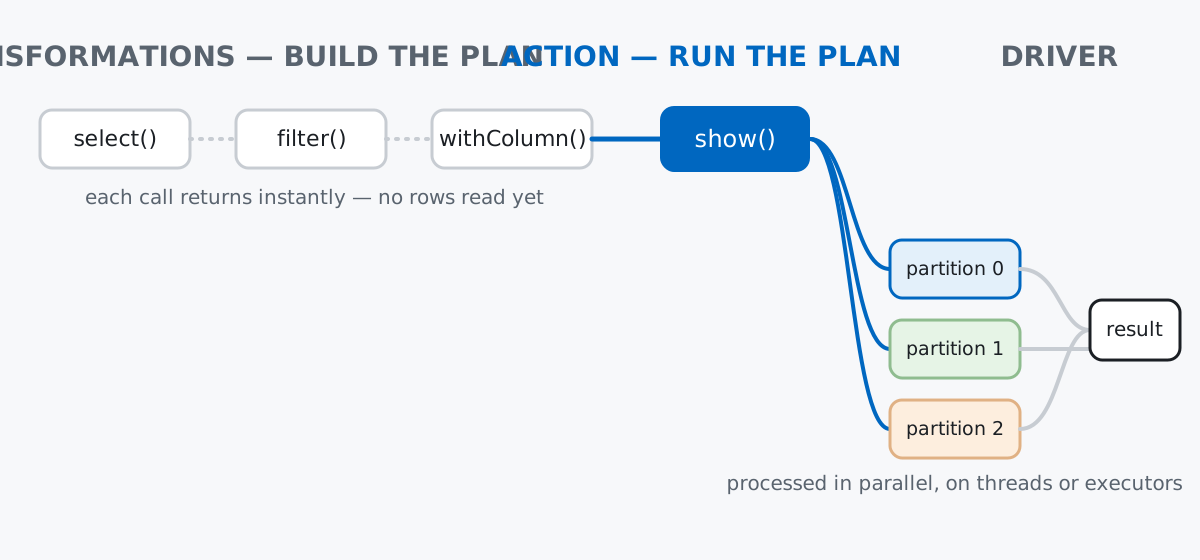
Keep that plan-versus-data distinction in mind for everything below: a variable holding the result of .filter(...) is not a filtered table, it’s an unexecuted instruction to build one.
PySpark needs a Java runtime underneath it — Spark itself is written in Scala and runs on the JVM, and the Python package is a wrapper around that engine. Install both, then start a session:
pip install pysparkfrom pyspark.sql import SparkSession
spark = (
SparkSession.builder
.appName("wavelength-downloads")
.master("local[*]")
.getOrCreate()
)
spark<pyspark.sql.session.SparkSession object at 0x1069df410>(That memory address is exactly what your own run will print, just with a different number — it’s not something to worry about, and nothing in this post depends on it.) master("local[*]") tells Spark to run locally and use every CPU core available as its “cluster.” In a real deployment, this string would instead point at a cluster manager. (The outputs in this post come from PySpark 3.5.3 on Python 3.11 — see the gotchas section below for why the exact version matters more than usual here.)
Imagine a small independent podcast network called Wavelength, with three shows: Night Shift, Field Notes, and Quiet Hours. Every time an episode finishes downloading, the app logs one event — which show, which country, which device, how many seconds of listening, and whether the download completed. Fourteen events is a realistic slice of a log that, at real scale, would be billions of rows spread across many files — exactly the kind of workload Spark exists for, even though we’re running it on one laptop here to learn the shape of the API first.
downloads = [
    (101, "Night Shift",  "US", "phone",         642, True),
    (102, "Night Shift",  "DE", "desktop",       210, False),
    (103, "Field Notes",  "US", "smart_speaker", 918, True),
    (104, "Quiet Hours",  "BR", "phone",         305, False),
    (105, "Night Shift",  "IN", "phone",         740, True),
    (106, "Field Notes",  "DE", "desktop",       860, True),
    (107, "Quiet Hours",  "US", "phone",         120, False),
    (108, "Night Shift",  "FR", "smart_speaker", 690, True),
    (109, "Field Notes",  "BR", "phone",         455, False),
    (110, "Quiet Hours",  "DE", "desktop",       990, True),
    (111, "Night Shift",  "US", "phone",         88,  False),
    (112, "Field Notes",  "IN", "phone",         710, True),
    (113, "Quiet Hours",  "FR", "smart_speaker", 800, True),
    (114, "Night Shift",  "BR", "desktop",       610, True),
]
columns = ["episode_id", "show", "country", "device", "listen_seconds", "completed"]

df = spark.createDataFrame(downloads, columns)
df.printSchema()
root
|-- episode_id: long (nullable = true)
|-- show: string (nullable = true)
|-- country: string (nullable = true)
|-- device: string (nullable = true)
|-- listen_seconds: long (nullable = true)
|-- completed: boolean (nullable = true)createDataFrame inferred each column’s type from the Python values you handed it — episode_id became a long, completed became a boolean. Notice that calling printSchema() doesn’t print any rows — it’s metadata about the plan, not a peek at the data itself.
show()show() is the action you’ll reach for constantly while exploring — it’s PySpark’s equivalent of just typing a DataFrame’s name in a notebook:
df.show()+----------+-----------+-------+-------------+--------------+---------+
|episode_id| show|country| device|listen_seconds|completed|
+----------+-----------+-------+-------------+--------------+---------+
| 101|Night Shift| US| phone| 642| true|
| 102|Night Shift| DE| desktop| 210| false|
| 103|Field Notes| US|smart_speaker| 918| true|
| 104|Quiet Hours| BR| phone| 305| false|
| 105|Night Shift| IN| phone| 740| true|
| 106|Field Notes| DE| desktop| 860| true|
| 107|Quiet Hours| US| phone| 120| false|
| 108|Night Shift| FR|smart_speaker| 690| true|
| 109|Field Notes| BR| phone| 455| false|
| 110|Quiet Hours| DE| desktop| 990| true|
| 111|Night Shift| US| phone| 88| false|
| 112|Field Notes| IN| phone| 710| true|
| 113|Quiet Hours| FR|smart_speaker| 800| true|
| 114|Night Shift| BR| desktop| 610| true|
+----------+-----------+-------+-------------+--------------+---------+That call to show() is the moment Spark actually ran something — it built and executed the whole plan (in this case, just “read these rows”) and printed the first 20 rows by default. Everything before it was free.
select() and filter()select() keeps only the columns you name; filter() keeps only the rows that match a condition. Both are transformations — calling them doesn’t run anything yet:
narrow = df.select("show", "country", "listen_seconds")
type(narrow)
<class 'pyspark.sql.dataframe.DataFrame'>narrow is a fully-formed DataFrame object the instant that line finishes — no rows were read, filtered, or copied to produce it. Call show() to actually see it:
df.select("show", "country", "listen_seconds").show(5)+-----------+-------+--------------+
| show|country|listen_seconds|
+-----------+-------+--------------+
|Night Shift| US| 642|
|Night Shift| DE| 210|
|Field Notes| US| 918|
|Quiet Hours| BR| 305|
|Night Shift| IN| 740|
+-----------+-------+--------------+
only showing top 5 rowsfilter() works the same way, keeping whole rows instead of columns:
df.filter(df.completed == True).show()+----------+-----------+-------+-------------+--------------+---------+
|episode_id| show|country| device|listen_seconds|completed|
+----------+-----------+-------+-------------+--------------+---------+
| 101|Night Shift| US| phone| 642| true|
| 103|Field Notes| US|smart_speaker| 918| true|
| 105|Night Shift| IN| phone| 740| true|
| 106|Field Notes| DE| desktop| 860| true|
| 108|Night Shift| FR|smart_speaker| 690| true|
| 110|Quiet Hours| DE| desktop| 990| true|
| 112|Field Notes| IN| phone| 710| true|
| 113|Quiet Hours| FR|smart_speaker| 800| true|
| 114|Night Shift| BR| desktop| 610| true|
+----------+-----------+-------+-------------+--------------+---------+Nine of the fourteen downloads finished. df.completed == True builds a column expression, not a Python boolean — that expression is what gets attached to the plan.
withColumn()withColumn() adds a new column computed from existing ones, without mutating df — like every transformation, it returns a new DataFrame:
enriched = df.withColumn("listen_minutes", (df.listen_seconds / 60).cast("double"))
enriched.select("episode_id", "show", "listen_seconds", "listen_minutes").show(5)
+----------+-----------+--------------+------------------+
|episode_id| show|listen_seconds| listen_minutes|
+----------+-----------+--------------+------------------+
| 101|Night Shift| 642| 10.7|
| 102|Night Shift| 210| 3.5|
| 103|Field Notes| 918| 15.3|
| 104|Quiet Hours| 305| 5.083333333333333|
| 105|Night Shift| 740|12.333333333333334|
+----------+-----------+--------------+------------------+
only showing top 5 rowsdf itself is untouched — enriched is a separate DataFrame with one more column in its plan. This is the same immutable-by-default habit pandas encourages with df.assign(), just enforced rather than optional.
groupBy() and agg()This is where the payoff shows up. groupBy() groups rows by one or more columns, and agg() computes one or more summaries per group in a single pass:
from pyspark.sql import functions as F

summary = (
    enriched
    .groupBy("show")
    .agg(
        F.count("episode_id").alias("downloads"),
        F.round(F.avg("listen_minutes"), 2).alias("avg_minutes"),
        F.sum(F.when(F.col("completed"), 1).otherwise(0)).alias("completed_count"),
    )
    .orderBy("show")
)
summary.show()
+-----------+---------+-----------+---------------+
| show|downloads|avg_minutes|completed_count|
+-----------+---------+-----------+---------------+
|Field Notes| 4| 12.26| 3|
|Night Shift| 6| 8.28| 4|
|Quiet Hours| 4| 9.23| 2|
+-----------+---------+-----------+---------------+Read it the same way you’d read a pandas groupby().agg(): F.count, F.avg, and F.sum all run inside a single grouped pass over the data, and .alias() names each result column. Field Notes has the highest average listen time even though Night Shift has the most downloads. The full list of built-in aggregate and column functions lives in the PySpark SQL functions reference, and it’s worth a skim — most things you’d reach for a Python loop to compute already exist there, and using them is what lets Spark optimize and distribute the work instead of shipping your Python code row by row.
collect()show() is for looking, not for using the data in Python. collect() is the action that actually pulls rows back to the driver — your local Python process — as a list of Row objects:
rows = summary.collect()
for row in rows:
    print(row)
Row(show='Field Notes', downloads=4, avg_minutes=12.26, completed_count=3)
Row(show='Night Shift', downloads=6, avg_minutes=8.28, completed_count=4)
Row(show='Quiet Hours', downloads=4, avg_minutes=9.23, completed_count=2)Each Row behaves like a namedtuple — rows[0].show and rows[0]["show"] both work. collect() is safe here because summary only has three rows; calling it on an unaggregated multi-billion-row DataFrame is how people accidentally try to load a distributed dataset into a single machine’s memory and crash the driver. Aggregate or filter down first, then collect.
Nothing runs until you call an action — and it’s easy to assume otherwise. If a filter looks wrong, printing the DataFrame variable directly won’t show you why; it will show you the DataFrame object, not its rows:
filtered = df.filter(df.completed == True)
print(type(filtered))
<class 'pyspark.sql.dataframe.DataFrame'>You have to call .show(), .collect(), or another action to actually see whether the filter did what you expected.
show() truncates long strings to 20 characters by default. It’s a display setting, not a data problem — pass truncate=False when a column’s contents matter:
long_text_df = spark.createDataFrame(
    [(1, "This is a much longer piece of text than the default column width allows for")],
    ["id", "note"],
)
long_text_df.show()
long_text_df.show(truncate=False)
+---+--------------------+
| id| note|
+---+--------------------+
| 1|This is a much lo...|
+---+--------------------+
+---+----------------------------------------------------------------------------+
|id |note |
+---+----------------------------------------------------------------------------+
|1 |This is a much longer piece of text than the default column width allows for|
+---+----------------------------------------------------------------------------+PySpark’s newest release may want a newer JDK than you have installed. pip install pyspark currently installs PySpark 4.x, which needs JDK 17 or newer. If your machine has JDK 11 — a common long-term-support choice — Spark’s Java gateway fails to start with an UnsupportedClassVersionError before you ever get to write Python. Either install a JDK 17+ runtime, or pin an older PySpark that matches the JDK you have: pip install "pyspark==3.5.3" runs cleanly on JDK 8, 11, or 17. Check your compatibility with java -version before you spend time debugging what looks like a Python problem.
Local mode is not a real cluster, and Python code inside Spark isn’t free. local[*] runs Spark’s real distributed engine, but on one machine’s threads instead of a network of executors — good enough to learn the API, not to learn about cluster tuning, shuffles across a network, or node failures. Similarly, the built-in functions used above (F.avg, F.sum, F.when) run inside the JVM at full speed. A Python UDF (udf()), by contrast, has to serialize every row out to a Python process and back, which is dramatically slower — reach for a built-in function first, and only write a UDF when nothing in pyspark.sql.functions covers what you need.
Every part of PySpark’s DataFrame API comes back to one distinction: transformations build a plan, actions run it.
SparkSession — your entry point, created once per script or notebookselect, filter, withColumn, groupBy — transformations; instant, lazy, return a new DataFrame describing more of the planshow, collect, count — actions; the only calls that read data and actually run somethingagg() with pyspark.sql.functions — per-group summaries computed inside a single pass, the same shape as pandas’ groupby().agg() but built to scale past one machineIf you want the same select-filter-groupBy instincts on data that comfortably fits in memory on a single machine — including cleaning, merging, and visualizing it — the Pandas Data Analysis lessons in our free Python for Data Analytics course cover that ground in depth, and are a natural place to go before or after this post.
 Python
Build an AI Chatbot in Python: A Command-Line LLM Client
A from-scratch walkthrough of the pattern behind every LLM chatbot: one function that sends a message plus conversation history to a chat-completion API, a persona set by a system prompt, and a loop that keeps the conversation going.
Read article
Python
Build an AI Chatbot in Python: A Command-Line LLM Client
A from-scratch walkthrough of the pattern behind every LLM chatbot: one function that sends a message plus conversation history to a chat-completion API, a persona set by a system prompt, and a loop that keeps the conversation going.
Read article
 Software Engineering
The Single Responsibility Principle: One Class, One Reason to Change
The Single Responsibility Principle says a class should have only one reason to change. See it in action: take a Python AuthService that also owns its logging, find why that's a problem, and refactor it into clean, focused classes.
Read article
Software Engineering
The Single Responsibility Principle: One Class, One Reason to Change
The Single Responsibility Principle says a class should have only one reason to change. See it in action: take a Python AuthService that also owns its logging, find why that's a problem, and refactor it into clean, focused classes.
Read article