Title here
Summary here
Python gives you four built-in ways to hold a group of values, and picking the wrong one causes bugs down the line. This guide builds a three-question decision tree, then walks through lists, tuples, and sets in depth on one running example, with a side-by-side comparison table to keep them all straight.

Every Python program eventually needs to hold more than one value at a time, and Python hands you four built-in ways to do it: the list, the tuple, the set, and the dictionary. Beginners usually learn all four in isolation, get the syntax down, and then hit the real question nobody answered: which one do I reach for here?
That question is what this post answers. If you want a deep dive into one of the four — key-value lookups, .setdefault(), iterating with .items() — our post on Python dictionaries already covers that ground in detail. This post is the map to all four stops, not another deep dive into one of them: a mental model for choosing between them, then a closer look at lists, tuples, and sets specifically, since dictionaries already have their own guide.
You can pick the right structure for almost any situation by asking three yes/no questions, in this order:
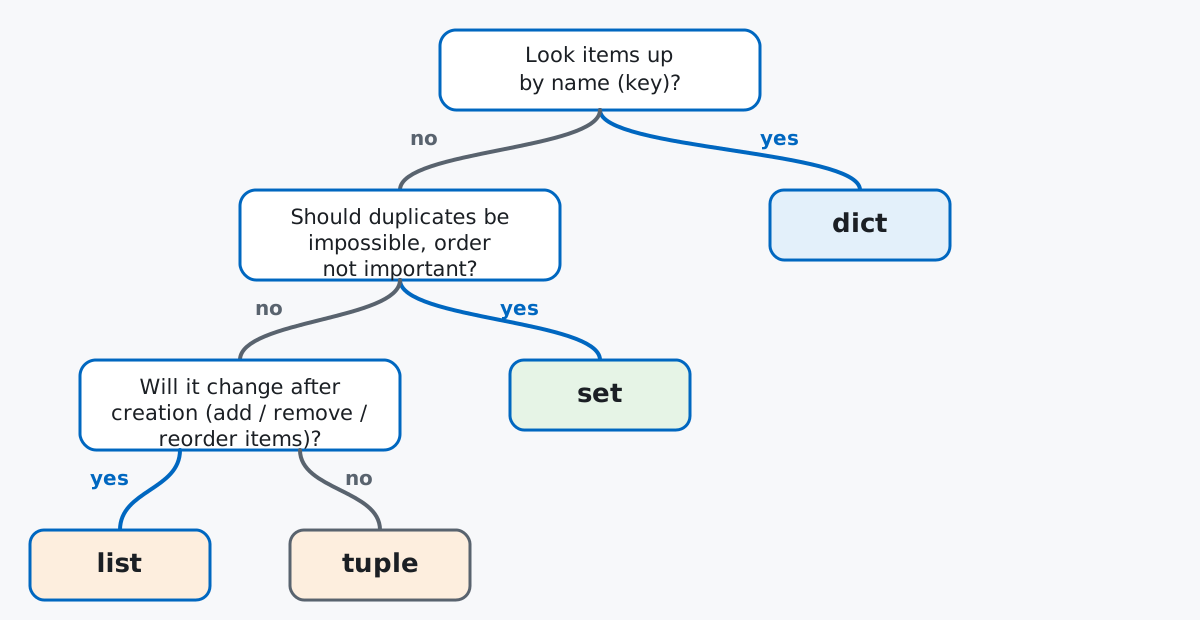
Notice the order of the questions matters: it’s a funnel, not four independent checks. You ask about naming first because a dictionary is the most specific tool; you ask about mutability last because “ordered and allows duplicates” describes both lists and tuples, and only that final question tells them apart.
No download needed — these are language features, not a dataset to analyze, so a small hand-written example is more useful than an external file. Imagine you help run a neighborhood Saturday trail-running club, and you’re keeping track of a group run: the route, the runners, and the gear people are bringing.
checkpoints = ["Trailhead", "Overlook", "Creek Crossing", "Overlook", "Trailhead"]
print(checkpoints)
['Trailhead', 'Overlook', 'Creek Crossing', 'Overlook', 'Trailhead']That’s an out-and-back route: runners pass the Overlook and the Trailhead twice, once on the way out and once on the way back. (The outputs in this post come from Python 3.13 — everything shown also works on Python 3.9+.)
A list is the default choice when you have a sequence of things and don’t yet know a strong reason to reach for something more specialized. It keeps items in the order you put them in, lets you change that order or the items themselves later, and doesn’t mind if the same value shows up twice — exactly what the checkpoint route needs, since “Overlook” legitimately appears twice:
print(checkpoints[0])
print(checkpoints[-1])
print(len(checkpoints))
Trailhead
Trailhead
5Square-bracket indexing reads by position — [0] is the first item, [-1] is the last, regardless of what value is stored there. len() counts every item, duplicates included.
Lists are mutable, so you can grow one after creating it:
checkpoints.append("Trailhead")
print(checkpoints)
print(checkpoints.count("Trailhead"))
['Trailhead', 'Overlook', 'Creek Crossing', 'Overlook', 'Trailhead', 'Trailhead']
3.append() adds to the end in place — it doesn’t return a new list, it changes this one. .count() shows duplicates are tracked normally, not silently merged. The official Python documentation on data structures has the complete list of methods beyond what fits here.
“In place” is worth sitting with, because it’s also where lists cause the most confusion:
route_a = ["Trailhead", "Overlook", "Creek Crossing"]
route_b = route_a
route_b.append("Summit")
print(route_a)
print(route_b)
['Trailhead', 'Overlook', 'Creek Crossing', 'Summit']
['Trailhead', 'Overlook', 'Creek Crossing', 'Summit']route_b = route_a didn’t copy the list — it gave route_a’s existing list a second name. Appending through route_b changes the same object route_a points at. If you wanted an independent copy, you’d write route_b = route_a.copy() (or route_a[:]) instead.
A tuple holds an ordered sequence too, and it allows duplicates just like a list does — the difference is that once built, a tuple can’t be changed. No appending, no reassigning an item, no sorting in place. That sounds like a limitation, but it’s exactly the guarantee you want for values that represent one fixed thing:
trailhead_coords = (45.5231, -122.6765)
print(trailhead_coords)
print(trailhead_coords[0])
(45.5231, -122.6765)
45.5231A GPS coordinate is a pair that only makes sense together, and it shouldn’t drift after you’ve written it down. Trying to change it tells you so directly:
try:
    trailhead_coords[0] = 46.0
except TypeError as e:
    print(f"TypeError: {e}")
TypeError: 'tuple' object does not support item assignmentTuples are also a natural fit for a short, fixed-shape record — several related values bundled together, where the position of each value has a fixed meaning:
runners = [
    ("Aisha", 7, 5.0),
    ("Noah", 12, 5.0),
    ("Priya", 23, 10.0),
    ("Marco", 31, 10.0),
]
for name, bib, distance_km in runners:
    print(f"{name}: bib {bib}, {distance_km} km")
Aisha: bib 7, 5.0 km
Noah: bib 12, 5.0 km
Priya: bib 23, 10.0 km
Marco: bib 31, 10.0 kmEach tuple is always (name, bib number, distance), in that order, and unpacking it into three named variables on the for line reads better than indexing runner[0], runner[1], runner[2] everywhere. Because tuples are immutable, they’re also hashable — you can use one as a dictionary key, which a list can never do:
checkpoint_notes = {
    (7, "Overlook"): "water station",
    (12, "Creek Crossing"): "muddy after rain",
}
print(checkpoint_notes[(7, "Overlook")])
water stationHere the key is a (bib, checkpoint) pair — a note that only makes sense tied to both together, which a single string key would have to awkwardly encode.
A set holds items with no duplicates and no guaranteed order. You reach for one the moment your real question is “what are the distinct values here?” or “is this specific thing present?” rather than “in what order do these appear?”
Say every runner texts in what gear they’re bringing, and the list has repeats:
gear_requests = ["headlamp", "poles", "headlamp", "rain jacket", "poles", "gloves"]
unique_gear = set(gear_requests)
print(unique_gear)
{'poles', 'headlamp', 'rain jacket', 'gloves'}Wrapping the list in set() collapses it down to the four distinct items — that’s deduplication in one call, and it’s often the single best reason to convert a list to a set. Sets support the operations you’d expect for checking and updating membership:
print("poles" in unique_gear)
unique_gear.add("first-aid kit")
unique_gear.discard("gloves")
print(sorted(unique_gear))
True
['first-aid kit', 'headlamp', 'poles', 'rain jacket'].add() and .discard() change the set in place, and .discard() — unlike .remove() — doesn’t complain if the item isn’t there. (Wrapping the result in sorted() for printing is just for a readable, repeatable order; the set itself still has none.)
Sets also give you the standard set-theory operations directly, which is handy for comparing two groups — say, gear requested for Saturday’s run versus Sunday’s:
saturday_gear = {"headlamp", "poles", "rain jacket"}
sunday_gear = {"poles", "sunscreen", "rain jacket"}
print(sorted(saturday_gear & sunday_gear))
print(sorted(saturday_gear | sunday_gear))
print(sorted(saturday_gear - sunday_gear))
['poles', 'rain jacket']
['headlamp', 'poles', 'rain jacket', 'sunscreen']
['headlamp']& is the intersection (needed both days), | is the union (needed either day), and - is the difference (needed Saturday only). Read left to right, each operator answers one specific question about the two groups.
The other reason to use a set is speed. Checking x in some_set doesn’t scan the set item by item the way x in some_list scans a list — it jumps straight to where x would be, using the same hashing mechanism as dictionary keys. The difference is invisible on a handful of items but dramatic at scale. Registering 200,000 runners across a season and checking whether one bib number is already registered:
import timeit

registered_bibs_list = list(range(1, 200_001))
registered_bibs_set = set(registered_bibs_list)

list_time = timeit.timeit(
    "199999 in registered_bibs_list", globals=globals(), number=200
)
set_time = timeit.timeit(
    "199999 in registered_bibs_set", globals=globals(), number=200
)
print(f"list membership check: {list_time:.6f} sec for 200 lookups")
print(f"set membership check:  {set_time:.6f} sec for 200 lookups")
print(f"set was about {list_time / set_time:.0f}x faster")
list membership check: 0.195527 sec for 200 lookups
set membership check: 0.000004 sec for 200 lookups
set was about 44277x fasterThe exact multiplier will vary by machine and Python version — don’t treat 44277 as a magic number — but the shape of the result won’t: a list’s in check is O(n), meaning it gets slower in proportion to how many items you have, while a set’s in check is close to O(1), staying fast regardless of size. If you’re doing repeated membership checks against a large, mostly-static collection, converting it to a set first is one of the cheapest performance wins available in Python.
A dictionary maps each key to a value and looks items up by that key instead of by position — the tool from question 1 in the mental model above. In this club, that’s pairing each runner’s name with their pace:
runner_paces = {"Aisha": "5:45/km", "Noah": "6:10/km", "Priya": "5:20/km"}
print(runner_paces["Priya"])
for name, pace in runner_paces.items():
    print(f"{name}: {pace}")
5:20/km
Aisha: 5:45/km
Noah: 6:10/km
Priya: 5:20/kmThat’s the shape of it: unique keys, one value each, retrieved by name rather than counted position. Reading, updating, safe lookups with .get(), and building frequency counts with .setdefault() are all covered in depth in the dictionaries post — this section is deliberately short because that post already does the topic justice.
| List | Tuple | Set | Dict | |
|---|---|---|---|---|
| Ordered? | Yes (insertion) | Yes (fixed) | No | Yes (insertion) |
| Mutable? | Yes | No | Yes | Yes |
| Duplicates? | Allowed | Allowed | Not allowed | Keys unique, values can repeat |
| Reach for it when… | building/changing a sequence | a fixed-shape record, or a dict key | deduping or checking “is X in here” fast | looking things up by name |
A mutable default argument is shared across every call that doesn’t override it. This is one of Python’s most famous traps, and it hits lists (and dictionaries) specifically because they’re mutable:
def add_checkpoint(name, route=[]):
    route.append(name)
    return route

trip_1 = add_checkpoint("Trailhead")
trip_2 = add_checkpoint("Overlook")
print(trip_1)
print(trip_2)
['Trailhead', 'Overlook']
['Trailhead', 'Overlook']The default list [] is created once, when the function is defined — not fresh on every call — so every call that doesn’t pass its own route mutates that same shared list. trip_2 comes back with "Trailhead" still in it, from a call that never should have known about it. The fix is to default to None and build the list inside the function body:
def add_checkpoint_fixed(name, route=None):
    if route is None:
        route = []
    route.append(name)
    return route

trip_3 = add_checkpoint_fixed("Trailhead")
trip_4 = add_checkpoint_fixed("Overlook")
print(trip_3)
print(trip_4)
['Trailhead']
['Overlook']Immutable only goes one level deep. A tuple can’t be reassigned itself, but if one of its items is a mutable object — like a list — that inner object can still change:
runner_record = ("Aisha", 7, ["headlamp", "poles"])
runner_record[2].append("gloves")
print(runner_record)
try:
    runner_record[2] = ["new gear"]
except TypeError as e:
    print(f"TypeError: {e}")
('Aisha', 7, ['headlamp', 'poles', 'gloves'])
TypeError: 'tuple' object does not support item assignmentThe tuple itself is locked — you can’t swap out slot 2 for a different list — but nothing stops you from mutating the list that’s already sitting in that slot. If you need a truly frozen structure, the tuple’s own top level being immutable isn’t a guarantee about what’s inside it.
And one about sets specifically: iteration order isn’t guaranteed, even when it looks consistent.
a = {"poles", "headlamp", "gloves", "rain jacket"}
b = {"gloves", "rain jacket", "poles", "headlamp"}
print(a == b)
print(list(a))
True
['poles', 'headlamp', 'rain jacket', 'gloves']Two sets built from the same items in a different order are still equal — sets compare by contents, not sequence — but don’t write code that depends on the printed order staying the same across runs, Python versions, or even repeated executions of the same script. If order matters for output, sort it explicitly.
Four structures, three questions to tell them apart:
Lists are the right default when you’re unsure; reach for a tuple, set, or dictionary only once you’ve noticed a specific property — immutability, uniqueness, or named lookup — that the situation actually needs.
If you want a slower, hands-on walkthrough of any single structure, the Working with Lists lesson and the Advanced Collections and Data Structures lesson in our free Python for Data Analytics course go further than this overview, and the Python dictionaries post picks up exactly where the brief dictionary section here leaves off.
 Python
Build an AI Chatbot in Python: A Command-Line LLM Client
A from-scratch walkthrough of the pattern behind every LLM chatbot: one function that sends a message plus conversation history to a chat-completion API, a persona set by a system prompt, and a loop that keeps the conversation going.
Read article
Python
Build an AI Chatbot in Python: A Command-Line LLM Client
A from-scratch walkthrough of the pattern behind every LLM chatbot: one function that sends a message plus conversation history to a chat-completion API, a persona set by a system prompt, and a loop that keeps the conversation going.
Read article
 Software Engineering
The Single Responsibility Principle: One Class, One Reason to Change
The Single Responsibility Principle says a class should have only one reason to change. See it in action: take a Python AuthService that also owns its logging, find why that's a problem, and refactor it into clean, focused classes.
Read article
Software Engineering
The Single Responsibility Principle: One Class, One Reason to Change
The Single Responsibility Principle says a class should have only one reason to change. See it in action: take a Python AuthService that also owns its logging, find why that's a problem, and refactor it into clean, focused classes.
Read article