Title here
Summary here
Matplotlib, seaborn, pandas' .plot(), and plotly all draw charts from the same DataFrame. This guide builds a mental model for choosing between them, then plots the same restaurant-tips data three different ways so you can see exactly what each one buys you.

You’ve got a DataFrame and a question you can only really answer by looking at it — does the tip actually scale with the bill, or is that just what everyone assumes? The moment you reach for a chart, Python hands you a genuine embarrassment of options. matplotlib, seaborn, pandas’ own .plot(), plotly, and half a dozen others all show up in every tutorial, often with conflicting opinions about which one is “the” way to plot in Python. None of them are wrong to reach for — they’re less like competitors and more like different layers of the same stack, and once you see how the layers relate to each other, the choice mostly makes itself.
This is where people quietly get stuck: they learn one library’s syntax, hit something it can’t do cleanly, and don’t realize the fix is switching layers rather than fighting harder. (If you’ve already made a chart or two with matplotlib — our first scikit-learn model post plots a fitted trend line with it — this is the bigger picture of when to reach for what.) We’ll build a small mental model for the ecosystem first, then plot the same real dataset three ways: by hand in matplotlib, in a couple of lines of seaborn, and with a quick look at where an interactive library like plotly earns its keep.
Don’t think of matplotlib, seaborn, pandas, and plotly as four competing chart libraries to memorize. Think of them as layers stacked on one engine, and ask three questions to find your layer:
matplotlib.seaborn does that computation for you and draws it in one call.plotly, not a static image.And a fourth case that isn’t really a question: if you already have the numbers sitting in a pandas Series or DataFrame and just want a fast look before you’ve decided any of the above matters, .plot() is right there and it costs you nothing to try first.
Every one of those tools, including seaborn and pandas’ .plot(), is drawing through matplotlib under the hood — they hand you a matplotlib Figure and Axes at the end, whether you asked for one or not. That’s the one fact that makes the rest of this post make sense.
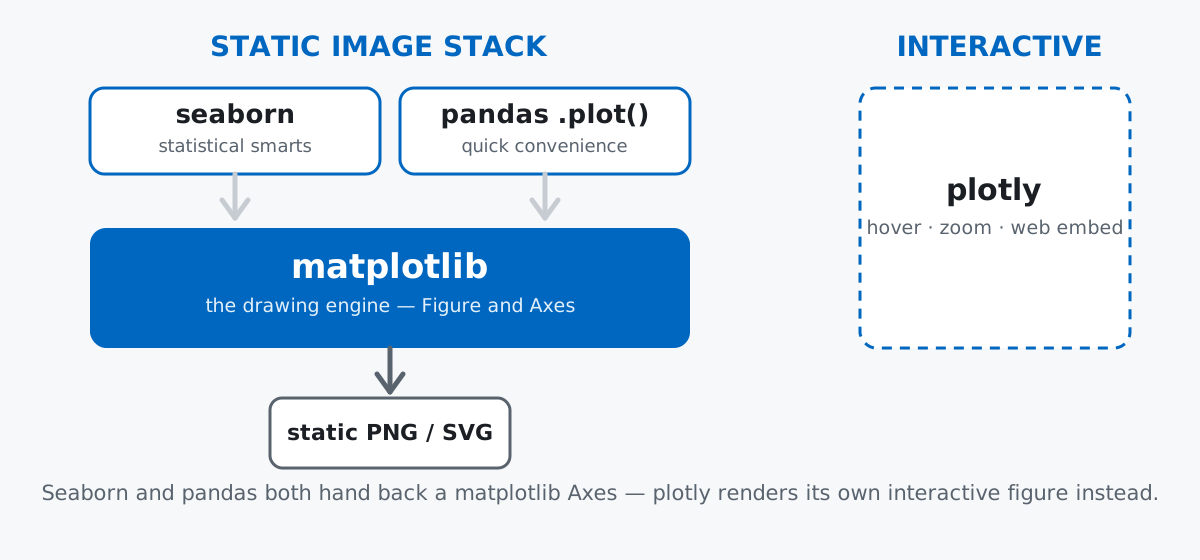
We’ll use tips, a small, real dataset of restaurant bills that ships with seaborn itself — no download, no API key, just pip install seaborn and it’s there. Each row is one table’s bill: the total, the tip left on it, who paid, whether they smoked, which day, and how many people were at the table.
import matplotlib
matplotlib.use("Agg")  # headless backend — see the gotchas section below
import matplotlib.pyplot as plt
import seaborn as sns

tips = sns.load_dataset("tips")
tips.head()
total_bill tip sex smoker day time size
0 16.99 1.01 Female No Sun Dinner 2
1 10.34 1.66 Male No Sun Dinner 3
2 21.01 3.50 Male No Sun Dinner 3
3 23.68 3.31 Male No Sun Dinner 2
4 24.59 3.61 Female No Sun Dinner 4244 rows, no missing values, and a mix of a numeric relationship (total_bill vs. tip) and categorical groupings (day, time) — enough variety to show what each library actually does differently. Data: the tips dataset bundled with seaborn (seaborn.load_dataset), one of the standard teaching datasets distributed with the library itself.
matplotlibStart with the most basic question: as the bill goes up, does the tip go up with it? In matplotlib, you build the figure and axes explicitly, then call the plotting method you want on them.
fig, ax = plt.subplots(figsize=(6, 4))
ax.scatter(tips["total_bill"], tips["tip"], alpha=0.6, color="#0067c0")
ax.set_xlabel("Total bill ($)")
ax.set_ylabel("Tip ($)")
ax.set_title("Tip vs. total bill")

len(ax.collections), ax.collections[0].get_offsets().shape
(1, (244, 2))In an interactive session — a Jupyter notebook, or a script with an interactive backend — this would render inline or pop up in a window, and you’d normally finish with plt.show(). This post’s verification script runs headlessly instead, so rather than describe a screenshot, we can confirm the chart’s real content directly: ax.collections holds exactly one PathCollection, and get_offsets() — the (x, y) pairs matplotlib actually draws — has shape (244, 2), one point per row in tips. Every argument you see above (figsize, alpha, color, the axis labels) is something you set by hand. That’s the trade-off with matplotlib: nothing happens unless you say so, which is exactly what you want when you need full control.
seabornNow the same question, but seaborn already knows what a “relationship between two numeric columns, split by a category” looks like — you just have to tell it which columns.
fig, ax = plt.subplots(figsize=(6, 4))
sns.scatterplot(data=tips, x="total_bill", y="tip", hue="time", ax=ax)
ax.set_title("Tip vs. total bill, by time of day")

legend = ax.get_legend()
legend.get_title().get_text(), [t.get_text() for t in legend.get_texts()]
('time', ['Lunch', 'Dinner'])One call, and hue="time" did work that would take several lines in matplotlib: it split the points into color groups by time, picked distinguishable colors, and built the legend for you. If you want to see everything else seaborn’s scatterplot can do — sizing points by a third variable, faceting into a grid — the official seaborn reference documents every parameter. The relationship itself is easier to read this way too: dinner tables (176 of the 244 rows) run a noticeably wider spread of bills than lunch tables (68 rows), and you get that for free just by asking for the color split.
.plot()Sometimes you don’t want a relationship at all — you want one number per category, right now, without leaving the DataFrame you’re already working in. Say you care about tip percentage rather than the raw dollar amount:
tips["tip_pct"] = tips["tip"] / tips["total_bill"] * 100
avg_pct_by_day = tips.groupby("day", observed=True)["tip_pct"].mean().round(2)
avg_pct_by_day
day
Thur 16.13
Fri 16.99
Sat 15.32
Sun 16.69
Name: tip_pct, dtype: float64That’s already the answer as numbers. Turning it into a chart is one more line, because a pandas Series carries its own .plot() method:
fig, ax = plt.subplots(figsize=(6, 4))
avg_pct_by_day.plot(kind="bar", ax=ax, color="#0067c0")
ax.set_ylabel("Average tip (%)")
ax.set_title("Average tip percentage by day")

type(ax), len(ax.patches)
(<class 'matplotlib.axes._axes.Axes'>, 4)Notice what .plot() handed back: an ordinary matplotlib Axes, the same type plt.subplots() gives you, with one bar (patch) per day. Pandas didn’t invent a new plotting engine — .plot() is a convenience wrapper that reads your DataFrame’s structure, decides on sensible x and y values, and calls matplotlib underneath. Reach for it when the numbers already exist and you just want to see them, not when you’re building a considered chart from scratch.
matplotlib to Customize a Seaborn PlotHere’s the trick that makes “seaborn or matplotlib” a false choice: every seaborn plotting function accepts an ax argument. Hand it an Axes you created yourself, and seaborn draws onto that instead of making its own figure — which means the object you get back is still a full matplotlib Axes, with every matplotlib method available on it.
fig, ax = plt.subplots(figsize=(6, 4))
sns.scatterplot(data=tips, x="total_bill", y="tip", hue="time", ax=ax)

mean_tip = tips["tip"].mean()
lines_before = len(ax.lines)
ax.axhline(mean_tip, color="#59636e", linestyle="--", linewidth=1)
ax.text(40, mean_tip + 0.3, f"mean tip: ${mean_tip:.2f}", color="#59636e", fontsize=9)
ax.legend(title="Time of day")
ax.set_title("Tip vs. total bill, with the average tip marked")

len(ax.lines) - lines_before1That last line confirms exactly one new Line2D landed on the axes — the dashed reference line at the mean tip, $3.00, added with plain matplotlib’s axhline and text. Nothing about switching to matplotlib here required leaving seaborn’s plot behind or rebuilding it from scratch; ax is just an Axes, no matter which library’s function drew onto it first. This is the single most useful habit to carry forward: let seaborn do the statistical drawing, then drop to matplotlib for the polish it doesn’t have a parameter for.
plotly FitsEverything so far produces a static image — a PNG you’d embed in a report or, in this post’s case, a page. Sometimes that’s not enough: you want a reader to hover over a point and see which table it was, or zoom into a crowded cluster. That’s a genuinely different kind of library, not just a prettier matplotlib. plotly (and similar tools like Bokeh or Altair) build a chart as an interactive object meant for a browser, not a fixed image.
import plotly.express as px

fig = px.scatter(tips, x="total_bill", y="tip", color="time", hover_data=["day", "size"])

len(fig.data), [trace.name for trace in fig.data]
(2, ['Dinner', 'Lunch'])Same relationship, same color="time" idea as the seaborn version — but fig here isn’t a matplotlib Axes at all, it’s a plotly.graph_objects.Figure with two independent traces, one per time-of-day group, each carrying the day and size columns as hover data a reader could inspect point by point in a browser. That’s genuinely useful for a dashboard or a notebook you’re actively exploring in. It’s usually overkill for a blog post’s static chart or a one-off exploratory plot, where the extra weight of learning a separate charting grammar doesn’t pay for itself — reach for it when hover, zoom, or web interactivity is an actual requirement, not a nice-to-have.
Whether a chart “just appears” depends entirely on where the code runs. Jupyter notebooks display the last plotting call’s result automatically; a plain .py script needs an explicit plt.show() or it does nothing visible at all, because matplotlib is waiting to hand the figure to an interactive backend that isn’t there. Headless environments — CI, a server, this post’s own verification script — need a non-interactive backend set explicitly:
import matplotlib
matplotlib.get_backend()'Agg'Agg renders to an image buffer instead of a window, which is why every chart above was set up with matplotlib.use("Agg") before pyplot was even imported, and why this post confirms each chart’s content through its real data (point counts, legend labels, bar heights) rather than describing something rendered on screen.
Without an explicit fig, ax, matplotlib’s pyplot interface quietly reuses whatever figure is already open. plt.plot() is a shortcut that targets a hidden “current axes” — if you don’t create a new figure between calls, a second plot doesn’t replace the first, it stacks on top of it:
plt.plot([1, 2, 3], label="first")
plt.plot([3, 2, 1], label="second")

len(plt.gca().lines)2Two separate plt.plot() calls, zero new figures, and both lines end up on the same axes. This is exactly why every chart earlier in this post starts with fig, ax = plt.subplots(): grabbing explicit objects sidesteps the shared global state entirely, which matters a lot once you’re re-running notebook cells out of order.
sns.barplot shows a mean by default, not a count or a sum. It looks like a plain bar chart of your category, but seaborn is aggregating behind the scenes:
fig, ax = plt.subplots(figsize=(6, 4))
sns.barplot(data=tips, x="day", y="total_bill", ax=ax, color="#0067c0")

[round(p.get_height(), 2) for p in ax.patches]
[17.68, 17.15, 20.44, 21.41]Those bar heights match tips.groupby("day", observed=True)["total_bill"].mean() exactly. If what you actually wanted was total revenue per day, the real numbers look completely different:
tips.groupby("day", observed=True)["total_bill"].sum().round(2)day
Thur 1096.33
Fri 325.88
Sat 1778.40
Sun 1627.16
Name: total_bill, dtype: float64Friday’s bar looks like one of the smaller averages in the barplot — but it’s the smallest total by a wide margin too, for a much more mundane reason: fewer tables were open on Fridays, and a mean doesn’t tell you that. If you want the sum or the count, either pass estimator="sum" to sns.barplot or, more reliably, aggregate yourself with groupby first and plot the result directly.
Every chart in this post came from the same handful of rows — the difference was always the layer, not the data:
matplotlib — when you need control over the exact pixels, or you’re customizing something another library already drew for youseaborn — when the plot is fundamentally a statistical question (a relationship, a distribution, a category comparison) you’d otherwise compute by hand first.plot() — when the numbers already exist in a Series or DataFrame and you just want a fast lookplotly (or a similar library) — when hover, zoom, or browser interactivity is an actual requirement, not a nice-to-haveIf you want to go further with any of these — building multi-panel layouts, customizing every element of a figure, or working through seaborn’s full range of statistical plot types — the Data Visualization with Python lessons in our free Python for Data Analytics course pick up exactly where this post leaves off.
 Python
Build an AI Chatbot in Python: A Command-Line LLM Client
A from-scratch walkthrough of the pattern behind every LLM chatbot: one function that sends a message plus conversation history to a chat-completion API, a persona set by a system prompt, and a loop that keeps the conversation going.
Read article
Python
Build an AI Chatbot in Python: A Command-Line LLM Client
A from-scratch walkthrough of the pattern behind every LLM chatbot: one function that sends a message plus conversation history to a chat-completion API, a persona set by a system prompt, and a loop that keeps the conversation going.
Read article
 Software Engineering
The Single Responsibility Principle: One Class, One Reason to Change
The Single Responsibility Principle says a class should have only one reason to change. See it in action: take a Python AuthService that also owns its logging, find why that's a problem, and refactor it into clean, focused classes.
Read article
Software Engineering
The Single Responsibility Principle: One Class, One Reason to Change
The Single Responsibility Principle says a class should have only one reason to change. See it in action: take a Python AuthService that also owns its logging, find why that's a problem, and refactor it into clean, focused classes.
Read article