Title here
Summary here
Timestamps are everywhere in real code, but strptime, strftime, and timedelta are easy to mix up. This guide builds a point-and-duration mental model, then works through creating, parsing, formatting, date arithmetic, and basic timezone-awareness on a small delivery-tracking scenario you can reproduce yourself.

Almost every program eventually has to answer a question about time: how long did this take, is this record older than a week, what happens 30 days from now. Python answers all of these with one standard-library module, datetime — but knowing the module exists is different from knowing how its pieces fit together. A raw timestamp sitting in a log file isn’t useful until you can turn it into something you can compute with, and back again.
This is also where people quietly get tripped up: strptime and strftime look like near-anagrams of each other and refuse to stay memorized, dates compare fine until you mix a timezone-aware one with a naive one and get a cryptic TypeError, and timezones in general are a genuine rabbit hole most tutorials either skip or drown you in. This guide keeps it modest: one mental model first, then creating, parsing, formatting, date arithmetic, and just enough timezone-awareness to keep you out of trouble.
Everything in datetime builds on two kinds of object:
datetime object is a point in time — a specific year, month, day, hour, minute, and second, all bundled together.timedelta object is a duration — the distance between two points, or a span of time you can add to or subtract from a point.strptime) reads a specific text shape and produces a point.strftime) takes a point and asks it to describe itself as text, using the same format codes in reverse.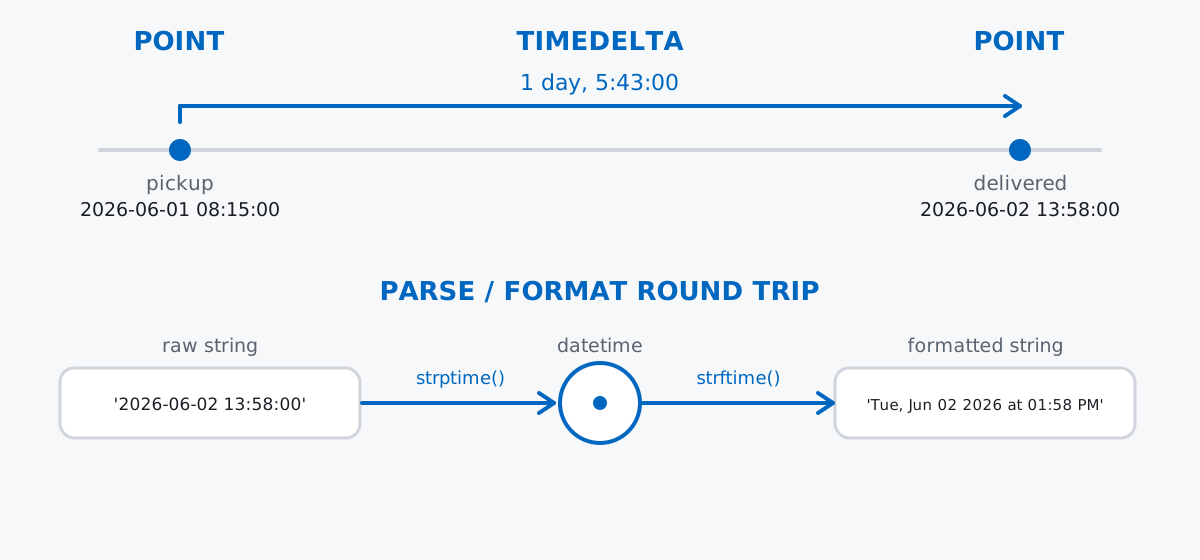
Once you can place points on a timeline and measure the distance between them, parsing, formatting, arithmetic, and timezones are all just refinements of the same two ideas.
Imagine Nimbus Courier, a small last-mile delivery service. Every time a package is scanned, a device appends one line of text to a log: a timestamp, a package ID, and a status.
scan_log = [
    "2026-06-01 08:15:00 PKG-1042 picked-up",
    "2026-06-01 11:42:00 PKG-1042 arrived-hub",
    "2026-06-02 07:05:00 PKG-1042 out-for-delivery",
    "2026-06-02 13:58:00 PKG-1042 delivered",
]

for line in scan_log:
    print(line)
2026-06-01 08:15:00 PKG-1042 picked-up
2026-06-01 11:42:00 PKG-1042 arrived-hub
2026-06-02 07:05:00 PKG-1042 out-for-delivery
2026-06-02 13:58:00 PKG-1042 deliveredFour scan events for one package, PKG-1042, moving from pickup to delivery over a day and a half. Each line is just text right now — the rest of this post turns it into something you can actually compute with.
datetime ObjectsThe most direct way to get a datetime is to ask for the current moment:
from datetime import datetime

right_now = datetime.now()
print(right_now)
print(type(right_now))
2026-07-03 13:48:13.222153
<class 'datetime.datetime'>The exact value will be different every time you run this — it’s whatever moment your machine’s clock reads at that instant, down to the microsecond. That’s useful for logging “when did this happen,” but it’s a poor choice for a tutorial you want to reproduce, so from here on we’ll construct datetime objects explicitly instead.
You build one the same way you’d build any other object, by passing the pieces in order — year, month, day, then optionally hour, minute, second:
pickup = datetime(2026, 6, 1, 8, 15, 0)
print(pickup)
print(pickup.year, pickup.month, pickup.day, pickup.hour, pickup.minute)
2026-06-01 08:15:00
2026 6 1 8 15pickup is a single point on the timeline. Every field you passed in — year, month, day, hour, minute — is available afterward as a plain attribute, which is handy when you need to pull just one piece out (say, filtering everything from a given month).
strptimeThe scan log doesn’t hand you a datetime — it hands you text. strptime (“parse time”) reads a string according to a format string made of codes like %Y (four-digit year), %m (zero-padded month), %d (zero-padded day), %H (24-hour hour), %M (minute), and %S (second), and produces a datetime object. The official datetime documentation has the full table of codes if you need one this post doesn’t cover.
Split off the timestamp portion of the first log line and parse it:
timestamp_text, package_id, status = scan_log[0].rsplit(" ", 2)
print(timestamp_text, "|", package_id, "|", status)

parsed = datetime.strptime(timestamp_text, "%Y-%m-%d %H:%M:%S")
print(parsed)
print(parsed == pickup)
2026-06-01 08:15:00 | PKG-1042 | picked-up
2026-06-01 08:15:00
Truersplit(" ", 2) splits from the right, into at most three pieces, which cleanly separates the fixed-format timestamp from the package ID and status that follow it. The format string "%Y-%m-%d %H:%M:%S" has to match the shape of the text exactly — same separators, same order, same zero-padding — and when it does, strptime hands back a datetime equal to the one we built by hand.
With that pattern established, parse the whole log in one pass:
events = []
for line in scan_log:
    timestamp_text, package_id, status = line.rsplit(" ", 2)
    event_time = datetime.strptime(timestamp_text, "%Y-%m-%d %H:%M:%S")
    events.append((event_time, package_id, status))

for event_time, package_id, status in events:
    print(event_time, package_id, status)
2026-06-01 08:15:00 PKG-1042 picked-up
2026-06-01 11:42:00 PKG-1042 arrived-hub
2026-06-02 07:05:00 PKG-1042 out-for-delivery
2026-06-02 13:58:00 PKG-1042 deliveredSame four events, but event_time in each tuple is now a real datetime you can compare, subtract, and format — not just a string that happens to look like one.
strftimestrftime (“format time”) is strptime in reverse: instead of reading text into a point, it asks a point to describe itself as text, using the same format codes. That symmetry is the whole trick — once you know %Y-%m-%d means “four-digit year, dash, zero-padded month, dash, zero-padded day” for parsing, it means exactly the same thing for formatting.
The raw scan log is fine for a machine, but a customer notification should read like a sentence:
delivered_time = events[-1][0]
friendly = delivered_time.strftime("%a, %b %d %Y at %I:%M %p")
print(friendly)
Tue, Jun 02 2026 at 01:58 PM%a and %b are the abbreviated weekday and month names, %I is the 12-hour clock, and %p adds AM/PM — none of which appear in the raw log, but all of which strftime can derive from a single datetime because it already knows the full date and time.
You’ll reach for narrower formats just as often — a plain date for a report, or just the time for a status line:
print(delivered_time.strftime("%Y-%m-%d"))
print(delivered_time.strftime("%H:%M"))
print(delivered_time.strftime("%B %d, %Y"))
2026-06-02
13:58
June 02, 2026Same underlying datetime, three different strings — strftime never changes the object itself, it just reads it a different way each time you call it.
timedeltaSubtracting one datetime from another doesn’t give you a number — it gives you a timedelta, the duration object from the mental model. How long did PKG-1042 sit at the hub between arriving and going out for delivery?
from datetime import timedelta

hub_arrival = events[1][0]
out_for_delivery = events[2][0]
dwell_time = out_for_delivery - hub_arrival
print(dwell_time)
print(type(dwell_time))
print(dwell_time.total_seconds())
19:23:00
<class 'datetime.timedelta'>
69780.0dwell_time prints as hours, minutes, and seconds, but internally a timedelta only really stores days, seconds, and microseconds — total_seconds() collapses all three into one float, which is the easiest way to compare durations or feed them into other calculations.
The same subtraction works end-to-end, across a day boundary:
pickup_time = events[0][0]
total_transit = delivered_time - pickup_time
print(total_transit)
print(total_transit.days, total_transit.seconds // 3600)
1 day, 5:43:00
1 5PKG-1042 took just over a day, five hours, and 43 minutes from pickup to delivery. Notice timedelta keeps .days and .seconds as separate attributes — .seconds is always the leftover within the current day (0–86399), never the whole duration, which is why we divide by 3600 to get hours rather than reading .seconds directly.
timedelta also works the other way: add one to a point to get a new point. Nimbus promises delivery within 2 days of pickup — did this package make the deadline?
sla_deadline = pickup_time + timedelta(days=2)
print(sla_deadline)
print(delivered_time <= sla_deadline)
2026-06-03 08:15:00
Truepickup_time + timedelta(days=2) gives back a datetime, not a timedelta — adding a duration to a point gives you another point, exactly like walking a fixed distance forward on the timeline.
Every datetime we’ve built so far is naive — it stores a year, month, day, and time, but nothing about which timezone that time is in. That’s fine as long as everything in your program agrees on the same clock, which is the case for most small scripts. Nimbus’s warehouse, though, dispatches a UTC-stamped record separately from the local scan log, and mixing those safely means telling Python which clock each datetime was read from.
An aware datetime carries that information in its tzinfo attribute. The simplest timezone to attach is UTC itself:
from datetime import timezone

print(pickup_time.tzinfo)

dispatch_utc = datetime(2026, 6, 1, 6, 15, 0, tzinfo=timezone.utc)
print(dispatch_utc)
print(dispatch_utc.tzinfo)
None
2026-06-01 06:15:00+00:00
UTCpickup_time.tzinfo is None — it’s naive, no clock attached. dispatch_utc was built with tzinfo=timezone.utc, so it prints with a +00:00 offset and knows it’s UTC.
For anything other than UTC, timezone also accepts a fixed timedelta offset — Amsterdam runs two hours ahead of UTC in June, so:
amsterdam = timezone(timedelta(hours=2))
dispatch_local = dispatch_utc.astimezone(amsterdam)
print(dispatch_local)
print(dispatch_local == dispatch_utc)
2026-06-01 08:15:00+02:00
Trueastimezone converts an aware datetime to a different clock without moving the underlying point — dispatch_local and dispatch_utc print differently but compare equal, because they’re the same instant viewed through two different offsets. (Real-world timezones also shift for daylight saving, which is where a fixed offset like this stops being enough — for that you’d reach for the zoneinfo module, which is beyond what this post covers.)
Comparing a naive and an aware datetime raises TypeError, not a wrong answer. Python refuses to guess which clock a naive value belongs to, so mixing the two fails loudly rather than silently comparing the wrong thing:
try:
    dispatch_utc < pickup_time
except TypeError as exc:
    print(f"TypeError: {exc}")
TypeError: can't compare offset-naive and offset-aware datetimesIf you see this, the fix is almost always to attach a timezone to the naive side (or strip it from the aware side) before comparing — never to catch and ignore it.
A format string that doesn’t match the text’s shape raises ValueError, not a partial parse. strptime needs every literal character and every code to line up exactly:
try:
    datetime.strptime("2026-06-01", "%Y-%m-%d %H:%M:%S")
except ValueError as exc:
    print(f"ValueError: {exc}")
ValueError: time data '2026-06-01' does not match format '%Y-%m-%d %H:%M:%S'The string has no time portion, but the format string demands %H:%M:%S after the date — read the error message left to right, it tells you exactly which side ran out of characters.
datetime objects are immutable — .replace() returns a new one, it doesn’t change the original. It’s easy to assume a method named replace mutates in place, the way a list’s .sort() does:
adjusted = pickup_time.replace(hour=9, minute=0)
print(pickup_time)
print(adjusted)
print(pickup_time is adjusted)
2026-06-01 08:15:00
2026-06-01 09:00:00
Falsepickup_time is untouched. .replace() copies every field you didn’t specify and swaps in the ones you did, then hands back a brand-new datetime — if you don’t assign the result to a variable, the change is silently thrown away.
Every part of datetime maps back to two objects and how you move between them:
datetime → a point in time; build one with datetime(...) or capture the current moment with .now()timedelta → the duration between two points, or a span to add to or subtract from onestrptime → text in, datetime point outstrftime → datetime point in, text out, using the same format codestimezone → labels which clock a point was read from, without moving the point itselfAdd .replace() for tweaking one field at a time and a healthy suspicion of any comparison that mixes naive and aware values, and you can handle nearly any timestamp a real program throws at you.
If you want to build these skills into a fuller Python foundation — file handling, error handling, and the rest of the standard library alongside dates and timezones — the Working with Dates, Times, and Timezones lesson in our free Python for Data Analytics course picks up exactly where this post leaves off.
 Python
Build an AI Chatbot in Python: A Command-Line LLM Client
A from-scratch walkthrough of the pattern behind every LLM chatbot: one function that sends a message plus conversation history to a chat-completion API, a persona set by a system prompt, and a loop that keeps the conversation going.
Read article
Python
Build an AI Chatbot in Python: A Command-Line LLM Client
A from-scratch walkthrough of the pattern behind every LLM chatbot: one function that sends a message plus conversation history to a chat-completion API, a persona set by a system prompt, and a loop that keeps the conversation going.
Read article
 Software Engineering
The Single Responsibility Principle: One Class, One Reason to Change
The Single Responsibility Principle says a class should have only one reason to change. See it in action: take a Python AuthService that also owns its logging, find why that's a problem, and refactor it into clean, focused classes.
Read article
Software Engineering
The Single Responsibility Principle: One Class, One Reason to Change
The Single Responsibility Principle says a class should have only one reason to change. See it in action: take a Python AuthService that also owns its logging, find why that's a problem, and refactor it into clean, focused classes.
Read article