Title here
Summary here
A practical walkthrough of descriptive statistics in Python: measures of center, measures of spread, and percentiles, computed with pandas and NumPy on a real restaurant tipping dataset.

Before you fit a model or run a test, you should be able to answer a much smaller question: what does this column of numbers actually look like? Descriptive statistics is the toolkit for that — a handful of numbers that summarize hundreds or millions of rows into something a human can reason about. It’s the step that comes before everything else, including the workflow in our first machine learning model post, where exploring the data honestly is what made the model trustworthy in the first place.
The trouble is that “summarize this column” has more than one right answer, and the different answers can disagree in ways that quietly mislead you. A single average can hide a skewed distribution. A standard deviation computed the wrong way can be subtly off. This guide gives you one mental model for organizing the whole topic, then works through it hands-on with pandas and NumPy on a dataset you can reproduce exactly.
Every descriptive statistic answers one of three questions about a column of numbers:
Center alone can lie. “Average tip: $3.00” sounds like a single, settled fact, but it hides whether most tips cluster tightly around $3 or swing wildly between $1 and $10. That’s why center and spread are always reported together — spread is what tells you how much to trust the center. Percentiles then let you locate any individual value inside that shape, which is exactly what “spread” was describing in the first place.
Keep those three questions in mind. Every method in this post answers one of them.
Restaurant tipping is a good subject for descriptive statistics because the numbers aren’t tidy — most bills cluster in a normal range, but a handful of big parties and big spenders stretch the top end. That’s exactly the kind of shape where mean and median start to disagree, which makes the difference between them concrete instead of theoretical.
We’ll use the tips dataset — 244 restaurant bills with the tip amount, party size, day, and time — which ships with seaborn as a sample dataset for exactly this kind of teaching.
import pandas as pd
import numpy as np
import seaborn as sns

tips = sns.load_dataset("tips")
tips.shape
(244, 7)Data: the tips dataset (BSD-3-Clause), bundled with the seaborn library — a classic restaurant-tipping sample used throughout data science teaching, no download required beyond pip install seaborn.
tips.head() total_bill tip sex smoker day time size
0 16.99 1.01 Female No Sun Dinner 2
1 10.34 1.66 Male No Sun Dinner 3
2 21.01 3.50 Male No Sun Dinner 3
3 23.68 3.31 Male No Sun Dinner 2
4 24.59 3.61 Female No Sun Dinner 4Seven columns, 244 rows. We’ll spend most of this post on total_bill. (The outputs in this post come from pandas 3.0 — everything shown also works on pandas 2.x.)
The mean is the sum divided by the count — the number most people mean by “average”:
tips["total_bill"].mean()19.78594262295082The median is the middle value once everything is sorted — half the bills are below it, half above:
tips["total_bill"].median()17.795Notice those two numbers don’t agree. The mean ($19.79) sits noticeably above the median ($17.80). That gap is the signature of a right-skewed distribution: most bills are modest, but a long tail of expensive checks — the largest is $50.81 — pulls the mean upward without moving the median much at all.
print(f"mean:   {tips['total_bill'].mean():.2f}")
print(f"median: {tips['total_bill'].median():.2f}")
print(f"max:    {tips['total_bill'].max():.2f}")
mean: 19.79
median: 17.80
max: 50.81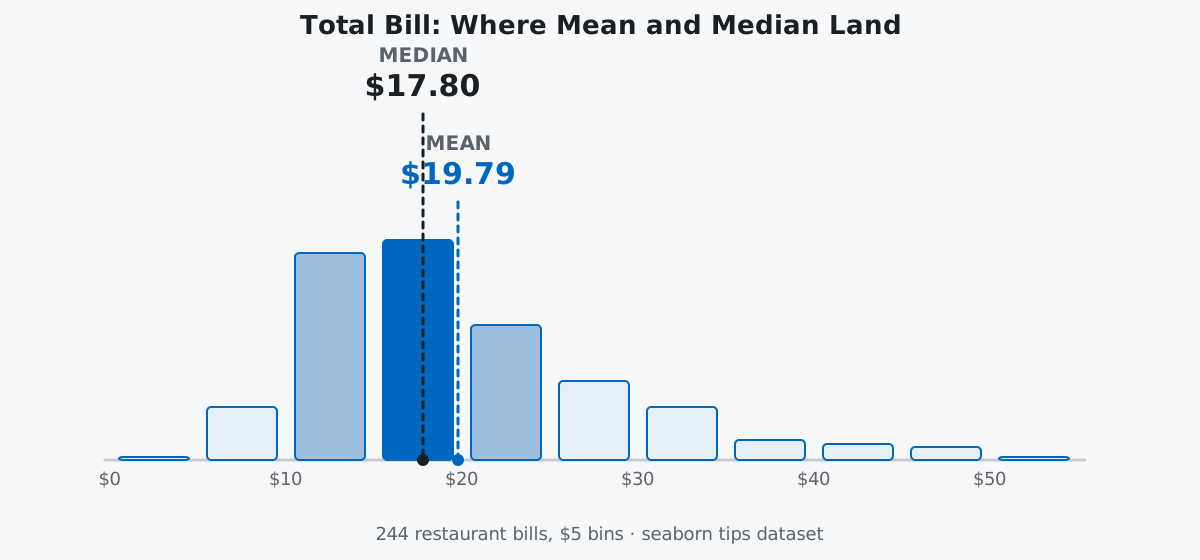
Read the shape, not just the numbers: the tallest bars sit between $10 and $25, and the bars keep thinning out all the way to $50 instead of stopping abruptly. The median sits inside the tall part of the distribution, where most bills actually are. The mean sits to its right, dragged there by the thinning tail — which is exactly why “average” and “typical” aren’t always the same word.
The mode is the single most frequent value. For continuous data like dollar amounts, it’s often a coincidence of rounding rather than a meaningful summary:
tips["total_bill"].mode()0 13.42
Name: total_bill, dtype: float64$13.42 shows up three times purely by chance — nothing about it is special. Mode earns its keep on discrete columns instead, where repeated values are the norm rather than a fluke:
tips["size"].mode()0 2
Name: size, dtype: int64A party of 2 is the single most common size in the dataset — that’s a genuinely useful fact, unlike the $13.42 coincidence above.
Center tells you where the middle is; spread tells you how far values wander from it. The variance is the average squared distance from the mean, and the standard deviation is its square root — back in the original dollar units, which is why std is the one people actually quote:
tips["total_bill"].var()
tips["total_bill"].std()
79.25293861397827
8.902411954856856A standard deviation of about $8.90 means bills typically land somewhere in the neighborhood of $19.79 ± $8.90 — roughly $11 to $29 — though that rule of thumb assumes a fairly symmetric distribution, which we already know total_bill isn’t quite.
The range is the crudest spread measure — max minus min, sensitive to a single extreme value. The interquartile range (IQR) is sturdier: the width of the middle 50% of the data, from the 25th percentile (Q1) to the 75th (Q3), ignoring both tails entirely:
bill_range = tips["total_bill"].max() - tips["total_bill"].min()
q1 = tips["total_bill"].quantile(0.25)
q3 = tips["total_bill"].quantile(0.75)
iqr = q3 - q1
bill_range, q1, q3, iqr
(47.74, 13.3475, 24.127499999999998, 10.779999999999998)The full range spans nearly $48, but the middle half of all bills is squeezed into a $10.78 band from about $13.35 to $24.13. That contrast is the point of the IQR: it tells you where the bulk of ordinary bills sit, undistracted by the few outliers that stretch the range.
A percentile answers “what value is this observation’s rank equivalent to, out of 100?” The 90th percentile is the value below which 90% of the data falls. NumPy’s percentile takes a list of percentiles as 0–100:
np.percentile(tips["total_bill"], [10, 25, 50, 75, 90])[10.34 13.3475 17.795 24.1275 32.235 ]Pandas’ quantile is the same idea on a 0–1 scale instead of 0–100, and it hands back a labeled Series rather than a bare array — see the pandas Series.quantile documentation for the interpolation options it supports:
tips["total_bill"].quantile([0.1, 0.25, 0.5, 0.75, 0.9])0.10 10.3400
0.25 13.3475
0.50 17.7950
0.75 24.1275
0.90 32.2350
Name: total_bill, dtype: float64The 50th percentile is just the median under a different name — one more reminder that these three questions (center, spread, position) are really one connected picture, not three separate topics.
.describe(): A One-Stop Summary, Read CriticallyRather than computing each statistic by hand, .describe() bundles most of them into one table:
tips[["total_bill", "tip", "size"]].describe() total_bill tip size
count 244.000000 244.000000 244.000000
mean 19.785943 2.998279 2.569672
std 8.902412 1.383638 0.951100
min 3.070000 1.000000 1.000000
25% 13.347500 2.000000 2.000000
50% 17.795000 2.900000 2.000000
75% 24.127500 3.562500 3.000000
max 50.810000 10.000000 6.000000Read it as a story, not a checklist. count tells you there are no missing values in these columns. mean sitting above 50% (the median) in both total_bill and tip is the skew signature again — you already know why it’s there. And size behaves like a discrete count more than a continuous measurement: its mean of 2.57 isn’t a party size anyone actually has, it’s just the arithmetic center of mostly 2s, 3s, and 4s. .describe() is a fast first look, not a substitute for the questions above.
NumPy and pandas disagree on the default standard deviation formula. NumPy’s std() divides by n by default (the population formula, ddof=0); pandas’ .std() divides by n - 1 by default (the sample formula, ddof=1), because it assumes your data is a sample drawn from a larger population — the normal case for real datasets. Mixing the two without noticing gives you two “correct-looking” numbers that don’t match:
np.std(tips["total_bill"])          # numpy default: ddof=0
tips["total_bill"].std()            # pandas default: ddof=1
8.884150577771132
8.902411954856856The gap is small here because n is 244, but on a small sample the two formulas can diverge meaningfully. If you need NumPy’s population formula to match pandas, pass ddof=1 explicitly; if you need pandas to match NumPy’s default, pass ddof=0.
The mean is not robust to outliers — the median barely notices them. Add a single implausible $500 bill to the dataset and watch what happens to each:
with_outlier = pd.concat([tips["total_bill"], pd.Series([500.0])], ignore_index=True)

print(f"mean without outlier:   {tips['total_bill'].mean():.2f}")
print(f"mean with outlier:      {with_outlier.mean():.2f}")
print(f"median without outlier: {tips['total_bill'].median():.2f}")
print(f"median with outlier:    {with_outlier.median():.2f}")
mean without outlier: 19.79
mean with outlier: 21.75
median without outlier: 17.80
median with outlier: 17.81One extra row out of 245 dragged the mean up by almost $2. The median moved by a single cent. When a dataset might contain data-entry errors or genuine extreme values, lead with the median, or report both and let the gap speak for itself.
Calling .mean() or .std() on a whole mixed-type DataFrame can raise an error instead of silently skipping columns. tips has category columns (sex, smoker, day, time) alongside numeric ones, and recent pandas refuses to guess what you meant:
try:
    tips.mean()
except TypeError as e:
    print("TypeError:", e)

tips.mean(numeric_only=True)
TypeError: 'Categorical' with dtype category does not support operation 'mean'
total_bill 19.785943
tip 2.998279
size 2.569672
dtype: float64Select the numeric columns first, or pass numeric_only=True, rather than assuming the aggregation will politely ignore text and category columns on its own.
Descriptive statistics always answers one of three questions:
mean, median, mode) — what’s typicalvar, std, range, IQR) — how much values vary around that centerquantile, percentile) — where a specific value ranksCompute center and spread together, always — a mean without a standard deviation (or a median without an IQR) is a number with no context for how much to trust it. And when mean and median disagree, believe the skew, not the mean.
If you want to build these ideas into a fuller statistics foundation — sampling, distributions, z-scores, and more on real datasets — the Measures of Center & Variability module in our free Statistics & Probability course picks up exactly where this post leaves off. And once your data is described honestly, Pandas GroupBy is the natural next step for asking these same center-and-spread questions per group instead of across the whole dataset.
 Python
Build an AI Chatbot in Python: A Command-Line LLM Client
A from-scratch walkthrough of the pattern behind every LLM chatbot: one function that sends a message plus conversation history to a chat-completion API, a persona set by a system prompt, and a loop that keeps the conversation going.
Read article
Python
Build an AI Chatbot in Python: A Command-Line LLM Client
A from-scratch walkthrough of the pattern behind every LLM chatbot: one function that sends a message plus conversation history to a chat-completion API, a persona set by a system prompt, and a loop that keeps the conversation going.
Read article
 Software Engineering
The Single Responsibility Principle: One Class, One Reason to Change
The Single Responsibility Principle says a class should have only one reason to change. See it in action: take a Python AuthService that also owns its logging, find why that's a problem, and refactor it into clean, focused classes.
Read article
Software Engineering
The Single Responsibility Principle: One Class, One Reason to Change
The Single Responsibility Principle says a class should have only one reason to change. See it in action: take a Python AuthService that also owns its logging, find why that's a problem, and refactor it into clean, focused classes.
Read article