Title here
Summary here
A dictionary is how Python stores anything you'd look up by name instead of position. This guide builds the key-value mental model, then works through creating, reading, updating, and iterating dictionaries on a small bookshop inventory you can type in yourself.

Most of the data you touch day to day isn’t a plain sequence — it’s things with names. A person has a name and an age, not just a position in a row. An API response is a bundle of labeled fields. A config file is a set of settings you look up by name, not by counting how far down the list they are. Python’s answer to “data with names” is the dictionary.
A dictionary stores key-value pairs: each value is filed under a key you choose, and you get it back by asking for that key, the same way you’d look up a word in a real dictionary and read its definition. The part that trips people up isn’t the basic idea — it’s the handful of near-identical-looking operations ([] vs .get(), del vs .pop(), .keys() vs .items()) that all do slightly different things. This guide builds the mental model first, then works through each operation on a small inventory you can type in and run yourself.
A list finds things by position — my_list[0] means “the first item, whatever it is.” A dictionary finds things by name:
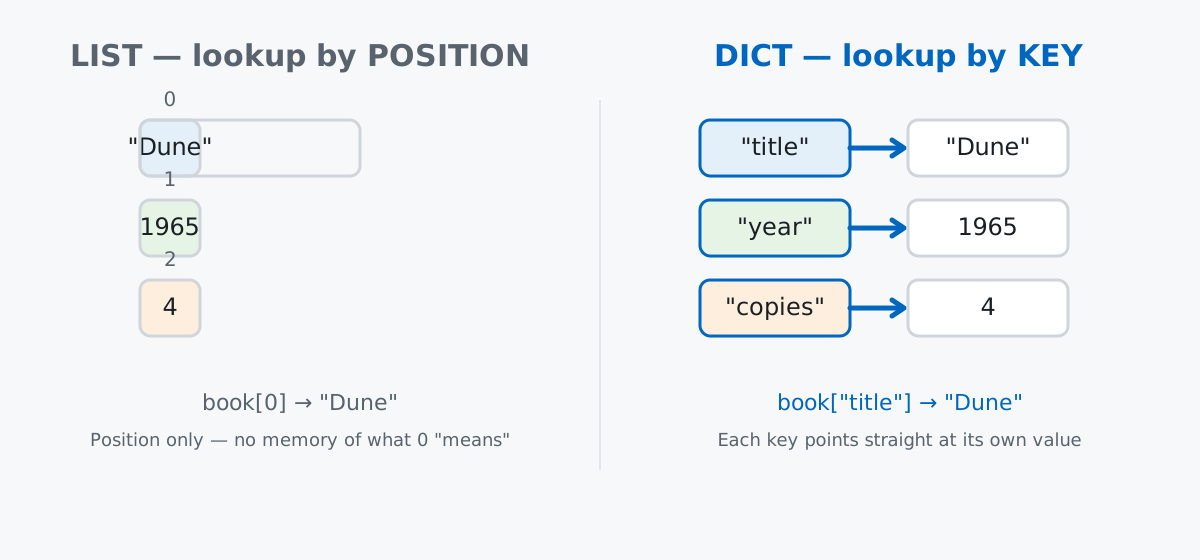
Keep rule 3 in mind especially — it’s the one thing that separates “adding to a dictionary” from “updating a dictionary,” even though the syntax for both is identical.
No dataset download needed here — dictionaries are a language feature, not a data-analysis tool, so a small hand-written example teaches the mechanics better than an external file would. Imagine you’re cataloguing books for a tiny neighborhood bookshop. Each book is naturally a set of named fields, which makes it a good fit for a dictionary:
book = {
    "title": "Project Hail Mary",
    "author": "Andy Weir",
    "year": 2021,
    "copies": 3,
}
print(book)
{'title': 'Project Hail Mary', 'author': 'Andy Weir', 'year': 2021, 'copies': 3}The {key: value, ...} syntax with curly braces is what you’ll see in almost all real code. There’s also a dict() constructor, which reads a little more like a function call:
book2 = dict(title="The Martian", author="Andy Weir", year=2011, copies=2)
print(book2)
{'title': 'The Martian', 'author': 'Andy Weir', 'year': 2011, 'copies': 2}Both produce an identical dictionary. The constructor form only works when every key is a valid Python identifier — a key like "first-name" (with a hyphen) can’t be written as first-name=..., so you’d need the {} form for that. (The outputs in this post come from Python 3.13 — everything shown also works on Python 3.9+.)
[] vs .get()Square brackets are the direct way to read a value by its key:
print(book["title"])Project Hail MaryBut square brackets are unforgiving about missing keys:
book["isbn"]KeyError: 'isbn'.get() looks up the same way but never raises — it returns None for a missing key, or a fallback value you supply:
print(book.get("isbn"))
print(book.get("isbn", "not catalogued"))
None
not cataloguedUse [] when a missing key would mean a bug in your own code (you expect it to always be there) and .get() when a missing key is a normal, expected possibility (optional fields, user input, API responses with inconsistent shape). If you only want to know whether a key exists at all, without reading its value, in checks membership directly:
print("author" in book)
print("isbn" in book)
True
FalseAssigning to a key follows rule 3 from the mental model — if the key exists, its value is replaced; if it doesn’t, a new entry is created. There’s no separate “add” method for a single key:
book["copies"] = 2          # key exists -> updates
print(book)

book["isbn"] = "978-0-593-13520-4"   # key is new -> adds
print(book)
{'title': 'Project Hail Mary', 'author': 'Andy Weir', 'year': 2021, 'copies': 2}
{'title': 'Project Hail Mary', 'author': 'Andy Weir', 'year': 2021, 'copies': 2, 'isbn': '978-0-593-13520-4'}To merge in several keys at once, .update() takes another dictionary and applies the same add-or-overwrite rule for every one of its keys:
shelf = {"Project Hail Mary": 3, "The Martian": 2}
shelf.update({"The Martian": 5, "Dune": 4})
print(shelf)
{'Project Hail Mary': 3, 'The Martian': 5, 'Dune': 4}The Martian went from 2 to 5 (overwritten), and Dune is a new entry — one call, both outcomes. Python 3.9 also added a merge operator, |, which does the same thing but returns a new dictionary instead of modifying one in place:
base = {"Dune": 4, "The Martian": 5}
extra = {"Dune": 6, "Foundation": 2}
merged = base | extra
print(merged)
print(base)
{'Dune': 6, 'The Martian': 5, 'Foundation': 2}
{'Dune': 4, 'The Martian': 5}Notice base is unchanged — | is useful exactly when you don’t want to mutate the original.
del vs .pop()del removes a key and gives nothing back:
book["isbn"] = "978-0-593-13520-4"
del book["isbn"]
print(book)
{'title': 'Project Hail Mary', 'author': 'Andy Weir', 'year': 2021, 'copies': 2}.pop() removes a key too, but returns the value it removed, which is handy when you need to use that value on the way out:
book["isbn"] = "978-0-593-13520-4"
removed = book.pop("isbn")
print(removed)
print(book)
978-0-593-13520-4
{'title': 'Project Hail Mary', 'author': 'Andy Weir', 'year': 2021, 'copies': 2}Both raise a KeyError if the key isn’t there, same as [] does for reads — .pop("isbn", None) would give it a safe fallback, just like .get().
.setdefault()A classic dictionary job is building a frequency count — how many times does each genre show up in a stack of orders? .setdefault(key, default) says “give me this key’s value, and if it doesn’t exist yet, create it with default first”:
counts = {}
for genre in ["mystery", "sci-fi", "sci-fi", "mystery", "mystery", "romance"]:
    counts[genre] = counts.setdefault(genre, 0) + 1
print(counts)
{'mystery': 3, 'sci-fi': 2, 'romance': 1}The first time "mystery" is seen, setdefault creates it at 0 and hands that 0 back, so the line becomes counts["mystery"] = 0 + 1. Every time after that, setdefault just returns the existing count, and the line adds one to it. One line, no if key in counts check needed. The full official reference for every dictionary method lives in the Python documentation on mapping types, if you want the exhaustive list beyond what this post covers.
.items(), .keys(), .values()Looping over a dictionary directly gives you its keys, one at a time — but the version you’ll reach for most is .items(), which unpacks each key and value together:
for title, copies in shelf.items():
    print(f"{title}: {copies}")
Project Hail Mary: 3
The Martian: 5
Dune: 4.keys() and .values() give you just one side, when that’s all you need — useful for quick totals:
print(list(shelf.keys()))
print(list(shelf.values()))
print(sum(shelf.values()))
['Project Hail Mary', 'The Martian', 'Dune']
[3, 5, 4]
12The comprehension syntax you know from lists works for dictionaries too — build a new dictionary in one line by filtering or transforming an existing one:
low_stock = {title: n for title, n in shelf.items() if n < 4}
print(low_stock)
{'Project Hail Mary': 3}And because a dictionary’s values can be anything, including other dictionaries, you naturally get nested structures once each book needs more than one field of its own:
catalog = {
    "Project Hail Mary": {"author": "Andy Weir", "year": 2021, "copies": 3},
    "The Martian": {"author": "Andy Weir", "year": 2011, "copies": 5},
    "Dune": {"author": "Frank Herbert", "year": 1965, "copies": 4},
}
print(catalog["Dune"]["year"])

for title, info in catalog.items():
    print(f"{title} ({info['year']}) - {info['copies']} copies")
1965
Project Hail Mary (2021) - 3 copies
The Martian (2011) - 5 copies
Dune (1965) - 4 copiesChain the brackets to drill down: catalog["Dune"] gets the inner dictionary, and ["year"] gets a value out of that. This is exactly the shape you’ll see reading a parsed JSON API response.
Only hashable values can be keys. Strings, numbers, and tuples work fine as keys, but a list can’t be one — lists are mutable, and a key has to stay constant so Python can find it again reliably:
bad = {["a", "b"]: 1}TypeError: unhashable type: 'list'A tuple, being immutable, works where a list doesn’t — handy for keys that are naturally a pair, like a seat number:
seat_map = {(1, "A"): "Jake", (1, "B"): "Meera"}
print(seat_map[(1, "A")])JakeInsertion order is guaranteed, but it isn’t sorted order. Since Python 3.7, dictionaries keep the order you added keys in — but that’s insertion order, not alphabetical or numeric order, and it’s easy to assume otherwise:
d = {}
d["z"] = 1
d["a"] = 2
d["m"] = 3
print(list(d.keys()))
['z', 'a', 'm']If you want sorted output, you still have to sort it yourself — sorted(d.keys()) or sorted(d.items()).
A mutable default argument is shared across every call, and it’s usually a dictionary or list. This is a famous Python trap that has nothing to do with dictionaries specifically, but dictionaries are one of the two things people most often get bitten by it with:
def make_shelf(default=None):
    if default is None:
        default = {}
    return default

s1 = make_shelf()
s1["Dune"] = 1
s2 = make_shelf()
print(s2){}That code is written the safe way — default=None, then create a fresh dictionary inside the function. If you instead write def make_shelf(default={}), that one {} is created once, when the function is defined, and every call that doesn’t pass its own argument shares and mutates the same dictionary. s2 would come back with Dune already in it. Always default to None and build the dictionary inside the function body.
A dictionary maps keys to values, remembers the order you added them, and gives you a small, consistent set of tools for reading, writing, and iterating that data:
[] → read a key you’re sure exists (raises KeyError if not).get(key, default) → read a key that might not exist, safelykey in d → check existence without reading the valued[key] = value → add a new key or overwrite an existing one.pop(key) / del d[key] → remove a key, with or without getting its value back.setdefault(key, default) → read-or-create in one step, ideal for counting.items() / .keys() / .values() → the three ways to iterateIf you want to keep building on this — lists, loops, functions, and the rest of the language fundamentals — the Python Dictionaries and Advanced Dictionaries and Frequency Tables lessons in our free Python for Data Analytics course go further with exactly this data structure, including the frequency-table pattern from this post.
 Python
Build an AI Chatbot in Python: A Command-Line LLM Client
A from-scratch walkthrough of the pattern behind every LLM chatbot: one function that sends a message plus conversation history to a chat-completion API, a persona set by a system prompt, and a loop that keeps the conversation going.
Read article
Python
Build an AI Chatbot in Python: A Command-Line LLM Client
A from-scratch walkthrough of the pattern behind every LLM chatbot: one function that sends a message plus conversation history to a chat-completion API, a persona set by a system prompt, and a loop that keeps the conversation going.
Read article
 Software Engineering
The Single Responsibility Principle: One Class, One Reason to Change
The Single Responsibility Principle says a class should have only one reason to change. See it in action: take a Python AuthService that also owns its logging, find why that's a problem, and refactor it into clean, focused classes.
Read article
Software Engineering
The Single Responsibility Principle: One Class, One Reason to Change
The Single Responsibility Principle says a class should have only one reason to change. See it in action: take a Python AuthService that also owns its logging, find why that's a problem, and refactor it into clean, focused classes.
Read article