Title here
Summary here
A lambda is just a def function with the name and return keyword stripped away, built for the one case where you'd throw the function away right after using it. This guide builds that mental model, then works through sorted(), map(), filter(), and pandas .apply() on a small task backlog you can type in yourself.

You’ve written plenty of functions with def. Then you hit a line of code like sorted(tasks, key=lambda t: t["priority"]) and you have to stop and parse a whole new piece of syntax just to keep reading. What is that thing living inside the parentheses, and why didn’t the author just write a normal function?
The honest answer is that lambda isn’t a different kind of function — it’s the same kind of function, written in a more compressed form for one specific situation. The compression is also exactly why it confuses people at first: there’s no def, no function name, and no return keyword, so it doesn’t look like the functions you already know. (If you’re still getting comfortable with the {}-shaped records this post uses as its running example, our guide to Python dictionaries covers the key-value model they’re built on.) This guide builds the mental model first, then works through lambda in the four places you’ll actually meet it, and — just as important — the places where you shouldn’t reach for it at all.
def With Everything Optional RemovedThink of lambda as a def function with the parts that only matter for reuse stripped away:
lambda is an expression, not a statement — it produces a function object on the spot, so you can write it anywhere Python expects a value: as an argument, inside a list, as a dictionary value.return keyword because there’s nothing else the function could possibly give back.lambda earns its keep in exactly one spot: a short, throwaway function you’re handing to something else (sorted, filter, map, .apply()) and will never refer to by name again.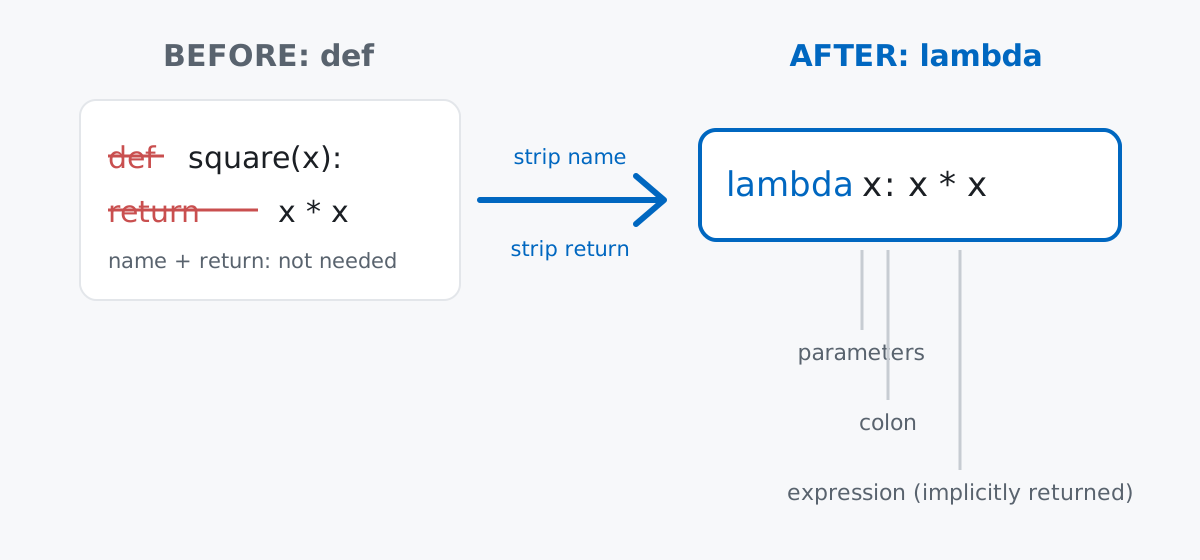
Keep rule 2 in mind above all — it’s the one constraint that decides, for any piece of logic, whether a lambda can even express it.
No dataset to download here — the whole point of lambda is that it works on ordinary Python values you already have in memory. Imagine a tiny team backlog: six tasks, each a dictionary with a title, a priority (1 is most urgent), an hour estimate, an assignee, and whether it’s done.
tasks = [
    {"title": "Fix login bug", "priority": 1, "hours": 3, "assignee": "Priya", "done": False},
    {"title": "Update docs", "priority": 3, "hours": 1, "assignee": "Sam", "done": True},
    {"title": "Add dark mode", "priority": 2, "hours": 5, "assignee": "Priya", "done": False},
    {"title": "Refactor auth module", "priority": 1, "hours": 8, "assignee": "Jonas", "done": False},
    {"title": "Write onboarding email", "priority": 3, "hours": 2, "assignee": "Sam", "done": True},
    {"title": "Speed up search endpoint", "priority": 2, "hours": 4, "assignee": "Jonas", "done": False},
]
Type that in exactly as shown and every result below will match yours. (Outputs in this post come from Python 3.11 — everything shown also works on 3.9+.)
lambda vs. def: the Same Function, Two SyntaxesBefore touching the task list, look at the equivalence directly. Here’s a function that squares a number, written both ways:
def square(x):
    return x * x

square_lambda = lambda x: x * x

print(square(6))
print(square_lambda(6))
36
36Same parameter, same body, same result — lambda x: x * x is just def square(x): return x * x with the name and the return keyword removed, because a lambda expression’s value is its return value. (We assigned square_lambda to a name here purely to compare it side by side with square; hold that thought, because assigning a lambda to a variable like this is exactly the pattern the “when not to” section below tells you to avoid in real code.) The Python language reference on lambda expressions has the full grammar, if you want the formal definition.
sorted(key=...)This is where lambda earns its keep: sorted() takes a key argument — a function it calls on every item to decide the order — and a lambda is almost always shorter than writing a separate def just for that one call.
by_priority = sorted(tasks, key=lambda t: t["priority"])
for t in by_priority:
    print(t["priority"], t["title"])
1 Fix login bug
1 Refactor auth module
2 Add dark mode
2 Speed up search endpoint
3 Update docs
3 Write onboarding emailThe lambda doesn’t sort anything itself — it just tells sorted() what number to look at for each task. Notice that tasks with equal priority keep their original relative order (sorted is stable), which is why “Fix login bug” still comes before “Refactor auth module”.
You can also return a tuple from the lambda to sort by more than one field at once. Here, within the same priority, we want the bigger (more hours) task first:
by_priority_then_hours = sorted(tasks, key=lambda t: (t["priority"], -t["hours"]))
for t in by_priority_then_hours:
    print(t["priority"], t["hours"], t["title"])
1 8 Refactor auth module
1 3 Fix login bug
2 5 Add dark mode
2 4 Speed up search endpoint
3 2 Write onboarding email
3 1 Update docssorted() compares tuples element by element, so it sorts by priority first, and only looks at -hours to break ties. Negating hours flips its sort direction without a second sorted() call.
filter() and map()filter() keeps the items where a function returns True; map() applies a function to every item and returns the results. Both take the function as their first argument, which is the other classic lambda slot:
open_tasks = list(filter(lambda t: not t["done"], tasks))
print([t["title"] for t in open_tasks])

open_titles_map = list(map(lambda t: t["title"], open_tasks))
print(open_titles_map)
['Fix login bug', 'Add dark mode', 'Refactor auth module', 'Speed up search endpoint']
['Fix login bug', 'Add dark mode', 'Refactor auth module', 'Speed up search endpoint']Honest opinion here: for exactly this job, a list comprehension is usually clearer than chaining map() and filter(), and it does both steps in one pass instead of two:
open_titles_comp = [t["title"] for t in tasks if not t["done"]]
print(open_titles_comp)
print(open_titles_map == open_titles_comp)
['Fix login bug', 'Add dark mode', 'Refactor auth module', 'Speed up search endpoint']
TrueSame result, one line, and you read it left to right as a sentence: “the title, for each task in tasks, if it’s not done.” map()/filter() with a lambda still shows up plenty in real code (and you’ll need to recognize it), but when you’re the one writing new code, reach for the comprehension first.
.apply()The same one-off-function pattern shows up constantly once your data lives in a pandas DataFrame. .apply() runs a function once per row or per value, and a lambda is the usual way to hand it one:
import pandas as pd

df = pd.DataFrame(tasks)
print(df)
title priority hours assignee done
0 Fix login bug 1 3 Priya False
1 Update docs 3 1 Sam True
2 Add dark mode 2 5 Priya False
3 Refactor auth module 1 8 Jonas False
4 Write onboarding email 3 2 Sam True
5 Speed up search endpoint 2 4 Jonas FalseApply a lambda to one column to turn the numeric priority into a readable label:
priority_labels = {1: "urgent", 2: "soon", 3: "later"}
df["priority_label"] = df["priority"].apply(lambda p: priority_labels.get(p, "unknown"))
print(df[["title", "priority", "priority_label"]])
title priority priority_label
0 Fix login bug 1 urgent
1 Update docs 3 later
2 Add dark mode 2 soon
3 Refactor auth module 1 urgent
4 Write onboarding email 3 later
5 Speed up search endpoint 2 soonPass axis=1 and the lambda receives a whole row at a time instead of a single value, which is what you need when the result depends on more than one column:
df["summary"] = df.apply(lambda row: f"{row['title']} ({row['hours']}h, {row['assignee']})", axis=1)
print(df["summary"].to_string(index=False))
Fix login bug (3h, Priya)
Update docs (1h, Sam)
Add dark mode (5h, Priya)
Refactor auth module (8h, Jonas)
Write onboarding email (2h, Sam)
Speed up search endpoint (4h, Jonas)row['title'], row['hours'], and row['assignee'] all come from the same row, so this is really the row-wise cousin of the map() pattern above — one small expression, applied once per row, never named or reused.
A lambda is the right call only while the whole thing stays inside rule 2 from the mental model — a single expression. Reach for def instead as soon as any of these is true:
The logic needs more than one statement. A lambda body can’t contain an assignment, a loop, or an if block — only an expression. This doesn’t even run:
# score = lambda t: total = t["priority"] * 10; total - t["hours"] # SyntaxErrorThere’s no way to introduce the intermediate variable total inside a lambda. Write a def and you get statements back:
def score(t):
    total = t["priority"] * 10
    return total - t["hours"]
The function needs a docstring, or its purpose isn’t obvious from the code alone. A lambda can’t have a docstring, and its name in a traceback is always the literal string <lambda> (more on that below) — neither helps the next person reading the code understand why the function exists, only what it computes.
You’re assigning it to a variable. PEP 8 explicitly calls this out: always use a def statement instead of an assignment statement that binds a lambda to an identifier.
f = lambda x: x + 1      # PEP 8: don't do this
def f(x):                # do this instead
    return x + 1
The lambda version has no real advantage here — it’s not passed to anything, it’s not an argument, it’s just a function with a name, which is exactly what def is for. def also gives you a proper __name__ (f, not <lambda>) and a place to hang a docstring, for free.
Loop variables are captured late, not at lambda-creation time — the classic closure trap. Building a list of lambdas inside a loop looks like it should capture each loop value, but every lambda actually shares the same variable, and that variable holds its final value by the time any lambda runs:
broken = [lambda: i for i in range(3)]
print([f() for f in broken])
[2, 2, 2]Every lambda looks up i when it’s called, not when it’s created — and by the time you call any of them, the loop has finished and i is 2. Fix it by capturing the current value as a default argument, which is evaluated at creation time:
fixed = [lambda i=i: i for i in range(3)]
print([f() for f in fixed])
[0, 1, 2]Lambdas are hard to debug because tracebacks only ever say <lambda>. A named function shows its name in a traceback; a lambda never does, no matter what it’s doing:
divide = lambda a, b: a / b
divide(10, 0)
Traceback (most recent call last):
File "<string>", line 3, in <module>
File "<string>", line 2, in <lambda>
ZeroDivisionError: division by zeroin <lambda> tells you almost nothing if your code has several lambdas in play — you’re left counting lines instead of reading a name. A def divide(a, b): would show in divide instead, which is a lot faster to locate in a stack of five other failures.
A lambda crammed with nested conditionals is a readability tax, even though it technically still fits on one line. Compare a letter-grade lookup written both ways:
grade_lambda = lambda score: "A" if score >= 90 else ("B" if score >= 80 else ("C" if score >= 70 else "F"))
print(grade_lambda(85))

def grade(score):
    """Return a letter grade for a 0-100 numeric score."""
    if score >= 90:
        return "A"
    if score >= 80:
        return "B"
    if score >= 70:
        return "C"
    return "F"

print(grade(85))
B
BBoth return "B" for 85. But the lambda is three nested conditional expressions squeezed onto one line, and you have to mentally unwind the parentheses to check it’s even correct. The def version reads as a list of thresholds, top to bottom, with a docstring explaining what it’s for. Being legal Python isn’t the same as being the right choice — this is the single-expression limit from the mental model turning into an actual readability cost.
A lambda is a def function with the name and return keyword removed, restricted to a single expression — which is also exactly why it only belongs in one spot:
sorted(key=lambda ...) → a one-off comparison key, never called again by namefilter() / map() → fine to recognize, but prefer a list comprehension when you’re writing new code.apply(lambda ...) → a per-value or per-row transform that doesn’t deserve its own named functiondef → anything with more than one expression, anything that needs a docstring, and anything you’d otherwise assign to a variableIf you want to build on this with the surrounding language fundamentals — writing full functions, list comprehensions, and the filter/map pair lambda most often rides along with — the Python Functions and Filter and Map Functions lessons in our free Python for Data Analytics course pick up exactly where this post leaves off.
 Python
Build an AI Chatbot in Python: A Command-Line LLM Client
A from-scratch walkthrough of the pattern behind every LLM chatbot: one function that sends a message plus conversation history to a chat-completion API, a persona set by a system prompt, and a loop that keeps the conversation going.
Read article
Python
Build an AI Chatbot in Python: A Command-Line LLM Client
A from-scratch walkthrough of the pattern behind every LLM chatbot: one function that sends a message plus conversation history to a chat-completion API, a persona set by a system prompt, and a loop that keeps the conversation going.
Read article
 Software Engineering
The Single Responsibility Principle: One Class, One Reason to Change
The Single Responsibility Principle says a class should have only one reason to change. See it in action: take a Python AuthService that also owns its logging, find why that's a problem, and refactor it into clean, focused classes.
Read article
Software Engineering
The Single Responsibility Principle: One Class, One Reason to Change
The Single Responsibility Principle says a class should have only one reason to change. See it in action: take a Python AuthService that also owns its logging, find why that's a problem, and refactor it into clean, focused classes.
Read article