Title here
Summary here
pandas covers most data-cleaning jobs, but not all of them. This guide surveys three libraries worth keeping in your toolbox — numpy for vectorized numeric fixes, re for pattern-based text cleaning, and rapidfuzz for catching near-duplicate rows exact matching can't see — each demonstrated on one small, reproducible dataset.

Ask “how do I clean data in Python” and almost every answer starts and ends with pandas — .dropna(), .fillna(), .duplicated(). That’s the right instinct; pandas earns its place as the default. But it’s not the only tool worth having open, and pretending otherwise is how you end up writing a slow, awkward .apply() loop for a job another library already does in one line. (If you want the deep, single-library walkthrough first — missing values, disguised placeholders, duplicates, and messy dates, all in pandas — our guide to cleaning messy data with pandas is the place to start.)
This post is a different kind of guide: not “how pandas cleans data” but “what else is in the toolbox, and when does reaching for it actually pay off.” We’ll build a small mental model for when pandas alone starts to strain, then work through three libraries — numpy, re, and rapidfuzz — on one small dataset you can reproduce exactly, showing what each one buys you that plain pandas methods make clumsy or impossible.
Pandas is genuinely good at the common cleaning moves: dropping or filling missing values, spotting exact duplicates, converting a column’s dtype. Those cover most of what a messy dataset throws at you. The remaining problems tend to fall into one of three shapes, and each shape has a library built specifically for it:
if/elif/else; numpy does..str methods can call a regex, but the pattern logic itself belongs to the standard library’s re..duplicated() only catches exact string matches; rapidfuzz scores how alike two strings are.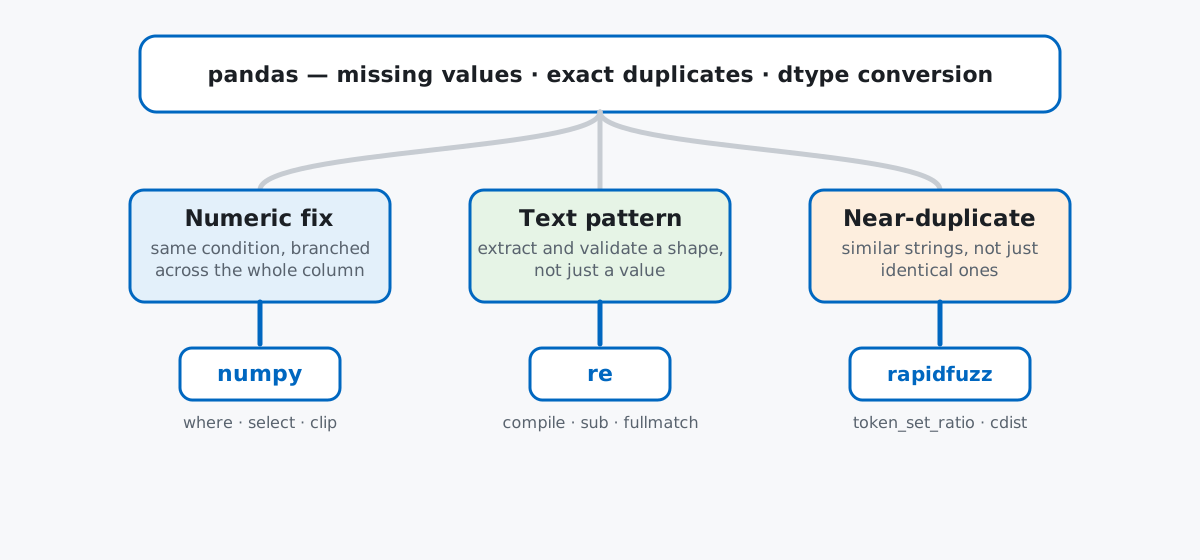
Keep this mapping in mind rather than a list of function names: every section below is really answering “which of these three shapes am I looking at,” because that’s what decides which import you reach for.
Imagine Fixly, a small home-services marketplace, and its vendor sign-up form: three plain text fields — business name, phone number, hourly rate — with no format validation on any of them. Thirty-one real-looking sign-ups, typed by hand over a few weeks, produce exactly the mess you’d expect:
import numpy as np
import pandas as pd
import re

vendors = pd.DataFrame([
    {"business_name": "Blue Bottle Coffee",         "phone": "555-234-1098",     "price_per_hour": 35.0},
    {"business_name": "blue bottle coffee ",        "phone": "(555) 234-1098",   "price_per_hour": 35.0},
    {"business_name": "Blue Bottle Coffee Co.",     "phone": "555.234.1099",     "price_per_hour": 36.0},
    {"business_name": "Riverside Plumbing",         "phone": "555-887-2200",     "price_per_hour": 65.0},
    {"business_name": "Riverside  Plumbing LLC",    "phone": "5558872200",       "price_per_hour": 65.0},
    {"business_name": "GreenLeaf Landscaping",      "phone": "555-118-9922",     "price_per_hour": 42.0},
    {"business_name": "Green Leaf Landscaping",     "phone": "+1-555-118-9922",  "price_per_hour": 42.0},
    {"business_name": "Ace Electrical",              "phone": "555-300-4411",    "price_per_hour": 5500.0},
    {"business_name": "ACE Electrical Services",    "phone": "(555) 300-4411",   "price_per_hour": 55.0},
    {"business_name": "Silver Spoon Catering",      "phone": "555-771-2200",     "price_per_hour": "$48"},
    {"business_name": "SilverSpoon Catering",       "phone": "555-771-2201",     "price_per_hour": 48.0},
    {"business_name": "Sunny Side Bakery",          "phone": "555-441-9090",     "price_per_hour": 28.0},
    {"business_name": "Metro Movers",               "phone": "555-902-1234",     "price_per_hour": 75.0},
    {"business_name": "Fresh Paint Co",             "phone": "  555-233-8871",   "price_per_hour": -20.0},
    {"business_name": "Harbor Auto Repair",         "phone": "555-664-2210",     "price_per_hour": 60.0},
    {"business_name": "Pixel Perfect Design",       "phone": None,               "price_per_hour": 50.0},
    {"business_name": "Golden Gate Tutoring",       "phone": "555-119-3345",     "price_per_hour": 30.0},
    {"business_name": "Northside Roofing",          "phone": "555-887-6611",     "price_per_hour": 70.0},
    {"business_name": "Willow Creek Yoga",          "phone": "555-220-9981",     "price_per_hour": 25.0},
    {"business_name": "Downtown Dental",            "phone": "555-330-1188",     "price_per_hour": 90.0},
    {"business_name": "Maple Tree Daycare",         "phone": "555-556-7712",     "price_per_hour": 22.0},
    {"business_name": "Coastal Cleaning Services",  "phone": "555-812-9034",     "price_per_hour": 33.0},
    {"business_name": "Bright Smile Orthodontics",  "phone": "555-673-2200",     "price_per_hour": 95.0},
    {"business_name": "Urban Fitness Studio",       "phone": "555-118-2244",     "price_per_hour": 40.0},
    {"business_name": "Lakeside Veterinary Clinic", "phone": "555-990-1123",     "price_per_hour": 85.0},
    {"business_name": "Copper Kettle Diner",        "phone": "555-441-7789",     "price_per_hour": 24.0},
    {"business_name": "Evergreen Tree Service",     "phone": "12345",            "price_per_hour": 58.0},
    {"business_name": "Skyline Window Washing",     "phone": "555-229-8871",     "price_per_hour": 0.0},
    {"business_name": "Bramblewood Florist",        "phone": "555-664-9932",     "price_per_hour": np.nan},
    {"business_name": "Ironclad Locksmith",         "phone": "555-887-1123",     "price_per_hour": 45.0},
    {"business_name": "Velvet Curtain Alterations", "phone": "555-220-4471",     "price_per_hour": 27.0},
])
vendors.shape
(31, 3)This is a hand-written, hard-coded dataset — every reader who pastes this block gets the exact same 31 rows, no download required. That’s deliberate: the mess in it (a mixed-type price column, phone numbers in five different formats, five pairs of near-identical business names) was planted on purpose, to give each library something real to fix. Pandas’ own .duplicated() finds none of it:
vendors.duplicated(subset=["business_name"]).sum()0Zero — even though your eyes can already spot “Blue Bottle Coffee” three times. That gap is exactly what the rest of this post closes. (The outputs below come from pandas 3.0, numpy 2.4, and rapidfuzz 3.14 — the general approach works on recent 2.x releases of each too.)
numpyprice_per_hour mixes real floats with one string ("$48"), which forces the whole column to an object dtype — pandas’ catch-all for “I can’t tell what this is.” A quick pd.to_numeric with errors="coerce" fixes the dtype and turns anything unparseable into NaN, which is standard pandas:
vendors["price_per_hour"] = pd.to_numeric(
    vendors["price_per_hour"].astype(str).str.replace("$", "", regex=False),
    errors="coerce",
)
vendors["price_per_hour"].dtype, vendors["price_per_hour"].isna().sum()
(dtype('float64'), 1)Now the real cleanup starts. The column has a negative value (a vendor mistyped -20 instead of 20), a 0 (an empty rate they never filled in), one missing value, and one absurd outlier (5500, almost certainly a missing decimal point that should read 55.00). Flagging and re-bucketing values like this by hand usually means .apply() with a row-by-row if/elif/else — a plain Python loop hiding inside a method call that only looks vectorized. numpy’s np.where expresses the same two-way branch as one call across the entire array, evaluated in compiled code instead of a Python loop, and reads left to right as condition, then true-value, then false-value. Nest two calls and you get three-way branching:
vendors["price_flag"] = np.where(
    vendors["price_per_hour"].isna(), "missing",
    np.where(vendors["price_per_hour"] <= 0, "invalid", "ok"),
)
vendors["price_flag"].value_counts()
price_flag
ok 28
invalid 2
missing 1
Name: count, dtype: int64For more than two or three branches, np.select is the cleaner form — a list of conditions and a matching list of results, evaluated top to bottom like a match statement over an array:
conditions = [
    vendors["price_flag"] != "ok",
    vendors["price_per_hour"] < 40,
    vendors["price_per_hour"] < 80,
]
choices = ["n/a", "budget", "standard"]
vendors["price_tier"] = np.select(conditions, choices, default="premium")
vendors["price_tier"].value_counts()
price_tier
standard 14
budget 10
premium 4
n/a 3
Name: count, dtype: int64The outlier is still sitting there, though, dragging the average of the “ok” rows far above what a real hourly rate should be:
vendors.loc[vendors["price_flag"] == "ok", "price_per_hour"].describe().round(2)count 28.00
mean 243.86
std 1030.31
min 22.00
25% 34.50
50% 46.50
75% 65.00
max 5500.00
Name: price_per_hour, dtype: float64np.clip caps every value in the array to a [min, max] range in one pass — no loop, no .apply(), and it happens to fix the negative value too, since anything below the floor gets pulled up to it just like anything above the ceiling gets pulled down:
vendors["price_capped"] = np.clip(vendors["price_per_hour"], 0, 150)
vendors.loc[vendors["price_per_hour"] > 150, ["business_name", "price_per_hour", "price_capped"]]
business_name price_per_hour price_capped
7 Ace Electrical 5500.0 150.0Ace Electrical’s 5500 is capped down to 150; Fresh Paint Co.’s -20 (not shown above, since it isn’t over the 150 ceiling) is pulled up to 0 by the same call. One vectorized function, two different problems fixed.
rephone arrived in at least five formats: dashes, dots, parentheses, no separators at all, a leading +1, and one genuinely invalid five-digit entry. Pandas’ .str accessor can call a regex for a single pass — .str.replace(r"\D", "", regex=True) strips everything but digits — but it can’t easily do two things at once: strip and validate, rejecting anything that isn’t a real 10-digit number after cleanup. That’s a job for re directly, where you compile a pattern once and reuse it both to clean and to check:
digits_only = re.compile(r"\D")
us_phone = re.compile(r"^(\d{3})(\d{3})(\d{4})$")

def clean_phone(raw):
    if pd.isna(raw):
        return None
    digits = digits_only.sub("", raw)
    if len(digits) == 11 and digits.startswith("1"):
        digits = digits[1:]
    match = us_phone.fullmatch(digits)
    if not match:
        return None
    return f"({match[1]}) {match[2]}-{match[3]}"

vendors["phone_clean"] = vendors["phone"].apply(clean_phone)
vendors[["business_name", "phone", "phone_clean"]].head(6)
business_name phone phone_clean
0 Blue Bottle Coffee 555-234-1098 (555) 234-1098
1 blue bottle coffee (555) 234-1098 (555) 234-1098
2 Blue Bottle Coffee Co. 555.234.1099 (555) 234-1099
3 Riverside Plumbing 555-887-2200 (555) 887-2200
4 Riverside Plumbing LLC 5558872200 (555) 887-2200
5 GreenLeaf Landscaping 555-118-9922 (555) 118-9922digits_only.sub("", raw) throws away every non-digit character regardless of which separator style produced it, and us_phone.fullmatch(digits) — the ^...$ anchors baked into the pattern mean “the entire string, not just part of it” — refuses to accept anything that isn’t exactly ten digits after cleanup. That second part is the piece plain .str.replace doesn’t give you for free:
vendors.loc[vendors["phone_clean"].isna() & vendors["phone"].notna(), ["business_name", "phone"]] business_name phone
26 Evergreen Tree Service 12345Evergreen Tree Service’s "12345" cleans up to five digits, fails the ten-digit check, and correctly comes back None instead of a fabricated phone number. (Pixel Perfect Design’s phone was already None going in, so it’s excluded here — missing and invalid are different problems, same as in the pandas-only cleaning guide.) The official re module documentation covers the full pattern syntax if you want more than the character classes and groups used here; if regex itself is the part that’s fuzzy, our Python regex guide is a deeper, dedicated walkthrough of search, findall, and sub.
rapidfuzzThis is the gap .duplicated() can’t close by design: it does exact string comparison, so “Blue Bottle Coffee”, “blue bottle coffee “, and “Blue Bottle Coffee Co.” all count as three different businesses. Writing your own similarity check in pure Python — comparing every pair of names character by character — works but is slow, and gets slower quadratically as the row count grows. rapidfuzz is a fuzzy-string-matching library with the comparison logic implemented in C++: it scores how similar two strings are on a 0–100 scale using several different algorithms, and it’s noticeably faster than the older fuzzywuzzy library it’s commonly swapped in for.
token_set_ratio is the scorer to reach for on business names specifically, because it ignores word order and doesn’t penalize one name for having an extra word the other lacks — exactly the “LLC” and “Co.” suffixes scattered through this dataset. Passing processor=utils.default_process lowercases and strips both strings before scoring, so casing and whitespace differences don’t count against the match:
from rapidfuzz import fuzz, process, utils

names = vendors["business_name"].tolist()
process.extract("ace electrical llc", names, scorer=fuzz.token_set_ratio,
                 processor=utils.default_process, limit=3)
[('Ace Electrical', 100.0, 7), ('ACE Electrical Services', 87.5, 8), ('Maple Tree Daycare', 44.44444444444444, 20)]A brand-new sign-up for “ace electrical llc” scores a perfect 100 against the existing “Ace Electrical” and 87.5 against “ACE Electrical Services” — both real matches — while an unrelated name barely clears 44. To sweep every row against every other row at once instead of checking one name at a time, process.cdist builds the full similarity matrix in one call:
scores = process.cdist(names, names, scorer=fuzz.token_set_ratio, processor=utils.default_process)

pairs = []
for i in range(len(names)):
    for j in range(i + 1, len(names)):
        if scores[i, j] >= 90:
            pairs.append((names[i], names[j], round(float(scores[i, j]), 1)))

pd.DataFrame(pairs, columns=["name_a", "name_b", "similarity"]).sort_values(
    "similarity", ascending=False, ignore_index=True)
name_a name_b similarity
0 Blue Bottle Coffee blue bottle coffee 100.0
1 Blue Bottle Coffee Blue Bottle Coffee Co. 100.0
2 blue bottle coffee Blue Bottle Coffee Co. 100.0
3 Riverside Plumbing Riverside Plumbing LLC 100.0
4 Ace Electrical ACE Electrical Services 100.0
5 GreenLeaf Landscaping Green Leaf Landscaping 97.7
6 Silver Spoon Catering SilverSpoon Catering 97.6Seven pairs, at a threshold (90) high enough to avoid flagging genuinely different businesses. Every one of these was invisible to .duplicated(). Notice “Blue Bottle Coffee” shows up in three separate pairs — that’s one underlying business, not three — which is the first gotcha below.
A pandas-only fix and a numpy/re/rapidfuzz fix aren’t always interchangeable — check whether pandas already has a native one-liner before reaching further. np.where is genuinely useful, but if the branch is just “fill missing values,” .fillna() already does that without an extra import. Pull in a specialist library for the 20% pandas is clumsy at, not as a reflex for everything.
Similarity pairs aren’t the same as duplicate groups. The rapidfuzz output above lists three separate pairs for “Blue Bottle Coffee,” “blue bottle coffee,” and “Blue Bottle Coffee Co.” — but that’s one cluster of three rows, not three unrelated matches. Turning pairs into groups needs a clustering step (union-find, or networkx’s connected components on the pairs as edges) before you can safely pick one canonical name per business and drop the rest.
A high similarity score can still be a false positive — read the actual strings, don’t just trust the number.
fuzz.token_set_ratio("First National Bank", "Second National Bank", processor=utils.default_process)81.2Two clearly different banks score 81.2 purely because they share “National Bank.” At a threshold of 80 — reasonable-sounding on paper — this pair gets flagged as a likely duplicate. There’s no universal safe threshold; it depends on how generic the shared words in your data tend to be, and it’s worth spot-checking a sample of borderline pairs by eye before you auto-merge anything.
Adding a dependency for a problem re alone can solve is overkill in the other direction. If all you need is stripping non-digit characters from a phone column, .str.replace(r"\D", "", regex=True) is one line of pandas and doesn’t need re imported at all. Reach for the standard library first; rapidfuzz and other third-party packages earn their place only when the problem genuinely needs what they add — fuzzy scoring, in this case, which no combination of pandas or re methods does natively.
Three extra imports, three problems pandas’ own methods don’t reach:
numpy → vectorized conditional logic across a whole column (np.where, np.select, np.clip) instead of a row-by-row .apply() loop.re → pattern-based text extraction and validation, compiled once and reused, when pandas’ .str methods can only apply a regex once per call.rapidfuzz → similarity scoring for near-duplicate strings, which .duplicated() structurally can’t detect since it only compares for exact equality.None of these replace pandas — they sit next to it, each covering one specific gap. If you haven’t already, the pandas-only cleaning workflow is worth reading first for the detect-decide-fix loop this post builds on. For the full course context — missing data, duplicates, dtype conversion, and string operations as a connected sequence with exercises — the Handling Missing Data and Duplicates & Outliers lessons in our free Python for Data Analytics course are the natural next stop.
 Python
Build an AI Chatbot in Python: A Command-Line LLM Client
A from-scratch walkthrough of the pattern behind every LLM chatbot: one function that sends a message plus conversation history to a chat-completion API, a persona set by a system prompt, and a loop that keeps the conversation going.
Read article
Python
Build an AI Chatbot in Python: A Command-Line LLM Client
A from-scratch walkthrough of the pattern behind every LLM chatbot: one function that sends a message plus conversation history to a chat-completion API, a persona set by a system prompt, and a loop that keeps the conversation going.
Read article
 Software Engineering
The Single Responsibility Principle: One Class, One Reason to Change
The Single Responsibility Principle says a class should have only one reason to change. See it in action: take a Python AuthService that also owns its logging, find why that's a problem, and refactor it into clean, focused classes.
Read article
Software Engineering
The Single Responsibility Principle: One Class, One Reason to Change
The Single Responsibility Principle says a class should have only one reason to change. See it in action: take a Python AuthService that also owns its logging, find why that's a problem, and refactor it into clean, focused classes.
Read article