Title here
Summary here
The match statement is one of Python's most underused features. See how it replaces messy if/elif chains and, more importantly, how structural pattern matching lets you match the shape of your data and pull out the parts you need.

One Python feature I still don’t see many people use is the match statement. It arrived in Python 3.10, and for simple cases you can think of it roughly like the switch statement from other languages — but it can do a great deal more than that. This guide starts with the easy version and then shows the part that makes match genuinely worth reaching for.
Say you have a status value and you want a different message for each one. Without match, you’d reach for a chain of if / elif / else. With match, it reads like a small table:
match status:
    case "success":
        return "Operation completed"
    case "error":
        return "An error occurred"
    case "pending":
        return "Still in progress"
    case _:
        return f"Unknown: {status}"
It’s about as simple as it looks. If status is "success", the success case runs. If it’s "error", the error case runs. If nothing matches, execution falls into the case _ branch, where the underscore is a wildcard that works like a default.
So far this is just a tidier way to write a long if/elif chain — which is nice, but not the interesting part.
The real reason match is useful is that it doesn’t only compare values. It can match the structure of your data and pull the useful pieces out for you:
match data:
    case 0:
        return "Zero"

    case 1 | 2 | 3:
        return "Small number"

    case [first, second]:
        return f"Two items: {first} and {second}"

    case {"name": name, "age": age}:
        return f"Person: {name}, age {age}"

    case str(text):
        return f"String: {text}"

    case _:
        return f"Unknown: {data}"
This is where match goes well beyond an ordinary switch. Each case describes a different shape of data:
case 0 matches the exact value 0.case 1 | 2 | 3 matches any of several values — the | reads as “or”.case [first, second] matches a list (or tuple) of exactly two items, like ["apple", "banana"], and binds the two values to first and second for you.case {"name": name, "age": age} matches a dictionary that has name and age keys, capturing their values. Extra keys are fine — the pattern only checks for the keys it names.case str(text) matches anything that is a string and binds it to text. This is a class pattern — you can swap in int, float, or any class.That’s why the feature’s full name is structural pattern matching. You’re not just asking “is this value equal to X?” — you’re describing the shape of the data you want to handle, and Python destructures it and hands you the parts.
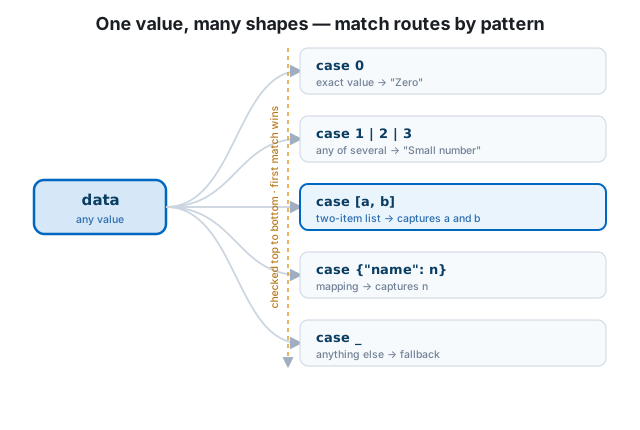
One important rule: Python checks the cases from top to bottom, and the first case that matches is the one that runs. The rest are skipped.
That means ordering is part of the logic, not just style. Put your most specific patterns first and your catch-all (case _) last. If you accidentally place a broad pattern above a narrow one, the narrow one can become unreachable:
match point:
    case [x, y]:                 # matches ANY two-item sequence...
        return f"Point at {x}, {y}"
    case [0, 0]:                 # ...so this can never run
        return "Origin"
Flip those two cases and the special “Origin” case gets its chance first.
You can attach an if condition — called a guard — to a case. The case matches only when both the pattern and the condition hold:
match point:
    case [x, y] if x == y:
        return "On the diagonal"
    case [x, y]:
        return f"Point at {x}, {y}"
The first case matches a two-item list and requires the two values to be equal. This keeps the structural part and the value-logic part cleanly separated.
Where match really shines is handling data that arrives in different shapes — think parsed JSON, API responses, or a mix of record formats. Here’s a function that turns assorted “event” records into a readable line:
def describe(event):
    match event:
        case {"type": "click", "x": x, "y": y}:
            return f"Click at ({x}, {y})"
        case {"type": "key", "key": key}:
            return f"Key pressed: {key}"
        case {"type": "scroll", "delta": delta}:
            return f"Scrolled by {delta}"
        case [name, *rest]:
            return f"Batch '{name}' with {len(rest)} more events"
        case _:
return "Unrecognized event"describe({"type": "click", "x": 10, "y": 20}) # 'Click at (10, 20)'
describe({"type": "key", "key": "Enter"}) # 'Key pressed: Enter'
describe(["startup", "a", "b", "c"]) # "Batch 'startup' with 3 more events"
describe(42) # 'Unrecognized event'The same statement cleanly handles three different dictionary shapes, a list with a *rest capture, and a fallback — no nested if value.get("type") == ... ladder in sight.
One gotcha worth knowing: a bare name like case something is a capture pattern — it matches anything and binds the value to that name, rather than comparing against an existing variable. If you want to match against a constant, use a literal (case "click") or a dotted name such as an enum member (case Color.RED). A bare lowercase name will quietly swallow every value.
match isn’t a replacement for every if. A single condition or a quick dict lookup is still the right tool for simple value-to-value mapping. Reach for match when:
if/elif chain that also has to unpack the data; orUsed in the right spot, match makes that kind of code noticeably easier to read — and easier to get right.
match statement (Python 3.10+) reads like a switch for simple values, with case _ acting as the default.|, lists and tuples, dictionaries, and types — capturing the parts you name.if guard to a case when you need an extra condition beyond the shape.case name captures instead of comparing — use a literal or a dotted/enum name to match a constant.It’s a small feature, but it’s worth trying the next time your data-handling code starts getting messy. If you want to strengthen the fundamentals underneath it, work through our free Python for Data Analytics course, then put match to work the next time you’re untangling a pile of differently-shaped records.
 Software Engineering
The Single Responsibility Principle: One Class, One Reason to Change
The Single Responsibility Principle says a class should have only one reason to change. See it in action: take a Python AuthService that also owns its logging, find why that's a problem, and refactor it into clean, focused classes.
Read article
Software Engineering
The Single Responsibility Principle: One Class, One Reason to Change
The Single Responsibility Principle says a class should have only one reason to change. See it in action: take a Python AuthService that also owns its logging, find why that's a problem, and refactor it into clean, focused classes.
Read article
 Python
Managing Python Projects with Poetry: A Practical Guide
Outgrown venv and requirements.txt? Poetry handles dependencies, virtual environments, lockfiles, and packaging from a single pyproject.toml. A practical, end-to-end guide with real commands.
Read article
Python
Managing Python Projects with Poetry: A Practical Guide
Outgrown venv and requirements.txt? Poetry handles dependencies, virtual environments, lockfiles, and packaging from a single pyproject.toml. A practical, end-to-end guide with real commands.
Read article