Title here
Summary here
uv is a single, blazing-fast tool that handles virtual environments, dependencies, lockfiles, Python versions, and packaging. A practical guide to the toolchain replacing pip, venv, and pyenv.

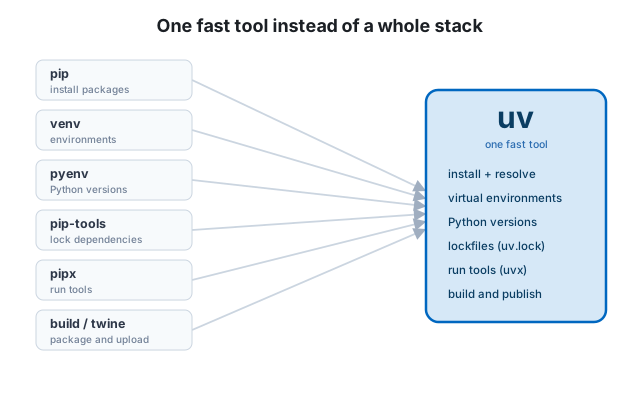
If you’ve followed our guides on Python virtual environments and Poetry, you already know the shape of the problem: real projects need isolated environments, locked dependencies, and a clean way to manage Python itself. The usual answer is a small stack of tools — pip, venv, pyenv, pip-tools, pipx, and a build backend — each doing one piece.
uv collapses that whole stack into a single, remarkably fast tool. Written in Rust by the team behind the Ruff linter, uv creates virtual environments, resolves and locks dependencies, installs and downloads Python versions, runs command-line tools, and builds and publishes packages — usually in a fraction of the time the older tools take. This guide shows you how to use it for real work.
The pitch for uv is consolidation plus speed. Instead of remembering which tool does what, you learn one command set; instead of waiting on dependency resolution, it finishes almost instantly thanks to a global cache and parallel downloads.
uv moves quickly and releases often. It is still pre-1.0 but is widely used in production; install the latest and check your version with uv --version.
uv ships as a single standalone binary, so the fastest install doesn’t even need Python:
# macOS / Linux
curl -LsSf https://astral.sh/uv/install.sh | sh
# Windows (PowerShell)
powershell -ExecutionPolicy ByPass -c "irm https://astral.sh/uv/install.ps1 | iex"It’s also available through pipx install uv and Homebrew (brew install uv). Once installed, keep it current with:
uv self updateuv has two modes, and it helps to know both:
pyproject.toml and a uv.lock lockfile (uv init, uv add, uv run, uv sync).uv pip install, uv venv) that you can adopt gradually in existing projects.We’ll focus on the project workflow, then cover the pip interface for when you need it.
Create a new project with uv init:
uv init weather-report
cd weather-report
uv scaffolds a small, standards-based project:
weather-report/
├── .python-version      # the Python version this project uses
├── pyproject.toml       # project metadata and dependencies
├── README.md
└── main.py
There’s no virtual environment yet, and that’s intentional — uv creates and updates a .venv automatically the first time you add a dependency or run code. You never have to create or activate it by hand.
Adding a package edits pyproject.toml, resolves the full dependency tree, updates the uv.lock lockfile, and installs into the project’s environment — all in one fast step:
uv add requests
uv add "httpx>=0.27"        # with a version constraint
Development-only tools go in a separate group so they never ship to production:
uv add --dev pytest ruffRemoving is symmetrical and cleans up everything:
uv remove requestsThis is the habit that makes uv feel different. Use uv run to execute anything inside the project environment:
uv run python main.py
uv run pytest
Before each run, uv quietly makes sure the environment matches your lockfile — installing anything missing — so the code you run is always in sync with what you’ve declared. You almost never type activate again.
To install a project from its lockfile explicitly (what a teammate or CI runs first), use:
uv syncAnd to update the lockfile to the newest versions allowed by your constraints:
uv lock --upgradeCommit pyproject.toml and uv.lock; ignore .venv
Commit both pyproject.toml and uv.lock — together they reproduce your project exactly, on any platform, because uv.lock is cross-platform. Add .venv/ to your .gitignore; uv rebuilds it from the lockfile in seconds.
Here’s a job the older project managers leave to a separate tool like pyenv: installing and switching Python versions. uv does it natively, downloading prebuilt interpreters on demand:
uv python install 3.12      # download and install Python 3.12
uv python list              # see what's installed and available
uv python pin 3.12          # pin this project to 3.12 (writes .python-version)
When a project pins a version it doesn’t have, uv simply fetches it. That means a new contributor can clone your repo and run uv sync without first installing the right Python by hand — uv handles it.
Command-line tools like ruff, black, or httpie shouldn’t be dependencies of your project — they’re utilities you run on it. uv runs them in throwaway, cached environments, the way pipx does, but instantly:
uvx ruff check . # run ruff without installing it into your projectuvx is shorthand for uv tool run. If you use a tool constantly and want it always available, install it for your user:
uv tool install ruffIf you have an existing project and aren’t ready to adopt the full workflow, uv can stand in for pip and venv directly — same commands you already know, dramatically faster:
uv venv                     # create a .venv (like python -m venv)
uv pip install -r requirements.txt
uv pip install requests
This is the gentlest way to bring uv into an existing codebase: swap pip for uv pip and python -m venv for uv venv, keep everything else, and enjoy the speedup. You can migrate to the project workflow later.
When your project is ready to share, uv builds and publishes it too:
uv build      # creates a wheel and source distribution in dist/
uv publish    # uploads them to PyPI
That rounds out the picture: one tool from uv init to uv publish, with no other packaging utilities required.
Both Poetry and uv manage environments, dependencies, lockfiles, and packaging from pyproject.toml, and you can be productive with either. A few honest distinctions:
pipx, so it covers more of your toolchain in one place.A reasonable rule of thumb: choose uv if speed and an all-in-one toolchain matter most, and Poetry if you value a long-established, plugin-rich tool with broad community familiarity. Either is a major upgrade over hand-managing venv and requirements.txt.
pip, venv, pyenv, pip-tools, pipx, and a build backend.uv init to start a project and uv add / uv remove to manage dependencies (with --dev for tools).uv run — uv keeps the environment in sync automatically, so you never activate anything.uv python install/pin) and runs tools (uvx), and offers a drop-in uv pip / uv venv interface for existing projects.pyproject.toml and uv.lock; ignore .venv/.If you’re setting up Python tooling in 2026, uv is the fastest path from an empty folder to a reproducible, publishable project. Compare it with Poetry to pick your favorite, revisit the fundamentals in A Complete Guide to Python Virtual Environments, and build the Python skills underneath it all with our free Python for Data Analytics course.
 Python
Managing Python Projects with Poetry: A Practical Guide
Outgrown venv and requirements.txt? Poetry handles dependencies, virtual environments, lockfiles, and packaging from a single pyproject.toml. A practical, end-to-end guide with real commands.
Read article
Python
Managing Python Projects with Poetry: A Practical Guide
Outgrown venv and requirements.txt? Poetry handles dependencies, virtual environments, lockfiles, and packaging from a single pyproject.toml. A practical, end-to-end guide with real commands.
Read article
 Python
A Complete Guide to Python Virtual Environments
Stop fighting dependency conflicts. Learn what virtual environments are, why they matter, and how to create, activate, and share them with venv, pip, and requirements.txt — step by step.
Read article
Python
A Complete Guide to Python Virtual Environments
Stop fighting dependency conflicts. Learn what virtual environments are, why they matter, and how to create, activate, and share them with venv, pip, and requirements.txt — step by step.
Read article