Title here
Summary here
Messy ticket subjects, log lines, and free-text fields all hide structured data. This guide builds a pattern-then-question mental model for Python's re module, then works through groups, findall, sub, and re.compile on a support-ticket inbox you can reproduce yourself.

Real data is rarely as clean as the column it ends up in. Before “order ID” and “email domain” become their own fields, they’re often buried inside a free-text string someone typed by hand — a support ticket subject, a log line, a product listing title. The question you’re actually asking is: how do you turn that text mess into structured values you can filter, group, and count? In Python, the answer is almost always the re module.
re is also where a lot of people quietly bounce off text processing. The syntax looks cryptic, there are four or five functions that all seem to do something similar, and one misplaced special character can silently match the wrong thing instead of raising an error. (If the messy text you’re wrangling lives inside HTML pages rather than a column of strings, our post on web scraping with Scrapy covers the sibling problem — pulling structured data out of a page instead of out of a sentence.) This guide builds the mental model first, then works through the whole toolkit on a small support-ticket inbox you can reproduce exactly.
Every regex task is really two separate decisions, and keeping them separate is what makes the syntax click:
ORD-), character classes (a category of character, like \d for “any digit”), quantifiers (how many times a piece repeats, like {4} or ?), and groups (parentheses that mark the pieces you actually want to keep).search, match, fullmatch), “give me every match” (findall, finditer), or “replace what matched” (sub).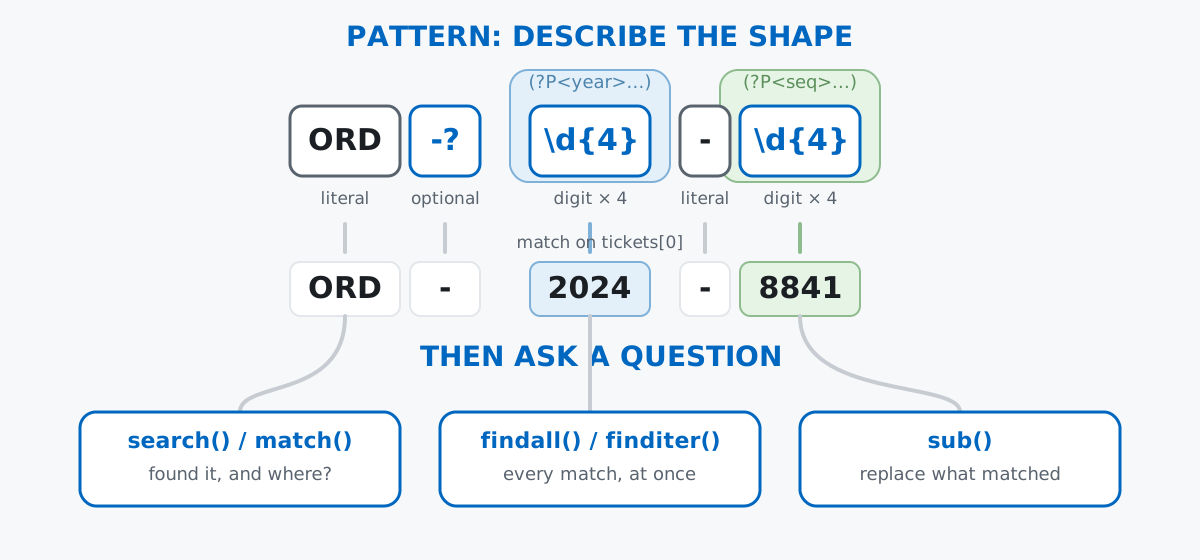
The pattern never changes based on which function you call — the same ORD-?\d{4}-\d{4} works whether you’re checking one string or replacing it in ten thousand. Only the question changes.
Imagine you’re the one Python person on the support team at a small subscription-box company, and it’s Monday morning. The weekend’s ticket subjects landed in three different systems with three different conventions, and nobody agreed on a format:
tickets = [
    "Order ORD-2024-8841 delayed - please advise ASAP [URGENT]",
    "Re: refund needed for ord-2023-1122, confirmed by [email protected]",
    "Can't log in to my account - reach me at 555-234-1099 or [email protected]",
    "order# ORD-2024-9954 never arrived!! called 555.888.2210 twice",
    "Question about invoice INV-2024-0033, no order attached",
    "[P1] payment failed for order ORD-2024-7710 - email [email protected]",
    "duplicate ticket - shipping delay on ORD-2024-8841",
    "how do I reset my password? no order number on file",
    "missing items for order ord2024-6650, call (555) 902-4471 anytime",
    "subscription cancel request, ref# ORD-2024-1180 [LOW]",
    "wrong size sent for ORD-2024-3305, swap requested",
    "spam??? unsubscribe me now",
]
print(len(tickets), "tickets")
12 ticketsTwelve lines, hand-written to be realistic rather than pulled from any real inbox — order IDs show up as ORD-2024-8841, ord-2023-1122, and even ord2024-6650 with no hyphen at all. That inconsistency is the whole reason this post exists. (The outputs here come from Python 3.11 — everything shown also works on Python 3.9+.)
Start with the simplest question: does a ticket mention an order ID at all? re.search() scans a string and returns a Match object at the first place the pattern fits, or None if it never does:
import re

match = re.search(r"ORD-\d{4}-\d{4}", tickets[0])
print(match)
print(match.group())
<re.Match object; span=(6, 19), match='ORD-2024-8841'>
ORD-2024-8841\d is a character class meaning “any digit,” and {4} is a quantifier meaning “exactly four of the previous piece.” Everything else in that pattern — ORD- and the middle - — is a literal, matched character for character. .group() reads back the actual text that matched.
That pattern is too strict for this inbox, though: it misses the lowercase ord-2023-1122 and the hyphen-free ord2024-6650. A case-insensitive flag and an optional hyphen (-?) fix both:
pattern = r"ORD-?\d{4}-\d{4}"
for ticket in tickets:
    found = re.search(pattern, ticket, re.IGNORECASE)
    print(f"{found.group() if found else '-':<15} {ticket}")
ORD-2024-8841 Order ORD-2024-8841 delayed - please advise ASAP [URGENT]
ord-2023-1122 Re: refund needed for ord-2023-1122, confirmed by [email protected]
- Can't log in to my account - reach me at 555-234-1099 or [email protected]
ORD-2024-9954 order# ORD-2024-9954 never arrived!! called 555.888.2210 twice
- Question about invoice INV-2024-0033, no order attached
ORD-2024-7710 [P1] payment failed for order ORD-2024-7710 - email [email protected]
ORD-2024-8841 duplicate ticket - shipping delay on ORD-2024-8841
- how do I reset my password? no order number on file
ord2024-6650 missing items for order ord2024-6650, call (555) 902-4471 anytime
ORD-2024-1180 subscription cancel request, ref# ORD-2024-1180 [LOW]
ORD-2024-3305 wrong size sent for ORD-2024-3305, swap requested
- spam??? unsubscribe me nowNotice the INV-2024-0033 ticket correctly gets a - (no match) — the literal ORD prefix excludes it, even though the rest of its shape looks identical to an order ID. Specific literals are what keep a pattern from matching things you didn’t mean.
Knowing that a ticket has an order ID is a start, but you usually want the year and the sequence number as separate values. Wrapping part of a pattern in parentheses turns it into a group, and .group(n) reads back the nth one:
m = re.search(r"ORD-?(\d{4})-(\d{4})", tickets[0], re.IGNORECASE)
print(m.group())
print(m.group(1))
print(m.group(2))
print(m.groups())
ORD-2024-8841
2024
8841
('2024', '8841')m.group() with no argument still returns the whole match (group 0). m.group(1) and m.group(2) return the two parenthesized pieces, and .groups() hands back all of them at once as a tuple. This is the same idea pandas uses for named aggregations — pull several related values out of one operation instead of running it twice.
Numbered groups work, but m.group(2) doesn’t tell you what the second piece means six months from now. Named groups fix that with (?P<name>...):
order_pattern = r"ORD-?(?P<year>\d{4})-(?P<seq>\d{4})"
m = re.search(order_pattern, tickets[8], re.IGNORECASE)
print(m.groupdict())
{'year': '2024', 'seq': '6650'}.groupdict() returns every named group as a dictionary, which drops straight into a dict() call or a pandas row without any positional guessing. From here on, order_pattern is the one pattern this whole post reuses — it’s the same pattern from the diagram above.
findall() and finditer()search() stops at the first match. To sweep up every order ID across the whole inbox, findall() returns them all as a list — and when your pattern has groups, each item comes back as a tuple of the group values instead of the full match:
order_ids = re.findall(order_pattern, " ".join(tickets), re.IGNORECASE)
print(order_ids)
print(len(order_ids), "order ids found")
[('2024', '8841'), ('2023', '1122'), ('2024', '9954'), ('2024', '7710'), ('2024', '8841'), ('2024', '6650'), ('2024', '1180'), ('2024', '3305')]
8 order ids foundEight matches from twelve lines — that lines up with the table above, where four lines had no order ID at all. If you need the position of each match too, not just its text, finditer() returns an iterator of full Match objects instead of a flattened list:
for m in re.finditer(order_pattern, tickets[6], re.IGNORECASE):
    print(m.group(), m.span(), m.groupdict())
ORD-2024-8841 (37, 50) {'year': '2024', 'seq': '8841'}.span() gives the (start, end) character offsets of the match — useful if you need to highlight or slice the original string rather than just read the extracted value. The official re module documentation covers the full method list on Match objects if you want to go further than this post does.
A different pattern, same tool, finds every email address instead:
email_pattern = r"[\w.+-]+@[\w-]+\.[\w.-]+"
emails = re.findall(email_pattern, " ".join(tickets))
print(emails)\w is another character class — “any word character” (letters, digits, underscore) — and the + quantifier means “one or more.” Note that this pattern is deliberately loose: real email validation is a much deeper rabbit hole than a blog post pattern should try to solve.
sub()Extraction answers “what’s in here?” sub() answers “how do I fix it?” — it replaces every match with something else and returns the whole string. To normalize every order ID to a single canonical ORD-YYYY-NNNN form regardless of how it was typed, pass a function instead of a plain string as the replacement:
def normalize_id(m):
    return f"ORD-{m.group('year')}-{m.group('seq')}"

print(re.sub(order_pattern, normalize_id, tickets[8], flags=re.IGNORECASE))
print(re.sub(order_pattern, normalize_id, tickets[1], flags=re.IGNORECASE))
missing items for order ORD-2024-6650, call (555) 902-4471 anytime
Re: refund needed for ORD-2023-1122, confirmed by [email protected]ord2024-6650 and ord-2023-1122 both come out the other side uppercase, hyphenated, and consistent — re calls normalize_id with the Match object every time it finds one, and substitutes whatever the function returns. The same approach cleans up the three different phone formats hiding in this inbox, this time using backreferences (\1, \2, \3) instead of a function, to rearrange the digits a plain group already captured:
phone_pattern = r"\(?(\d{3})\)?[-.\s]?(\d{3})[-.\s]?(\d{4})"
for ticket in [tickets[2], tickets[3], tickets[8]]:
    print(re.sub(phone_pattern, r"\1-\2-\3", ticket))
Can't log in to my account - reach me at 555-234-1099 or [email protected]
order# ORD-2024-9954 never arrived!! called 555-888-2210 twice
missing items for order ord2024-6650, call 555-902-4471 anytime555.888.2210 and (555) 902-4471 both land on 555-888-2210 and 555-902-4471 — one dash convention, no matter what separators (or parentheses) the original ticket used.
Every example so far calls re.search() or re.sub() with a fresh pattern string. Python re-parses that string into an internal representation every single time — fine for twelve tickets, wasteful if you’re validating a form field on every request or scanning a million log lines. re.compile() parses the pattern once into a reusable object:
ORDER_ID_RE = re.compile(r"ORD-\d{4}-\d{4}", re.IGNORECASE)
candidates = ["ORD-2024-8841", "ORD-2024-88410", "order ORD-2024-8841 please", "ORD-24-8841"]
for c in candidates:
    print(f"{c!r:<32} {bool(ORDER_ID_RE.fullmatch(c))}")
'ORD-2024-8841' True
'ORD-2024-88410' False
'order ORD-2024-8841 please' False
'ORD-24-8841' FalseThis also introduces .fullmatch(), the third member of the search family: it only succeeds if the entire string matches the pattern, start to end — no extra digit tacked on, no surrounding words. That’s exactly what you want when validating a single form field (like a user typing an order number into a search box), versus search(), which is right for scanning a whole sentence for a pattern buried somewhere inside it.
A greedy quantifier grabs as much as it can, not as little as makes sense. * and + are greedy by default — given two bracket tags in one string, .* stretches across both instead of stopping at the first one:
tag_line = "[URGENT][P1] payment failed for ORD-2024-7710"
print(re.search(r"\[.*\]", tag_line).group())
print(re.search(r"\[.*?\]", tag_line).group())
[URGENT][P1]
[URGENT]Adding ? after a quantifier (*?, +?) makes it non-greedy — it stops at the first place the rest of the pattern can still succeed, which is almost always what you actually meant.
An unescaped . matches any character, not just a literal dot. It’s the single most common source of a regex that “works” until it silently matches something it shouldn’t:
print(bool(re.search("shopcorp.io", "shopcorpXio was a typo domain")))
safe_pattern = re.escape("shopcorp.io")
print(safe_pattern)
print(bool(re.search(safe_pattern, "shopcorpXio was a typo domain")))
print(bool(re.search(safe_pattern, "contact shopcorp.io support")))
True
shopcorp\.io
False
Truere.escape() backslash-escapes every special character in a plain string, which is the safest way to search for literal text that happens to contain regex metacharacters like ., (, or +.
re.match() only anchors at the very start of the string — re.search() looks anywhere. This trips people up constantly, because the names sound almost interchangeable:
line = tickets[6]
print(re.match(r"ORD-\d{4}-\d{4}", line, re.IGNORECASE))
print(re.search(r"ORD-\d{4}-\d{4}", line, re.IGNORECASE).group())
None
ORD-2024-8841The order ID in tickets[6] isn’t at position 0 (“duplicate ticket - shipping delay on ORD-2024-8841”), so match() gives up immediately while search() keeps scanning and finds it. Default to search() unless you specifically need start-of-string anchoring.
Use a raw string (r"...") for any pattern with backslashes, or Python will silently mangle it. \d isn’t a recognized Python string escape, so it survives unharmed either way — but \b (word boundary in regex) is a recognized string escape, for the backspace character:
not_raw = "\bORD\b"
raw = r"\bORD\b"
print(repr(not_raw))
print(repr(raw))
print(re.search(not_raw, "the ORD-2024-8841 case"))
print(re.search(raw, "the ORD-2024-8841 case").group())
'\x08ORD\x08'
'\\bORD\\b'
None
ORDWithout the r prefix, \b becomes an actual backspace character (\x08) before re ever sees it — the pattern silently stops meaning “word boundary” and starts meaning something that will never appear in normal text. There’s no warning; it just quietly never matches. Always write regex patterns as raw strings.
Every regex task splits into the same two decisions: describe the shape, then ask a question about it.
search() / match() / fullmatch() → is the pattern here, and where? (fullmatch for validating a whole field, search for scanning free text)findall() / finditer() → every match at once, as values or as full Match objects with positions.groupdict() → pull structured pieces out of a single matchsub() → replace or normalize whatever matched, with a string, backreferences, or a functionre.compile() → parse a pattern once, reuse it across many stringsOnce a pattern is right, it doesn’t change — only the function you call around it does.
If you want to go further with the mechanics — lookaheads, non-capturing groups, and more of re’s method surface — the Regular Expressions for Text Processing lesson in our free Python for Data Analytics course picks up exactly where this post leaves off.
 Python
Build an AI Chatbot in Python: A Command-Line LLM Client
A from-scratch walkthrough of the pattern behind every LLM chatbot: one function that sends a message plus conversation history to a chat-completion API, a persona set by a system prompt, and a loop that keeps the conversation going.
Read article
Python
Build an AI Chatbot in Python: A Command-Line LLM Client
A from-scratch walkthrough of the pattern behind every LLM chatbot: one function that sends a message plus conversation history to a chat-completion API, a persona set by a system prompt, and a loop that keeps the conversation going.
Read article
 Software Engineering
The Single Responsibility Principle: One Class, One Reason to Change
The Single Responsibility Principle says a class should have only one reason to change. See it in action: take a Python AuthService that also owns its logging, find why that's a problem, and refactor it into clean, focused classes.
Read article
Software Engineering
The Single Responsibility Principle: One Class, One Reason to Change
The Single Responsibility Principle says a class should have only one reason to change. See it in action: take a Python AuthService that also owns its logging, find why that's a problem, and refactor it into clean, focused classes.
Read article