Title here
Summary here
Running another program from Python means dealing with output, exit codes, and safety all at once. This guide builds the mental model for subprocess.run(), then works through capturing output, checking return codes with check=True, and why list-based arguments beat a shell=True string.

Sooner or later, a Python program needs to run something that isn’t Python: a command-line tool, a shell script, another language’s compiler, or a small helper script of your own. The question that trips people up isn’t “how do I start it” — that part is one line — it’s “how do I actually know what happened,” get back whatever the other program printed, and find out whether it thinks the job succeeded or failed.
This is where a lot of people write something that works once and then quietly breaks: they glue a command together with string formatting, run it through a shell, and never check whether it actually succeeded. That habit is also how shell-injection bugs get into otherwise careful code. This guide builds the mental model first, then works through the modern subprocess API on a small, reproducible example, ending with the safety trade-offs you need to know before you ship anything that shells out.
Every use of subprocess, no matter how it’s dressed up, is the same three steps:
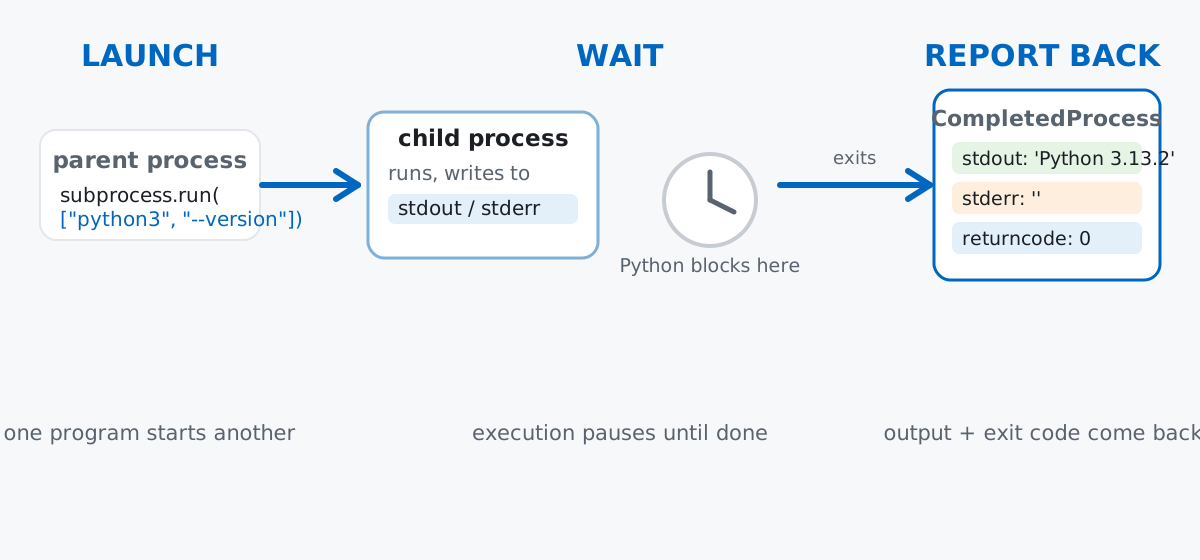
Keep this model in mind, because almost every subprocess gotcha is really a mistake in one of these three steps: launching with a shell string instead of a list, forgetting that step 2 blocks, or not reading what step 3 actually reported.
Imagine you keep a folder of Markdown drafts for a blog, and before you publish one you want a tiny “preflight” check: does the draft have enough words to be worth publishing? Rather than writing that check inline, you write it as its own small command-line script — wordcount.py — and call it from a bigger Python program with subprocess. That split, a small script doing one job and something else invoking it, is exactly the situation subprocess exists for.
Run this once to create the project on disk. Everything after this reads these same files:
from pathlib import Path

demo = Path("subprocess_demo")
demo.mkdir(exist_ok=True)

(demo / "wordcount.py").write_text(
    '''#!/usr/bin/env python3
"""Count the words in a text file. Exit non-zero if it is too short to publish."""
import sys

MIN_WORDS = 20

def main():
    path = sys.argv[1]
    with open(path, encoding="utf-8") as f:
        text = f.read()

    words = len(text.split())
    print(f"{path}: {words} words")

    if words < MIN_WORDS:
        print(f"error: {path} has only {words} words (minimum is {MIN_WORDS})", file=sys.stderr)
        sys.exit(1)

if __name__ == "__main__":
    main()
''',
    encoding="utf-8",
)

(demo / "draft_ok.md").write_text(
    "Subprocess lets a Python program launch other programs, capture what "
    "they print, and check whether they succeeded or failed before deciding "
    "what to do next.",
    encoding="utf-8",
)
(demo / "draft_short.md").write_text("Subprocess is useful.", encoding="utf-8")

print(f"wrote {sorted(p.name for p in demo.iterdir())}")
wrote ['draft_ok.md', 'draft_short.md', 'wordcount.py']wordcount.py is a completely ordinary script: it takes a file path as a command-line argument, prints a word count, and exits with status 1 (failure) if the draft is too short. It has no idea it’s about to be called from another Python program — which is the point. (The outputs in this post come from Python 3.13.2; the subprocess API used here has been stable since Python 3.5.)
subprocess.run(): Capturing What a Command Prints and How It Exitedsubprocess.run() is the function you reach for almost every time. Pass it a list — the program name followed by its arguments — plus capture_output=True to grab output instead of letting it print straight to your terminal, and text=True to get back regular str instead of raw bytes:
import subprocess

result = subprocess.run(
    ["python3", "--version"],
    capture_output=True,
    text=True,
)

print("stdout:", result.stdout.strip())
print("stderr:", repr(result.stderr))
print("returncode:", result.returncode)
stdout: Python 3.13.2
stderr: ''
returncode: 0result is a CompletedProcess object, and those three attributes are the whole “report back” step from the mental model: .stdout and .stderr are strings (because of text=True), and .returncode is 0, which is the universal convention for “everything went fine.” Non-zero means something went wrong — you’ll see that in a moment.
Notice the command above is a Python list, ["python3", "--version"], not the string "python3 --version". This matters more than it looks. Here’s wordcount.py called the same way, on the draft file:
result = subprocess.run(
    ["python3", "subprocess_demo/wordcount.py", "subprocess_demo/draft_ok.md"],
    capture_output=True,
    text=True,
)
print(result.stdout, end="")
print("returncode:", result.returncode)
subprocess_demo/draft_ok.md: 25 words
returncode: 0Each list element becomes exactly one argument, byte for byte, with no interpretation in between. That means filenames with spaces, quotes, or other characters that would confuse a shell just work, with no escaping on your part:
weird_path = demo / "draft with spaces.md"
weird_path.write_text(
    "Subprocess lets a Python program launch other programs safely with a "
    "list of arguments instead of a fragile shell command string built "
    "with string formatting.",
    encoding="utf-8",
)

result = subprocess.run(
    ["python3", "subprocess_demo/wordcount.py", str(weird_path)],
    capture_output=True,
    text=True,
)
print(result.stdout, end="")
print("returncode:", result.returncode)
subprocess_demo/draft with spaces.md: 25 words
returncode: 0"draft with spaces.md" arrives at wordcount.py as one single argument, sys.argv[1], exactly as written. If you’d built this as a shell string instead — f"python3 wordcount.py {weird_path}" — a shell would split it into three separate arguments at the spaces, and your script would fail on a file that doesn’t exist. The list form sidesteps that entire class of bug, which is also why it’s the safer default — more on that shortly.
check=Truesubprocess.run() never raises an exception just because the command it ran failed — it hands you the return code and lets you decide. Here’s what happens on the too-short draft:
result = subprocess.run(
    ["python3", "subprocess_demo/wordcount.py", "subprocess_demo/draft_short.md"],
    capture_output=True,
    text=True,
)
print("stdout:", result.stdout.strip())
print("stderr:", result.stderr.strip())
print("returncode:", result.returncode)
stdout: subprocess_demo/draft_short.md: 3 words
stderr: error: subprocess_demo/draft_short.md has only 3 words (minimum is 20)
returncode: 1Reading .returncode yourself works fine, but in code that just wants to fail loudly the moment something goes wrong, pass check=True instead. It turns any non-zero return code into a real Python exception, subprocess.CalledProcessError, which you can catch like anything else:
try:
    subprocess.run(
        ["python3", "subprocess_demo/wordcount.py", "subprocess_demo/draft_short.md"],
        capture_output=True,
        text=True,
        check=True,
    )
except subprocess.CalledProcessError as exc:
    print(f"caught: {exc}")
    print("exc.returncode:", exc.returncode)
    print("exc.stderr:", exc.stderr.strip())
caught: Command '['python3', 'subprocess_demo/wordcount.py', 'subprocess_demo/draft_short.md']' returned non-zero exit status 1.
exc.returncode: 1
exc.stderr: error: subprocess_demo/draft_short.md has only 3 words (minimum is 20)The exception carries the same .returncode and .stderr you’d have gotten manually — check=True just makes forgetting to look at them impossible, because an unhandled failure now stops your program instead of silently continuing with result.stdout full of nothing useful.
shell=True: Tempting, and a Real Injection RiskSometimes it’s tempting to build one string and hand it to a shell, especially if you’re used to typing commands yourself. subprocess.run() supports this with shell=True, but it comes with a real risk the moment any part of that string comes from outside your program — a filename, a user-supplied argument, a URL parameter, anything you didn’t type yourself.
Here’s why. Say a filename arrives from somewhere you don’t fully control:
untrusted_filename = "draft_ok.md; echo GOTCHA-injected-command-ran"

command_string = f"wc -l subprocess_demo/{untrusted_filename}"
print("command string handed to the shell:", command_string)

shell_result = subprocess.run(command_string, shell=True, capture_output=True, text=True)
print("shell=True output:", shell_result.stdout.strip())
command string handed to the shell: wc -l subprocess_demo/draft_ok.md; echo GOTCHA-injected-command-ran
shell=True output: 0 subprocess_demo/draft_ok.md
GOTCHA-injected-command-ranThe shell sees a ; and reads it exactly the way it would from a terminal: as two separate commands. wc -l runs on the real file, and then, completely independent of your intent, echo GOTCHA-injected-command-ran runs too. In this example that “extra command” is a harmless echo — but a real attacker controls the string, not you, and could put anything a shell understands after that semicolon.
The list-based form doesn’t have this problem, because there’s no shell involved to interpret ; at all:
list_result = subprocess.run(
    ["wc", "-l", f"subprocess_demo/{untrusted_filename}"],
    capture_output=True,
    text=True,
)
print("list-based returncode:", list_result.returncode)
print("list-based stderr:", list_result.stderr.strip())
list-based returncode: 1
list-based stderr: wc: subprocess_demo/draft_ok.md; echo GOTCHA-injected-command-ran: open: No such file or directoryThe entire messy string, semicolon included, is treated as one literal (and here, nonexistent) filename. wc fails cleanly instead of running an extra command. The official subprocess documentation is direct about this: only use shell=True with a string built entirely from fixed pieces you wrote yourself, never one containing any value that came from outside your program. If you’re not sure whether a value is “outside your program,” treat it as untrusted and use the list form.
subprocess.run() blocks until the child process finishes — it isn’t asynchronous. People coming from JavaScript or from asyncio sometimes expect the call to return immediately while the other program runs in the background. It doesn’t, by default:
import time

start = time.perf_counter()
subprocess.run(["python3", "subprocess_demo/slow_task.py"], capture_output=True, text=True)
elapsed = time.perf_counter() - start
print(f"back in Python after {elapsed:.1f}s")
back in Python after 1.0sslow_task.py sleeps for one second before printing anything. The line after subprocess.run() really does wait that full second — this is “wait” from the mental model, and it’s the default for a reason: most scripts want the result before doing anything else.
Forget text=True and you get bytes back, not str. This is a common source of TypeError: a bytes-like object is required, not 'str' a few lines later, when you try to search or format the output as if it were text:
without_text = subprocess.run(["python3", "--version"], capture_output=True)
print("without text=True:", without_text.stdout)

with_text = subprocess.run(["python3", "--version"], capture_output=True, text=True)
print("with text=True:   ", repr(with_text.stdout))
without text=True: b'Python 3.13.2\n'
with text=True: 'Python 3.13.2\n'Both calls ran the exact same command. The only difference is the type of .stdout — bytes versus str — and that one keyword argument is the entire fix.
shell=True danger isn’t limited to semicolons. Any shell metacharacter is fair game once a string reaches a shell, including wildcards:
untrusted_filename = "*"
command_string = f"wc -l subprocess_demo/{untrusted_filename}"
print(command_string)

result = subprocess.run(command_string, shell=True, capture_output=True, text=True)
print(result.stdout)
wc -l subprocess_demo/*
0 subprocess_demo/draft with spaces.md
0 subprocess_demo/draft_ok.md
0 subprocess_demo/draft_short.md
6 subprocess_demo/slow_task.py
20 subprocess_demo/wordcount.py
26 totalNobody asked for a report on every file in the directory, including wordcount.py’s own source code — but that’s what a bare * expands to once a shell gets hold of it. This is the same root cause as the semicolon example: a string built with untrusted input, handed to a shell that’s happy to interpret it.
A child process that reads from standard input hangs forever if nothing ever arrives. If a program you call tries to read stdin and you didn’t supply anything (via input=) or explicitly close its input, it just waits — in an interactive terminal, that means it hangs until you type something or press Ctrl-D:
proc = subprocess.Popen(
    ["python3", "subprocess_demo/echo_stdin.py"],
    stdin=subprocess.PIPE,
    stdout=subprocess.PIPE,
    text=True,
)
try:
    proc.wait(timeout=2)
except subprocess.TimeoutExpired:
    print("still running after 2s -- it never got a stdin to read")
    proc.kill()
    proc.wait()

fixed = subprocess.run(
    ["python3", "subprocess_demo/echo_stdin.py"],
    input="hello from the parent\n",
    capture_output=True,
    text=True,
    timeout=2,
)
print("with input= supplied:", repr(fixed.stdout))
still running after 2s -- it never got a stdin to read
with input= supplied: 'HELLO FROM THE PARENT\n'echo_stdin.py calls sys.stdin.read(), which blocks until it sees end-of-file. Leaving its stdin connected to an open pipe that nothing ever writes to or closes means it waits indefinitely — the timeout=2 above is only there so this post doesn’t hang forever; without it, proc.wait() would block for real. Passing input= fixes it properly: subprocess.run() writes your string, then closes the pipe for you, so the child gets its data and its end-of-file signal in one step.
Every subprocess call is the same three steps: launch a program with a list of arguments, wait for it (by default), and report back what it printed and how it exited.
subprocess.run(..., capture_output=True, text=True) — the everyday call; read .stdout, .stderr, and .returncode.check=True — turns a failing return code into a catchable subprocess.CalledProcessError.shell=True — only with a string built entirely from fixed pieces you wrote yourself, never anything from outside your program.If you want to build this into a fuller toolchain — managing the environments and dependencies the programs you’re calling actually need — the Virtual Environments and Dependency Management lesson in our free Python for Data Analytics course picks up exactly where this post leaves off. Reading whatever a called program writes to a file afterward? Our guide to reading files in Python covers that half of the pipeline.
 Python
Build an AI Chatbot in Python: A Command-Line LLM Client
A from-scratch walkthrough of the pattern behind every LLM chatbot: one function that sends a message plus conversation history to a chat-completion API, a persona set by a system prompt, and a loop that keeps the conversation going.
Read article
Python
Build an AI Chatbot in Python: A Command-Line LLM Client
A from-scratch walkthrough of the pattern behind every LLM chatbot: one function that sends a message plus conversation history to a chat-completion API, a persona set by a system prompt, and a loop that keeps the conversation going.
Read article
 Software Engineering
The Single Responsibility Principle: One Class, One Reason to Change
The Single Responsibility Principle says a class should have only one reason to change. See it in action: take a Python AuthService that also owns its logging, find why that's a problem, and refactor it into clean, focused classes.
Read article
Software Engineering
The Single Responsibility Principle: One Class, One Reason to Change
The Single Responsibility Principle says a class should have only one reason to change. See it in action: take a Python AuthService that also owns its logging, find why that's a problem, and refactor it into clean, focused classes.
Read article