Title here
Summary here
Before you reach for pandas or any other library, it helps to know what Python is actually doing when it reads a file. This guide builds a mental model for three file shapes, then works through open(), csv.reader, csv.DictReader, and json.load on a small set of example files you write and read yourself.

Almost every real Python program starts by reading something off disk: a log file, a spreadsheet someone exported as CSV, a config file, a response saved from an API. Before any of that data reaches a DataFrame or a database, it passes through three humble functions — open(), csv.reader, and json.load — and understanding what each one actually does saves you from a lot of confusing bugs later. (If loading a CSV eventually leads you into pandas, our guide to Pandas groupby picks up right where this post’s tabular data leaves off.)
Here’s where people quietly get tripped up: files aren’t all shaped the same way, and Python gives you a different tool for each shape. Use the wrong one — or forget to close a file, or assume every text file is UTF-8 — and you get a program that works on your machine and breaks everywhere else. This guide builds the mental model first, then walks through plain text, CSV, and JSON on a small set of example files you’ll create and read yourself.
Every file you’ll read in Python is really one of three shapes, and the shape tells you which tool to reach for:
.txt note, a list of URLs. You read it with open() and iterate over lines yourself.csv module, which knows how to handle quoting and commas-inside-fields so you don’t have to split strings by hand.json module, which hands you back real Python dicts and lists in one call instead of text you’d have to parse yourself.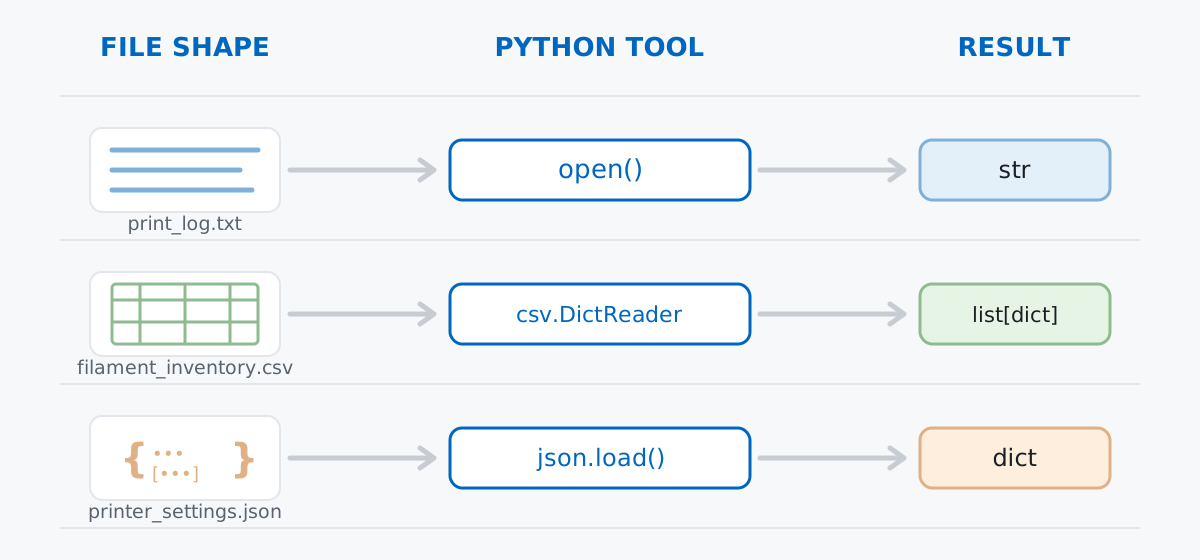
The shape isn’t just a filing detail — it decides how much work Python does for you. open() gives you raw text and nothing else. csv gives you rows. json gives you a fully rebuilt Python object, nesting and all. As the shape gets more structured, the module does more of the parsing, and you write less code.
One more idea sits underneath all three: every file you open needs to be closed, or the operating system keeps it reserved until your program exits. Python’s with statement — a context manager — closes the file automatically the moment you’re done with it, even if your code raises an error in between. You’ll see this pattern in every example below.
Say you’re running a small home 3D-printing workshop and you keep three files around: a plain-text log of print jobs, a CSV inventory of your filament spools, and a JSON config for your printer’s temperature profiles. Run this once to create them exactly as shown — every example after this reads these same files.
from pathlib import Path

workshop_dir = Path("workshop_files")
workshop_dir.mkdir(exist_ok=True)

(workshop_dir / "print_log.txt").write_text(
    "2026-06-01 08:12 INFO  Print job 'gear-bracket' started on profile PLA-fast\n"
    "2026-06-01 08:47 WARN  Nozzle temp drifted to 215C, target 210C\n"
    "2026-06-01 09:03 INFO  Print job 'gear-bracket' finished, 91g filament used\n"
    "2026-06-01 09:10 ERROR Print job 'vase-tall' aborted, filament runout\n"
    "2026-06-02 07:55 INFO  Print job 'vase-tall' restarted on profile PETG-standard\n",
    encoding="utf-8",
)

(workshop_dir / "filament_inventory.csv").write_text(
    "spool_id,material,color,weight_g,price_eur\n"
    "SP-01,PLA,Orange,850,18.50\n"
    "SP-02,PETG,Black,620,21.90\n"
    "SP-03,PLA,White,1000,17.00\n"
    "SP-04,TPU,Clear,410,24.75\n",
    encoding="utf-8",
)

(workshop_dir / "printer_settings.json").write_text(
    json.dumps({
        "printer_name": "Workshop-Mini",
        "default_profile": "PLA-fast",
        "profiles": {
            "PLA-fast": {"nozzle_c": 210, "bed_c": 60, "speed_mm_s": 80},
            "PETG-standard": {"nozzle_c": 235, "bed_c": 80, "speed_mm_s": 45},
        },
    }, indent=2),
    encoding="utf-8",
)
wrote ['filament_inventory.csv', 'print_log.txt', 'printer_settings.json']Three small files, three shapes: a log that’s just lines, an inventory that’s rows, a config that’s a nested object. (Everything below was run and verified on Python 3.11 — the syntax shown is stable across Python 3.8+.)
The simplest read: open the file, get the whole thing as one string.
with open(workshop_dir / "print_log.txt", encoding="utf-8") as f:
    contents = f.read()
print(contents)
2026-06-01 08:12 INFO Print job 'gear-bracket' started on profile PLA-fast
2026-06-01 08:47 WARN Nozzle temp drifted to 215C, target 210C
2026-06-01 09:03 INFO Print job 'gear-bracket' finished, 91g filament used
2026-06-01 09:10 ERROR Print job 'vase-tall' aborted, filament runout
2026-06-02 07:55 INFO Print job 'vase-tall' restarted on profile PETG-standard.read() is fine for a small file, but for anything you actually want to process, iterate over the file object directly. It hands you one line at a time — including the trailing \n, which is why the example strips it — without ever loading the entire file into memory at once:
with open(workshop_dir / "print_log.txt", encoding="utf-8") as f:
    for line in f:
        line = line.strip()
        if "WARN" in line or "ERROR" in line:
            print(line)
2026-06-01 08:47 WARN Nozzle temp drifted to 215C, target 210C
2026-06-01 09:10 ERROR Print job 'vase-tall' aborted, filament runoutwith open(...) as f is doing two things: it opens the file and hands you f, and it guarantees f.close() runs afterward — no matter how the block exits. Compare it to opening a file the manual way:
f = open(workshop_dir / "print_log.txt", encoding="utf-8")
print(f.closed)
f.close()
print(f.closed)
False
TrueThat works, but only if nothing between open() and close() raises an exception — if it does, close() never runs and the file stays open for the rest of your program. The context manager form doesn’t have that problem:
with open(workshop_dir / "print_log.txt", encoding="utf-8") as f:
    print(f.closed)
print(f.closed)
False
TrueNotice f.closed flips to True the instant the with block ends, whether it ended normally or because of an error. This is why with open(...) — never a bare open() — is the idiom you’ll see in every serious codebase.
csv ModuleA CSV file looks like something you could parse with line.split(","), and that temptation is exactly how people end up with bugs — real CSV fields can contain commas, quotes, and even embedded newlines, and the csv module already handles all of that correctly. csv.reader gives you each row as a plain list of strings:
import csv

with open(workshop_dir / "filament_inventory.csv", newline="", encoding="utf-8") as f:
    reader = csv.reader(f)
    header = next(reader)
    print(header)
    for row in reader:
        print(row)
['spool_id', 'material', 'color', 'weight_g', 'price_eur']
['SP-01', 'PLA', 'Orange', '850', '18.50']
['SP-02', 'PETG', 'Black', '620', '21.90']
['SP-03', 'PLA', 'White', '1000', '17.00']
['SP-04', 'TPU', 'Clear', '410', '24.75']next(reader) consumes the header row so the loop only sees data rows. Notice every value came back as a string — '850', not 850 — the csv module never guesses types for you; that’s on you to convert.
Lists indexed by position get unreadable fast once you have more than a couple of columns. csv.DictReader reads the same file but uses the header row as keys, so each row comes back as a dict:
with open(workshop_dir / "filament_inventory.csv", newline="", encoding="utf-8") as f:
    reader = csv.DictReader(f)
    spools = list(reader)

for spool in spools:
    print(spool)
{'spool_id': 'SP-01', 'material': 'PLA', 'color': 'Orange', 'weight_g': '850', 'price_eur': '18.50'}
{'spool_id': 'SP-02', 'material': 'PETG', 'color': 'Black', 'weight_g': '620', 'price_eur': '21.90'}
{'spool_id': 'SP-03', 'material': 'PLA', 'color': 'White', 'weight_g': '1000', 'price_eur': '17.00'}
{'spool_id': 'SP-04', 'material': 'TPU', 'color': 'Clear', 'weight_g': '410', 'price_eur': '24.75'}Now spool["price_eur"] is self-explanatory in a way row[4] never is. Since every value is still a string, converting types is still your job — here’s the whole inventory’s value in one line:
total_value = sum(float(spool["price_eur"]) for spool in spools)
print(f"total filament value: EUR {total_value:.2f}")
total filament value: EUR 82.15Notice the newline="" argument passed to open() in every example above — not mode="r", an actual empty string. That’s not a typo; the next section explains exactly why it matters. The csv module documentation covers dialects and quoting rules in more depth than fits here.
json.loadJSON is the only one of the three shapes that doesn’t need you to reconstruct structure by hand. json.load reads the file and gives you back real Python objects — dicts, lists, strings, numbers — matching the JSON exactly:
import json

with open(workshop_dir / "printer_settings.json", encoding="utf-8") as f:
    settings = json.load(f)

print(type(settings))
print(settings["default_profile"])
print(settings["profiles"]["PLA-fast"])
<class 'dict'>
PLA-fast
{'nozzle_c': 210, 'bed_c': 60, 'speed_mm_s': 80}A JSON object ({...}) becomes a Python dict; a JSON array ([...]) becomes a list; numbers and strings become int/float/str. settings["profiles"]["PLA-fast"] is just ordinary dict-of-dicts indexing — json.load already did the work of turning nested braces into nested Python data.
A JSON file’s root can be a list, not a dict — check before you index into it. If a print queue file happens to start with [ instead of {, indexing it like a dict will crash. Confirm the type first, or design your code to branch on it:
with open(workshop_dir / "print_queue.json", encoding="utf-8") as f:
    queue = json.load(f)

print(type(queue))
for job in queue:
    print(job["job"], job["est_minutes"])

if isinstance(queue, list):
    print(f"{len(queue)} jobs queued")
<class 'list'>
gear-bracket-v2 54
enclosure-lid 122
2 jobs queuedprint_queue.json is a top-level array of job objects, not a single object — queue["job"] would raise TypeError: list indices must be integers or slices, not str. Always check whether an API or export gives you a list or a dict at the root before you write code that assumes one or the other.
A file’s actual byte encoding doesn’t always match what you assume. Python’s open() defaults to your platform’s preferred encoding — often UTF-8, but not guaranteed — and reading a file written in a different encoding raises UnicodeDecodeError instead of quietly corrupting your data:
try:
    with open(workshop_dir / "notes_latin1.txt", encoding="utf-8") as f:
        print(f.read())
except UnicodeDecodeError as e:
    print(f"UnicodeDecodeError: {e}")
UnicodeDecodeError: 'utf-8' codec can't decode byte 0xe9 in position 30: invalid continuation bytenotes_latin1.txt was written with encoding="latin-1", and the accented é it contains isn’t valid UTF-8 on its own. The fix is knowing (or finding out) the real encoding and passing it explicitly:
with open(workshop_dir / "notes_latin1.txt", encoding="latin-1") as f:
    print(f.read())
Filament order confirmed - café run scheduled for TuesdayIf you genuinely don’t know the source encoding and can tolerate losing a character or two, errors="replace" swaps unreadable bytes for � instead of crashing — useful for a quick look, not for anything you plan to keep:
with open(workshop_dir / "notes_latin1.txt", encoding="utf-8", errors="replace") as f:
    print(f.read())
Filament order confirmed - caf� run scheduled for TuesdayAlways pass newline="" to open() when reading or writing CSV. The csv module does its own line-ending handling, and if Python’s text-mode newline translation runs first too, the two can interfere — most visibly as blank rows appearing between records on Windows. It also matters for a field that legitimately contains a newline, like a multi-line note:
with open(workshop_dir / "quoted_notes.csv", "w", newline="", encoding="utf-8") as f:
    writer = csv.writer(f)
    writer.writerow(["spool_id", "note"])
    writer.writerow(["SP-01", "Reorder before Friday.\nSupplier ships Mondays only."])

with open(workshop_dir / "quoted_notes.csv", newline="", encoding="utf-8") as f:
    reader = csv.DictReader(f)
    rows = list(reader)

print(len(rows), "row(s)")
for row in rows:
    print(row)
1 row(s)
{'spool_id': 'SP-01', 'note': 'Reorder before Friday.\nSupplier ships Mondays only.'}That’s one row, not two — csv correctly kept the embedded \n inside the quoted field instead of treating it as a new record. Drop the newline="" and this is exactly the kind of thing that can quietly break.
Three shapes, three tools:
open() plus a with block, iterating the file object line by linecsv module — csv.reader for lists, csv.DictReader for dicts, always with newline=""json.load, which rebuilds the whole structure — dicts, lists, and all — in one callGet the shape right and the rest of the syntax mostly falls out of it: what tool to use, whether you’ll be converting strings to numbers yourself, and whether an embedded newline or a mismatched encoding is even a risk. Wrap every read in a with block and you never have to think about closing a file again.
If you want to go deeper into file handling and the with statement itself, the Working with Files lesson and Context Managers and Resource Management lesson in our free Python for Data Analytics course build directly on everything covered here.
 Python
Build an AI Chatbot in Python: A Command-Line LLM Client
A from-scratch walkthrough of the pattern behind every LLM chatbot: one function that sends a message plus conversation history to a chat-completion API, a persona set by a system prompt, and a loop that keeps the conversation going.
Read article
Python
Build an AI Chatbot in Python: A Command-Line LLM Client
A from-scratch walkthrough of the pattern behind every LLM chatbot: one function that sends a message plus conversation history to a chat-completion API, a persona set by a system prompt, and a loop that keeps the conversation going.
Read article
 Software Engineering
The Single Responsibility Principle: One Class, One Reason to Change
The Single Responsibility Principle says a class should have only one reason to change. See it in action: take a Python AuthService that also owns its logging, find why that's a problem, and refactor it into clean, focused classes.
Read article
Software Engineering
The Single Responsibility Principle: One Class, One Reason to Change
The Single Responsibility Principle says a class should have only one reason to change. See it in action: take a Python AuthService that also owns its logging, find why that's a problem, and refactor it into clean, focused classes.
Read article