Title here
Summary here
A wider tour of scikit-learn than one worked example can give you: the shared fit/predict/transform pattern behind every estimator, a classifier and a preprocessing transformer side by side, and how Pipeline chains them into one reusable object.

Open the documentation page for almost any scikit-learn algorithm — a classifier, a clustering method, a dimensionality reducer — and the usage example looks the same: create the object, call .fit(), call .predict() or .transform(). That’s not a coincidence or a style choice. It’s the whole reason scikit-learn is learnable at all: one consistent interface sits underneath dozens of unrelated algorithms.
The trap is learning that interface through a single example and assuming it’s specific to whatever algorithm you happened to start with. (If you want one full worked example first — loading data, fitting a model, and honestly grading it end to end — our post on training your first machine learning model walks through a complete regression workflow with scikit-learn.) This post takes the wider view: the one interface idea that makes every estimator learnable, a classifier and a preprocessing transformer both exposing that same shape, and Pipeline, which chains steps like those into a single object you can fit and predict on as if it were one estimator.
Every object in scikit-learn that learns something from data — whether it predicts categories, predicts numbers, groups similar rows, or reshapes features — is called an estimator, and every estimator follows the same four rules:
KNeighborsClassifier(n_neighbors=5), StandardScaler() — before it has seen a single row of data..fit(X, y) or .fit(X) learns from data. Estimators that predict a label take a target y (supervised learning); estimators that only reshape or summarize features take just X (unsupervised or preprocessing)..predict(X) to produce labels or numbers. A preprocessing step exposes .transform(X) to produce reshaped features. The verb changes; the shape of the call — one fitted object, one method, one array in — doesn’t..fit(), an estimator remembers what it learned — a scaler’s .mean_, a classifier’s .classes_ — and you can inspect that state any time afterward.Once you know this shape, you don’t need a new mental model for every algorithm scikit-learn ships. A KNeighborsClassifier and a StandardScaler do completely different jobs, but you already know how to drive both.
Rather than downloading anything, we’ll use a dataset that ships with scikit-learn itself, so your numbers will match mine exactly with nothing more than pip install scikit-learn. Imagine you do quality control for a small wine importer: a shipment’s paperwork claims which of three grape cultivars it came from, and instead of trusting the label, you want to verify it from a chemical panel — alcohol content, acidity, color, and so on — run in the lab.
Data: the wine recognition dataset bundled with scikit-learn (originally deposited with the UCI Machine Learning Repository; public research data, redistributed under scikit-learn’s BSD license), loaded via load_wine().
import pandas as pd
from sklearn.datasets import load_wine

wine = load_wine(as_frame=True)
df = wine.frame
df[["alcohol", "malic_acid", "color_intensity", "proline", "target"]].head()
alcohol malic_acid color_intensity proline target
0 14.23 1.71 5.64 1065.0 0
1 13.20 1.78 4.38 1050.0 0
2 13.16 2.36 5.68 1185.0 0
3 14.37 1.95 7.80 1480.0 0
4 13.24 2.59 4.32 735.0 0df.shape(178, 14)178 wine samples, 13 chemical-panel features, and one target column: which of the three cultivars (labeled 0, 1, 2) the sample actually came from. (The outputs in this post come from pandas 3.0 and scikit-learn 1.9.)
df["target"].value_counts().sort_index()target
0 59
1 71
2 48
Name: count, dtype: int64All three classes are reasonably represented — nothing here is a rare-event problem. One more thing worth checking before modeling anything: do the features share a common scale?
df[["alcohol", "proline"]].describe().round(2) alcohol proline
count 178.00 178.00
mean 13.00 746.89
std 0.81 314.91
min 11.03 278.00
25% 12.36 500.50
50% 13.05 673.50
75% 13.68 985.00
max 14.83 1680.00They don’t. alcohol lives in a tight band around 11–15; proline ranges from 278 to 1680, with a standard deviation nearly 400 times alcohol’s. Keep that gap in mind — it’s about to matter.
Set aside a test set the model never trains on, the same discipline any supervised model needs regardless of algorithm:
from sklearn.model_selection import train_test_split

X = df.drop(columns=["target"])
y = df["target"]

X_train, X_test, y_train, y_test = train_test_split(
    X, y, test_size=0.2, random_state=42, stratify=y
)
X_train.shape, X_test.shape
((142, 13), (36, 13))stratify=y keeps the same class proportions in both the train and test slices — with only 48–71 examples per class, an unlucky shuffle could otherwise leave the test set thin on one cultivar. Now fit a classifier that predicts cultivar from the raw chemical panel. KNeighborsClassifier decides a sample’s class by looking at its nearest neighbors in feature space — a reasonable first choice when you don’t yet know if the classes separate cleanly:
from sklearn.neighbors import KNeighborsClassifier

knn = KNeighborsClassifier(n_neighbors=5)
knn.fit(X_train, y_train)KNeighborsClassifier()Same rule as the mental model: configure with n_neighbors=5, then .fit(X_train, y_train). Now ask it to guess the 36 held-out samples’ cultivars:
y_pred = knn.predict(X_test)

preview = pd.DataFrame({"actual": y_test.values[:5], "predicted": y_pred[:5]})
preview
actual predicted
0 0 0
1 2 2
2 0 0
3 1 1
4 1 2from sklearn.metrics import accuracy_score
acc_unscaled = accuracy_score(y_test, y_pred)
print(f"accuracy (unscaled features): {acc_unscaled:.3f}")accuracy (unscaled features): 0.806Four of the first five guesses are right, and 80.6% overall — decent, but keep that number in mind. KNeighborsClassifier decides “nearest” using plain distance between feature vectors, and we just saw that proline’s values are hundreds of times larger than alcohol’s. A distance calculation dominated by one oversized feature isn’t really using all 13 columns.
StandardScalerThis is where the second estimator comes in, and it’s not a classifier at all — it’s a preprocessing transformer. StandardScaler doesn’t predict anything; it learns each feature’s mean and standard deviation, then rescales every column to have a mean of 0 and a standard deviation of 1.
from sklearn.preprocessing import StandardScaler

scaler = StandardScaler()
scaler.fit(X_train)StandardScaler()Notice the shape of that call is identical to the classifier’s: configure, then .fit(X_train). The only difference is StandardScaler doesn’t take a y — it has nothing to predict, only feature statistics to learn. Those statistics are now sitting in the fitted object’s attributes:
print("alcohol mean/scale:", round(scaler.mean_[0], 3), round(scaler.scale_[0], 3))
print("proline mean/scale:", round(scaler.mean_[12], 3), round(scaler.scale_[12], 3))
alcohol mean/scale: 12.971 0.8
proline mean/scale: 739.479 300.436Those numbers were learned only from the 142 training rows — the test set hasn’t been touched yet, which matters and comes back in the gotchas section. Where a classifier’s next move is .predict(), a transformer’s next move is .transform():
X_train_scaled = scaler.transform(X_train)
X_test_scaled = scaler.transform(X_test)

pd.DataFrame(X_train_scaled, columns=X.columns)[["alcohol", "proline"]].describe().round(3)
alcohol proline
count 142.000 142.000
mean 0.000 -0.000
std 1.004 1.004
min -2.428 -1.536
25% -0.752 -0.810
50% 0.048 -0.220
75% 0.736 0.805
max 2.324 2.581Both columns are now centered on 0 with roughly unit spread — alcohol and proline are finally on a comparable scale, even though their raw units (percent alcohol by volume versus milligrams of an amino acid) have nothing to do with each other. .fit() learned the statistics; .transform() applied them. Same estimator API, a transform() verb instead of predict() because the job is reshaping features, not producing a label.
Refit the same KNeighborsClassifier — same hyperparameter, same train/test split — on the scaled features instead of the raw ones:
knn_scaled = KNeighborsClassifier(n_neighbors=5)
knn_scaled.fit(X_train_scaled, y_train)
y_pred_scaled = knn_scaled.predict(X_test_scaled)

acc_scaled = accuracy_score(y_test, y_pred_scaled)
print(f"accuracy (scaled features): {acc_scaled:.3f}")
accuracy (scaled features): 0.9720.806 to 0.972 — scaling alone moved 6 more predictions from wrong to right on a 36-sample test set. Accuracy is a fair headline number here because the three classes are close to balanced, but it hides which classes get confused with each other. A confusion matrix breaks that down: rows are the true cultivar, columns are the predicted one.
from sklearn.metrics import confusion_matrix, classification_report

cm = confusion_matrix(y_test, y_pred_scaled)
cm
[[12 0 0]
[ 0 13 1]
[ 0 0 10]]print(classification_report(y_test, y_pred_scaled, target_names=wine.target_names)) precision recall f1-score support
class_0 1.00 1.00 1.00 12
class_1 1.00 0.93 0.96 14
class_2 0.91 1.00 0.95 10
accuracy 0.97 36
macro avg 0.97 0.98 0.97 36
weighted avg 0.97 0.97 0.97 36The diagonal (12, 13, 10) is every correct prediction; the single off-diagonal 1 says one true class_1 sample got predicted as class_2. class_0 is perfectly separated in this test set; the model’s only confusion is between the other two cultivars. That single misclassification is also why class_1’s recall (0.93) and class_2’s precision (0.91) are the two numbers below 1.00 in the report — recall counts a missed true positive against the class that lost it, precision counts a wrong prediction against the class that wrongly received it.
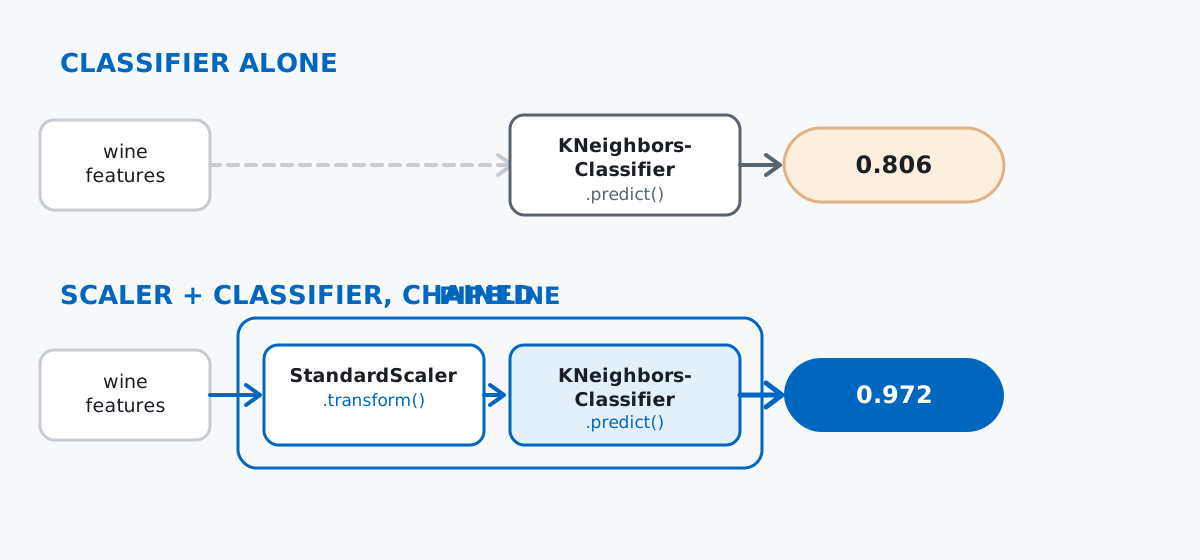
PipelineThe scaled-classifier result above required remembering to scale the training set, scale the test set the same way, and refit the classifier on the scaled version — three manual steps a reader (or a future you) could easily do out of order. Pipeline chains a list of estimators into a single object that exposes the exact same .fit() / .predict() shape as any individual one:
from sklearn.pipeline import Pipeline

pipe = Pipeline([
    ("scaler", StandardScaler()),
    ("knn", KNeighborsClassifier(n_neighbors=5)),
])
pipe.fit(X_train, y_train)
Pipeline(steps=[('scaler', StandardScaler()), ('knn', KNeighborsClassifier())])One .fit() call on the original, unscaled X_train — the pipeline handles calling StandardScaler’s fit_transform internally before handing the result to KNeighborsClassifier’s fit. Predicting is just as short:
y_pred_pipe = pipe.predict(X_test)
acc_pipe = accuracy_score(y_test, y_pred_pipe)
print(f"accuracy (pipeline): {acc_pipe:.3f}")
accuracy (pipeline): 0.972Same 0.972 as the manual scaled version, because it’s doing the same computation — but now it’s one object. That object is what you’d save, hand to a colleague, or deploy: pipe.predict(new_data) scales and classifies in one call, and there’s no separate scaler to lose track of or apply out of order.
Fitting a transformer on the whole dataset before splitting leaks the test set into training. Any step that learns statistics from data — a scaler, an imputer — must be fit on the training set only:
leaky_scaler = StandardScaler().fit(X)          # sees all 178 rows, test included
honest_scaler = StandardScaler().fit(X_train)   # sees only the 142 training rows

print("proline mean seen by leaky scaler (all 178 rows):   ", round(leaky_scaler.mean_[12], 3))
print("proline mean seen by honest scaler (142 train rows):", round(honest_scaler.mean_[12], 3))
proline mean seen by leaky scaler (all 178 rows): 746.893
proline mean seen by honest scaler (142 train rows): 739.479746.893 versus 739.479 doesn’t look dramatic, but the leaky version means every “unseen” test row quietly influenced the very statistics used to rescale it, which optimistically biases whatever accuracy you report. On a larger, more skewed dataset the gap — and the bias it introduces — can be far bigger than this one.
Manually chaining preprocessing and a model is exactly how that leak sneaks in. It’s not that the wine example above did anything wrong — scaler.fit(X_train) was correct — but the manual version required remembering to never call .fit() on the full X. Pipeline removes the opportunity to make that mistake: pipe.fit(X_train, y_train) only ever calls fit_transform on the training data, and pipe.predict(X_test) only ever calls transform (never fit) on the test data, structurally, every time.
predict_proba doesn’t exist on every classifier. KNeighborsClassifier can report class probabilities because “how many of the nearest neighbors voted for each class” is a natural probability:
proba = knn_scaled.predict_proba(X_test_scaled)[:3].round(3)
proba
[[1. 0. 0. ]
[0. 0.4 0.6]
[1. 0. 0. ]]But not every classifier has an equivalent built in. LinearSVC finds a decision boundary directly, with no probability estimate as a byproduct:
from sklearn.svm import LinearSVC

svm = LinearSVC(max_iter=10000, dual="auto")
svm.fit(X_train_scaled, y_train)
svm.predict_proba(X_test_scaled)
AttributeError: 'LinearSVC' object has no attribute 'predict_proba'If your code needs probabilities rather than just labels, check the estimator’s documentation for predict_proba before you build around it — some models (like SVC, LinearSVC’s cousin) can produce probabilities, but only if you explicitly ask for them at construction time, at a real training-time cost.
One interface, reused across every job scikit-learn does:
KNeighborsClassifier(...), StandardScaler()) → configure hyperparameters before any data exists.fit(X, y) / .fit(X) → learn from data, with a target for supervised jobs and without one for preprocessing.predict(X) → produce labels or numbers from a fitted classifier or regressor.transform(X) → produce reshaped features from a fitted preprocessing stepPipeline → chain steps like those into one object with the same .fit() / .predict() shape, so preprocessing and modeling can’t get out of syncaccuracy_score / confusion_matrix → grade a classifier’s predictions per class, not just in aggregateIf you want to go deeper on the classification side specifically — the sigmoid function, decision boundaries, and a full guided project with a real dataset — the Classification module in our free Machine Learning course picks up exactly where this post leaves off.
 Python
Build an AI Chatbot in Python: A Command-Line LLM Client
A from-scratch walkthrough of the pattern behind every LLM chatbot: one function that sends a message plus conversation history to a chat-completion API, a persona set by a system prompt, and a loop that keeps the conversation going.
Read article
Python
Build an AI Chatbot in Python: A Command-Line LLM Client
A from-scratch walkthrough of the pattern behind every LLM chatbot: one function that sends a message plus conversation history to a chat-completion API, a persona set by a system prompt, and a loop that keeps the conversation going.
Read article
 Software Engineering
The Single Responsibility Principle: One Class, One Reason to Change
The Single Responsibility Principle says a class should have only one reason to change. See it in action: take a Python AuthService that also owns its logging, find why that's a problem, and refactor it into clean, focused classes.
Read article
Software Engineering
The Single Responsibility Principle: One Class, One Reason to Change
The Single Responsibility Principle says a class should have only one reason to change. See it in action: take a Python AuthService that also owns its logging, find why that's a problem, and refactor it into clean, focused classes.
Read article