Title here
Summary here
A trigger is code the database runs for you, automatically, whenever a row changes. This guide builds the event-timing-action mental model, then works through BEFORE and AFTER triggers, an audit log, and the traps that catch people the first time, all in SQLite.

Most of the time, your application decides when the database changes: a user clicks “borrow,” your code runs an INSERT, done. But some rules need to hold no matter how a row changes, whether the write comes from your web app, a background script, or someone poking around with a database client. “Every time stock drops to zero, log it” is a rule about the data, not about any one program that touches it.
That’s the gap a trigger fills, and it’s also where people get tangled up: a trigger runs on its own, with no caller and no return value, which makes it feel like debugging a black box the first time something goes wrong. This guide gives you one small model for how triggers fire, then works through BEFORE and AFTER triggers hands-on, using nothing but Python’s built-in sqlite3 module — no server to install, no account to create.
Every trigger, in every SQL database, answers three questions:
INSERT, UPDATE, or DELETE.BEFORE the row is written, or AFTER it’s already committed.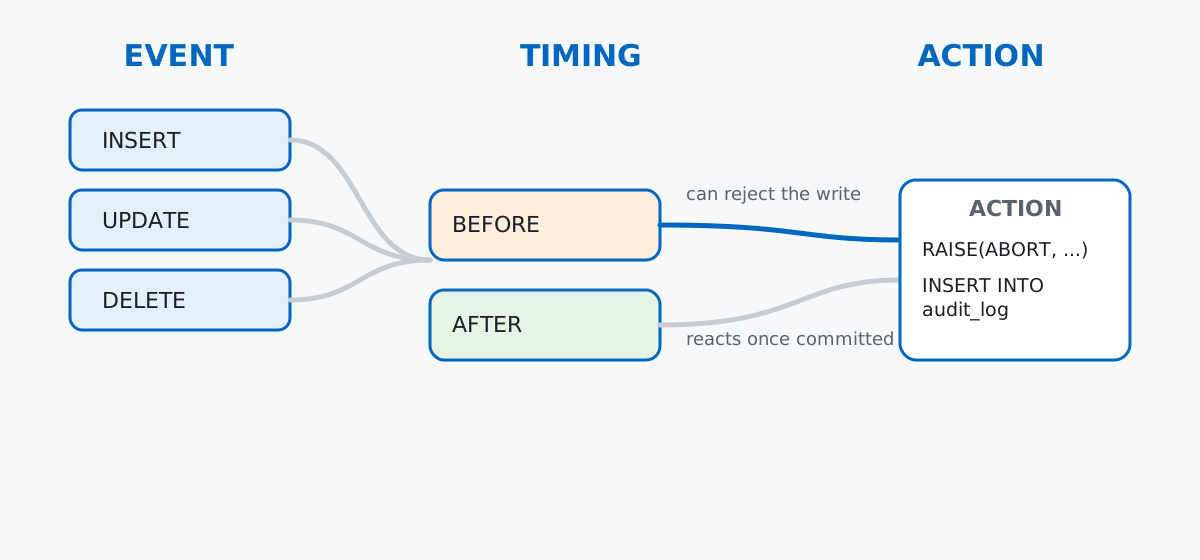
The timing choice is the one beginners skip past, and it’s the one that matters most. A BEFORE trigger can inspect and reject a write before it happens — that’s how you enforce a rule like “don’t let stock go negative.” An AFTER trigger runs once the write has already succeeded — that’s for reactions, like writing an audit row, that shouldn’t be able to block the original change.
Keep that split in mind: BEFORE guards, AFTER reacts. Almost every trigger you’ll write fits one of those two jobs.
No dataset to download here — triggers are a mechanism, not something you analyze, so a few small hand-built tables are the right tool. Imagine a small library app: members borrow books, and each book has a limited number of copies.
import sqlite3

con = sqlite3.connect(":memory:")
con.execute("PRAGMA foreign_keys = ON;")
cur = con.cursor()

cur.executescript("""
CREATE TABLE members (
    id INTEGER PRIMARY KEY,
    name TEXT NOT NULL,
    joined_on TEXT NOT NULL
);

CREATE TABLE books (
    id INTEGER PRIMARY KEY,
    title TEXT NOT NULL,
    copies_available INTEGER NOT NULL
);

CREATE TABLE loans (
    id INTEGER PRIMARY KEY,
    book_id INTEGER NOT NULL REFERENCES books(id),
    member_id INTEGER NOT NULL REFERENCES members(id),
    borrowed_on TEXT NOT NULL,
    returned_on TEXT
);

INSERT INTO members (id, name, joined_on) VALUES
    (1, 'Nora', '2024-01-10'),
    (2, 'Faisal', '2024-03-22');

INSERT INTO books (id, title, copies_available) VALUES
    (1, 'The Pragmatic Programmer', 2),
    (2, 'Designing Data-Intensive Applications', 1);
""")
con.commit()
Three tables: members, books, and loans, which records who borrowed what and when. (The outputs in this post come from SQLite 3.50, bundled with Python 3.13 — the SQL itself works on any recent SQLite version.)
Start with the easy direction: something that reacts after a change, without trying to stop it. Every time a loan is inserted, the borrowed book should have one fewer copy available.
cur.execute("""
CREATE TRIGGER trg_loans_after_insert
AFTER INSERT ON loans
FOR EACH ROW
BEGIN
    UPDATE books
    SET copies_available = copies_available - 1
    WHERE id = NEW.book_id;
END;
""")
con.commit()
NEW is a special row alias available inside the trigger — it refers to the row that was just inserted, so NEW.book_id is the book_id column of that specific loan. Now insert a loan and check the book table, without touching copies_available yourself:
cur.execute(
    "INSERT INTO loans (id, book_id, member_id, borrowed_on) VALUES (1, 1, 1, '2024-05-01')"
)
con.commit()

cur.execute("SELECT id, title, copies_available FROM books WHERE id = 1")
print(cur.fetchall())
[(1, 'The Pragmatic Programmer', 1)]Nobody wrote UPDATE books SET copies_available = ... from Python. The trigger did it, automatically, the instant the INSERT committed. That’s the entire pitch for triggers: write the rule once, in the database, and it applies no matter what inserts the row.
You can always see what triggers exist on a database with sqlite_master:
cur.execute("SELECT name, tbl_name FROM sqlite_master WHERE type = 'trigger'")
print(cur.fetchall())
[('trg_loans_after_insert', 'loans')]BEFORE Triggers: Guarding a WriteAFTER triggers react; BEFORE triggers can refuse. Say the library shouldn’t allow a loan for a book with zero copies available. A BEFORE INSERT trigger can check that and abort the whole statement:
cur.execute("""
CREATE TRIGGER trg_loans_before_insert
BEFORE INSERT ON loans
FOR EACH ROW
WHEN (SELECT copies_available FROM books WHERE id = NEW.book_id) < 1
BEGIN
    SELECT RAISE(ABORT, 'no copies available for this book');
END;
""")
con.commit()
The WHEN clause is a guard: the trigger’s body only runs when that condition is true, so most inserts skip it entirely. RAISE(ABORT, ...) is SQLite’s way of cancelling the statement and rolling back — the row never gets written. First, drive the second book’s stock down to zero the normal way:
cur.execute(
    "INSERT INTO loans (id, book_id, member_id, borrowed_on) VALUES (2, 2, 2, '2024-05-02')"
)
con.commit()

cur.execute("SELECT id, title, copies_available FROM books WHERE id = 2")
print(cur.fetchall())
[(2, 'Designing Data-Intensive Applications', 0)]Now try to lend a book with no copies left:
try:
    cur.execute(
        "INSERT INTO loans (id, book_id, member_id, borrowed_on) VALUES (3, 2, 1, '2024-05-03')"
    )
    con.commit()
except sqlite3.IntegrityError as e:
    print(f"IntegrityError: {e}")

cur.execute("SELECT count(*) FROM loans")
print("loans count:", cur.fetchall())
IntegrityError: no copies available for this book
loans count: [(2,)]Python surfaces the abort as an IntegrityError, and the loan count stays at 2 — the third INSERT never happened. This is the pattern for any rule that must hold no matter which application writes the data: put the check in a BEFORE trigger, and no client can bypass it, not even one you haven’t written yet.
AFTER UPDATETriggers aren’t limited to INSERT. A common real use is logging every change to a sensitive column, which is exactly the kind of thing you don’t want to trust every calling application to remember to do. Add an audit table and an AFTER UPDATE trigger scoped to just the copies_available column:
cur.executescript("""
CREATE TABLE book_audit (
    id INTEGER PRIMARY KEY,
    book_id INTEGER NOT NULL,
    old_copies INTEGER,
    new_copies INTEGER,
    changed_at TEXT NOT NULL
);

CREATE TRIGGER trg_books_after_update
AFTER UPDATE OF copies_available ON books
FOR EACH ROW
BEGIN
    INSERT INTO book_audit (book_id, old_copies, new_copies, changed_at)
    VALUES (OLD.id, OLD.copies_available, NEW.copies_available, datetime('now'));
END;
""")
con.commit()
UPDATE OF copies_available means this trigger only fires when that specific column changes — an update to title alone wouldn’t trigger it. Inside the body, both OLD and NEW are available on an UPDATE: OLD is the row before the write, NEW is the row after. Restock a copy and check the log:
cur.execute("UPDATE books SET copies_available = copies_available + 1 WHERE id = 1")
con.commit()

cur.execute("SELECT book_id, old_copies, new_copies FROM book_audit")
print(cur.fetchall())
[(1, 1, 2)]The audit row records exactly what changed, without a single line of logging code in the application that issued the UPDATE. This is also, per the SQLite documentation on CREATE TRIGGER, the standard way to implement history and audit tables in SQLite — the docs are worth a skim for the full grammar, including INSTEAD OF triggers on views, which are outside the scope of this post.
A trigger firing on its own UPDATE can build an accidental chain. If a trigger’s action updates the same table its event watches, and a second trigger is listening for that same event, you can end up with triggers calling triggers. Add a second trigger on copies_available and watch both fire from a single write:
cur.executescript("""
CREATE TABLE stock_changes (
    id INTEGER PRIMARY KEY,
    book_id INTEGER,
    delta INTEGER
);
""")

cur.execute("""
CREATE TRIGGER trg_books_log_change
AFTER UPDATE OF copies_available ON books
FOR EACH ROW
WHEN NEW.copies_available != OLD.copies_available
BEGIN
    INSERT INTO stock_changes (book_id, delta) VALUES (NEW.id, NEW.copies_available - OLD.copies_available);
END;
""")
con.commit()

cur.execute("UPDATE books SET copies_available = copies_available - 1 WHERE id = 1")
con.commit()

cur.execute("SELECT book_id, delta FROM stock_changes")
print(cur.fetchall())
[(1, -1)]That single UPDATE now runs both trg_books_after_update (the audit log) and trg_books_log_change (the delta log). Neither one writes back to books.copies_available, so there’s no loop here — but if one of them did, each write would re-fire every trigger watching that column, potentially forever. SQLite caps recursive trigger depth precisely to stop this, but the safer habit is to never let a trigger’s action touch the same column its own event watches.
Triggers fire per row, including inside executemany. It’s tempting to assume batch inserts somehow skip trigger logic — they don’t. FOR EACH ROW means exactly that, one firing per affected row, whether the row arrived via a single INSERT or a Python loop:
cur.executemany(
    "INSERT INTO loans (id, book_id, member_id, borrowed_on) VALUES (?, ?, ?, ?)",
    [(4, 1, 2, '2024-05-04')],
)
con.commit()

cur.execute("SELECT id, copies_available FROM books WHERE id = 1")
print(cur.fetchall())
[(1, 1)]Copies dropped from 2 back to 1 — the AFTER INSERT trigger fired exactly as it would for a single manual INSERT. If you’re bulk-loading thousands of rows and a trigger does anything nontrivial per row, that cost adds up; it’s worth measuring before you assume a bulk load will be fast.
Dropping a trigger doesn’t touch the data it already wrote. A trigger is metadata attached to a table, and DROP TRIGGER removes only that behavior going forward — every audit row and every stock adjustment it already made stays exactly where it is:
cur.execute("DROP TRIGGER trg_loans_before_insert")
con.commit()

cur.execute("SELECT name FROM sqlite_master WHERE type = 'trigger'")
print(cur.fetchall())
[('trg_loans_after_insert',), ('trg_books_after_update',), ('trg_books_log_change',)]trg_loans_before_insert is gone from the schema, but book_audit and stock_changes still hold every row it and the others ever produced. If you ever need to remove a trigger’s effects, that’s a separate, manual cleanup — dropping the trigger only stops future firings.
A trigger is code the database runs for you, automatically, on INSERT, UPDATE, or DELETE. Everything else is a variation on three questions:
INSERT, UPDATE, or DELETEBEFORE to guard and possibly reject a write, AFTER to react once it’s committedNEW and OLD giving you the row’s values after and before the changeReach for a BEFORE trigger when a rule must hold no matter which application writes the data, and an AFTER trigger when you need a side effect — like an audit trail — that shouldn’t be able to block the original write. Keep the action small and be careful about triggers that write back to the columns their own event watches.
If you want to build this into a broader SQL foundation — filtering, joins, subqueries, and views, all hands-on with real datasets — the subqueries, CTEs, and views lessons in our free SQL & Databases course are a natural next stop, and cover the other major way logic can live inside your database.
 Python
Build an AI Chatbot in Python: A Command-Line LLM Client
A from-scratch walkthrough of the pattern behind every LLM chatbot: one function that sends a message plus conversation history to a chat-completion API, a persona set by a system prompt, and a loop that keeps the conversation going.
Read article
Python
Build an AI Chatbot in Python: A Command-Line LLM Client
A from-scratch walkthrough of the pattern behind every LLM chatbot: one function that sends a message plus conversation history to a chat-completion API, a persona set by a system prompt, and a loop that keeps the conversation going.
Read article
 Software Engineering
The Single Responsibility Principle: One Class, One Reason to Change
The Single Responsibility Principle says a class should have only one reason to change. See it in action: take a Python AuthService that also owns its logging, find why that's a problem, and refactor it into clean, focused classes.
Read article
Software Engineering
The Single Responsibility Principle: One Class, One Reason to Change
The Single Responsibility Principle says a class should have only one reason to change. See it in action: take a Python AuthService that also owns its logging, find why that's a problem, and refactor it into clean, focused classes.
Read article