Title here
Summary here
Build a working spam/ham text classifier with spaCy's TextCategorizer, from a blank pipeline through a real training loop to a proper precision/recall evaluation on held-out messages.

“Is this message spam?” is a question a computer can only answer if something has taught it what spam looks like. That teaching step — showing a program enough labeled examples that it can generalize to new, unseen text — is text classification, and it’s one of the most practical entry points into natural language processing (NLP). You don’t need a research background to build one. You need a handful of labeled examples and a library that knows how to turn text into something a model can learn from.
That library, for this post, is spaCy. A lot of spaCy tutorials jump straight to its pretrained pipelines for tagging parts of speech or finding names in text, which is where people who are new to it quietly get stuck — training your own classifier for your own categories feels like a separate, harder skill. It isn’t. This guide builds the mental model first, then walks through spaCy’s TextCategorizer end to end: setting up a pipeline, formatting training data, running the training loop, and honestly evaluating what the model actually learned.
spaCy processes text through a pipeline — a sequence of components that each add something to a Doc object as text flows through them. A full pretrained pipeline might tokenize text, tag parts of speech, parse sentence structure, and find named entities, one component at a time.
For text classification, you don’t need any of that. You need exactly one component: textcat, spaCy’s TextCategorizer. Three ideas carry the whole post:
spacy.blank("en") gives you English tokenization rules with no trained components attached — no downloads, no pretrained weights, nothing to go stale. You add textcat to it yourself.textcat doesn’t output “spam” or “ham” — it outputs a score per label between 0 and 1. You decide the cutoff.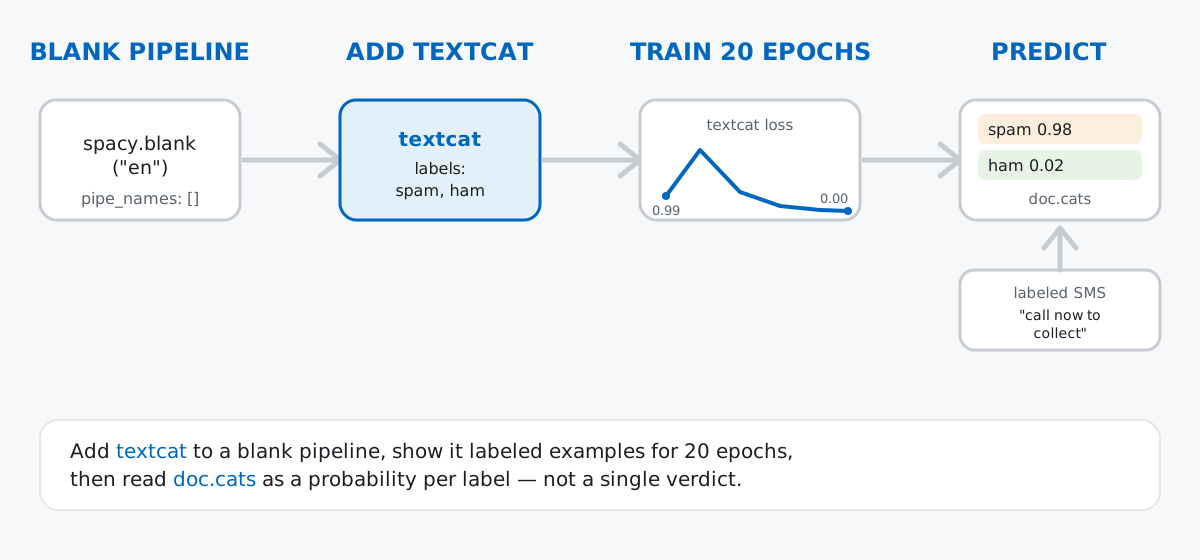
Keep that in mind as the throughline: everything below is just “add textcat, show it examples, ask it questions.”
Hand-written toy examples work for the smallest of demos, but a real spam/ham dataset makes the training loop and its output much more convincing. This post uses a small sample drawn from the SMS Spam Collection, a set of labeled SMS messages released for spam-research purposes and distributed under a CC BY 4.0 license (attribution required, reuse and adaptation permitted). Forty messages — 20 spam, 20 ham (the non-spam label used in the original dataset) — are enough to train and evaluate a first classifier in seconds, with no GPU and no large download.
Data: a 40-message sample of the SMS Spam Collection dataset (CC BY 4.0), vendored at /datasets/blog/text-classification-with-spacy/sms-sample.csv.
import csv

rows = []
with open("sms-sample.csv", newline="", encoding="utf-8") as f:
    reader = csv.DictReader(f)
    for r in reader:
        rows.append((r["text"], r["label"]))

print(len(rows), "messages")
print(rows[0])
print(rows[1])
40 messages
("That's my honeymoon outfit. :)", 'ham')
('Camera - You are awarded a SiPix Digital Camera! call 09061221066 fromm landline. Delivery within 28 days.', 'spam')Each row is a (text, label) pair — exactly the shape spaCy’s training format expects. A quick label count confirms the set is balanced:
from collections import Counter

print(Counter(label for _, label in rows))
Counter({'ham': 20, 'spam': 20})Twenty of each. A balanced dataset matters here: if 39 out of 40 messages were ham, a model could get 97% accuracy by guessing “ham” every time and you’d never notice it hadn’t learned anything.
Before training, hold some data back. If you evaluate a model on the same messages it trained on, you’re measuring memorization, not generalization.
import random
import spacy

spacy.util.fix_random_seed(42)
random.shuffle(rows)

split_at = int(len(rows) * 0.75)
train_rows = rows[:split_at]
test_rows = rows[split_at:]
print("train:", len(train_rows), "test:", len(test_rows))
train: 30 test: 10spacy.util.fix_random_seed is worth using instead of Python’s plain random.seed: spaCy’s training internals also draw randomness from NumPy, and this one call seeds both, which is what makes the rest of this post’s numbers reproducible on your machine. Thirty messages to learn from, ten held back to grade the result honestly.
textcatHere’s the part that surprises people: you don’t need en_core_web_sm or any other pretrained model to train a text classifier. spacy.blank("en") gives you an empty pipeline with just English tokenization rules — no components, no downloaded weights — and you build up from there:
nlp = spacy.blank("en")
print(nlp.pipe_names)

textcat = nlp.add_pipe("textcat")
textcat.add_label("spam")
textcat.add_label("ham")
print(nlp.pipe_names)
print(textcat.labels)
[]
['textcat']
('spam', 'ham')The first pipe_names is empty — a blank pipeline really is blank. After add_pipe("textcat"), the pipeline has one component, and it knows about two labels because you told it to. This matters for reproducibility, too: a blank pipeline behaves identically wherever you run it, since there’s no external model file whose version might drift.
spaCy’s trainer doesn’t take raw (text, label) tuples. It wants Example objects that pair a Doc with a reference dictionary of what the correct answer should be — for textcat, a {label: True/False} mapping per document:
from spacy.training import Example

def make_examples(nlp, data):
    examples = []
    for text, label in data:
        doc = nlp.make_doc(text)
        cats = {"spam": label == "spam", "ham": label == "ham"}
        examples.append(Example.from_dict(doc, {"cats": cats}))
    return examples

train_examples = make_examples(nlp, train_rows)
print(train_examples[0].reference.cats)
{'spam': False, 'ham': True}nlp.make_doc(text) tokenizes the text without running any pipeline components — you just need the tokens, not predictions, at this stage. Every label gets an explicit True or False; textcat treats this as a set of independent binary questions (“is this spam?”, “is this ham?”) rather than a single forced choice, which is exactly what lets a document, in principle, match more than one label.
Training a textcat component is a loop: initialize the model’s weights, then repeatedly show it shuffled batches of examples, letting it adjust after each one.
optimizer = nlp.initialize(lambda: train_examples)

spacy.util.fix_random_seed(42)
for epoch in range(20):
    random.shuffle(train_examples)
    losses = {}
    for batch in spacy.util.minibatch(train_examples, size=8):
        nlp.update(batch, sgd=optimizer, losses=losses)
    if epoch % 4 == 0 or epoch == 19:
        print(f"epoch {epoch:>2}  textcat loss {losses['textcat']:.4f}")
epoch 0 textcat loss 0.9971
epoch 4 textcat loss 0.0282
epoch 8 textcat loss 0.0000
epoch 12 textcat loss 0.0000
epoch 16 textcat loss 0.0000
epoch 19 textcat loss 0.0000nlp.initialize sets up the model’s starting weights and returns an optimizer, which is what actually adjusts those weights during nlp.update. Reshuffling before every epoch stops the model from learning the order of your data instead of its content. Read the loss curve as “how wrong was I this epoch”: it drops fast and hits zero well before epoch 20, which — on only 30 training examples — is a sign the model has fully memorized the training set. Keep that in mind; it comes back in the gotchas section.
With training done, nlp(text) runs the full pipeline — tokenization, then textcat — and the resulting Doc carries a .cats dictionary of scores:
doc = nlp("Your account has been credited, call now to collect.")
print(doc.cats)

doc2 = nlp("See you at the gym later?")
print(doc2.cats)
{'spam': 0.998137354850769, 'ham': 0.001862621633335948}
{'spam': 0.0008109373738989234, 'ham': 0.9991890788078308}Both scores in each dictionary sum to (approximately) 1, and both examples land where you’d hope: the credited-account message scores 0.998 spam, the gym message scores 0.999 ham. To turn a score into a decision, pick the higher one — max(doc.cats, key=doc.cats.get) — or apply your own threshold if false positives and false negatives don’t cost you the same.
A demo prediction or two feels convincing, but the ten held-out test messages are the real test — the model never saw them during training:
correct = 0
for text, true_label in test_rows:
    doc = nlp(text)
    pred_label = max(doc.cats, key=doc.cats.get)
    correct += pred_label == true_label
    flag = "" if pred_label == true_label else "  <- wrong"
    print(f"{true_label:5} -> {pred_label:5} (spam={doc.cats['spam']:.3f})  {text[:55]!r}{flag}")

accuracy = correct / len(test_rows)
print("accuracy:", round(accuracy, 3))
ham -> spam (spam=0.976) 'THANX4 TODAY CER IT WAS NICE 2 CATCH UP BUT WE AVE 2 FI' <- wrong
spam -> spam (spam=0.996) 'You have an important customer service announcement. Ca'
ham -> spam (spam=0.820) "It's that time of the week again, ryan" <- wrong
spam -> spam (spam=1.000) 'You have 1 new message. Please call 08718738034.'
spam -> spam (spam=0.999) 'For your chance to WIN a FREE Bluetooth Headset then si'
spam -> spam (spam=1.000) 'Ringtone Club: Gr8 new polys direct to your mobile ever'
ham -> ham (spam=0.002) "Ok Chinese food on its way. When I get fat you're payin"
spam -> spam (spam=0.999) 'it to 80488. Your 500 free text messages are valid unti'
spam -> spam (spam=0.836) 'Camera - You are awarded a SiPix Digital Camera! call 0'
ham -> ham (spam=0.007) 'So why didnt you holla?'
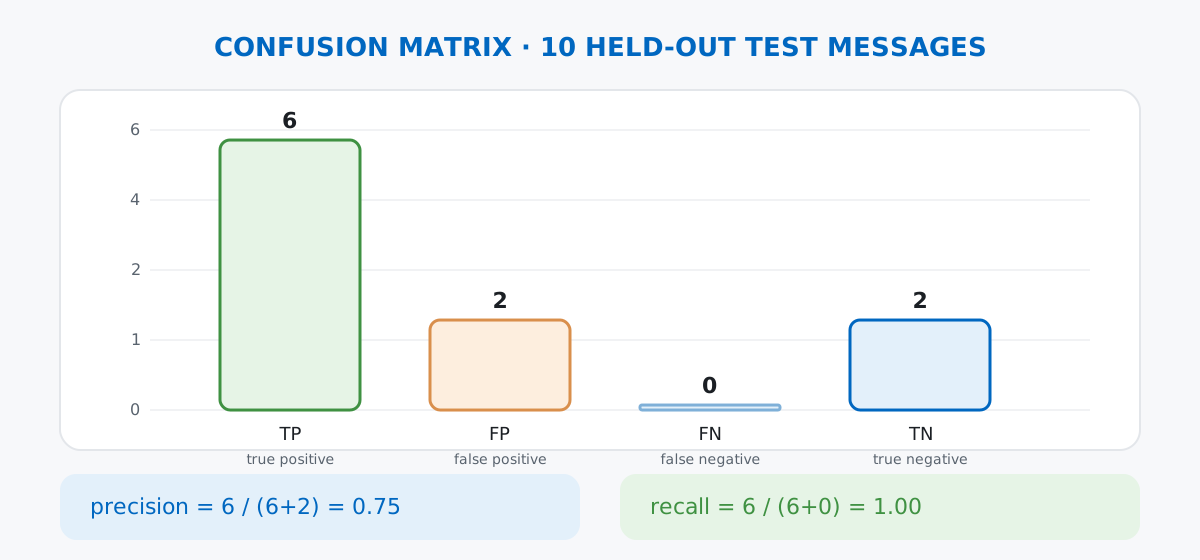
accuracy: 0.8Eight out of ten correct. Notice both mistakes go the same direction: real ham messages predicted as spam, never the reverse. That pattern is worth digging into rather than shrugging off, because accuracy alone hides it — which is exactly what precision and recall are for:
preds = [(t, max(nlp(text).cats, key=nlp(text).cats.get)) for text, t in test_rows]
tp = sum(1 for t, p in preds if t == "spam" and p == "spam")
fp = sum(1 for t, p in preds if t == "ham" and p == "spam")
fn = sum(1 for t, p in preds if t == "spam" and p == "ham")
tn = sum(1 for t, p in preds if t == "ham" and p == "ham")
print(f"tp={tp} fp={fp} fn={fn} tn={tn}")

precision = tp / (tp + fp)
recall = tp / (tp + fn)
print(f"precision={precision:.2f} recall={recall:.2f}")
tp=6 fp=2 fn=0 tn=2
precision=0.75 recall=1.00Recall is a perfect 1.00: every actual spam message got caught. Precision is lower, at 0.75: two ham messages got wrongly flagged as spam (fp=2). For a spam filter, that split is the wrong way round — you’d rather let a little spam through than bury real messages in a spam folder, so in practice you’d want to see the mistakes go the other way. The spaCy training documentation covers configuration options like dropout and batching strategies that can shift this balance on a larger dataset.
A near-zero training loss on a tiny dataset is a warning sign, not a trophy. The loss curve above hit 0.0000 by epoch 8 — the model didn’t generalize a rule, it memorized all 30 training messages. Watch what happens on an everyday sentence with no spam vocabulary at all:
doc3 = nlp("Can you pick up some milk on your way home?")
print(doc3.cats)
{'spam': 0.9920535087585449, 'ham': 0.007946469821035862}That’s a confident, wrong answer — 99% spam for a message about groceries. With only 30 training examples and no pretrained word vectors, the model has no real notion of word meaning; it’s pattern-matching on the specific words and structures it happened to see, and “pick up” or “on your way” apparently correlated with spam often enough in training to trip it up. More data (or starting from a pretrained pipeline with word vectors instead of a blank one) is the fix, not more epochs.
textcat scores are calibrated to your data, not to the world. A 0.99 score means “the model is 99% confident given what it learned,” not “this text is 99% likely to be spam in any general sense.” Don’t treat the raw number as a probability you can compare across different models or datasets — only the ranking within one trained model is meaningful.
A blank pipeline has no shared vocabulary with a pretrained one. If you later swap spacy.blank("en") for spacy.load("en_core_web_sm") to get word vectors or better tokenization edge cases, you have to rebuild and retrain the textcat component — you can’t just bolt a blank-trained one onto a different pipeline. Decide early whether you need a pretrained base, because switching later means retraining, not reattaching.
Training a text classifier with spaCy comes down to a short list of moving parts:
spacy.blank("en") → a pipeline with tokenization only, no downloads requiredtextcat + add_label → the trainable component and the categories it should learnExample.from_dict → the format the trainer expects, pairing a Doc with a {label: bool} referencenlp.update in a loop → the actual training, one shuffled batch at a timedoc.cats → a probability per label once training is done, not a single verdictThe dataset here was small on purpose, to keep the whole loop fast and reproducible — the same code scales up to thousands of labeled examples without changing shape.
If you want to go further with NLP in Python — word embeddings, sequence models, and transformer-based classifiers on real data — the NLP & Deep Learning module in our free Machine Learning course picks up exactly where this post leaves off, and the AI Engineering catalog covers the LLM-based side of working with text if you want to compare approaches.
 Python
Build an AI Chatbot in Python: A Command-Line LLM Client
A from-scratch walkthrough of the pattern behind every LLM chatbot: one function that sends a message plus conversation history to a chat-completion API, a persona set by a system prompt, and a loop that keeps the conversation going.
Read article
Python
Build an AI Chatbot in Python: A Command-Line LLM Client
A from-scratch walkthrough of the pattern behind every LLM chatbot: one function that sends a message plus conversation history to a chat-completion API, a persona set by a system prompt, and a loop that keeps the conversation going.
Read article
 Software Engineering
The Single Responsibility Principle: One Class, One Reason to Change
The Single Responsibility Principle says a class should have only one reason to change. See it in action: take a Python AuthService that also owns its logging, find why that's a problem, and refactor it into clean, focused classes.
Read article
Software Engineering
The Single Responsibility Principle: One Class, One Reason to Change
The Single Responsibility Principle says a class should have only one reason to change. See it in action: take a Python AuthService that also owns its logging, find why that's a problem, and refactor it into clean, focused classes.
Read article