Title here
Summary here
A hands-on introduction to the requests library: make a real GET request to a live API, read the JSON response into Python, shape the request with query parameters, and check status codes before trusting the result.

You want today’s weather for a city, or the current price of a stock, or a list of a GitHub user’s public repositories. Somewhere out there, a server already has that exact answer sitting in a database. A web API is a way to ask for it directly, in a format meant for code to read, instead of asking a browser to render a whole page and then picking through the HTML for the one number you actually wanted.
That split — a server that hands you structured data on purpose, versus a page that was only ever meant for human eyes — is the one worth getting straight before you write any code. If a site publishes a documented API, you talk to the API: a request, a response, done. If it doesn’t, scraping the rendered page is your fallback, which is exactly the problem our post on web scraping with Scrapy covers — a different toolkit for a messier situation. This post stays entirely on the cleaner side of that split: no HTML, no selectors, just a URL, a response, and Python’s requests library. We’ll build the mental model first, then make real calls against a live, no-signup API so every request and response you see here actually happened.
Every call to a web API reduces to the same four steps:
?, narrow the question down. Not “what’s the weather,” but “what’s the weather at latitude 52.52, longitude 13.41, right now.”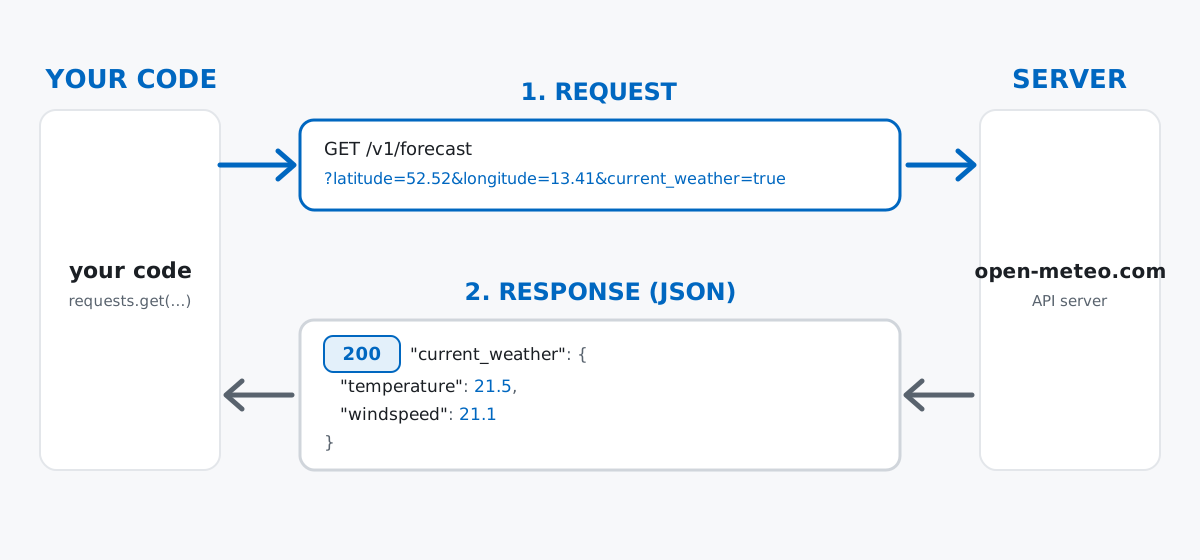
That order in step 4 is the habit this whole post is really trying to build. It’s tempting to jump straight to the body, since that’s where the interesting data lives — but a response with a bad status code often has a body too, just not the one you were expecting.
Every response in this post comes from a real HTTP call to Open-Meteo, a free weather API with no signup and no API key required for non-commercial use. It exists specifically so demos like this hit the same real server you’ll hit when you run this code yourself. Your numbers will differ from mine, because the weather is a moving target — but the shape of every response, its keys, and its status codes will match exactly.
Install requests and make the request:
pip install requestsimport requests
url = "https://api.open-meteo.com/v1/forecast"
params = {"latitude": 52.52, "longitude": 13.41, "current_weather": "true"}
response = requests.get(url, params=params, timeout=10)
print(response.status_code)
print(response.url)200
https://api.open-meteo.com/v1/forecast?latitude=52.52&longitude=13.41¤t_weather=truerequests.get took the base URL and the params dictionary and assembled the full URL for you — response.url shows exactly what got sent. Passing a params dict is the right way to add a query string; hand-building "?latitude=52.52&..." as a string works too, but it’s error-prone the moment a value needs URL-escaping. 200 is the status code for “understood, here’s your answer” — the one you want to see. (The outputs in this post come from requests 2.34.2 on Python 3.13 — everything shown also works on older 2.x releases.)
Call response.json() and requests parses the body’s JSON text straight into ordinary Python data — no manual string parsing required:
data = response.json()
data
{'latitude': 52.52, 'longitude': 13.419998, 'generationtime_ms': 0.05078315734863281, 'utc_offset_seconds': 0, 'timezone': 'GMT', 'timezone_abbreviation': 'GMT', 'elevation': 38.0, 'current_weather_units': {'time': 'iso8601', 'interval': 'seconds', 'temperature': '°C', 'windspeed': 'km/h', 'winddirection': '°', 'is_day': '', 'weathercode': 'wmo code'}, 'current_weather': {'time': '2026-07-05T11:00', 'interval': 900, 'temperature': 21.5, 'windspeed': 21.1, 'winddirection': 307, 'is_day': 1, 'weathercode': 2}}data is a plain Python dict, nested one level deep, because JSON objects nest the same way Python dicts do. Everything under current_weather is the actual observation; current_weather_units is a second, parallel dict telling you what unit each of those numbers is in. Pull both out together, exactly like you’d index any nested dictionary:
current = data["current_weather"]
temp = current["temperature"]
temp_unit = data["current_weather_units"]["temperature"]
wind = current["windspeed"]
wind_unit = data["current_weather_units"]["windspeed"]

print(f"Berlin is currently {temp}{temp_unit} with wind speed {wind} {wind_unit}.")
Berlin is currently 21.5°C with wind speed 21.1 km/h.Notice the API keeps the number and its unit in two separate places, rather than baking "21.5°C" into one string. That’s a deliberate design choice on the API’s part, and it’s exactly why you read a new API’s documentation instead of guessing field names — the shape of the JSON isn’t something you can reliably infer.
The same endpoint answers a different question just by changing what’s in params. Wrap the call in a small function and reuse it for any city:
def current_weather(latitude, longitude, **extra_params):
    params = {"latitude": latitude, "longitude": longitude, "current_weather": "true"}
    params.update(extra_params)
    return requests.get(url, params=params, timeout=10)

paris = current_weather(48.8566, 2.3522)
print(paris.url)
print(paris.json()["current_weather"]["temperature"])https://api.open-meteo.com/v1/forecast?latitude=48.8566&longitude=2.3522¤t_weather=true
25.0Same function, same endpoint, different question — only the parameters changed. **extra_params lets you bolt on whatever else the API supports without rewriting the function signature every time. Open-Meteo, for instance, also accepts a temperature_unit parameter:
berlin_f = current_weather(52.52, 13.41, temperature_unit="fahrenheit")
print(berlin_f.url)
print(berlin_f.json()["current_weather"]["temperature"])https://api.open-meteo.com/v1/forecast?latitude=52.52&longitude=13.41¤t_weather=true&temperature_unit=fahrenheit
70.770.7°F and 21.5°C describe the same moment in the same place — the API did the unit conversion, you didn’t have to. This is the whole pattern for shaping a request: look up what parameters an API accepts (the requests Quickstart covers everything you can pass through params, headers, and the request body), add them to the same dict, and the URL takes care of itself.
status_code Before You Trust the BodyEvery request so far returned 200. Real ones don’t always. Pass a latitude that isn’t a real place on Earth — anything outside -90 to 90 degrees — and Open-Meteo tells you so, both in the status code and in the body:
bad = requests.get(
    url,
    params={"latitude": 999, "longitude": 13.41, "current_weather": "true"},
    timeout=10,
)
print(bad.status_code)
print(bad.json())
400
{'error': True, 'reason': 'Latitude must be in range of -90 to 90°. Given: 999.0.'}400 means the client — your request — was malformed; the server understood you fine, it’s the question itself that doesn’t make sense. The body is still valid JSON, just shaped differently than a successful response: there’s no current_weather key anywhere in it. Code that assumed success would find out the hard way:
try:
    temp = bad.json()["current_weather"]["temperature"]
except KeyError as e:
    print(f"KeyError: {e}")
KeyError: 'current_weather'That’s the trap: the request itself didn’t raise anything — requests.get() returns a normal Response object for a 400 just as readily as for a 200. The KeyError only shows up later, on the line where your code assumed a key would be there. A typo’d URL path teaches the same lesson from a different angle:
missing = requests.get("https://api.open-meteo.com/v1/forecast/nonexistent-endpoint", timeout=10)
print(missing.status_code)
print(missing.json())
404
{'error': True, 'reason': 'Not Found'}The fix is to check status_code yourself — or, cleaner, call .raise_for_status(), which turns any 4xx or 5xx status into a Python exception you can catch like any other:
try:
    bad.raise_for_status()
except requests.exceptions.HTTPError as e:
    print(f"HTTPError: {e}")
HTTPError: 400 Client Error: Bad Request for url: https://api.open-meteo.com/v1/forecast?latitude=999&longitude=13.41¤t_weather=trueWrap the whole exchange — request, status check, and JSON parsing — in one small helper, and every call site downstream gets the same safety net for free:
def safe_current_weather(latitude, longitude):
    try:
        r = requests.get(
            url,
            params={"latitude": latitude, "longitude": longitude, "current_weather": "true"},
            timeout=10,
        )
        r.raise_for_status()
    except requests.exceptions.RequestException as e:
        print(f"Request failed: {e}")
        return None
    return r.json()["current_weather"]

print(safe_current_weather(52.52, 13.41))
print(safe_current_weather(999, 13.41))
{'time': '2026-07-05T11:00', 'interval': 900, 'temperature': 21.5, 'windspeed': 21.1, 'winddirection': 307, 'is_day': 1, 'weathercode': 2}
Request failed: 400 Client Error: Bad Request for url: https://api.open-meteo.com/v1/forecast?latitude=999&longitude=13.41¤t_weather=true
Nonerequests.exceptions.RequestException is the base class for every error requests can raise — connection failures and timeouts included, not just bad status codes — so catching that one class covers “something went wrong with this request” in general.
Open-Meteo’s forecast endpoint needs no authentication, which is exactly why it makes a good teaching example: every reader can run every snippet in this post with zero setup. Plenty of APIs aren’t that generous — a stock-price feed, a translation service, most anything with a cost per request — and they need you to prove who you are on every call. Two patterns cover almost all of them.
The first is an Authorization header, sent alongside the request rather than folded into the URL:
import os

api_key = os.environ["API_KEY"]
headers = {"Authorization": f"Bearer {api_key}"}
response = requests.get(some_url, headers=headers, timeout=10)
The second is an API key as a query parameter, added to the same params dict you’ve already been using in this post:
params = {"q": "Berlin", "api_key": api_key}
response = requests.get(some_url, params=params, timeout=10)
Either way, treat the key itself like a password: read it from an environment variable rather than typing it into the script, and never commit it to version control. Which pattern a given API expects is always documented — there’s no way to guess correctly, and no reason to; look it up once per API and move on.
A non-200 response doesn’t stop your script by itself. requests.get() returns a normal Response object no matter what the server said — a 404, a 500, and a 200 all travel through the exact same code path. Skip the status check and the first sign of trouble is usually a confusing KeyError several lines later, on a field that simply isn’t in an error body.
Rate limits are a real budget, not a suggestion. Open-Meteo’s free, non-commercial tier caps usage at well under 10,000 calls a day, with tighter per-minute and per-hour ceilings on top — generous, but not infinite, and plenty of free APIs are stricter still. A loop that calls an API once per row of a 50,000-row spreadsheet, with no delay and no caching, is the fastest way to get an IP temporarily blocked. Check the docs for the limit, and add a short time.sleep() between calls if you’re making more than a handful in a row.
Query parameters and the request body are two different places to put data. Everything this post passed through params={...} attaches key-value pairs to the URL’s query string, which is what a GET request expects. A POST request typically sends its payload as a request body instead, via requests.post(url, json={...}). Passing params to a POST still just extends the URL; passing json/data to a GET is usually ignored by the server. Match the argument to the HTTP method the API actually documents.
Skipping timeout= means “hang forever” is the default, not a fallback. requests.get(url) with no timeout argument waits indefinitely if the server never responds — a dropped connection, an overloaded proxy, a server that’s simply down. Every example in this post passed timeout=10; make that a habit rather than an afterthought, especially in anything that runs unattended.
Every API call in this post followed the same shape:
params={...} on a GET)response.json() → the answer, already Python dicts and listsstatus_code / raise_for_status() → check before you trust the bodyheaders= / an api_key param → prove who you are, when the API asksIf you want to take that JSON a step further — load it straight into a DataFrame, clean it up, and combine it with other data — the DataFrames and Reading Data lessons in our free Python for Data Analytics course pick up exactly where this post’s response.json() leaves off.
 Python
Build an AI Chatbot in Python: A Command-Line LLM Client
A from-scratch walkthrough of the pattern behind every LLM chatbot: one function that sends a message plus conversation history to a chat-completion API, a persona set by a system prompt, and a loop that keeps the conversation going.
Read article
Python
Build an AI Chatbot in Python: A Command-Line LLM Client
A from-scratch walkthrough of the pattern behind every LLM chatbot: one function that sends a message plus conversation history to a chat-completion API, a persona set by a system prompt, and a loop that keeps the conversation going.
Read article
 Software Engineering
The Single Responsibility Principle: One Class, One Reason to Change
The Single Responsibility Principle says a class should have only one reason to change. See it in action: take a Python AuthService that also owns its logging, find why that's a problem, and refactor it into clean, focused classes.
Read article
Software Engineering
The Single Responsibility Principle: One Class, One Reason to Change
The Single Responsibility Principle says a class should have only one reason to change. See it in action: take a Python AuthService that also owns its logging, find why that's a problem, and refactor it into clean, focused classes.
Read article