Title here
Summary here
A hands-on walkthrough of Scrapy's core pieces — spiders, selectors, Items, and pipelines — building a small price-watch project against a real practice site, one runnable step at a time.

You can requests.get() a single page in three lines, but the moment you need fifty pages, a polite delay between requests, and a clean CSV at the end, hand-rolled scripts turn into a pile of loops and try/except blocks. That’s the gap Scrapy fills: it’s a full framework for crawling sites and pulling structured data out of them, not just a library for fetching one page.
The part that trips people up isn’t the HTML parsing — it’s the shape of the framework itself. A Scrapy project has spiders, selectors, items, and pipelines, and until you see how they connect, it feels like a lot of ceremony for what looks like a for loop. This post builds that mental model first, then works through each piece by building a small, real spider against a practice site, one runnable step at a time.
Every piece of data that comes out of a Scrapy project travels the same path:
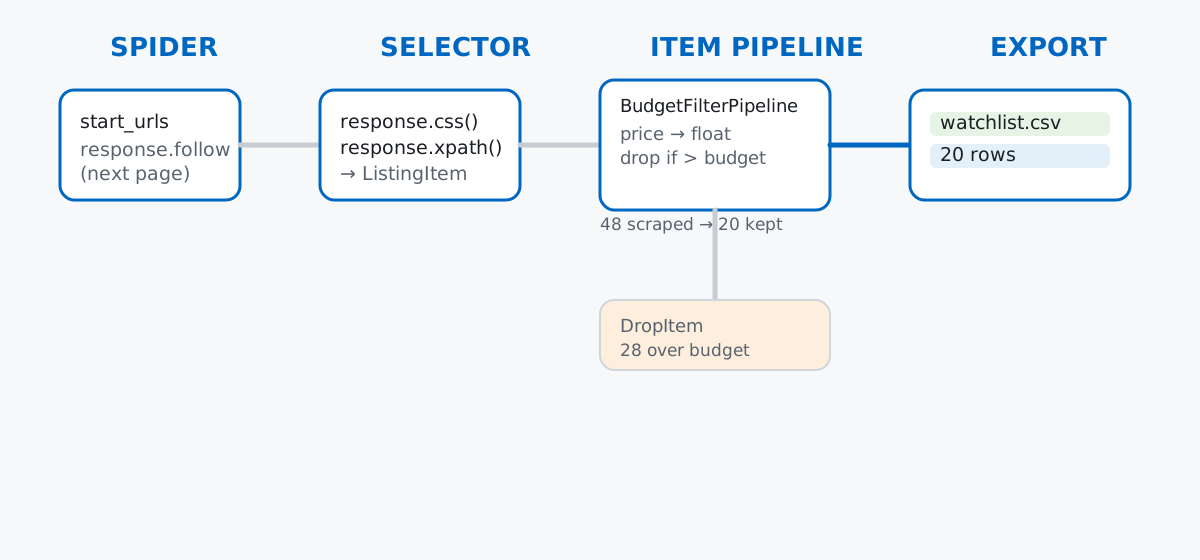
You only ever write steps 1, 2, and (optionally) 4. Scrapy’s engine handles the actual downloading, scheduling, and writing — including things you’d otherwise forget, like respecting robots.txt and pacing your requests.
Practicing on a real commercial site is a bad idea — you can annoy the site owner, get your IP blocked, or scrape data you have no right to reuse. Instead, this post scrapes scrapeme.live, a small WordPress/WooCommerce store built specifically as a public scraping playground: fake Pokémon-themed products, real HTML, no login, and a robots.txt that only blocks /wp-admin/:
User-agent: *
Disallow: /wp-admin/
Allow: /wp-admin/admin-ajax.php
The scenario: imagine you collect Pokémon merchandise and want a personal price-watch list — a script that scrapes the current catalog and keeps only the items under your budget. The store lists 48 products across several pages, each with a name and a price in GBP. Everything below was actually run against the live site; your numbers will match as long as the store’s demo catalog hasn’t changed.
Scrapy projects are scaffolded, not hand-built. One command creates the standard layout:
scrapy startproject pricewatchNew Scrapy project 'pricewatch', using template directory
'.../scrapy/templates/project', created in:
pricewatch
You can start your first spider with:
cd pricewatch
scrapy genspider example example.comThat leaves you with pricewatch/settings.py, items.py, pipelines.py, and an empty spiders/ package. Every spider you write lives in spiders/ and gets discovered automatically — there’s no registry to update by hand.
A spider is a Python class with a name, one or more start_urls, and a parse method that Scrapy calls with the downloaded page. Save this as pricewatch/spiders/prices.py:
import scrapy


class MinimalSpider(scrapy.Spider):
    name = "minimal"
    start_urls = ["https://scrapeme.live/shop/"]

    def parse(self, response):
        for product in response.css("li.product"):
            yield {
                "name": product.css("h2::text").get(),
                "price": product.css(".price .amount::text").get(),
            }
response.css("li.product") finds every product card on the page and returns a list of sub-selectors, so product.css(...) inside the loop searches only within that one card. Run it with scrapy runspider, capping it at one page for now:
scrapy runspider pricewatch/spiders/prices.py -O prices.json -s CLOSESPIDER_PAGECOUNT=1[
{"name": "Bulbasaur", "price": "63.00"},
{"name": "Ivysaur", "price": "87.00"},
{"name": "Venusaur", "price": "105.00"},
{"name": "Charmander", "price": "48.00"},
{"name": "Charmeleon", "price": "165.00"},
{"name": "Charizard", "price": "156.00"},
{"name": "Squirtle", "price": "130.00"},
{"name": "Wartortle", "price": "123.00"},
{"name": "Blastoise", "price": "76.00"},
{"name": "Caterpie", "price": "73.00"},
{"name": "Metapod", "price": "148.00"},
{"name": "Butterfree", "price": "162.00"},
{"name": "Weedle", "price": "25.00"},
{"name": "Kakuna", "price": "148.00"},
{"name": "Beedrill", "price": "168.00"},
{"name": "Pidgey", "price": "159.00"}
]Sixteen products, one request. -O overwrites the output file (use lowercase -o to append instead — worth knowing before you accidentally combine two runs into one file). CLOSESPIDER_PAGECOUNT=1 is a safety rail for this demo so the spider stops after the first page; drop it later once you’re ready to crawl for real.
Every field so far came from a CSS selector, but Scrapy selectors also speak XPath, and some fields are easier to reach one way than the other. The price sits inside nested <span> tags — <span class="woocommerce-Price-amount amount">£<span class="woocommerce-Price-currencySymbol">...</span>63.00</span> — and an XPath expression can grab just the outer span’s own text, skipping the currency symbol’s nested span entirely:
product.xpath(".//span[contains(@class, 'amount')]/text()").get()contains(@class, ...) matters here because the real class attribute is "woocommerce-Price-amount amount" — two classes, not one — so an exact-match selector like [@class='amount'] would silently return nothing. This is also the moment to stop returning bare dictionaries and define an Item. An Item is a small schema — it documents what fields a scraped record has, and misspelling a field name raises an error instead of silently creating a new key. Add this to pricewatch/items.py:
import scrapy


class ListingItem(scrapy.Item):
    name = scrapy.Field()
    price = scrapy.Field()
    url = scrapy.Field()
    image_url = scrapy.Field()
And update the spider to fill one in per product:
import scrapy

from pricewatch.items import ListingItem


class ItemsSpider(scrapy.Spider):
    name = "items"
    start_urls = ["https://scrapeme.live/shop/"]

    def parse(self, response):
        for product in response.css("li.product"):
            item = ListingItem()
            item["name"] = product.css("h2::text").get()
            item["price"] = product.xpath(".//span[contains(@class, 'amount')]/text()").get()
            item["url"] = product.css("a::attr(href)").get()
            item["image_url"] = product.css("img::attr(src)").get()
            yield item
[
{
"name": "Bulbasaur",
"price": "63.00",
"url": "https://scrapeme.live/shop/Bulbasaur/",
"image_url": "https://scrapeme.live/wp-content/uploads/2018/08/001-350x350.png"
},
{
"name": "Ivysaur",
"price": "87.00",
"url": "https://scrapeme.live/shop/Ivysaur/",
"image_url": "https://scrapeme.live/wp-content/uploads/2018/08/002-350x350.png"
},
{
"name": "Venusaur",
"price": "105.00",
"url": "https://scrapeme.live/shop/Venusaur/",
"image_url": "https://scrapeme.live/wp-content/uploads/2018/08/003-350x350.png"
}
]Same sixteen products, now with a url and image_url alongside the name and price, and a schema behind them. The Scrapy selectors documentation covers the full CSS and XPath API if you need something more specific than what’s here — nested attributes, sibling navigation, regular-expression extraction, and more.
One page gets you sixteen products; the store has 48 across several pages. The “next page” link is right there in the HTML — response.follow reads an href, resolves it against the current page’s URL, and schedules it as a new request with the same callback:
import scrapy

from pricewatch.items import ListingItem


class PaginationSpider(scrapy.Spider):
    name = "pagination"
    start_urls = ["https://scrapeme.live/shop/"]
    max_pages = 3

    def parse(self, response, page=1):
        for product in response.css("li.product"):
            item = ListingItem()
            item["name"] = product.css("h2::text").get()
            item["price"] = product.xpath(".//span[contains(@class, 'amount')]/text()").get()
            item["url"] = product.css("a::attr(href)").get()
            item["image_url"] = product.css("img::attr(src)").get()
            yield item

        next_page = response.css("a.next.page-numbers::attr(href)").get()
        if next_page and page < self.max_pages:
            yield response.follow(
                next_page, callback=self.parse, cb_kwargs={"page": page + 1}
            )
cb_kwargs passes the running page count into the next call to parse, which is how the spider knows when to stop — max_pages = 3 caps this demo at 48 products instead of crawling the entire 48-page catalog. Run it and write straight to CSV:
scrapy runspider pricewatch/spiders/prices.py -O products.csvimage_url,name,price,url
https://scrapeme.live/wp-content/uploads/2018/08/001-350x350.png,Bulbasaur,63.00,https://scrapeme.live/shop/Bulbasaur/
https://scrapeme.live/wp-content/uploads/2018/08/002-350x350.png,Ivysaur,87.00,https://scrapeme.live/shop/Ivysaur/
https://scrapeme.live/wp-content/uploads/2018/08/003-350x350.png,Venusaur,105.00,https://scrapeme.live/shop/Venusaur/
...
https://scrapeme.live/wp-content/uploads/2018/08/049-350x350.png,Venomoth,53.00,https://scrapeme.live/shop/Venomoth/
https://scrapeme.live/wp-content/uploads/2018/08/050-350x350.png,Diglett,122.00,https://scrapeme.live/shop/Diglett/item_scraped_count in the run’s final stats reads 48 — three pages of sixteen. Notice the CSV columns come out alphabetical (image_url, name, price, url), not in the order you assigned them; if column order matters downstream, pass FEEDS settings with an explicit fields list rather than relying on dict order.
The price is still the string "63.00", and every one of the 48 products got scraped whether it fits your budget or not. Both are exactly what an item pipeline is for — code that runs on every item after the spider yields it, before export. Add this to pricewatch/pipelines.py:
import logging

from scrapy.exceptions import DropItem

logger = logging.getLogger(__name__)


class BudgetFilterPipeline:
    """Convert the scraped price string to a float, and drop anything
    outside the reader's watch-list budget."""

    def __init__(self, budget):
        self.budget = budget
        self.seen = 0
        self.kept = 0

    @classmethod
    def from_crawler(cls, crawler):
        return cls(budget=crawler.settings.getfloat("WATCHLIST_BUDGET_GBP", 100.0))

    def process_item(self, item):
        self.seen += 1
        item["price"] = float(item["price"])
        if item["price"] > self.budget:
            raise DropItem(f"Over budget: {item['name']} at £{item['price']}")
        self.kept += 1
        return item

    def close_spider(self):
        logger.info(
            "BudgetFilterPipeline: kept %d of %d items under £%s",
            self.kept, self.seen, self.budget,
        )
Raising DropItem is how a pipeline says “don’t export this one” — Scrapy catches it, logs it, and moves on. Wire the pipeline into pricewatch/settings.py and it runs on every spider in the project:
ITEM_PIPELINES = {
    "pricewatch.pipelines.BudgetFilterPipeline": 300,
}
WATCHLIST_BUDGET_GBP = 100.0
The 300 is priority — lower numbers run first when you have several pipelines. Rerunning the exact same spider from the previous section now produces a filtered watch list, with no change to the spider’s own code:
scrapy runspider pricewatch/spiders/prices.py -O watchlist.csv2026-07-03 06:23:03 [scrapy.core.scraper] WARNING: Dropped: Over budget: Venusaur at £105.0
...
2026-07-03 06:23:06 [pricewatch.pipelines] INFO: BudgetFilterPipeline: kept 20 of 48 items under £100.0Twenty of the forty-eight products are under £100. This is the payoff of separating spiders from pipelines: the spider’s only job is “find the products and follow the pages,” and the pipeline’s only job is “decide what counts as a keeper.” You can change the budget, or the rule entirely, without touching a single selector.
ROBOTSTXT_OBEY is on by default, and it silently drops requests, not errors. Point a spider at a disallowed path and nothing crashes — the request just never happens:
2026-07-03 06:23:34 [scrapy.downloadermiddlewares.robotstxt] DEBUG: Forbidden by robots.txt: <GET https://scrapeme.live/wp-admin/>If your item count looks lower than expected, check the log for Forbidden by robots.txt before you assume your selectors are broken.
Being polite is a setting, not a habit you have to remember. Current versions of scrapy startproject scaffold DOWNLOAD_DELAY = 1 and CONCURRENT_REQUESTS_PER_DOMAIN = 1 into settings.py out of the box — a one-second gap between requests to the same domain, one at a time. Loosening those to crawl faster is your call to make deliberately, not something to do by deleting lines you didn’t understand.
Scrapy only ever sees what arrived in the HTTP response — never what JavaScript would have rendered. This particular store is a good scraping target precisely because it isn’t one: the price text is already sitting in the raw HTML before any script runs.
"63.00" in response.textTruePlenty of modern sites build their product grids client-side, so the raw response Scrapy fetches is a nearly empty shell — your selectors would find nothing, and it isn’t a selector bug. That’s a job for a browser-automation tool instead, not vanilla Scrapy.
A relative href becomes a broken URL if you concatenate strings by hand. response.urljoin resolves it against the page’s URL, not the site’s root:
from scrapy.http import HtmlResponse

body = b"<a href='/shop/Bulbasaur/'>Bulbasaur</a>"
response = HtmlResponse(url="https://scrapeme.live/shop/page/3/", body=body, encoding="utf-8")

href = response.css("a::attr(href)").get()
response.url + href        # naive concatenation
response.urljoin(href)     # correct
'https://scrapeme.live/shop/page/3//shop/Bulbasaur/'
'https://scrapeme.live/shop/Bulbasaur/'response.follow, used earlier for pagination, already calls urljoin internally — one more reason to reach for it instead of building request URLs by hand.
Everything in a Scrapy project follows the same path: a spider requests pages, selectors pull fields out of the response, an Item gives those fields a schema, and an item pipeline cleans or filters before export:
Respect robots.txt, keep DOWNLOAD_DELAY sane, and remember that a JS-heavy page needs a different tool entirely, and you can point this same pattern at any static site’s product list, article index, or directory.
If you want to do more with the data once it’s scraped — loading a CSV into a DataFrame, cleaning columns, joining it with other sources — the DataFrames and Reading Data lesson in our free Python for Data Analytics course picks up exactly where this post’s products.csv leaves off.
 Python
Build an AI Chatbot in Python: A Command-Line LLM Client
A from-scratch walkthrough of the pattern behind every LLM chatbot: one function that sends a message plus conversation history to a chat-completion API, a persona set by a system prompt, and a loop that keeps the conversation going.
Read article
Python
Build an AI Chatbot in Python: A Command-Line LLM Client
A from-scratch walkthrough of the pattern behind every LLM chatbot: one function that sends a message plus conversation history to a chat-completion API, a persona set by a system prompt, and a loop that keeps the conversation going.
Read article
 Software Engineering
The Single Responsibility Principle: One Class, One Reason to Change
The Single Responsibility Principle says a class should have only one reason to change. See it in action: take a Python AuthService that also owns its logging, find why that's a problem, and refactor it into clean, focused classes.
Read article
Software Engineering
The Single Responsibility Principle: One Class, One Reason to Change
The Single Responsibility Principle says a class should have only one reason to change. See it in action: take a Python AuthService that also owns its logging, find why that's a problem, and refactor it into clean, focused classes.
Read article