Title here
Summary here
Every lesson so far has assumed the experiment ran correctly and you just had to analyze it well. Reality is messier: assignment code has bugs, events get dropped, and users react to change itself in ways that have nothing to do with whether your change is good. Before you trust any number an experiment produces, you run a handful of cheap sanity checks that catch a broken pipeline — and you stay alert to a set of threats to validity that can invalidate a result even when every statistic is computed perfectly. The mindset is simple: an experiment’s number is only as trustworthy as the plumbing behind it, and these checks are how you inspect the plumbing before you ship a decision.
By the end of this lesson, you will be able to:
Let’s start with the one check you run first, every time.
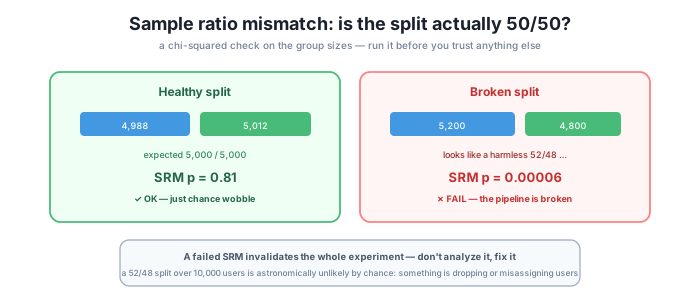
You assigned users 50/50. When the experiment ends, you count the groups — and they aren’t 50/50. Is that a problem? Random assignment always wobbles: 4,988 versus 5,012 is nothing. But if the observed split drifts further from 50/50 than chance allows, that’s a sample ratio mismatch (SRM), and it means something in the pipeline is broken — a bug is dropping users, misassigning them, or logging one arm differently. When assignment itself is broken, no analysis of that experiment can be trusted, because the two groups are no longer comparable at all.
To decide whether a split is “just wobble” or “broken,” test the observed counts against the expected ratio with a chi-squared goodness-of-fit test. It gives you a p-value for “how surprising is this split if assignment were truly 50/50?”
The check is a few lines with SciPy. We compare the observed counts to the expected split and read off the p-value:
from scipy import stats

def srm_pvalue(n_a, n_b, expected_ratio=0.5):
    total = n_a + n_b
    exp = [total * expected_ratio, total * (1 - expected_ratio)]
    return stats.chisquare([n_a, n_b], f_exp=exp).pvalue

print("4988/5012:", round(srm_pvalue(4988, 5012), 3))   # healthy
print("5200/4800:", srm_pvalue(5200, 4800))             # broken
Running it:
4988/5012: 0.81
5200/4800: 6.33e-05
The healthy split gives p = 0.81 — completely unremarkable, exactly the kind of wobble random assignment produces. The second split looks like a harmless “52/48,” but over 10,000 users the SRM p-value is 0.00006: astronomically unlikely to happen by chance if assignment were really 50/50. Something in the pipeline is broken. Notice how ordinary the counts look — this is why you compute SRM instead of eyeballing the split. A 200-user gap feels small; the test tells you it’s a five-alarm fire.
Check SRM first, always — before any other analysis
SRM is the very first thing you look at when an experiment ends, before you touch the metric you actually care about. If it fails — the common threshold is p < 0.001 — stop. Do not analyze the result, do not “adjust for it,” do not ship. A failed SRM means the two groups aren’t comparable, so every downstream number is built on sand. Go fix the instrumentation, then rerun. A failed SRM also often explains a mix imbalance of the kind that drives Simpson’s paradox (Lesson 3): if the arms received different user populations, aggregate comparisons were never going to be fair.
SRM catches a broken pipeline. But an experiment can pass every sanity check and still mislead you, because some threats live in user behavior and timing rather than in the code. Here are the four to watch for, each with the mitigation that neutralizes it.
1. Novelty effect. Users react to a change simply because it’s new. When Lumen ships a redesigned dashboard, some users click the shiny new export button just to see what it does — the early lift is curiosity, not value, and it fades within days. Mitigation: run the test long enough for the novelty to wear off, and split new versus returning users. If the “win” lives entirely in returning users during week one and evaporates after, it was novelty. Watch the trend over time, not just the pooled average.
2. Primacy / change-aversion effect. The mirror image: existing users are briefly worse because they’re used to the old way. Lumen’s power users know exactly where the old “Run report” button lived; move it and they fumble for a few days, so the treatment looks like a loss at first. As they adapt, the effect improves — and the real steady-state effect may be positive. Mitigation: the same discipline — run long enough for behavior to stabilize before you read the result.
3. Seasonality / day-of-week effects. Behavior isn’t constant across the calendar. Lumen sees heavy weekday usage and quiet weekends, plus a spike right after payday. A test that runs Tuesday to Friday samples only the busy part of the cycle and can mislead badly. Mitigation: run for at least one, ideally two, full weeks so the analysis averages over the weekly cycle — the same reason Module 3 warned against runtimes shorter than a full week.
4. Instrumentation / logging bugs. The metric itself is measured wrong, or events are dropped for one arm — the treatment’s conversion events fire on a page the control never sees, and now the numbers aren’t measuring the same thing. Mitigation: the SRM check catches many of these, and you back it up by sanity-checking absolute metric levels against known baselines (a 40% conversion rate where you’ve always seen 4% is a logging bug, not a miracle) and by dogfooding the experience before launch.
The pattern across all four: a correctly computed statistic can still answer the wrong question if the data feeding it is distorted by newness, adaptation, timing, or measurement.
You ran a 50/50 test and observed 5,050 versus 4,950 out of 10,000 users. Without the exact p-value, is this more like the healthy case or the broken one — and how would you settle it?
Hint
It’s much closer to healthy. A 100-user gap out of 10,000 is a smaller deviation than the 5,200/4,800 case (a 200-user gap that already gave p = 0.00006 is very extreme; halving the gap moves the p-value well back toward the “just wobble” range). Don’t guess, though — settle it by calling srm_pvalue(5050, 4950) and comparing against the p < 0.001 threshold. The whole point of SRM is that you compute it rather than eyeball it.
Lumen’s new onboarding flow showed a +12% signup lift in its first three days, then drifted back toward zero by the end of week two. Novelty or primacy — and what should the team conclude?
Hint
This is a novelty effect: the treatment started ahead and faded, which is curiosity wearing off, not change-aversion (that would start behind and improve). The right conclusion is that the true steady-state effect is near zero — the early +12% was users reacting to newness. This is exactly why you run long enough to see the trend and don’t declare victory on day three. Splitting new versus returning users would confirm it.
An analyst reports: “SRM p = 0.0002, but the treatment still won on revenue by 6%, so I think we should ship.” What’s wrong with this reasoning?
Hint
A failed SRM (p = 0.0002 is well below 0.001) means assignment is broken, so the two groups aren’t comparable — which makes the 6% revenue difference meaningless, not a result to ship on. You can’t “look past” a broken assignment to trust a downstream metric; the mismatch is often exactly what created the apparent lift. The correct move is to stop, find the pipeline bug, fix it, and rerun the experiment from scratch. No analysis of a SRM-failed test can be trusted.
Before you trust any experiment, you run cheap sanity checks and stay alert to threats to validity. The headline check is sample ratio mismatch (SRM): test the observed group split against the expected ratio with a chi-squared goodness-of-fit test. A 4,988/5,012 split gives p = 0.81 (fine), while a 5,200/4,800 split — which looks like a harmless 52/48 — gives p = 0.00006, meaning assignment is broken and the whole experiment is untrustworthy. Check SRM first; if it fails (commonly p < 0.001), stop and fix the pipeline rather than analyze. Even a test that passes SRM can be invalidated by behavioral and timing threats: novelty (a new-thing lift that fades), primacy (change-aversion that improves as users adapt), seasonality (day-of-week and pay-cycle effects), and instrumentation bugs (a mismeasured or dropped metric). Each has a matching mitigation, and most reduce to “run long enough” and “measure carefully.”
These checks are the difference between a number you can act on and a number that quietly lies to you. A failed SRM you didn’t check for turns a “6% revenue win” into a bug report you shipped as a feature; a novelty effect you didn’t wait out turns three days of curiosity into a permanent decision; a partial-week runtime turns a weekday spike into a “result.” None of these show up as an error message — the statistics are computed correctly on top of distorted data, which is exactly why they survive review. The habit of sanity-checking the plumbing before trusting the number is what keeps a broken test from becoming a shipped bad decision. Next, you’ll put all of Module 6 to work auditing a real Lumen experiment end to end.
Put every check from this module to work auditing a real Lumen experiment for peeking, multiple comparisons, Simpson's paradox, and SRM.
Return to the Pitfalls and Validity module overview
You now have the checklist you run before trusting any result: SRM first, then a scan for novelty, primacy, seasonality, and instrumentation bugs. These checks are cheap, and skipping them is how a broken test becomes a shipped bad decision. In the guided project that closes this module, you’ll audit a real Lumen experiment end to end — spotting the peeking, the multiple comparisons, the Simpson’s-paradox mix, and the SRM failure all at once, and deciding what can actually be trusted.