Title here
Summary here
You’ve named the two errors and seen the levers that raise power. Now we cash all of that in for a single number: how many users does each arm of the experiment actually need? The good news is that once you’ve made four decisions, the answer is fixed — there’s no wiggle room and no guessing. Feed the formula a baseline rate, a minimum detectable effect, a significance level, and a target power, and it hands back the required sample size per arm. This lesson turns that formula into a few lines of scipy, runs it for real, and reads off the numbers you’d actually plan a test around.
By the end of this lesson, you will be able to:
Let’s start with the four inputs.
Sample size feels like a mysterious constant handed down by a calculator, but it’s nothing more than the output of four decisions you make before the test runs. Give it these four and the answer is determined:
p1 — the current conversion rate of the control, which you guess from historical data (say 10%).p2 = p1 + MDE — the treatment rate you want to be able to detect, set by choosing the minimum detectable effect (say +2 points, so 12%).α — your tolerated false-positive rate, almost always 0.05 (from Lesson 1).1 − β — how reliably you want to catch a real effect of that size, usually 0.80 or 0.90 (from Lesson 2).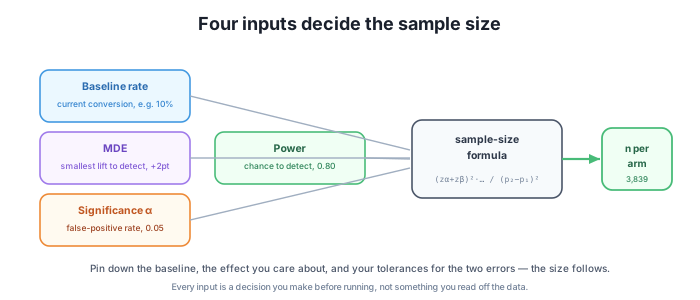
There’s no fifth input hiding somewhere. Change any one of these four and the sample size changes; leave all four fixed and there is exactly one right answer. That’s what makes sizing a deliberate act rather than a guess.
For a two-proportion test, the required sample size per arm is:
The two z-terms are just normal quantiles for your chosen α and power: z_{1-α/2} is 1.96 for α = 0.05, and z_{power} is 0.84 for power = 0.80. In code it’s almost a transcription of the formula:
import math
from scipy.stats import norm

def n_per_arm(p1, p2, alpha=0.05, power=0.80):
    z_a = norm.ppf(1 - alpha/2)      # 1.96 for alpha=0.05
    z_b = norm.ppf(power)            # 0.84 for power=0.80
    num = (z_a + z_b)**2 * (p1*(1-p1) + p2*(1-p2))
    den = (p2 - p1)**2
    return math.ceil(num / den)

print(n_per_arm(0.10, 0.12))                 # 3839
print(n_per_arm(0.10, 0.12, power=0.90))     # 5139
print(n_per_arm(0.10, 0.12, alpha=0.01))     # 5712
Running it:
3839
5139
5712
Read the formula and it tells you why the levers behave the way they do. The numerator carries (z_a + z_b)² — tighten α or raise power and those z-values climb, so n goes up. The denominator carries (p2 − p1)² — the effect squared, which is the callback to Module 2: halve the MDE and you quadruple n. The p(1−p) terms are the per-arm variance of a proportion; they’re largest near a 50% rate and shrink toward the extremes.
The three calls above are the same 10%→12% experiment sized under three different sets of choices, and every number came out of scipy for real:
The pattern is the whole point: higher power and stricter significance both buy you a better test, and both cost more users. Neither is free, and the formula makes the exchange rate explicit before you commit a single day of traffic.
Your baseline is a guess — make it a recent one
Notice that p1 isn’t measured during the test; you have to supply it up front from historical data. That makes it the shakiest input, because a wrong baseline changes n. Size a test at a 10% baseline when the true rate has drifted to 7%, and your p(1−p) variance term and your effective MDE are both off, so the experiment is quietly mis-powered. Pull the baseline from recent data — the last few weeks, not last year — and if the rate is seasonal, size for the window you’ll actually run in.
A colleague resized the 10%→12% test and n per arm jumped from 3,839 to 5,139. Nothing about the baseline or the MDE changed. What did they change, and why did n rise?
Hint
They raised power from 0.80 to 0.90. In the formula that lifts z_power from 0.84 to about 1.28, so the (z_a + z_b)² numerator grows — and n with it. They’re asking to catch the same 2-point lift more reliably, and reliability is paid for in users.
Suppose Lumen decides a 1-point lift (10%→11%) is worth catching instead of 2 points, keeping α = 0.05 and power = 0.80. Roughly what happens to the sample size, and why?
Hint
It roughly quadruples. The MDE lives in the denominator as (p2 − p1)², so halving the effect from 0.02 to 0.01 divides the denominator by 4 — and n goes up by about 4×, into the mid-teens of thousands per arm. Smaller effects are exponentially more expensive to detect, which is why picking the MDE is the highest-leverage decision you make.
The raw formula for the default test returns something like 3,838.4, and the code calls math.ceil to report 3,839. Why round up and not to the nearest integer — and why might you plan for even more than 3,839?
Hint
Rounding up guarantees you meet the power target: 3,838 users would leave you a hair short of 80% power, so you always ceil. Beyond that, real experiments lose users — bots, users who never trigger the metric, tracking gaps — so teams often pad the number (say 5–10%) so the usable sample still clears the requirement.
Sample size is not a guess — it’s the output of four decisions: the baseline rate p1, the target rate p2 = p1 + MDE, the significance level α, and the target power 1 − β. Fix those four and the two-proportion formula returns exactly one required n per arm. We wrote it in a few lines of scipy and computed the real numbers: detecting a 10%→12% lift at 80% power and 5% significance needs 3,839 per arm (7,678 total); raising power to 90% pushes it to 5,139; tightening α to 0.01 pushes it to 5,712. The formula’s shape explains the levers — the effect sits in the denominator squared, so halving the MDE quadruples n, while stricter α and higher power raise the numerator’s z-terms. This is the analytic answer; next lesson we’ll confirm it holds up by simulating experiments at that exact size.
p1, target p2 = p1 + MDE, significance α, and power 1 − β fully determine the required sample size per arm.n = (z_{1-α/2} + z_power)² · (p1(1−p1) + p2(1−p2)) / (p2 − p1)², computed for real with scipy.The single number this lesson produces is what a launch plan is built on: it decides whether a test finishes in a week or a quarter, and whether it can run at all given your traffic. A team that sizes deliberately knows before enrolling anyone that a 1-point lift needs four times the users of a 2-point one, and can renegotiate the MDE instead of running an underpowered test doomed to a Type II error. Getting the baseline from recent data, rounding up, and padding for loss are the difference between a plan that delivers the power you asked for and one that quietly falls short. Next, you’ll stop trusting the formula on faith and watch simulated experiments hit the target power at exactly this sample size.
Confirm the sample-size formula by simulation, and trace how power rises with n along a power curve.
Return to the Power and Sample Size module overview
You can now turn four decisions — baseline, MDE, significance, and power — into a concrete sample size with a few lines of scipy, and you’ve seen the exact numbers: 3,839 per arm for the default 10%→12% test, more when you demand higher power or stricter significance. Next you’ll put that number to the test, simulating thousands of experiments at that size to watch the measured power land right on 80%, and tracing the full power curve that connects sample size to detection.