Title here
Summary here
Across this module you built the pieces one at a time: the two errors and what α controls (Lesson 1), what power is and the levers that raise it (Lesson 2), and the two-proportion formula that turns a target effect into a required sample size (Lesson 3). Now you’ll put them together on one real decision. Lumen is about to test a redesigned signup page, and before a single visitor is bucketed, someone has to answer: how many users do we need, and how long will that take? That’s sizing, and doing it wrong is how tests end up secretly guaranteed to miss a real win.
You’ll size this experiment end to end — pick the inputs and justify each one, compute the sample size, and then do the thing most teams skip: confirm the number by simulation. The formula makes a promise (“this n gives 80% power”); you’ll run thousands of simulated experiments and check that the promise holds. Then you’ll turn the sample size into a runtime a stakeholder can actually plan around.
By the end of this project, you will be able to:
We’ll build it in stages, reusing the exact functions from earlier in the module. Let’s size Lumen’s experiment.
Sizing needs four numbers, and every one of them is a decision, not a default. Write them down before touching any code:
That’s the whole specification: detect 0.10 → 0.12, at α = 0.05, with 80% power. Notice the split — the baseline is measured, the MDE is a business call, and α and power are risk tolerances. Get any of them from the wrong place (a made-up baseline, an MDE pulled from thin air) and the sample size that follows is fiction. With the inputs pinned down, the formula does the rest.
This is the two-proportion sample-size formula from Lesson 3, wrapped in the exact n_per_arm function you built there. It takes the two rates and the two risk tolerances and returns the number of users each arm needs.
import math
import numpy as np
from scipy.stats import norm

def n_per_arm(p1, p2, alpha=0.05, power=0.80):
    z_a = norm.ppf(1 - alpha / 2)          # critical value for the significance level
    z_b = norm.ppf(power)                    # z for the desired power
    return math.ceil((z_a + z_b) ** 2 * (p1 * (1 - p1) + p2 * (1 - p2)) / (p2 - p1) ** 2)

n = n_per_arm(0.10, 0.12)                     # Lumen's inputs: baseline .10, treatment .12
print("per arm:", n, " total:", 2 * n)
Running it:
per arm: 3839 total: 76783,839 users per arm — 7,678 total. That’s the answer to “how many users do we need.” The two arms are equal-sized (a 50/50 split is the most efficient design), so the control and treatment each get 3,839 visitors, and Lumen needs 7,678 eligible signups in total before the test can end. Every piece of that number traces back to a Stage 1 input: shrink the MDE and it explodes, raise the baseline variance and it grows, ask for more power and it climbs. Right now it’s a formula’s promise. Next we check whether the promise is real.
Here’s the step that separates sizing you trust from sizing you hope. The formula asserts that 3,839 per arm buys 80% power — but that formula rests on a normal approximation. Does it actually deliver? We can check the only way that settles it: simulate the experiment thousands of times and count how often it wins.
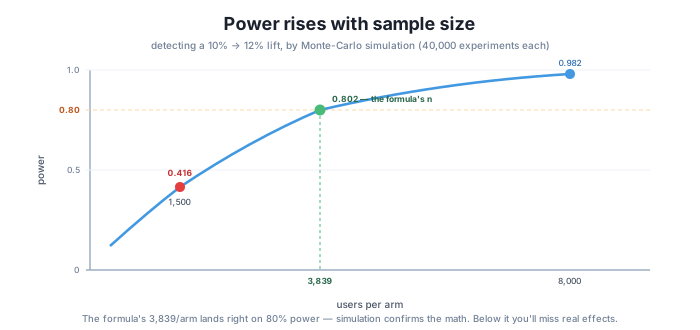
The idea is exactly the power definition from Lesson 2. Assume the effect is real (control converts at 0.10, treatment at 0.12), draw 40,000 simulated experiments at n = 3,839 per arm, run the two-proportion z-test on each, and measure the fraction that reach p < 0.05. That fraction is the achieved power.
def two_prop_p(c1, n1, c2, n2):              # vectorized two-sided p-value, from Lesson 1
    p1, p2 = c1 / n1, c2 / n2
    p = (c1 + c2) / (n1 + n2)
    se = np.sqrt(p * (1 - p) * (1 / n1 + 1 / n2))
    z = (p2 - p1) / se
    return 2 * (1 - norm.cdf(np.abs(z)))

def simulate_power(p_c, p_t, n, sims=40000, seed=202):
    rng = np.random.default_rng(seed)
    c1 = rng.binomial(n, p_c, size=sims)      # control conversions, effect assumed real
    c2 = rng.binomial(n, p_t, size=sims)      # treatment conversions
    return float(np.mean(two_prop_p(c1, n, c2, n) < 0.05))

print("simulated power @ n=3839:", round(simulate_power(0.10, 0.12, 3839), 3))
print("simulated power @ n=1500:", round(simulate_power(0.10, 0.12, 1500), 3))
Running it:
simulated power @ n=3839: 0.802
simulated power @ n=1500: 0.416
0.802 — right on the 0.80 target. The formula and the simulation agree: size the experiment at 3,839 per arm and roughly 80% of the time a real +2-point lift will come back significant. That’s the confirmation. The formula wasn’t lying, and now you know it wasn’t, because you watched 40,000 experiments and counted.
The second line is the warning. At n = 1,500 per arm — a number that might feel “big enough” to a stakeholder eyeballing it — the simulated power is only 0.416. Fewer than half the time would this test detect the very effect it was built to find. A test run at 1,500 per arm isn’t a smaller version of the right test; it’s a coin flip dressed up as an experiment. That gap between 0.802 and 0.416 is exactly why you size before you run.
A sample size answers “how many,” but the stakeholder’s real question is “how long.” Turning one into the other is simple division — once you state a traffic assumption out loud.
Assumption: Lumen’s signup flow sees roughly 2,000 eligible signups per day. Split 50/50, that’s 1,000 per arm per day landing in each bucket. (This is an assumption — a planning estimate from recent traffic, not a guarantee. If real traffic runs lighter, the test runs longer.)
Now the arithmetic:
per_arm_needed = 3839
per_arm_per_day = 1000                        # 2000/day split 50/50
days = per_arm_needed / per_arm_per_day
print(f"days to reach {per_arm_needed} per arm: {days:.1f}  ->  round up to {math.ceil(days)}")
Running it:
days to reach 3839 per arm: 3.8 -> round up to 4So at the assumed traffic, Lumen hits 3,839 per arm in about 4 days. That’s the headline number for the plan — but don’t stop there. In practice you’d run this at least a full week, probably two, even though the math says four days. Weekday and weekend visitors behave differently, and a test that ends mid-week can bake that weekly rhythm into the result. Running whole weeks averages the seasonality out. (Why a too-short run can quietly bias the answer is a validity issue you’ll tackle head-on in Module 6 — for now, just round up to complete weeks.) The sizing gives you the floor; calendar realities set the actual runtime.
Everything above collapses into one short spec — the thing you’d paste into the experiment doc before launch:
Experiment: Lumen new signup page (redesign vs. current) Inputs: baseline p₁ = 0.10 (from history), MDE = +0.02 → p₂ = 0.12 (business value), α = 0.05, power = 0.80 Sample size: 3,839 per arm — 7,678 total Confirmed power: 0.802 by 40,000-experiment simulation (target 0.80 ✓) Estimated runtime: ~4 days at ~2,000 signups/day (assumption) — run ≥ 1–2 full weeks to cover weekly seasonality Caveat: the baseline drives n. If the true baseline isn’t 10%, the required sample size changes — re-size if history says otherwise.
That last line matters. Every number here hangs off the Stage 1 baseline; a wrong baseline guess quietly makes the whole plan the wrong size. When in doubt, re-measure the baseline and re-run n_per_arm.
And notice what this project did not do: it didn’t run the experiment. Sizing happens before any data is collected — you’ve decided how big the test must be and how long it must run, but you haven’t gathered a single real conversion or made a ship decision. Actually running the test and analyzing the result — the full two-proportion z-test on real data, with a p-value and a confidence interval, ending in a ship/no-ship call — is Module 4. You’ve built the plan; next you execute it.
Size before you run — always
A test you didn’t size is a test you can’t trust. Without a sample size, you have no idea whether a “no significant difference” means the change genuinely didn’t work or just that you never had enough users to see it — the two are indistinguishable after the fact. Sizing up front turns that ambiguity into a decision you made on purpose: we chose to be able to detect a 2-point lift 80% of the time. Skip it, and you’re not running an experiment; you’re collecting numbers and hoping. Compute n first, confirm it, then launch.
Suppose Lumen’s history actually shows a 15% baseline, not 10%, and they still want to detect a +2-point lift (0.15 → 0.17) at α = 0.05 and 80% power. Compute the new sample size per arm. Is it bigger or smaller than 3,839, and why?
Hint
Call n_per_arm(0.15, 0.17). You’ll get a larger number than 3,839. Two things changed: the +2-point lift is now a smaller relative effect (2 points on a 15% base vs. a 10% base), and the variance term p(1−p) is higher near 15–17% than near 10–12%. Both push the required sample size up. This is exactly why the Stage 5 caveat matters — a wrong baseline guess changes n.
Lumen’s marketing team drives more traffic, and the signup flow now sees 3,000 eligible signups per day instead of 2,000. Keeping the sample size at 3,839 per arm, how many days does the test need? Would you still round up to whole weeks?
Hint
At 3,000/day split 50/50, each arm gets 1,500/day, so 3839 / 1500 ≈ 2.6 days — round up to 3. But the seasonality argument from Stage 4 hasn’t changed: even though the math says under 3 days, you’d still run at least one full week (ideally two) so the result isn’t skewed by which days of the week happened to be in the window. More traffic shortens the statistical minimum, not the calendar minimum.
A stakeholder proposes stopping at 2,500 per arm to “save time.” Use simulate_power(0.10, 0.12, 2500) to estimate the achieved power at that size, and explain what the number means for the decision.
Hint
Run simulate_power(0.10, 0.12, 2500) — you’ll get a power below 0.80 (between the 0.416 at n=1,500 and the 0.802 at n=3,839, since power rises with n). Interpret it as: “at 2,500 per arm, if the +2-point lift is real, we’d only detect it this fraction of the time.” Anything under 0.80 means Lumen is accepting a higher-than-planned chance of missing a genuine win to save a day or two — usually a bad trade. This is the underpowered-test warning from Stage 3, made concrete for their proposed number.
You sized a real Lumen experiment from a business goal to a launch-ready spec. Starting from four justified inputs — baseline p₁ = 0.10 (from history), an MDE of +0.02 to treatment p₂ = 0.12 (from business value), α = 0.05, and power = 0.80 — the two-proportion formula n_per_arm returned 3,839 per arm, 7,678 total. Rather than trust that number, you confirmed it: a 40,000-experiment Monte-Carlo simulation put the achieved power at 0.802, right on the 0.80 target, while showing that a tempting-but-small 1,500 per arm delivers only 0.416 — badly underpowered. Finally you turned n into runtime — ~4 days at an assumed 2,000 signups/day, rounded up to full weeks for seasonality — and wrote the whole thing into a one-paragraph sizing readout with the baseline caveat front and center. Every number here was computed for real with numpy and scipy.
n_per_arm(0.10, 0.12) → 3,839 per arm, 7,678 total.Sizing is the difference between an experiment and a gamble. A test launched without a computed, confirmed sample size can’t distinguish “the change didn’t work” from “we never had enough users to tell” — so a null result teaches you nothing. Doing the full loop here — justify the inputs, compute n, confirm it by simulation, translate to a runtime — is what lets a team commit to a launch knowing exactly what they can and can’t detect, and how long it’ll take. That discipline is what makes the next module worth doing: only a properly sized test produces a result worth analyzing.
Run the two-proportion z-test, get a p-value and confidence interval, and make the ship/no-ship call.
Return to the Power and Sample Size module overview
You can now take an experiment from a business goal to a sizing spec: pick and justify the inputs, compute the sample size, confirm the achieved power by simulation instead of trusting the formula blind, and turn n into a runtime a stakeholder can plan around. Lumen’s redesign is sized — 3,839 per arm, ~1–2 weeks — and confirmed. What’s left is to actually run it and read the result: collect the real conversions, run the two-proportion z-test in full, and make the ship-or-not call. That’s Module 4.