Title here
Summary here
Here’s a truth that surprises people: when an agent misbehaves, the culprit is usually not the model and not the loop — it’s the tools. Claude calls the wrong tool because two descriptions sound alike. It passes a bad argument because the schema didn’t constrain it. It produces a confusing answer because a tool returned a wall of unstructured text. The good news is that all of these are design problems you control. This lesson covers the four levers that make a tool Claude reaches for correctly and calls right the first time — the foundation for the validation and repair you’ll add in the rest of the module.
By the end of this lesson, you will be able to:
This builds on the tool definitions from Module 2. Let’s begin.
Recall a tool definition has a name, a description, and an input_schema. Those three fields — plus what your function returns — are the four levers you have. Here’s each one annotated on a well-formed tool:
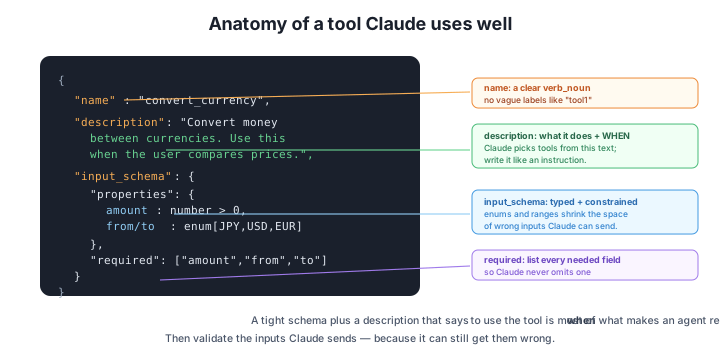
Let’s take them one at a time.
Claude decides which tool to call almost entirely from the name and description. So those are where reliability begins.
A good name is a clear verb_noun: get_weather, convert_currency, search_destinations. It tells the model what the tool does at a glance. Avoid vague names (tool1, helper) and avoid two tools whose names blur together (search and lookup will get confused — make them search_destinations and lookup_hotel).
The description is the single highest-leverage field in the whole tool. Write it like an instruction that states both what the tool does and when to use it:
# Weak — only says what it does
"description": "Convert currency."

# Strong — says what it does AND when to reach for it
"description": ("Convert an amount of money from one currency to another. "
                "Use this whenever the user asks to convert, compare, or "
                "budget prices across different currencies.")
That “use this whenever…” clause is what stops Claude from calling the tool at the wrong time, or ignoring it when it should help. If your agent ever calls the wrong tool, fix the descriptions before you touch anything else.
The input_schema does two jobs: it tells Claude what arguments to provide, and it constrains them. A loose schema invites mistakes; a tight one makes many mistakes impossible to even express.
Three habits make a schema tight:
amount is a number, city is a string. Types alone rule out a lot of nonsense.enum for fixed choices. If a currency must be one of JPY, USD, or EUR, say so with an enum. Now Claude can’t invent "GBP" — the set of legal values is right there in the schema.required fields. Mark every argument the tool genuinely needs as required, so Claude never omits one.A field description helps too — "city": {"type": "string", "description": "The city name, e.g. 'Kyoto'"} nudges Claude toward the right format. The tighter the schema, the smaller the space of wrong calls Claude can make. (In the next lesson you’ll go further and validate inputs with Pydantic — because even a tight schema can’t catch everything, and the model can still slip.)
Tools are a prompt, not just an API
It’s tempting to think of tools as a plain function interface. But to Claude, the names, descriptions, and schemas are prompt — they’re how the model reasons about what’s available and when to use it. That reframe changes how you write them: be as deliberate with a tool description as with your system prompt. Most “the agent picked the wrong tool” bugs are really “the description didn’t say when to use it” bugs.
The fourth lever is what your tool returns — which the agent loop feeds back to Claude as a tool_result. The model has to read that result and decide what to do next, so make it easy:
"16°C, clear and crisp" is far more useful than a 200-line raw API response Claude has to wade through."20000 JPY = 134.0 USD", not just "134.0")."no flights found for those dates" is a real, useful result — better than an empty string the model has to guess about.A good return value is short, labeled, and tells Claude exactly what happened. Bloated or cryptic results are a common reason agents give vague or wrong final answers.
A tool is named get_info with description "Gets information." and the agent keeps calling it for everything. Diagnose the problem and rewrite both the name and description.
Hint
The name and description are both too vague, so Claude can’t tell when it applies — it becomes a catch-all. Give it a specific verb_noun name (e.g. get_country_facts) and a description that says exactly when to use it: “Get key facts (capital, currency, language) about a country. Use this when the user asks about a country’s basics.” Specificity is what stops over-calling.
A book_seats tool takes count as a plain number and cabin as a free-text string. Travelers can book 1–9 seats, and cabins are economy, premium, or business. How would you tighten the schema?
Hint
Constrain count to an integer in the 1–9 range, and make cabin an enum of ["economy", "premium", "business"]. Mark both required. Now Claude literally cannot request 0 seats or a “first class” cabin the system doesn’t support — the wrong calls aren’t even expressible.
A get_weather tool returns the raw JSON {"temp_c": 16, "cond": "clr", "wind_kph": 8, "humidity": 0.62, ...} (30 more fields). Why might this hurt the agent’s final answer, and what would you return instead?
Hint
A huge raw blob forces Claude to parse cryptic keys and wastes tokens, making mistakes and vague answers more likely. Return a short, labeled summary the model can use directly, e.g. "16°C, clear, wind 8 km/h" — concise, unambiguous, and units included.
Most of an agent’s reliability comes from tool design, and you have four levers. A clear name (verb_noun, distinct from other tools) and a description that says when to use the tool are how Claude chooses correctly — descriptions are the highest-leverage field, because the model picks tools from that text. A tight, typed input_schema (types, enums for fixed choices, required fields) shrinks the space of wrong calls Claude can even make. And a clear return value — concise, structured, labeled — makes the result easy for the model to act on. Treat all of these as prompt, written as deliberately as your system prompt.
verb_noun, distinct from other tools.Getting tool design right is the cheapest, highest-impact thing you can do for agent reliability — far more so than swapping models or tweaking the loop. A well-named, well-described, tightly-typed tool with clear returns prevents whole classes of failures before they start. But “tight schema” isn’t the same as “guaranteed valid input” — Claude can still send a wrong value the schema didn’t rule out. That’s why the next lesson adds a hard guarantee: validating every input with Pydantic before your code runs.
Catch bad tool inputs before they reach your code — and generate the tool's schema from a Pydantic model.
Return to the Designing Tools module overview
You now know the four levers of a tool Claude uses well — name, description, schema, and return value. Next you’ll make inputs bulletproof: defining them as a Pydantic model that validates every argument Claude sends, and generating the tool’s schema straight from that model so the two never drift apart.