Title here
Summary here
In the last lesson you used Pydantic to catch bad inputs before your code runs. But catching a bad input is only half the job — what you do with that failure decides whether your agent is fragile or robust. The fragile version raises an exception and the whole loop dies. The robust version takes the failure, packages it as a tool_result marked is_error, and hands it straight back to Claude. The difference is enormous: a crash ends the run, but an error sent back to the model is information it can act on. Claude reads the message, sees what went wrong, and tries again with a corrected call. That feedback cycle — bad call, clear error, fixed call — is the repair loop, and it’s what turns a brittle script into an agent that recovers from its own mistakes.
By the end of this lesson, you will be able to:
is_error tool_resultThis sharpens the error handling you met in Module 2 with the Pydantic-driven messages from Lesson 2. Let’s begin.
Think about what happens when a tool call goes wrong inside a loop. There are really two kinds of failure. The first is a validation failure: Claude sent an argument that doesn’t pass your Pydantic model — an unsupported currency, a negative amount, a missing field. The second is a runtime failure: the input was valid, but the function itself blew up — a network timeout, a divide-by-zero, a key that wasn’t found. Both are normal. Both will happen. The question is whether they end the run.
If you let either of these raise out of the loop, your program stops and Claude never learns anything. The trick is to contain the failure: catch it, turn it into a short message, and return a normal outcome that says “this didn’t work, and here’s why.” That’s the job of the validate-then-run wrapper. It validates the input, and only if that passes does it run the function — wrapping both stages so nothing escapes as an exception:
from pydantic import ValidationError

def run_tool(model_cls, fn, raw_input):
    try:
        validated = model_cls(**raw_input)          # Pydantic validation
    except ValidationError as exc:
        msgs = "; ".join(f"{e['loc'][0]}: {e['msg']}" for e in exc.errors())
        return {"ok": False, "content": f"Invalid input -> {msgs}"}
    try:
        return {"ok": True, "content": fn(**validated.model_dump())}
    except Exception as exc:                         # a real runtime failure
        return {"ok": False, "content": f"Tool error -> {exc}"}
Notice the shape of what comes back. Whether the call succeeds, fails validation, or throws at runtime, run_tool always returns the same little dict: an ok flag and a content string. It never raises. On a validation error it pulls the field name and message straight out of Pydantic’s exc.errors() and joins them into something readable. On a runtime error it captures the exception text. Either way, the caller gets a clean outcome it can hand to Claude — no try/except scattered through the loop, no crash.
Now connect that wrapper to the agent loop. Each time Claude emits a tool_use block, you look the tool up, run it through run_tool, and turn the outcome into a tool_result. The one new field is is_error — set it to True whenever the call failed, so Claude knows this block is a problem report and not a normal result:
model_cls, fn = REGISTRY[block.name]          # REGISTRY maps name -> (input model, function)
outcome = run_tool(model_cls, fn, block.input)
results.append({
    "type": "tool_result",
    "tool_use_id": block.id,
    "content": outcome["content"],
    "is_error": not outcome["ok"],            # True when the call failed
})
The REGISTRY here is just a dictionary mapping each tool name to its (input model, function) pair, so the loop can find the right Pydantic model and the right function from the name Claude sent. The crucial line is "is_error": not outcome["ok"]. When the outcome’s ok flag is False, is_error becomes True, and the error message rides back to Claude as a result of that exact tool call — matched by tool_use_id. Nothing is dropped, and nothing crashes. A failed call produces a tool_result just like a successful one; it’s simply flagged as an error.
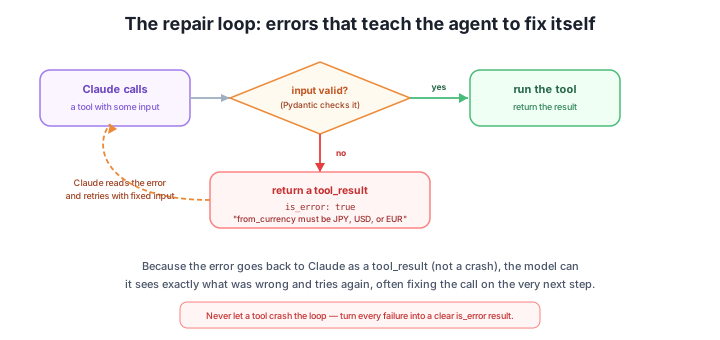
Read the figure as a single cycle. Claude calls a tool; Pydantic checks the input. Valid inputs flow down the success path — run the function, return the result. Invalid inputs take the error path — build a clear message, return it as an is_error tool_result, and let the dashed arrow carry it back to Claude. That dashed arrow is the whole point: the failure doesn’t leave the loop, it re-enters it as something the model can read and respond to.
Here’s what that looks like with a real run. We gave the agent a convert_currency tool whose input model only accepts JPY, USD, or EUR, then asked it to do a conversion. On the first attempt Claude sent an unsupported currency. Watch what happens — this is the actual trace, captured step by step:
  step 1: convert_currency({'amount': 100, 'from_currency': 'GBP', 'to_currency': 'USD'}) -> ERROR (is_error): Invalid input -> from_currency: Input should be 'JPY', 'USD' or 'EUR'
  step 2: convert_currency({'amount': 100, 'from_currency': 'USD', 'to_currency': 'EUR'}) -> ok: 100.0 USD = 92.0 EUR
  final answer: 100 USD is about 92.0 EUR.
Trace it line by line. In step 1, Claude calls convert_currency with from_currency='GBP'. That value isn’t in the model’s enum, so Pydantic rejects it; run_tool returns ok: False with the message from_currency: Input should be 'JPY', 'USD' or 'EUR', and the loop sends it back as an is_error tool_result. Nothing crashes — the run keeps going. In step 2, Claude has read that error. It sees exactly which field was wrong and exactly which values are allowed, so it retries with a supported currency. This time the input validates, the function runs, and the result comes back: 100.0 USD = 92.0 EUR. With a successful result in hand, Claude writes its final answer.
That recovery from step 1 to step 2 is the repair loop, and it happened on its own — no retry logic, no special-casing in your code. You simply returned the error instead of raising it, and the model did the rest. (The exact wording of the final answer is illustrative and varies from run to run; the guaranteed part is that the error is fed back and the model can recover from it.)
Return failures, never raise out of the loop
The whole trick fits in one sentence: an error returned as a tool_result is something Claude can act on, but a crashed program is not. A raised exception ends the conversation; an is_error tool_result continues it, handing the model the information it needs to fix its own call. So make this a rule for every tool in your agent — validate, run, and on any failure return a clear message with is_error: True. Never let a tool exception escape the loop.
Because the error message is what Claude reads to fix its call, the quality of that message decides how quickly repair happens. A vague error makes the model guess; a specific one tells it exactly what to change. Compare:
"invalid input" — Claude knows something is wrong but not what, so it may retry blindly or give up."from_currency: Input should be 'JPY', 'USD' or 'EUR'" — Claude knows the field, the problem, and the legal values, so its next call is almost certainly right.This is exactly why Lesson 2’s Pydantic messages are so useful here: they already name the offending field and describe what was expected. The run_tool wrapper just surfaces them verbatim. When you write your own runtime error messages, aim for the same standard — say which input was bad and what a good one looks like, not merely that it failed. A good error message turns a failed call into a one-step fix instead of a guessing game.
A teammate suggests it would be simpler to just raise the ValidationError and let it propagate up. Explain what would happen to the agent if you did that, and why returning an is_error tool_result is the more robust choice.
Hint
A raised exception escapes the loop and ends the run — the conversation stops and Claude never sees what went wrong, so it can’t recover. Returning an is_error tool_result instead keeps the loop alive and hands the model the failure as information it can read and act on. A crash is a dead end; an error result is feedback the agent can repair from on the next step.
Two versions of the same failure come back to Claude: "bad value" and "amount: Input should be greater than 0". Which one leads to faster, more reliable repair, and what general rule does that suggest for writing error messages?
Hint
The second one repairs faster: it names the field (amount) and states the constraint (must be greater than 0), so Claude knows precisely what to change. The rule: say which input was wrong and what a valid one looks like, not just that something failed. Specific messages turn a failure into a one-step fix; vague ones make the model guess.
An agent calls convert_currency with from_currency='GBP' (only JPY, USD, EUR are supported), then calls again with from_currency='USD'. Walk through what run_tool returns each time, what the tool_result looks like, and how the loop gets from the bad call to the final answer.
Hint
First call: Pydantic rejects 'GBP', so run_tool returns {"ok": False, "content": "Invalid input -> from_currency: ..."}; the loop appends a tool_result with is_error: True and sends it back. Claude reads that message and retries with 'USD'. Second call: validation passes, the function runs, run_tool returns {"ok": True, "content": "100.0 USD = 92.0 EUR"}, the loop sends a normal tool_result (is_error: False), and with a successful result Claude writes its final answer. The recovery happens because the error was returned, not raised.
A robust agent never crashes on a bad tool call — it turns the failure into feedback. The validate-then-run wrapper (run_tool) catches both kinds of failure, validation errors from Pydantic and runtime exceptions from the function, and always returns the same clean outcome (ok plus content) instead of raising. The loop turns that outcome into a tool_result, setting is_error: True whenever the call failed, so the error rides back to Claude matched to the exact tool_use_id. That feedback enables the repair loop: Claude reads the error, sees what went wrong, and retries with a corrected call on the next step — as the verified trace showed, going from a rejected GBP call to a successful USD conversion with no retry logic of your own. And because the model repairs from the message, clear, specific error messages (which field, what’s expected) make that repair fast.
run_tool validates input, runs the function, and returns a clean {ok, content} outcome for both validation and runtime failures; it never raises.is_error: True and matched by tool_use_id, so the error goes back to Claude instead of crashing the loop.The single line that separates a fragile agent from a robust one is “return the failure, don’t raise it.” A crash ends the run and teaches the model nothing; an is_error tool_result keeps the conversation alive and gives Claude exactly the information it needs to recover. This is what lets agents survive the messy reality of bad inputs, flaky APIs, and the model’s own occasional wrong guess — they don’t need to be perfect on the first try, because they can read their mistakes and fix them. With validation, error feedback, and the repair loop in place, you’re ready to look at the broader patterns that make tools dependable across a whole agent.
Step back from single tools to the patterns that keep a whole set of tools reliable, composable, and easy for Claude to use.
Return to the Designing Tools module overview
You now have the piece that makes agents resilient: failures come back as is_error tool_results, and Claude repairs its own calls instead of crashing the loop. Next you’ll widen the lens from a single tool to the design patterns that keep an entire toolset dependable — how tools compose, how to keep them distinct, and how to structure them so the model reaches for the right one every time.