Title here
Summary here
In Lesson 2 a supervisor delegated a hard sub-problem to a specialist agent exposed as a tool. That’s the right shape when one request needs help from an expert. But there’s a different, very common situation: requests don’t need one expert — they fall into distinct categories, and each category has its own expert. A travel assistant gets weather questions, budget questions, and food questions, and each is best answered by a specialist that knows only that job. You could pile all three into one agent, but then you’re back to the bloated prompt and sprawling tool list from Lesson 1. The cleaner move is to look at each request, decide which category it belongs to, and hand it to exactly one specialist. That’s routing — and it costs just one cheap classification call.
By the end of this lesson, you will be able to:
route function that classifies a request and dispatches to one handlerLet’s look at the core idea, then build it.
Routing has two steps. First, a classification call: you ask the model to read the request and reply with a single label from a fixed list — nothing else. This is a tiny call: a low max_tokens, a one-line prompt, and no tools. Second, a dispatch: you look up that label in a table of specialists and run exactly the one it points to. Only that specialist executes; the others never run.
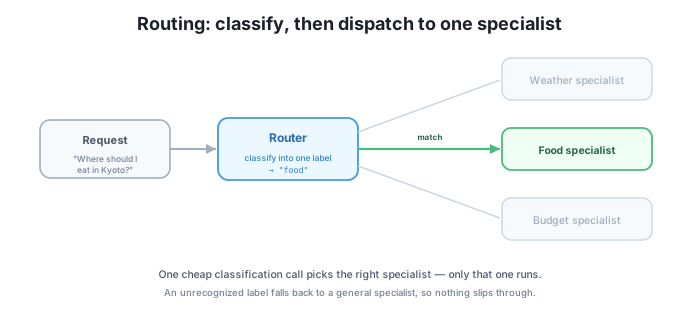
Here’s the whole router. The specialists argument is a dict mapping each label to a handler — here plain functions, but in a real system each handler could be its own agent, connecting straight back to the agents-as-tools pattern from Lesson 2.
def route(client, request, specialists, *, model="claude-haiku-4-5"):
    labels = ", ".join(specialists)
    r = client.messages.create(model=model, max_tokens=16, system="You are a router.",
        messages=[{"role":"user","content":
                   f"Classify this request into exactly one of: {labels}. "
                   f"Reply with only the label.\n\nRequest: {request}"}])
    label = "".join(b.text for b in r.content if b.type == "text").strip().lower()
    if label not in specialists:
        label = "general"
    return {"label": label, "answer": specialists[label](request)}
Read it top to bottom. labels is just the specialist keys joined into a string, so the prompt always lists the exact categories you support. The messages.create call is deliberately small — max_tokens=16 is plenty for one word, and there are no tools because the model’s only job is to pick a label. Then you pull the text out, strip().lower() it to normalize whitespace and casing, and check it against the known specialists. If it isn’t one of them, you fall back to "general". Finally you dispatch — specialists[label](request) — and return both the chosen label and the specialist’s answer.
The one line that matters most for robustness is if label not in specialists: label = "general". Models are usually reliable classifiers, but “usually” isn’t “always” — a model might reply with a category you never defined, add stray punctuation, or hallucinate a label. Without the fallback, specialists[label] would raise a KeyError and the whole request would crash. With it, any label the router doesn’t recognize is quietly handled by the general specialist. Nothing slips through; the system degrades gracefully instead of failing.
Here’s the setup used to verify the router. The orchestration — the classification parsing, the dispatch, and the fallback — was verified against an SDK-shaped mock that mirrors the Claude API surface (there was no ANTHROPIC_API_KEY in the environment, so a mock stood in for the live model). The Claude API code above is correct as written; only the label text the model returns is illustrative — the exact word a real model picks varies.
specialists = {
    "weather": lambda q: "[weather] check the forecast",
    "budget":  lambda q: "[budget] estimate daily costs",
    "food":    lambda q: "[food] recommend restaurants",
    "general": lambda q: "[general] I can help with that",
}

# A food question classifies to "food" and dispatches to the food specialist.
out = route(client, "Where should I eat vegetarian in Kyoto?", specialists)
# out == {"label": "food", "answer": "[food] recommend restaurants"}

# An unrecognized label ("astrology") falls back to "general".
out2 = route(client2, "???", specialists)
# out2["label"] == "general"
In the verified run, the food question classified to "food" (an example — exact wording varies) and dispatched to the food specialist, returning "[food] recommend restaurants". The robustness case is the important one: when the model returned "astrology" — a label with no specialist — the fallback rewrote it to "general", so the request was still answered instead of crashing. The routing, dispatch, and fallback logic is real and verified; only the raw label strings are illustrative model output.
Keep labels few and distinct
A router is only as good as its categories. Keep the label set small and clearly separated — a handful of categories a model can tell apart at a glance. Overlapping or fuzzy labels (“info” vs. “help”) make classification unreliable, and a long list brings back the same selection problems that plague an overloaded tool list. Routing adds exactly one cheap call, and in exchange it saves you from running the wrong specialist on every request — a good trade when your categories are genuinely distinct.
Routing spends an extra model call just to pick a label before any specialist runs. Why is that cheaper and sharper than letting one agent handle all the categories itself?
Hint
One agent handling every category needs every category’s instructions and tools in one context — the prompt bloats and tool selection degrades (Lesson 1). Routing spends one tiny call (low max_tokens, no tools) to pick a label, then runs a single focused specialist. You pay one cheap classification but avoid loading and running the wrong expertise on every request.
The model returns "Weather!" for a weather question, but the specialists dict has a key "weather". Walk through route — does it dispatch correctly, and what would happen if the model returned "forecast" instead?
Hint
"Weather!" gets strip().lower()-ed to "weather!" — the exclamation mark means it’s not in specialists, so it falls back to "general". That shows why the classification prompt says “reply with only the label” and why you might normalize harder. "forecast" also isn’t a key, so it too falls back to "general" — the fallback catches any label the router doesn’t recognize, wrong wording or wrong category alike.
The specialists here are plain functions. How would you turn the "food" specialist into a real sub-agent, and which earlier lesson’s pattern does that reuse?
Hint
Replace the lambda with a function that calls run_agent internally — a restaurant-recommender agent with its own prompt and food tools — and return its answer. That’s exactly Lesson 2’s agents-as-tools: the handler’s body is another agent. Routing and agents-as-tools compose — the router picks which sub-agent runs.
Routing fits when requests fall into distinct categories, each with its own specialist. It works in two steps: a classification call — small max_tokens, one-line prompt, no tools — reads the request and returns a single label, then a dispatch runs exactly the specialist that label points to. The route function you built joins the specialist keys into the prompt, parses and normalizes the returned label, and — crucially — falls back to "general" when the label isn’t recognized, so a bad label never crashes the system. Verified against an SDK-shaped mock: a food question dispatched to the food specialist, and an unknown label ("astrology") safely fell back to general. Routing adds one cheap call and saves you from running the wrong specialist every time.
"general" so nothing slips through and nothing crashes.Real assistants field a mix of unrelated requests, and forcing one agent to be an expert at all of them is exactly the overload Lesson 1 warned about. Routing keeps each specialist focused and cheap by spending one small call to decide who should answer — and the fallback means a single misclassification degrades gracefully instead of taking the system down. It’s the pattern to reach for whenever your work sorts cleanly into categories. Next you’ll build the pattern for the opposite case: when one goal breaks into several pieces that all need doing — an orchestrator that decomposes a task, runs a worker on each, and synthesizes their outputs. Routing picks one path; orchestrator-workers runs many.
Decompose a goal into subtasks, run a worker on each, and synthesize their outputs into one answer.
Return to the Multi-Agent Systems module overview
You now know how to route each request to the right specialist with a single cheap classification call, and how a simple fallback keeps a bad label from ever crashing the system. Routing handles the “which one expert?” case. Next you’ll handle the “do all of these?” case: an orchestrator that breaks one goal into subtasks, runs a worker on each, and merges their results into a single answer.