Title here
Summary here
In Lesson 1 you saw why an agent needs retrieval, and that the knowledge base is really the memory module’s machinery pointed at documents. Now you build it. The job is small once you name it: take a document, cut it into bite-sized passages, turn each passage into a vector with the same embed() you used for long-term memory, and store the lot. To retrieve, embed the user’s question and return the passages whose vectors point most nearly the same way. That’s a knowledge base — chunk, embed, index, search — and by the end of this lesson you’ll have one that answers questions about a pair of travel guides.
The shape is deliberately familiar. In Module 4 you wrote a VectorMemory with add(note) and search(query, k); here you write a KnowledgeBase with add_document(source, text) and search(query, k). The only genuinely new piece is chunking — a document is too big to embed as one blob, so you split it into passages first. Everything else you’ve seen.
By the end of this lesson, you will be able to:
embed() from the memory module to vectorize each passageKnowledgeBase with add_document(source, text) and search(query, k)Let’s start with the embedding, then chunk, then put them together.
Retrieval is geometry: turn text into vectors that point the same way when they mean similar things, then rank by how aligned they are. We reuse the exact embed() from the memory module — a dependency-free keyword embedding so the whole thing runs with only numpy. Read the stop-word set and the comment carefully: this matches on shared words, not meaning, and that limitation is the one thing we’ll be honest about throughout.
import hashlib
import re
import numpy as np

# A dependency-free KEYWORD embedding: bag-of-words over a hashed vocabulary,
# with common words removed. Matches on shared WORDS, not meaning. Good enough
# to run with only numpy; for real SEMANTIC search, swap embed() (see the note).
STOP = {"the", "a", "an", "and", "or", "is", "are", "to", "of", "in", "on",
        "for", "with", "you", "your", "it", "its", "as", "at", "by", "be",
        "this", "that", "from", "has", "have", "best", "good", "great"}

def embed(text, dim=1024):
    vec = np.zeros(dim)
    for tok in re.findall(r"[a-z]+", text.lower()):
        if tok in STOP:
            continue
        vec[int(hashlib.md5(tok.encode()).hexdigest(), 16) % dim] += 1.0
    norm = np.linalg.norm(vec)
    return vec / norm if norm else vec
This is the same mechanism as before: lowercase, split into word tokens, drop stop words, hash each remaining word into one of dim slots, and count. Normalizing to unit length means a dot product is the cosine similarity directly. One change worth noting: we use dim=1024 here, four times the 256 we used for short memory notes. Passages are longer and more numerous than one-line notes, so a bigger vocabulary space gives each word more room and makes accidental collisions — two unrelated words hashing to the same slot — far less likely. More on that floor of noise shortly.
A document is too big to embed as a single vector — a whole page would smear every topic into one blurry direction, and retrieval would never sharpen onto the relevant paragraph. So before embedding, we chunk: split the document into short passages, each about one thing. The rule is simple — one passage per paragraph, and if a paragraph is long, cut it into pieces no longer than max_words.
def chunk(text, max_words=40):
    """Split a document into passages: one per paragraph, further split if long."""
    chunks = []
    for para in [p.strip() for p in text.split("\n\n") if p.strip()]:
        words = para.split()
        if len(words) <= max_words:
            chunks.append(para)
        else:
            for i in range(0, len(words), max_words):
                chunks.append(" ".join(words[i:i + max_words]))
    return chunks
The logic reads top to bottom. Split on blank lines (\n\n) to get paragraphs, dropping any empty ones. If a paragraph is short enough (<= max_words), keep it whole — that’s the common case, and it preserves the natural unit of the writing. If it’s too long, slice it into max_words-sized windows so no single passage swamps the rest. The result is a list of self-contained passages, each small enough to embed into one focused vector.
The right chunk size is a trade-off you’ll tune in real systems. Too large and a passage covers several topics, so its vector is unfocused and matches weakly. Too small and you fragment a single idea across passages, so no one chunk holds the full answer. Paragraph-sized, with a length cap, is a sensible default for prose.
Now combine the two. A KnowledgeBase holds a list of (source, text, vec) triples. add_document chunks a document, embeds each passage, and stores it with its source so retrieved text can always be traced back. search embeds the query and ranks every stored passage by cosine similarity, returning the top-k with scores.
class KnowledgeBase:
    def __init__(self):
        self.passages = []  # list of (source, text, vec)

    def add_document(self, source, text):
        for c in chunk(text):
            self.passages.append((source, c, embed(c)))

    def search(self, query, k=3):
        q = embed(query)
        scored = [(src, txt, float(q @ v)) for src, txt, v in self.passages]
        scored.sort(key=lambda r: -r[2])
        return [(s, t, round(sc, 3)) for s, t, sc in scored[:k] if sc > 0]
Three moving parts. add_document(source, text) runs the document through chunk(), embeds each passage, and appends a (source, text, vec) triple — the source label (“kyoto-guide”) is what lets a later answer cite where a fact came from. search(query, k) embeds the query, computes q @ v (the cosine similarity) against every passage, sorts high to low, and returns the top k as (source, text, score), dropping any with zero score. The score travels with each hit so the caller can judge how strong a match is — which becomes the basis for the refusal gate in Lesson 4.
This is structurally the VectorMemory from Module 4, with two differences: it stores documents as chunked passages instead of one-line notes, and it carries a source so every passage is attributable.
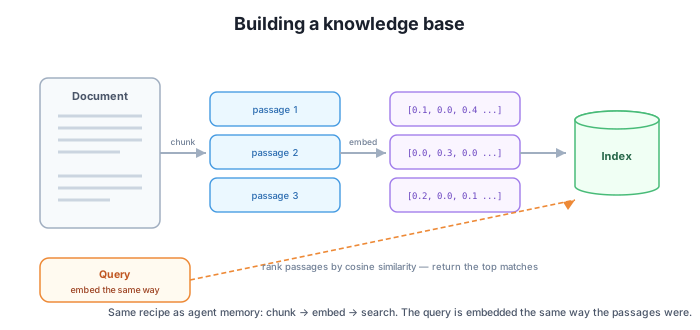
Let’s index two short travel guides and search them. These are the documents the rest of the module uses.
KYOTO = """Kyoto in autumn is famous for its fall foliage, which peaks in mid to late November.
Temperatures are mild, typically 10 to 18 degrees Celsius, ideal for walking temple grounds.

Arashiyama and the bamboo grove are a top autumn destination, best visited early morning to avoid crowds.

Many temples such as Tofuku-ji open special evening illuminations during the foliage season."""

SAPPORO = """Sapporo in winter is known for heavy snowfall and the February Snow Festival.
Temperatures often fall below freezing, so warm layers are essential."""

kb = KnowledgeBase()
kb.add_document("kyoto-guide", KYOTO)
kb.add_document("sapporo-guide", SAPPORO)
print(f"indexed {len(kb.passages)} passages")

for src, txt, sc in kb.search("When do autumn leaves peak in Kyoto?", k=2):
    print(f"  {sc:>5}  ({src})  {txt[:55]}...")
Output:
indexed 4 passages
  0.187  (kyoto-guide)  Kyoto in autumn is famous for its fall foliage, which p...
  0.105  (sapporo-guide)  Sapporo in winter is known for heavy snowfall and the F...
The Kyoto guide has three paragraphs (the first stays whole, well under 40 words) and Sapporo has one, so the base indexes 4 passages. The query “When do autumn leaves peak in Kyoto?” pulls back the foliage passage first — “Kyoto in autumn is famous for its fall foliage…” — with a score of 0.187. It wins because it shares the meaningful words Kyoto, autumn, and foliage-adjacent vocabulary with the query. A sharper query does even better: “When should I visit Arashiyama bamboo grove?” scores around 0.342 against the Arashiyama passage, because Arashiyama, bamboo, and grove are distinctive words that appear in exactly one place.
Look at the second hit, though. The Sapporo passage scores 0.105 even though it’s about a different city in a different season. That isn’t a real match — it’s the noise floor of keyword embedding, and it’s the limitation worth understanding next.
Keyword matches words; embeddings match meaning
This embed() only scores a passage when it shares actual words with the query — so “autumn leaves peak” finds the foliage passage, but a paraphrase with no overlapping vocabulary would miss it entirely. Worse, unrelated text can collide on a shared common word and score low-but-nonzero (the ~0.1 noise floor you saw on Sapporo). A real sentence-embedding model matches on meaning, so paraphrases hit and unrelated text stays near zero. That’s the whole point of the word semantic in semantic search. Larger dim (we use 1024) reduces collisions versus the 256 of short notes, but it can’t make keywords understand meaning.
The keyword embed() is perfect for teaching — zero install, fully transparent, runs anywhere — but its noise floor (unrelated passages scoring ~0.1) and its blindness to paraphrase make it the one part you upgrade for production. As in the memory module, you change only embed(); the KnowledgeBase class — add_document, chunk, search, the cosine ranking — is untouched.
# Production: real semantic embeddings. Only embed() changes; the rest stays.
from sentence_transformers import SentenceTransformer
_model = SentenceTransformer("all-MiniLM-L6-v2")

def embed(text):
    return _model.encode(text, normalize_embeddings=True)
# Or use a vector database (e.g. chromadb) that handles storage + search for you.
all-MiniLM-L6-v2 maps text into a space where passages about the same idea sit close together regardless of exact words — so a query like “where can I see colorful trees in fall?” still finds the foliage passage with no shared vocabulary, and the unrelated Sapporo passage drops toward zero instead of floating at the noise floor. For anything beyond a demo you’d reach for a vector database like chromadb, which handles embedding, persistence to disk, and fast nearest-neighbor search for you — but the mental model is exactly what you built: add_document, then search. The DataTweets Generative AI course covers sentence-transformers and chromadb in depth; here the point is that a knowledge base is this chunk/embed/search shape, and choosing a backend is choosing your embed.
In Lesson 4 you’ll add a similarity floor to the search results — a minimum score below which a “match” is rejected as noise, so the agent refuses honestly instead of answering from a 0.1 collision. And in Lesson 3 you’ll wrap search in a tool so the agent can decide, mid-loop, to look something up.
Why does add_document run the text through chunk() first instead of embedding the whole document as one vector?
Hint
A whole document covers many topics, so its single vector points in a blurry average direction that matches every query weakly and none strongly. Chunking into paragraph-sized passages gives each passage a focused vector about one thing, so a query about foliage lands sharply on the foliage passage. Retrieval can only be precise if the units it ranks are precise.
Searching “When do autumn leaves peak in Kyoto?” returns the Sapporo passage as a second hit at score ~0.105, even though Sapporo is a different city and season. Is that a real match? What causes it, and what would fix it?
Hint
It is not a real match — it’s the noise floor of keyword embedding, where unrelated text collides on a shared common word and scores low-but-nonzero. Two fixes: a larger embedding dimension (we use 1024) reduces accidental collisions, and a similarity floor (Lesson 4) rejects any hit below a threshold. The deeper fix is real semantic embeddings, which push unrelated text toward zero.
Describe the three things add_document(source, text) stores per passage, and explain why it keeps the source label alongside the text and vector.
Hint
For each chunk it stores a (source, text, vec) triple: the originating document’s label, the passage text, and its embedding. The source is what makes a retrieved fact attributable — when the agent later answers, it can cite “(kyoto-guide)” so the claim is checkable. Retrieval without a source is just text; retrieval with a source is grounding you can verify, which is the discipline this whole module is building toward.
A knowledge base is the chunk-embed-search machinery of the memory module pointed at documents. You chunk each document into paragraph-sized passages (splitting any over max_words into windows), embed each passage with the dependency-free keyword embed(), and store it as a (source, text, vec) triple. To retrieve, embed the query and rank every passage by cosine similarity, returning the top-k with their sources and scores. You ran it on two travel guides — 4 indexed passages, with “When do autumn leaves peak in Kyoto?” surfacing the foliage passage at ~0.187 — and saw the keyword embedding’s noise floor, where an unrelated passage still scores ~0.1. The production swap changes only embed(): drop in sentence-transformers (all-MiniLM-L6-v2) or a vector database like chromadb to match on meaning instead of shared words, leaving the KnowledgeBase interface untouched.
max_words, so each passage embeds into one focused vector.add_document(source, text) chunks, embeds, and stores triples; search(query, k) ranks by cosine similarity and returns the top-k with sources and scores.sentence-transformers or chromadb for real semantic search, interface unchanged.The knowledge base is the half of RAG you fully control: change a document and the agent’s answers change with it, no retraining. Seeing that it’s just chunk, embed, index, and rank by similarity demystifies every “we built a RAG bot” claim — the architecture is this small, and the quality lever is mostly your chunking and your choice of embed. Understanding the keyword embedding’s noise floor now is what motivates the next two lessons: turning search into a tool the agent can call, and adding a similarity floor so weak matches are refused instead of answered.
Wrap the knowledge base's search in a tool so the agent can decide, mid-loop, to look something up.
Return to the Retrieval-Augmented Agents module overview
You can now build a knowledge base the way real retrieval systems do: chunk documents into passages, embed each one, index them with their sources, and rank against a query by cosine similarity — reusing the embedding machinery from the memory module and knowing exactly where the keyword version’s noise floor lives. Next you’ll turn that search into a tool, so the agent itself decides when to retrieve and reasons on what it finds.