Title here
Summary here
In Module 1 you learned that an agent is a model in a loop that calls tools. Now you’ll see the actual mechanism that makes that possible: tool use (also called function calling). The idea is elegant. You describe some functions to Claude — their names, what they do, and what inputs they take. When Claude decides one would help, it doesn’t try to run it (it can’t); instead it returns a structured request to call that tool with specific arguments. Your code reads the request, runs the real function, and hands the result back. That request-and-result exchange is the atom the whole agent loop is built from, and this lesson is where you learn it.
By the end of this lesson, you will be able to:
name, description, and input_schemamessages.create so Claude can use themtool_use content block and the tool_use stop reasontool_choice and why descriptions matter so muchThis builds directly on your first Claude call from Module 1. Let’s begin.
A tool definition is just a dictionary with three keys. It tells Claude what the tool is called, when to use it, and what arguments it expects:
get_weather_tool = {
    "name": "get_weather",
    "description": "Get the current weather for a city. Use this whenever the "
                   "user asks about weather or conditions in a specific place.",
    "input_schema": {
        "type": "object",
        "properties": {
            "city": {"type": "string", "description": "The city name, e.g. 'Kyoto'"},
        },
        "required": ["city"],
    },
}
Three things to notice. The name is what you’ll match on when Claude calls it. The description is the single most important field — Claude reads it to decide when this tool applies, so write it like an instruction (“Use this whenever…”), not just a label. The input_schema is a JSON Schema describing the arguments; Claude will fill these in, and the schema is how it knows city is a required string. Vague descriptions and loose schemas are the number-one cause of an agent calling the wrong tool or passing bad arguments.
You give Claude tools by passing a list of these definitions to messages.create with the tools parameter:
from anthropic import Anthropic

client = Anthropic()

response = client.messages.create(
    model="claude-haiku-4-5",
    max_tokens=1024,
    system="You are Atlas, a concise trip-planning assistant.",
    tools=[get_weather_tool],
    messages=[{"role": "user", "content": "What's the weather in Kyoto?"}],
)
That’s the only change from a normal call: a tools list. Now, instead of always answering in prose, Claude has a choice — answer directly, or ask to use a tool. When the question clearly needs a tool (“What’s the weather in Kyoto?”), Claude will choose to call it.
tool_use ResponseWhen Claude decides to use a tool, two things in the response tell you so: the stop_reason is "tool_use", and the response content contains a tool_use block. Here’s the shape of that block:
# A tool_use block inside response.content has this structure:
#   block.type   == "tool_use"
#   block.id     == "toolu_01..."          (a unique id for this call)
#   block.name   == "get_weather"          (which tool to run)
#   block.input  == {"city": "Kyoto"}      (the arguments Claude chose)
Claude has effectively said: “please run get_weather with city="Kyoto", and I’ll wait for the result.” It hasn’t answered the user yet — it’s paused, waiting for you to act. (The exact arguments Claude picks are the model’s decision and can vary; the structure of the block is always this.) Here’s the full round trip you’re about to build:
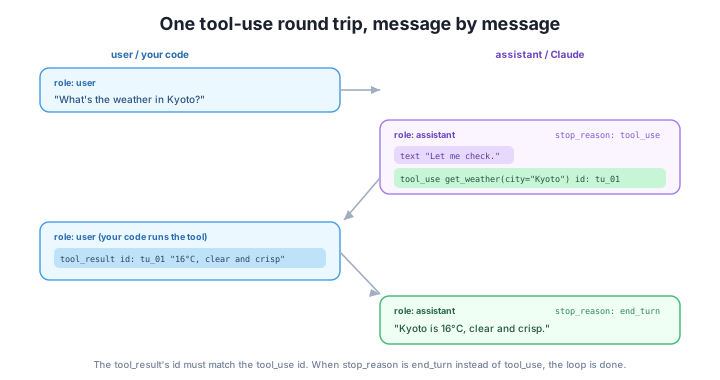
You’ll handle the response side — running the tool and returning the result — in the next lesson. For now, the key skill is reading the response: check stop_reason, and if it’s "tool_use", find the tool_use block(s) in content.
The description is a prompt, not a label
Claude chooses tools almost entirely from their descriptions. “Get the weather” is a weak description; “Get the current weather for a city — use this whenever the user asks about weather or conditions in a specific place” tells Claude exactly when to reach for it. Treat each tool description as a mini system prompt: state what the tool does and when to use it. Most “why did my agent call the wrong tool?” bugs are really description bugs.
tool_choiceBy default (tool_choice of {"type": "auto"}), Claude decides for itself whether to use a tool — which is exactly what you want for an agent. But you can steer it:
{"type": "auto"} — Claude decides (the default).{"type": "any"} — Claude must use some tool (it can’t answer in plain prose).{"type": "tool", "name": "get_weather"} — force a specific tool.{"type": "none"} — forbid tools for this call.For agents you’ll almost always use auto, because letting the model choose is the whole point. The forcing options are handy for workflows or for testing a single tool in isolation. There’s also disable_parallel_tool_use (to allow at most one tool call per turn), which you can add to any choice — more on parallel calls in Lesson 4.
Sketch the tool definition for a convert_currency tool that takes an amount (number) and two currency codes, from_currency and to_currency (strings), all required.
Hint
{
  "name": "convert_currency",
  "description": "Convert an amount of money from one currency to another. Use this when the user asks to convert or compare prices across currencies.",
  "input_schema": {
    "type": "object",
    "properties": {
      "amount": {"type": "number"},
      "from_currency": {"type": "string"},
      "to_currency": {"type": "string"},
    },
    "required": ["amount", "from_currency", "to_currency"],
  },
}
Note the description says when to use it, not just what it does.
After a call with tools, response.stop_reason is "tool_use". What does that tell you, and where do you look to find which tool Claude wants and with what arguments?
Hint
It means Claude wants to call a tool rather than answer directly. Look in response.content for a block whose block.type == "tool_use"; its block.name is the tool to run, block.input is the arguments, and block.id is the id you’ll echo back in the tool result.
You’re testing a single get_weather tool and want to guarantee Claude calls it on every request, so you can check your handling code. Which tool_choice would you use, and why wouldn’t you keep it for the finished agent?
Hint
Use {"type": "tool", "name": "get_weather"} to force that tool while testing. You wouldn’t keep it for the real agent because an agent’s whole value is letting the model decide when a tool is needed — forcing it removes that judgment and breaks any request the tool can’t answer.
Tool use is the mechanism behind every agent. You define a tool as a dictionary with a name, a description (which Claude reads to decide when to use it), and an input_schema (JSON Schema for the arguments), then pass a list of them to messages.create via tools. When Claude decides to act, the response’s stop_reason is "tool_use" and content holds a tool_use block with type, id, name, and input — a structured request to run that tool, not an executed action. tool_choice lets you steer or force tool use, but agents almost always use auto so the model chooses. The single biggest lever on tool-use quality is writing descriptions that say when to use each tool.
name + description + input_schema.tools parameter — the list of definitions you pass to messages.create.tool_use block — Claude’s structured request (id, name, input), signaled by stop_reason == "tool_use".tool_choice — auto (default) / any / a specific tool / none.Tool use is the bridge between a model that only talks and an agent that acts. Once you can define a tool and recognize when Claude wants to call it, you’re one step from a working agent — you just need to run the requested tool and feed the result back, which is exactly the next lesson. And because Claude picks tools from their descriptions, the habit you start building here — writing tool descriptions like precise instructions — is what will make your agents reliable later.
Run the tool Claude requested and feed the result back with a matching tool_result block.
Return to The Agent Loop with Claude module overview
You can now define tools and recognize when Claude wants to use one. Next you’ll close the loop on a single tool call — running the function Claude asked for and returning the result as a tool_result so the model can finish its answer.