Title here
Summary here
Every image you’ve built so far in this course used python:3.13-slim without asking why. This lesson asks why. You’re going to package a small, real CityFlow reporting job with a requirements.txt file — the standard way a Python job declares its dependencies — and then build the exact same image twice, changing nothing but one word in the FROM line: python:3.13 versus python:3.13-slim. The two images will print byte-identical reports. Their sizes will not be close.
By the end of this lesson, you will be able to:
requirements.txt and install them with pip install -r.python:3.13 and python:3.13-slim actually is on disk.Let’s package something real.
CityFlow’s ops team runs a lot of one-off sanity checks on slices of trip data before they go anywhere near a dashboard. Here’s a small one — nothing new algorithmically, just enough real work to make the image worth measuring:
# gate: setup: printf 'tpep_pickup_datetime,tpep_dropoff_datetime,passenger_count,trip_distance,PULocationID,DOLocationID,payment_type,fare_amount,tip_amount,total_amount\n2024-01-09 16:07:22,2024-01-09 16:31:46,,2.54,107,140,0,22.26,3.94,30.2\n2024-01-09 16:07:24,2024-01-09 17:01:23,1.0,19.13,132,50,1,70.0,8.77,96.46\n2024-01-09 16:07:28,2024-01-09 16:19:43,1.0,1.57,144,79,1,12.1,1.86,20.46\n2024-01-09 16:07:37,2024-01-09 16:27:19,1.0,1.54,237,161,1,17.0,7.05,30.55\n2024-01-09 16:08:08,2024-01-09 16:36:40,1.0,4.1,237,211,1,26.8,6.65,39.95\n2024-01-09 16:08:09,2024-01-09 16:14:23,1.0,0.96,141,263,2,7.9,0.0,14.4\n2024-01-09 16:08:28,2024-01-09 16:29:03,3.0,1.63,141,162,1,17.7,4.84,29.04\n' > trips.csv
# gate: teardown: rm -f trips.csv
"""CityFlow's zone-revenue snapshot - a small batch job the ops team runs
to sanity-check a slice of trips before it's loaded into the dashboard.
"""
import pandas as pd

df = pd.read_csv("trips.csv")

print("CityFlow zone-revenue snapshot")
print("-------------------------------")
print(f"trips in slice:    {len(df)}")
print(f"avg fare:           ${df['fare_amount'].mean():.2f}")
print(f"avg distance:        {df['trip_distance'].mean():.2f} mi")
print(f"total revenue:      ${df['total_amount'].sum():.2f}")

top = df.loc[df["fare_amount"].idxmax()]
print(
    f"highest fare trip:  zone {int(top['PULocationID'])} -> "
    f"{int(top['DOLocationID'])}, ${top['fare_amount']:.2f}"
)
Save this as snapshot.py, alongside a fresh slice of seven real trips as trips.csv:
tpep_pickup_datetime,tpep_dropoff_datetime,passenger_count,trip_distance,PULocationID,DOLocationID,payment_type,fare_amount,tip_amount,total_amount
2024-01-09 16:07:22,2024-01-09 16:31:46,,2.54,107,140,0,22.26,3.94,30.2
2024-01-09 16:07:24,2024-01-09 17:01:23,1.0,19.13,132,50,1,70.0,8.77,96.46
2024-01-09 16:07:28,2024-01-09 16:19:43,1.0,1.57,144,79,1,12.1,1.86,20.46
2024-01-09 16:07:37,2024-01-09 16:27:19,1.0,1.54,237,161,1,17.0,7.05,30.55
2024-01-09 16:08:08,2024-01-09 16:36:40,1.0,4.1,237,211,1,26.8,6.65,39.95
2024-01-09 16:08:09,2024-01-09 16:14:23,1.0,0.96,141,263,2,7.9,0.0,14.4
2024-01-09 16:08:28,2024-01-09 16:29:03,3.0,1.63,141,162,1,17.7,4.84,29.04
snapshot.py only needs one third-party package: pandas. Declare it the standard way, in a requirements.txt:
pandas==2.2.3Why pin the version?
pandas==2.2.3 rather than a bare pandas pins an exact version. Without a pin, pip install -r requirements.txt grabs whatever the latest release happens to be on build day — which means the same Dockerfile can quietly produce a different image next month. Pinning versions is what makes a build reproducible: the same requirements.txt should always install the same code.
This should look familiar from Module 2’s build-cache lesson: dependencies installed in their own layer, before the application code is copied in.
FROM python:3.13-slim

WORKDIR /app

COPY requirements.txt .
RUN pip install --no-cache-dir -r requirements.txt

COPY trips.csv snapshot.py .

CMD ["python", "snapshot.py"]
RUN pip install --no-cache-dir -r requirements.txt reads requirements.txt and installs every package it lists, the same command you’d run on your own machine. --no-cache-dir tells pip not to keep its own download cache inside the image — that cache would be dead weight the moment the install finishes, since nothing inside the running container ever needs to reinstall anything.
Build and run it once to confirm the job itself works:
docker build -f Dockerfile.slim -t cityflow-zone-snapshot:slim .
docker run --rm cityflow-zone-snapshot:slim
CityFlow zone-revenue snapshot
-------------------------------
trips in slice: 7
avg fare: $24.82
avg distance: 4.50 mi
total revenue: $261.06
highest fare trip: zone 132 -> 50, $70.00Seven real trips, a real average fare of $24.82, and a real total revenue of $261.06. Nothing about this changes for the rest of the lesson — the only thing that’s about to change is the base image.
Copy the Dockerfile, and change exactly one word:
FROM python:3.13

WORKDIR /app

COPY requirements.txt .
RUN pip install --no-cache-dir -r requirements.txt

COPY trips.csv snapshot.py .

CMD ["python", "snapshot.py"]
Every other line is identical, character for character. Build this second version too:
docker build -f Dockerfile.full -t cityflow-zone-snapshot:full .
docker run --rm cityflow-zone-snapshot:full
CityFlow zone-revenue snapshot
-------------------------------
trips in slice: 7
avg fare: $24.82
avg distance: 4.50 mi
total revenue: $261.06
highest fare trip: zone 132 -> 50, $70.00Byte-identical output. Same pandas version, same script, same data, same result. Now look at what they cost on disk.
docker imagesdocker images cityflow-zone-snapshotIMAGE ID DISK USAGE CONTENT SIZE EXTRA
cityflow-zone-snapshot:full 9c3f90e44e2e 1.29GB 0B
cityflow-zone-snapshot:slim 3bd18a41e0e4 305MB 0B1.29 GB versus 305 MB — the full-base image is more than four times larger, for a script that never uses anything the extra megabytes provide. Pull the two base images on their own to see where that difference actually starts:
docker pull python:3.13
docker images python
IMAGE ID DISK USAGE CONTENT SIZE EXTRA
python:3.13 1d0429053cc8 1.12GB 0B
python:3.13-slim e5d022584920 143MB 0BBefore a single line of CityFlow’s own code enters the picture, the base images alone are 1.12 GB versus 143 MB — a 7.8x difference. python:3.13-slim isn’t a different Python; it’s the same interpreter and the same standard library, built on a deliberately minimal Debian filesystem. python:3.13 adds a full complement of build tools, compilers, and extra system libraries that a Debian desktop or general-purpose server image would want, but that a container whose only job is to run one Python script never touches.
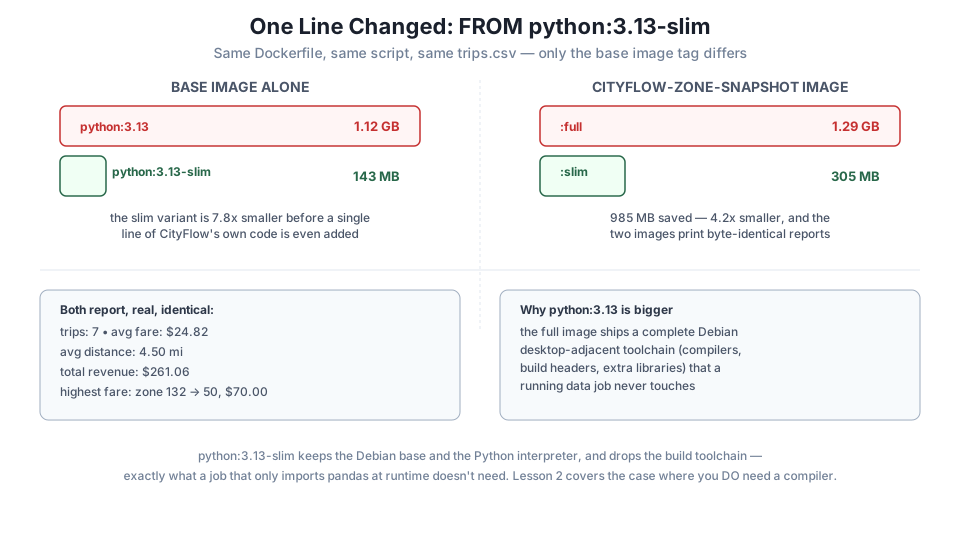
Why the two gaps are nearly the same size
Notice the two size differences land close together: roughly 985 MB whether you compare the bare base images or the two finished CityFlow images. That’s expected — pandas and its own dependencies (numpy, pytz, and a few smaller packages) add the same ~162 MB to both images, since pip install behaves identically regardless of which Debian variant it’s running on. The gap between slim and full is really a property of the base image, and it survives essentially unchanged once your own dependencies are layered on top.
python:3.13-slim isn’t automatically the right answer for every job, which is exactly why this lesson measured rather than assumed. The slim image strips out a C compiler and a handful of system libraries along with everything else — which is fine for snapshot.py, because pandas==2.2.3 ships as a prebuilt wheel (a .whl file with compiled code already inside it) for Python 3.13 on this machine’s platform. pip install just downloads and unpacks it; nothing needs to compile locally.
That assumption breaks the moment a dependency has no prebuilt wheel for your platform and needs to be compiled from source — which needs a compiler that the slim image doesn’t have. Lesson 2 hits exactly that case, with a real dependency that fails to install on python:3.13-slim for precisely this reason, and shows the pattern that lets you keep the compiler for the build without paying for it in the image you ship.
Save snapshot.py, trips.csv, and both Dockerfiles exactly as shown, build both images, and confirm your own docker images output shows a real, multi-hundred-megabyte gap between them. Confirm both docker run outputs match exactly: 7 trips, $24.82 average fare, $261.06 total revenue.
Hint
If your numbers come out different, check trips.csv character-for-character against this lesson’s copy first — the report is only as correct as the seven rows baked into the image.
Run docker history cityflow-zone-snapshot:full and docker history cityflow-zone-snapshot:slim, and compare the base-image layers (everything below your own WORKDIR/COPY/RUN lines). Identify which layer accounts for most of the size difference.
Hint
Look for a layer whose CREATED BY mentions installing build dependencies or compiling Python itself from source — that’s the one that’s present in the full image and absent (or much smaller) in the slim one.
Add requests==2.32.3 to requirements.txt (another package that ships prebuilt wheels), rebuild both images, and confirm pip install succeeds identically on both. What does this tell you about which dependencies actually need the full base image’s extra tools?
Hint
Watch the pip install build output for either image — a wheel install shows lines like Downloading ... .whl and no compiler invocation. If you never see gcc mentioned, the slim image was never actually missing anything this dependency needed.
You packaged a real pandas job with requirements.txt and pip install -r, then built the identical Dockerfile twice with only the base image tag changed. The two images produced byte-identical output — 7 trips, $24.82 average fare, $261.06 total revenue — while differing in size by nearly a gigabyte: 1.29 GB for python:3.13 versus 305 MB for python:3.13-slim, a difference traceable straight back to the base images themselves (1.12 GB versus 143 MB, a 7.8x gap). The slim variant works here because pandas installs from a prebuilt wheel — no compiler required — which is precisely the assumption Lesson 2 is about to break.
requirements.txt — the standard way to declare a Python job’s dependencies, with version pins for reproducibility.pip install --no-cache-dir -r requirements.txt — installs every pinned dependency without leaving pip’s own download cache behind.python:3.13-slim — the same interpreter and standard library as python:3.13, on a minimal Debian filesystem with the build toolchain removed..whl) — a prebuilt package archive that pip install can unpack directly, with no compiler needed at install time.pip install actually needs to compile anything.Base image choice is one of the highest-leverage decisions in a Dockerfile, and it costs nothing to get right: it’s one word, checked once, that can be worth a gigabyte per image, multiplied by every image you ever build and every registry pull anyone on your team ever makes. The habit this lesson is really teaching is bigger than slim versus full, though — it’s building the same thing two ways and measuring the difference rather than trusting a rule of thumb, which is exactly the discipline the rest of this module keeps applying to multi-stage builds, .dockerignore, and layer order.
python:3.13-slim got CityFlow’s snapshot job down to 305 MB, and it was free — no compiler needed, no functionality lost. In Lesson 2, you’ll meet a real dependency that the slim image genuinely can’t install on its own, and learn the technique that lets you compile it anyway without paying for the compiler in the image you ship: a multi-stage build.
Keep DATATWEETS free. Help fund practical data, AI, and engineering lessons for learners worldwide.
