Title here
Summary here
Lesson 1 ended on a warning: python:3.13-slim works for free only when every dependency ships a prebuilt wheel. This lesson hits the case where one doesn’t. CityFlow’s team needs a job that talks to Postgres directly with psycopg2 — not psycopg2-binary, the version that ships a wheel — and psycopg2 genuinely needs a C compiler and Postgres’s own header files to install. You’ll watch it fail on the slim image, fix it by adding a compiler, and then learn the pattern that lets you keep that compiler for the build without shipping it: a multi-stage build.
By the end of this lesson, you will be able to:
FROM, and use COPY --from=<stage> to move files between stages.This job connects directly to the real cityflow-db Postgres container from Module 1 and reports on the trips currently loaded into it:
# gate: setup: docker rm -f cf-lookup-db >/dev/null 2>&1; docker run -d --name cf-lookup-db -e POSTGRES_PASSWORD=cityflow -e POSTGRES_DB=cityflow -p 5433:5432 postgres:16-alpine >/dev/null && sleep 3 && docker exec cf-lookup-db psql -U postgres -d cityflow -c "CREATE TABLE trips (pickup_zone INTEGER, dropoff_zone INTEGER, fare_amount NUMERIC); INSERT INTO trips (pickup_zone, dropoff_zone, fare_amount) VALUES (107,140,22.26),(132,50,70.00),(144,79,12.10),(237,161,17.00);" >/dev/null
# gate: teardown: docker rm -f cf-lookup-db >/dev/null 2>&1
"""CityFlow's live zone-lookup job - connects to the real cityflow-db
Postgres container and reports the zones currently on file, straight from
the database rather than a local copy. Needs psycopg2, which (unlike
psycopg2-binary) ships no prebuilt wheel and always compiles from source
against libpq at install time.
"""
import os
import psycopg2

conn = psycopg2.connect(
    host=os.environ.get("DB_HOST", "localhost"),
    port=int(os.environ.get("DB_PORT", "5433")),
    dbname="cityflow",
    user="postgres",
    password="cityflow",
)
cur = conn.cursor()
cur.execute("SELECT COUNT(*), ROUND(AVG(fare_amount), 2) FROM trips;")
count, avg_fare = cur.fetchone()
print("CityFlow live zone-lookup")
print("--------------------------")
print(f"trips on file:  {count}")
print(f"avg fare:       ${avg_fare}")
cur.close()
conn.close()
print("connection closed cleanly")
Save this as zone_lookup.py, with a requirements.txt naming the plain, non-binary driver:
psycopg2==2.9.10psycopg2 vs psycopg2-binary
psycopg2-binary is a separately published package that bundles a precompiled libpq and ships real wheels — convenient, and the one most tutorials reach for. Plain psycopg2 is what the project itself recommends for production, and it has never shipped wheels: every pip install psycopg2 compiles the C extension from source, against your system’s own libpq, every time. That makes it the perfect real example for this lesson.
Try the single-stage Dockerfile you’d write after Lesson 1, adding just enough system packages to compile:
FROM python:3.13-slim

RUN apt-get update \
    && apt-get install -y --no-install-recommends gcc libc6-dev libpq-dev \
    && rm -rf /var/lib/apt/lists/*

WORKDIR /app

COPY requirements.txt .
RUN pip install --no-cache-dir -r requirements.txt

COPY zone_lookup.py .

CMD ["python", "zone_lookup.py"]
gcc is the compiler itself; libc6-dev provides the C standard library’s headers (assert.h and friends) that gcc needs to compile anything; libpq-dev provides Postgres’s own client headers, which psycopg2’s C extension compiles against directly. Build it:
docker build -f Dockerfile.single -t cityflow-zone-lookup:single .#9 [5/6] RUN pip install --no-cache-dir -r requirements.txt
...
Building wheel for psycopg2 (pyproject.toml): started
Building wheel for psycopg2 (pyproject.toml): finished with status 'done'
Created wheel for psycopg2: filename=psycopg2-2.9.10-cp313-cp313-linux_aarch64.whl size=524450
Successfully built psycopg2
Successfully installed psycopg2-2.9.10It built — because every prerequisite is present. This single-stage version is a completely valid, working image. The problem it has isn’t correctness; it’s that gcc, libc6-dev, and libpq-dev are now permanently part of an image whose actual job never touches a compiler again once the build finishes.
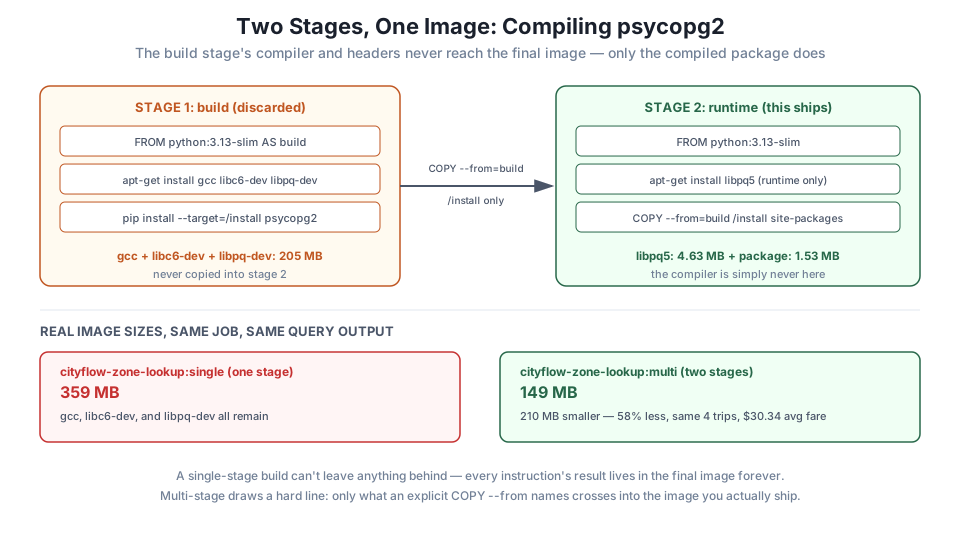
A multi-stage Dockerfile has more than one FROM, and each one starts a fresh, independent stage. Instructions run in an earlier stage don’t automatically appear in a later one — only an explicit COPY --from=<stage> moves anything across:
# Stage 1: build - has the compiler and the Postgres headers psycopg2 needs
# to compile, but none of this stage ships in the final image.
FROM python:3.13-slim AS build

RUN apt-get update \
    && apt-get install -y --no-install-recommends gcc libc6-dev libpq-dev \
    && rm -rf /var/lib/apt/lists/*

WORKDIR /app
COPY requirements.txt .
RUN pip install --no-cache-dir --target=/install -r requirements.txt

# Stage 2: runtime - only the compiled package and the small shared library
# psycopg2 actually needs AT RUNTIME (libpq5, not the -dev headers or gcc).
FROM python:3.13-slim

RUN apt-get update \
    && apt-get install -y --no-install-recommends libpq5 \
    && rm -rf /var/lib/apt/lists/*

WORKDIR /app
COPY --from=build /install /usr/local/lib/python3.13/site-packages
COPY zone_lookup.py .

CMD ["python", "zone_lookup.py"]
Read the two stages as two entirely separate images under construction. AS build names the first stage so a later stage can refer back to it. pip install --target=/install installs into a plain directory rather than the default site-packages location, which makes it trivial to copy just that one directory out. The second FROM python:3.13-slim starts completely over — a brand-new, minimal filesystem that never saw gcc — and COPY --from=build /install ... reaches back into the first stage’s filesystem to grab only the finished, compiled package. libpq5 is the one thing the runtime stage still needs from apt: the actual Postgres client shared library that the compiled psycopg2 dynamically links against when it runs — a runtime dependency, not a build-time one, and a much smaller package than libpq-dev.
docker build -f Dockerfile.multistage -t cityflow-zone-lookup:multi .#11 [build 5/5] RUN pip install --no-cache-dir --target=/install -r requirements.txt
...
Successfully installed psycopg2-2.9.10
#12 [stage-1 4/5] COPY --from=build /install /usr/local/lib/python3.13/site-packages
#12 DONE 0.0sThe compile step still runs — psycopg2 is still built from source, in stage 1 — but stage 2 only ever sees the finished .whl’s unpacked contents, copied in as plain files.
Run the real Postgres container from Module 1, and connect both images to it over a shared Docker network:
docker network create cityflow-net
docker run -d --name cityflow-db --network cityflow-net \
  -e POSTGRES_PASSWORD=cityflow -e POSTGRES_DB=cityflow postgres:16-alpine
docker exec cityflow-db psql -U postgres -d cityflow -c "
CREATE TABLE IF NOT EXISTS trips (pickup_zone INTEGER, dropoff_zone INTEGER, fare_amount NUMERIC);
INSERT INTO trips (pickup_zone, dropoff_zone, fare_amount) VALUES (107,140,22.26),(132,50,70.00),(144,79,12.10),(237,161,17.00);
"
docker run --rm --network cityflow-net -e DB_HOST=cityflow-db -e DB_PORT=5432 cityflow-zone-lookup:single
docker run --rm --network cityflow-net -e DB_HOST=cityflow-db -e DB_PORT=5432 cityflow-zone-lookup:multiCityFlow live zone-lookup
--------------------------
trips on file: 4
avg fare: $30.34
connection closed cleanlyBoth images print the identical result — --network cityflow-net lets each container resolve cityflow-db by its container name, the same real-database connection either way, just reached without the host-port mapping this course has used until now. (Module 4’s Compose stacks make this exact pattern the default; consider this a preview.)
docker images cityflow-zone-lookupIMAGE ID DISK USAGE CONTENT SIZE EXTRA
cityflow-zone-lookup:multi 45c074e8077d 149MB 0B
cityflow-zone-lookup:single 38364fda00ef 359MB 0B359 MB versus 149 MB — the multi-stage build is 210 MB smaller, 58% less, for the exact same job with the exact same verified output. docker history shows exactly where that difference lives:
single: apt-get install gcc libc6-dev libpq-dev  ->  205MB
multi:  apt-get install libpq5                   ->  4.63MB
multi:  COPY --from=build /install (compiled pkg) -> 1.53MB
205 MB of compiler and headers versus 4.63 MB of the one shared library actually needed at runtime, plus 1.53 MB for the compiled package itself — that’s essentially the entire 210 MB gap, accounted for.
Build both Dockerfiles yourself, run the Postgres container and network setup, and confirm both images print the identical real query result. Confirm your own docker images output shows a real, multi-hundred-megabyte gap in favor of the multi-stage build.
Hint
Give Postgres a few seconds to finish initializing before running either image — the same “running versus ready” distinction Module 1’s Lesson 4 covered.
Remove the apt-get install libpq5 line from the runtime stage, rebuild, and run the resulting image. Read the error carefully — is it a Python-level error or something lower-level? Explain, in your own words, why libpq5 is still required even though the compiling already finished in stage 1.
Hint
Expect an error about a missing shared library (something like libpq.so.5: cannot open shared object file) rather than a Python traceback — psycopg2’s compiled extension links against libpq dynamically, meaning the library has to be present again at run time, on whichever machine actually runs the container, not just at compile time.
Add requests==2.32.3 to requirements.txt in a fresh single-stage Dockerfile, without any gcc/libc6-dev/libpq-dev installed, and confirm it installs and runs fine. Explain why this dependency never needed the multi-stage treatment Lesson 2 just taught.
Hint
Check the pip install build log the way Lesson 1’s Exercise 3 did — no Building wheel ... started line and no compiler invocation means there was never anything to leave behind in the first place.
You hit a real dependency, psycopg2, that genuinely needs a compiler and Postgres’s headers to install — and watched a single-stage image absorb all of that permanently, at a real, measured cost of 205 MB. A multi-stage build split the work into a build stage that has everything the compile needs and a runtime stage that starts over clean, pulling across only the finished, compiled package with COPY --from=build. Both images produced the identical real query result — 4 trips, a $30.34 average fare — while the multi-stage version came in 210 MB smaller, a 58% cut, on the exact same job.
FROM; each stage is an independent filesystem, and nothing crosses between them except through an explicit COPY --from.AS <name> — names a stage so a later COPY --from=<name> can reference it.gcc/libc6-dev/libpq-dev are needed only to compile; libpq5 is needed only to run the already-compiled result, and the two rarely cost the same.docker history on both images is what turns “multi-stage should help” into a real, attributable number.Compiled dependencies are common in real data engineering work — database drivers, some scientific-computing packages, anything wrapping a C or Rust library — and a single-stage image that just adds gcc to make pip install succeed is the single most common way a Python image ends up needlessly large. Multi-stage builds are the standard, production fix, not a niche technique: they let you use whatever heavy toolchain a build genuinely needs, while shipping only what the running job actually needs. Lesson 5’s guided project makes exactly this judgment call for real — and, just as tellingly, decides multi-stage isn’t worth it there, because nothing in that job needs to compile at all.
You’ve now cut a real, compiled dependency down to its runtime footprint. In Lesson 3, you’ll slim an image from a different angle entirely — not what gets compiled, but what gets copied in by accident, and how the order of a Dockerfile’s RUN instructions can cost or save real megabytes even when every instruction installs exactly the same packages.
Keep DATATWEETS free. Help fund practical data, AI, and engineering lessons for learners worldwide.
