Title here
Summary here
Lessons 1 and 2 slimmed an image by choosing what goes into the FROM line and what a multi-stage build lets you leave behind. This lesson slims an image two more ways, both real and both easy to get wrong by accident: what a careless COPY . . drags in from your project folder, and how the number of layers an installation step uses can change the final size even when every layer installs exactly the same software.
By the end of this lesson, you will be able to:
.dockerignore file and explain exactly what it prevents.RUN instructions can shrink an image that splitting them never does.CityFlow’s zone-revenue reporter is the same shape of job as Lesson 1’s — but this time it lives in a real project folder, the way code actually does: alongside tests, a .git directory, some scratch notebooks, and a stray full copy of a dataset someone forgot to delete.
# gate: setup: printf 'tpep_pickup_datetime,tpep_dropoff_datetime,passenger_count,trip_distance,PULocationID,DOLocationID,payment_type,fare_amount,tip_amount,total_amount\n2024-01-20 00:56:23,2024-01-20 01:22:01,3.0,13.4,132,265,2,75.8,0.0,80.05\n2024-01-20 00:56:38,2024-01-20 01:23:48,1.0,7.1,230,159,1,31.0,9.0,45.0\n2024-01-20 00:56:45,2024-01-20 01:03:47,1.0,1.4,79,170,1,9.3,1.0,15.3\n2024-01-20 00:57:00,2024-01-20 01:03:19,2.0,1.3,230,233,1,8.6,2.7,16.3\n2024-01-20 00:57:01,2024-01-20 01:21:40,1.0,9.8,132,177,4,60.1,0.0,63.85\n2024-01-20 00:57:11,2024-01-20 01:21:34,1.0,2.08,158,158,1,20.5,10.0,35.5\n' > trips.csv
# gate: teardown: rm -f trips.csv
"""CityFlow's zone-revenue reporter - the packaged job for this lesson's
slimming exercise.
"""
import pandas as pd

df = pd.read_csv("trips.csv")

print("CityFlow zone-revenue report")
print("------------------------------")
print(f"trips in slice:    {len(df)}")
print(f"avg fare:           ${df['fare_amount'].mean():.2f}")
print(f"total revenue:      ${df['total_amount'].sum():.2f}")
Save this as report.py, with requirements.txt containing pandas==2.2.3 and a fresh six-trip trips.csv. Then look at what else is sitting in the same folder on a real, lived-in project:
ls -la.git/ (real git internals, ~2 MB)
__pycache__/ (a compiled bytecode cache)
notebooks/ (scratch exploration, including a stray full CSV copy)
tests/ (unit tests - useful, but not part of the shipped job)
README.md (dev-facing notes)
report.py
requirements.txt
trips.csvdu -sh .16M .Sixteen megabytes, almost all of it things report.py never opens at runtime.
COPY . .A Dockerfile that copies the whole project folder in one step is extremely common, and it’s what you’d write without thinking twice:
FROM python:3.13-slim

WORKDIR /app

COPY requirements.txt .
RUN pip install --no-cache-dir -r requirements.txt

COPY . .

CMD ["python", "report.py"]
docker build -t cityflow-zone-reporter:no-ignore .
docker images cityflow-zone-reporterIMAGE ID DISK USAGE CONTENT SIZE EXTRA
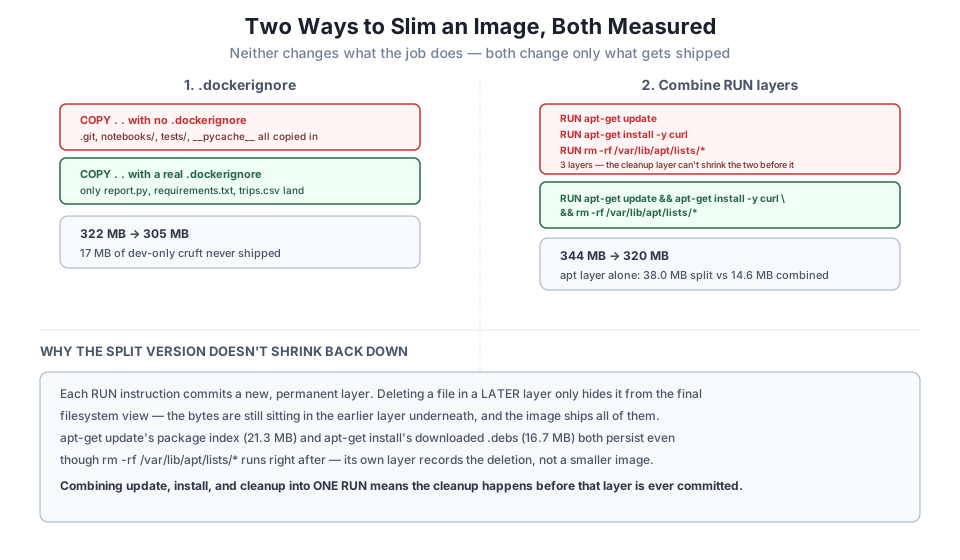
cityflow-zone-reporter:no-ignore 93f4ad16976e 322MB 0BThe job still runs correctly — COPY . . doesn’t break anything — but .git, notebooks/, tests/, and __pycache__ all rode along into the image, invisible unless you go looking for them.
.dockerignore: tell COPY what to skip.dockerignore works exactly like .gitignore, but for the Docker build context — anything it lists is excluded from every COPY and ADD instruction in the Dockerfile, without changing a single line of the Dockerfile itself:
.git
__pycache__
tests
notebooks
README.md
*.pyc
docker build -t cityflow-zone-reporter:ignore .
docker images cityflow-zone-reporterIMAGE ID DISK USAGE CONTENT SIZE EXTRA
cityflow-zone-reporter:ignore a60f96cf35e1 305MB 0B
cityflow-zone-reporter:no-ignore 93f4ad16976e 322MB 0B322 MB down to 305 MB — 17 MB of dev-only material that never should have shipped in the first place, gone with a six-line text file and zero changes to the Dockerfile. Confirm the job still works, and confirm the junk is really gone:
docker run --rm cityflow-zone-reporter:ignore
docker run --rm cityflow-zone-reporter:ignore ls -la /app
CityFlow zone-revenue report
------------------------------
trips in slice: 6
avg fare: $34.22
total revenue: $256.00total 28
-rw-r--r-- 1 root root 151 Jul 21 10:18 Dockerfile
-rw-r--r-- 1 root root 389 Jul 21 10:17 report.py
-rw-r--r-- 1 root root 14 Jul 21 10:17 requirements.txt
-rw-r--r-- 1 root root 582 Jul 21 10:17 trips.csvNo .git, no notebooks, no tests, no __pycache__. The report itself is unchanged — real, correct, and identical to what the bloated version produced.
.dockerignore also speeds up the build itself
Excluding files isn’t only about final image size. Everything in the build context has to be read and sent to the Docker build process before the first instruction even runs — a large, junk-filled context makes every build slower to start, independent of what actually ends up COPY’d. .dockerignore fixes both problems with the same file.
RUN instructions?Here’s a case that surprises most people the first time they measure it. Suppose the job also needs curl installed via apt-get — the same package Lesson 4 is about to use for a HEALTHCHECK. Compare two Dockerfiles that install the exact same package, differing only in how many RUN instructions they use:
FROM python:3.13-slim

RUN apt-get update
RUN apt-get install -y curl
RUN rm -rf /var/lib/apt/lists/*

WORKDIR /app
COPY requirements.txt .
RUN pip install --no-cache-dir -r requirements.txt
COPY report.py trips.csv .

CMD ["python", "report.py"]
FROM python:3.13-slim
RUN apt-get update \
&& apt-get install -y --no-install-recommends curl \
&& rm -rf /var/lib/apt/lists/*
WORKDIR /app
COPY requirements.txt .
RUN pip install --no-cache-dir -r requirements.txt
COPY report.py trips.csv .
CMD ["python", "report.py"]docker build -f Dockerfile.split -t cityflow-zone-reporter:split-layers .
docker build -f Dockerfile.combined -t cityflow-zone-reporter:combined-layers .
docker images cityflow-zone-reporterIMAGE ID DISK USAGE CONTENT SIZE EXTRA
cityflow-zone-reporter:combined-layers 0d16a8200cb1 320MB 0B
cityflow-zone-reporter:split-layers 9ce81814bbe2 344MB 0BBoth Dockerfiles install curl and nothing else. Both run identically. And yet the split version is 344 MB, the combined version is 320 MB — a real, 24 MB difference, from reordering nothing and installing nothing extra. docker history shows exactly why:
docker history cityflow-zone-reporter:split-layers --format "{{.Size}}\t{{.CreatedBy}}" | grep -i apt0B RUN /bin/sh -c rm -rf /var/lib/apt/lists/* #…
16.7MB RUN /bin/sh -c apt-get install -y curl # bui…
21.3MB RUN /bin/sh -c apt-get update # buildkitdocker history cityflow-zone-reporter:combined-layers --format "{{.Size}}\t{{.CreatedBy}}" | grep -i apt14.6MB RUN /bin/sh -c apt-get update && apt-get…There’s the whole story. In the split version, apt-get update commits a 21.3 MB layer (the downloaded package index), apt-get install curl commits a further 16.7 MB layer, and then rm -rf /var/lib/apt/lists/* runs — but as its own, third layer. That layer really does delete the files, and the final container’s filesystem genuinely doesn’t show them. What it doesn’t do is make the image smaller: Docker images are a stack of layers, and each layer is immutable once committed. A later layer can hide a file from view, but the bytes are still sitting in the earlier layer underneath, and every layer ships as part of the image. The combined version never has this problem, because update, install, and the cleanup all happen inside one RUN, before that single layer is ever committed — so the package index and the downloaded .deb files are gone before they’re ever written to a layer at all.
Build all four images from this lesson yourself — with and without .dockerignore, split and combined RUN layers — and confirm your own docker images output shows a real gap in both cases. Confirm every image still prints the identical report: 6 trips, $34.22 average fare, $256.00 total revenue.
Hint
Build with --no-cache at least once for the .dockerignore comparison — a cached COPY . . layer from a previous build won’t re-evaluate what’s actually in your build context.
.dockerignore for Lesson 2’s projectGo back to Lesson 2’s zone_lookup.py project and write a .dockerignore for it, even though that Dockerfile never used COPY . .. What, if anything, would it actually protect against, given how that Dockerfile explicitly names each file it copies?
Hint
A Dockerfile that only ever does COPY requirements.txt . and COPY zone_lookup.py . (naming exact files) is already immune to build-context bloat — .dockerignore only matters when a COPY or ADD instruction is broad enough to sweep up things you didn’t intend.
Starting from the split-layer Dockerfile, move just the rm -rf /var/lib/apt/lists/* line into the same RUN as apt-get install, but leave apt-get update as its own separate RUN. Rebuild and measure. Is the result closer to the fully split or fully combined version, and can you explain why from what you now know about layers?
Hint
apt-get update’s own layer (the package index, 21.3 MB) is untouched by this change — only install and rm share a layer now. Expect a size roughly between the two extremes, proportional to which specific bytes got cleaned up before their layer committed.
You slimmed the same job in two independent, real ways. A .dockerignore file kept .git, notebooks/, tests/, and __pycache__ out of a COPY . . build entirely, cutting 17 MB with zero Dockerfile changes and zero effect on the job’s own output. Separately, combining three RUN instructions — apt-get update, apt-get install, and cleanup — into one saved a further 24 MB, because Docker’s layers are immutable and a later layer’s deletion can never shrink an earlier layer that’s already been committed; only cleaning up inside the same layer actually keeps the bytes out of the image.
.dockerignore — excludes files and directories from every COPY/ADD in the Dockerfile, without changing the Dockerfile itself.docker build is run from; a large, junk-filled context slows the build and risks accidental COPY . . bloat.RUN — update && install && cleanup in one instruction keeps temporary files from ever being committed to a layer.Both of these mistakes are invisible unless you go looking — docker run ... ls -la and docker history are exactly how you’d catch them on a real image before it ships. Combined with Lesson 1’s base-image choice and Lesson 2’s multi-stage split, you now have four independent, measured techniques for keeping an image lean, and none of them required changing what the job actually does. The guided project in Lesson 5 applies all four to CityFlow’s real ETL job at once, and measures the total.
Every technique so far has been about what an image contains. Lesson 4 asks a different question: how does a container tell the outside world whether it’s actually working — and does the answer look the same for a job that runs once and exits as it does for a service that’s supposed to keep running forever? It doesn’t, and the difference matters more than it might seem.
Keep DATATWEETS free. Help fund practical data, AI, and engineering lessons for learners worldwide.
