Title here
Summary here
Module 2’s Lesson 4 taught you to read docker inspect --format '{{.State.ExitCode}}' on a container that had already crashed. This lesson asks a question that lesson never had to: what does “it worked” mean for a container that’s supposed to keep running forever, and never exits at all? The honest answer is that a one-shot batch job and a long-running service fail in genuinely different ways, and Docker gives you a different tool for each.
By the end of this lesson, you will be able to:
docker inspect.HEALTHCHECK instruction and watch a service’s status move from starting to healthy to unhealthy for real.A batch job runs once and stops. The only way it can tell a scheduler — cron, a Kubernetes Job, Airflow — what happened is its exit code, so a good batch job makes that code mean something specific:
# gate: skip
"""CityFlow's trip-validation batch job. A ONE-SHOT run: it processes
whatever CSV is mounted at /data/trips.csv, prints a short report, and
exits with a code that says exactly what happened - the way a scheduler
(cron, a Kubernetes Job, Airflow) is supposed to decide whether a run
needs a retry or a page:

  0  success            - trips validated and the report was printed
  2  no input found     - /data/trips.csv was never mounted in
  3  validation failed  - the file has a header but zero data rows
"""
import os
import sys
import pandas as pd

PATH = "/data/trips.csv"

if not os.path.exists(PATH):
    print(f"ERROR: no input file at {PATH} - was a volume mounted?", file=sys.stderr)
    sys.exit(2)

df = pd.read_csv(PATH)

if len(df) == 0:
    print("ERROR: input file has a header but zero trip rows", file=sys.stderr)
    sys.exit(3)

print("CityFlow trip-validation batch")
print("--------------------------------")
print(f"trips validated:    {len(df)}")
print(f"avg fare:            ${df['fare_amount'].mean():.2f}")
print(f"total revenue:       ${df['total_amount'].sum():.2f}")
print("batch completed successfully")
sys.exit(0)
Package it plainly, the way you have every job so far:
FROM python:3.13-slim

WORKDIR /app

COPY requirements.txt .
RUN pip install --no-cache-dir -r requirements.txt

COPY validate_batch.py .

CMD ["python", "validate_batch.py"]
Notice this job never bakes its own data in — it expects /data/trips.csv to be mounted, the same real design point Lesson 5’s guided project leans on fully. Run it three ways, checking docker inspect after each:
docker run --name cf-validate -v "$(pwd)/trips_good.csv":/data/trips.csv:ro cityflow-trip-validator:1.0
docker inspect cf-validate --format 'ExitCode={{.State.ExitCode}}'
CityFlow trip-validation batch
--------------------------------
trips validated: 5
avg fare: $11.54
total revenue: $95.66
batch completed successfully
ExitCode=0docker run --name cf-validate cityflow-trip-validator:1.0
docker inspect cf-validate --format 'ExitCode={{.State.ExitCode}}'ERROR: no input file at /data/trips.csv - was a volume mounted?
ExitCode=2docker run --name cf-validate -v "$(pwd)/trips_empty.csv":/data/trips.csv:ro cityflow-trip-validator:1.0
docker inspect cf-validate --format 'ExitCode={{.State.ExitCode}}'ERROR: input file has a header but zero trip rows
ExitCode=3Three real runs, three distinct exit codes, each one telling an automated caller something different and actionable: 0 needs nothing further, 2 means the pipeline that’s supposed to mount data upstream is broken, 3 means data arrived but something about it is genuinely wrong. A scheduler can act on all three differently — retry a 2, page a human for a 3 — which a single generic “it failed” never could.
Contrast the batch job with CityFlow’s status API — a small HTTP service meant to run indefinitely:
# gate: skip
"""CityFlow's status API - a tiny long-running service (not a batch job).
Serves GET /health, used by Docker's own HEALTHCHECK. To make the failure
mode observable in a short lesson, it stays healthy for FAIL_AFTER seconds
(default 12) and then starts reporting unhealthy - standing in for a real
service that degrades (a lost DB connection, a full queue) rather than
crashing outright.
"""
import os
import time
from http.server import BaseHTTPRequestHandler, HTTPServer

START = time.time()
FAIL_AFTER = float(os.environ.get("FAIL_AFTER", "12"))


class Handler(BaseHTTPRequestHandler):
    def do_GET(self):
        healthy = (time.time() - START) < FAIL_AFTER
        if self.path == "/health":
            self.send_response(200 if healthy else 500)
            self.end_headers()
            self.wfile.write(b"ok" if healthy else b"degraded")
        else:
            self.send_response(404)
            self.end_headers()

    def log_message(self, fmt, *args):
        pass


if __name__ == "__main__":
    print(f"CityFlow status API starting, will report unhealthy after {FAIL_AFTER}s", flush=True)
    HTTPServer(("0.0.0.0", 8000), Handler).serve_forever()
serve_forever() means exactly what it says — this process has no exit code to check, because under normal operation it never exits at all. docker inspect’s ExitCode field only means anything once a container has actually stopped; asking for it on a running service tells you nothing useful. What Docker offers instead is HEALTHCHECK: an instruction that runs a real command inside the still-running container, on a schedule, and tracks whether it’s currently succeeding.
FROM python:3.13-slim

RUN apt-get update \
    && apt-get install -y --no-install-recommends curl \
    && rm -rf /var/lib/apt/lists/*

WORKDIR /app
COPY status_api.py .

HEALTHCHECK --interval=2s --timeout=2s --start-period=1s --retries=2 \
    CMD curl -f http://localhost:8000/health || exit 1

CMD ["python", "-u", "status_api.py"]
--interval=2s runs the check every 2 seconds; --start-period=1s gives the service a moment to come up before failures start counting against it; --retries=2 means it takes two consecutive failures before Docker calls it unhealthy, not one blip. curl -f fails (nonzero exit) on an HTTP error status, which is exactly what turns a 500 response into a signal Docker can act on.
docker run -d --name cf-status -p 8000:8000 -e FAIL_AFTER=8 cityflow-status-api:1.0
docker ps --filter name=cf-status --format "table {{.Names}}\t{{.Status}}"
NAMES STATUS
cf-status Up 3 seconds (health: starting)A few seconds later, still inside the healthy window:
NAMES       STATUS
cf-status   Up 7 seconds (healthy)
And past FAIL_AFTER=8, once two consecutive checks have failed:
NAMES       STATUS
cf-status   Up 15 seconds (unhealthy)
docker inspect confirms the same transition, with the actual failing curl output logged:
docker inspect cf-status --format '{{.State.Health.Status}}'unhealthy"Output": "...\ncurl: (22) The requested URL returned error: 500\n"That’s a real HTTP 500 from the real handler, captured by Docker’s own health-check log — not a status Docker guessed at, a status it measured.
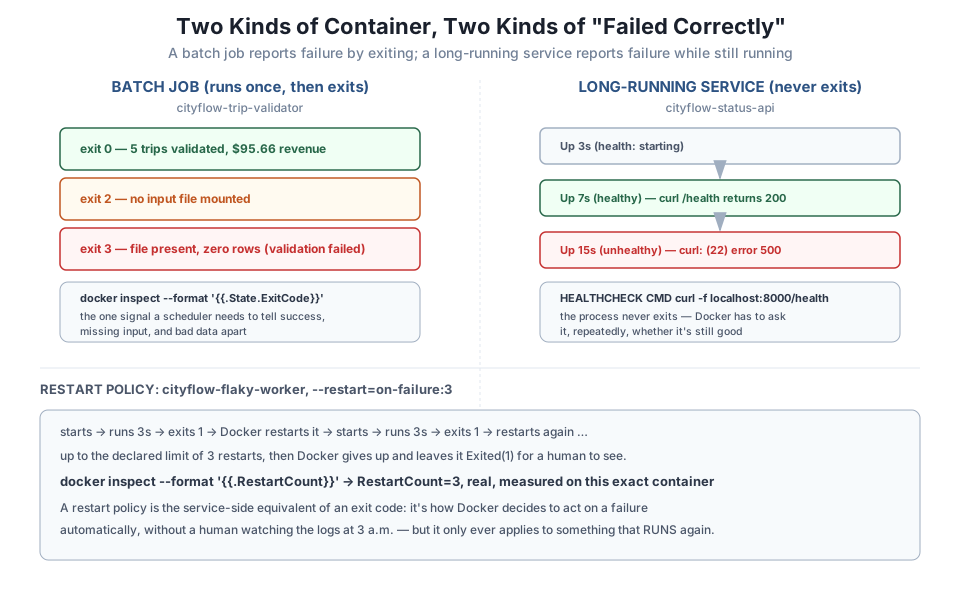
An exit code and a HEALTHCHECK both report a problem. Neither one fixes anything by itself. A restart policy is what turns a service’s failure into an automatic recovery attempt, the way you’d want a real long-running job to behave without a human watching it:
# gate: skip
"""CityFlow's flaky ingest worker - stands in for a long-running service
that keeps crashing shortly after start (e.g. it can't hold a connection
open). It runs for 3 seconds, then exits 1 - not a batch job's clean
completion, a real unhandled failure - so a restart policy is what keeps
it up rather than a human noticing and re-running it by hand.
"""
import sys
import time

print("flaky worker starting", flush=True)
time.sleep(3)
print("flaky worker crashing", flush=True)
sys.exit(1)
docker run -d --name cf-flaky --restart=on-failure:3 cityflow-flaky-worker:1.0--restart=on-failure:3 tells Docker: whenever this container exits with a nonzero code, start it again, up to 3 times. Wait long enough for all the restarts to play out, then check:
docker inspect cf-flaky --format 'RestartCount={{.RestartCount}} Status={{.State.Status}}'
docker logs cf-flaky
RestartCount=3 Status=exitedflaky worker starting
flaky worker crashing
flaky worker starting
flaky worker crashing
flaky worker starting
flaky worker crashing
flaky worker starting
flaky worker crashingFour full “starting/crashing” cycles logged — the original run plus 3 real restarts, exactly matching the declared limit — and then Docker stops trying, leaving the container Exited(1) for a human to actually see rather than restarting it forever. RestartCount=3 is Docker’s own record of exactly what it did, checkable the same way you’ve checked exit codes and health status all lesson.
Build cityflow-trip-validator yourself, and produce all three real exit codes — 0, 2, and 3 — by mounting a valid file, mounting nothing, and mounting an empty (header-only) CSV. Confirm each with docker inspect.
Hint
docker rm the container between runs before reusing the same --name — a stopped container with that name is still occupying it.
Run cityflow-status-api with FAIL_AFTER=6, and poll docker ps --filter name=cf-status every couple of seconds until you personally see all three states: (health: starting), (healthy), and (unhealthy).
Hint
With --retries=2 and --interval=2s, expect roughly a 4-second delay after FAIL_AFTER before the status actually flips to unhealthy — Docker requires two consecutive failing checks, not just one.
Rerun cityflow-flaky-worker with --restart=on-failure:5 instead of :3. Before running it, predict what docker inspect --format '{{.RestartCount}}' will show once it settles. Then confirm.
Hint
The worker crashes every 3 seconds without exception, so the restart count should simply track the new limit — this exercise is really about confirming the policy does exactly what its number says, no more and no less.
You gave two genuinely different kinds of container the check each one actually needs. A batch job — runs once, exits — reports through a real, meaningful exit code: 0 for success, 2 for missing input, 3 for a file that parsed but failed validation, all checkable with docker inspect --format '{{.State.ExitCode}}'. A long-running service never exits under normal operation, so it reports through HEALTHCHECK instead — a real command Docker runs on a schedule, moving a container’s status from (health: starting) to (healthy) to a genuinely measured (unhealthy) when two consecutive checks fail. And a restart policy, --restart=on-failure:3, is what turns a service’s crash into an automatic recovery attempt, with RestartCount=3 as Docker’s own real record of what it did.
HEALTHCHECK — a command Docker runs repeatedly inside a still-running container to judge whether it’s currently working.(health: starting) / (healthy) / (unhealthy) — the real states docker ps reports, driven by consecutive HEALTHCHECK results, not a guess.--restart=on-failure:N) — Docker automatically restarting a container that exits with a failure, up to a declared limit.Treating every container the same — reaching for a HEALTHCHECK on a batch job, or trusting a service’s docker ps status alone with no restart policy — is a genuine, common production mistake, and the fix is just knowing which kind of container you actually have. This distinction carries forward directly: Kubernetes formalizes exactly this split into Jobs (run-to-completion, like this lesson’s batch job) and Deployments with liveness/readiness probes (long-running, like this lesson’s service), which you’ll meet by name later in this course. The habit of asking “does this thing exit, or does it run forever?” before deciding how to check it is worth carrying the rest of the way.
Every technique from this module — a slim base image, a multi-stage build, a real .dockerignore, and now the right check for the right kind of container — comes together in the Guided Project: CityFlow’s first real Dockerfile, containerizing an actual slice of the zone-hour ETL pipeline from Course 1, run against the real January 2024 trip data, with a real before-and-after image size to show for it.
Keep DATATWEETS free. Help fund practical data, AI, and engineering lessons for learners worldwide.
