Title here
Summary here
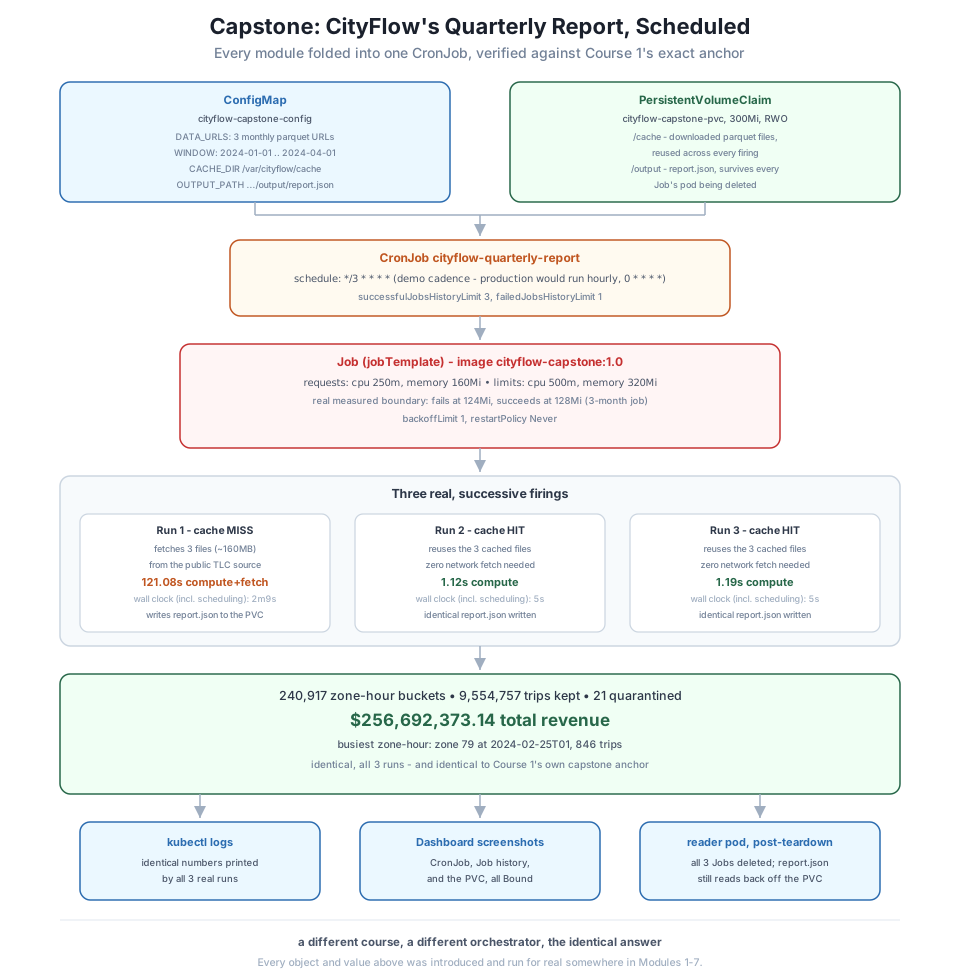
Go back to Module 1 for a moment. A single container, docker run hello-world, was the whole win — proof that one image could run identically on any machine with Docker installed. Every module since has been one answer to “now do that with something real”: a genuine data job in Module 3, a multi-service stack in Module 4, a real local Kubernetes cluster in Module 5, the config and storage a real pipeline needs in Module 6, and CityFlow’s actual ETL packaged and run as a one-off Kubernetes Job, with measured resource limits, in Module 7. Each module left one reusable piece behind, and this project stacks every one of them into a single, scheduled, self-running pipeline.
The job itself scales up, too. Every earlier module ran CityFlow’s ETL against one month — January 2024, 2,964,624 rows. This capstone processes the full first quarter: January, February, and March 2024, 9,554,778 real trips across three real files, fetched from the same public NYC TLC source this entire path has used since Course 1. That is not a bigger toy — it is the exact scope Scaling Python for Data Engineering’s own capstone verified with pandas and multiprocessing, and PySpark for Data Engineering’s capstone verified again with a completely different distributed engine. Both landed on the same answer: 240,917 zone-hour buckets, 9,554,757 trips, $256,692,373.14 in revenue. This project verifies that answer a third time, with a third completely different mechanism — a real, repeatedly-firing Kubernetes CronJob — on your own Kind cluster.
By the end of this project, you will be able to:
applyYou’ll need pandas, numpy, and pyarrow for the local proof, and a working Docker Desktop with the course’s Kind cluster (datatweets-docker-k8s) and Dashboard already running. Let’s begin.
Before writing a single manifest, here is what “done” means, checked against real output rather than trusted on faith:
successfulJobsHistoryLimit prunes old runs exactly as Module 6 Lesson 4 taught.Before touching a Dockerfile or a single YAML file, prove the logic itself is right, in plain Python, on the real three-month quarter. This is the identical row-group-at-a-time aggregation Module 3 first containerized and Module 7 packaged for Kubernetes — stream each file a row group at a time, keep 3 of 19 columns, filter to the reporting window, and aggregate by zone and hour — run here across all three files instead of one.
import datetime as dt
import numpy as np
import pandas as pd
import pyarrow.parquet as pq

FILES = ["yellow_tripdata_2024-01.parquet", "yellow_tripdata_2024-02.parquet", "yellow_tripdata_2024-03.parquet"]
KEEP = ["tpep_pickup_datetime", "PULocationID", "total_amount"]
WIN_LO = dt.datetime(2024, 1, 1)
WIN_HI = dt.datetime(2024, 4, 1)

def aggregate_row_group(path, rg):
    tbl = pq.ParquetFile(path).read_row_group(rg, columns=KEEP)
    ts = tbl.column(0).to_numpy(zero_copy_only=False)
    keep = (ts >= np.datetime64(WIN_LO)) & (ts < np.datetime64(WIN_HI))
    hour = ts[keep].astype("datetime64[h]").astype("int64")
    zone = tbl.column(1).to_numpy()[keep]
    amt = tbl.column(2).to_numpy(zero_copy_only=False)[keep]
    part = (pd.DataFrame({"zone": zone, "hour": hour, "amt": amt})
            .groupby(["zone", "hour"], sort=False)
            .agg(trips=("amt", "size"), revenue=("amt", "sum"))
            .reset_index())
    return part, int((~keep).sum())

parts, quarantined, total_rows = [], 0, 0
for f in FILES:
    pf = pq.ParquetFile(f)
    total_rows += pf.metadata.num_rows
    for rg in range(pf.metadata.num_row_groups):
        part, q = aggregate_row_group(f, rg)
        parts.append(part)
        quarantined += q

agg = pd.concat(parts, ignore_index=True)
report = (agg.groupby(["zone", "hour"], sort=False)
          .agg(trips=("trips", "sum"), revenue=("revenue", "sum"))
          .reset_index())

print(f"source rows across 3 files: {total_rows:,}")
print(f"zone-hour buckets:          {len(report):,}")
print(f"trips kept:                 {int(report['trips'].sum()):,}")
print(f"quarantined (outside qtr):  {quarantined}")
print(f"total revenue:              ${report['revenue'].sum():,.2f}")
top = report.loc[report["trips"].idxmax()]
hour_str = str(np.array(int(top["hour"]), dtype="datetime64[h]"))
print(f"busiest zone-hour:          zone {int(top['zone'])} at {hour_str}, {int(top['trips'])} trips")
source rows across 3 files: 9,554,778
zone-hour buckets: 240,917
trips kept: 9,554,757
quarantined (outside qtr): 21
total revenue: $256,692,373.14
busiest zone-hour: zone 79 at 2024-02-25T01, 846 tripsThere it is, in plain pandas, before a single Docker or Kubernetes object exists: 240,917 buckets, 9,554,757 trips, $256,692,373.14 — Course 1’s exact anchor, reproduced here with the same discipline Module 7 Lesson 4 taught (keep every row, quarantine only what falls outside the window, key on PULocationID, never a name). The busiest single zone-hour — zone 79, East Village, 1 a.m. on February 25th, 846 trips — matches Course 1’s own capstone finding exactly. The logic is right. Now it gets containerized.
Every earlier module’s job ran once and stopped. This one is going to be invoked over and over by a CronJob, which changes a design decision that didn’t matter before: where the input data lives between runs. Module 3’s rule was “mount the data, never bake it in” — right for a job that runs once. But a job invoked every few minutes that re-fetches three files totaling roughly 160 MB every single time wastes real network and real time for no reason, since the same three files never change. So this job’s design adds one new idea on top of everything Module 3 and Module 6 taught: cache the input on the same PersistentVolumeClaim that holds the output — fetch once, on the first firing, and every firing after that finds it already there. This is Module 6 Lesson 2’s PVC-survives-a-pod-deletion guarantee, applied to input instead of output.
SCRIPT = r'''"""CityFlow's quarterly zone-hour ETL - the capstone job. Combines every
module: Module 3's chunked row-group aggregation (never load a file whole),
Module 6's ConfigMap-driven config and PVC-backed durable output, Module 7's
resource-measured Job packaging - scaled up to a full quarter (Jan-Mar 2024,
9,554,778 real trips) instead of one month.

Unlike every earlier module's one-shot Job, this job is invoked repeatedly by
a CronJob, so it caches each month's downloaded parquet file on a PVC instead
of re-fetching ~160 MB from the network on every firing - fetch once, reuse
on every subsequent run, the same durability idea Module 6 Lesson 2 proved
for a checkpoint file, applied here to input data instead of output.

Exit codes (same convention since Module 3):
  0  success            - report computed and written
  2  no input available - a source file is not cached AND the fetch failed
  3  validation failed   - the files parsed but produced zero in-window trips
"""
import datetime as dt
import json
import os
import sys
import time
import urllib.request

import numpy as np
import pandas as pd
import pyarrow.parquet as pq

DATA_URLS = [u.strip() for u in os.environ["DATA_URLS"].split(",") if u.strip()]
CACHE_DIR = os.environ.get("CACHE_DIR", "/cache")
OUTPUT_PATH = os.environ.get("OUTPUT_PATH", "/output/report.json")
WINDOW_START = os.environ.get("WINDOW_START", "2024-01-01")
WINDOW_END = os.environ.get("WINDOW_END", "2024-04-01")
KEEP = ["tpep_pickup_datetime", "PULocationID", "total_amount"]
WIN_LO = dt.datetime.strptime(WINDOW_START, "%Y-%m-%d")
WIN_HI = dt.datetime.strptime(WINDOW_END, "%Y-%m-%d")


def log(msg):
    print(f"[cityflow-capstone] {msg}", flush=True)


def ensure_cached(url):
    os.makedirs(CACHE_DIR, exist_ok=True)
    local = os.path.join(CACHE_DIR, os.path.basename(url))
    if os.path.exists(local):
        log(f"cache hit:  {local}")
        return local
    log(f"cache miss: fetching {url}")
    try:
        urllib.request.urlretrieve(url, local)
    except Exception as e:
        print(f"ERROR: fetch failed for {url}: {e}", file=sys.stderr)
        sys.exit(2)
    log(f"cached to:  {local}")
    return local


def aggregate_row_group(path, rg):
    tbl = pq.ParquetFile(path).read_row_group(rg, columns=KEEP)
    ts = tbl.column(0).to_numpy(zero_copy_only=False)
    keep = (ts >= np.datetime64(WIN_LO)) & (ts < np.datetime64(WIN_HI))
    hour = ts[keep].astype("datetime64[h]").astype("int64")
    zone = tbl.column(1).to_numpy()[keep]
    amt = tbl.column(2).to_numpy(zero_copy_only=False)[keep]
    part = (pd.DataFrame({"zone": zone, "hour": hour, "amt": amt})
            .groupby(["zone", "hour"], sort=False)
            .agg(trips=("amt", "size"), revenue=("amt", "sum"))
            .reset_index())
    return part, int((~keep).sum())


def main():
    start = time.time()
    log(f"starting - {len(DATA_URLS)} source files, window={WINDOW_START}..{WINDOW_END}")
    paths = [ensure_cached(u) for u in DATA_URLS]

    parts, quarantined, source_rows = [], 0, 0
    for path in paths:
        pf = pq.ParquetFile(path)
        source_rows += pf.metadata.num_rows
        for rg in range(pf.metadata.num_row_groups):
            part, q = aggregate_row_group(path, rg)
            parts.append(part)
            quarantined += q

    agg = pd.concat(parts, ignore_index=True)
    report = (agg.groupby(["zone", "hour"], sort=False)
              .agg(trips=("trips", "sum"), revenue=("revenue", "sum"))
              .reset_index())

    if len(report) == 0 or report["trips"].sum() == 0:
        print("ERROR: zero in-window trips after aggregation", file=sys.stderr)
        sys.exit(3)

    top = report.loc[report["trips"].idxmax()]
    hour_str = str(np.array(int(top["hour"]), dtype="datetime64[h]"))

    result = {
        "run_at_utc": dt.datetime.now(dt.timezone.utc).isoformat(),
        "source_files": [os.path.basename(u) for u in DATA_URLS],
        "window_start": WINDOW_START,
        "window_end": WINDOW_END,
        "source_rows": source_rows,
        "zone_hour_buckets": len(report),
        "trips_kept": int(report["trips"].sum()),
        "quarantined": quarantined,
        "total_revenue": round(float(report["revenue"].sum()), 2),
        "busiest_zone": int(top["zone"]),
        "busiest_hour": hour_str,
        "busiest_trips": int(top["trips"]),
        "elapsed_seconds": round(time.time() - start, 2),
    }

    os.makedirs(os.path.dirname(OUTPUT_PATH), exist_ok=True)
    with open(OUTPUT_PATH, "w", encoding="utf-8") as f:
        json.dump(result, f, indent=2)

    log("CityFlow quarterly zone-hour report")
    log("------------------------------------")
    log(f"source rows (3 months):      {source_rows:,}")
    log(f"zone-hour buckets:           {len(report):,}")
    log(f"trips kept:                  {int(report['trips'].sum()):,}")
    log(f"quarantined (outside qtr):   {quarantined}")
    log(f"total revenue:               ${report['revenue'].sum():,.2f}")
    log(f"busiest zone-hour:           zone {int(top['zone'])} at {hour_str}, {int(top['trips'])} trips")
    log(f"report written to:           {OUTPUT_PATH}")
    log(f"elapsed seconds:             {result['elapsed_seconds']}")
    log("ETL completed successfully")
    sys.exit(0)


if __name__ == "__main__":
    main()
'''
with open("cityflow_quarterly_etl.py", "w") as f:
    f.write(SCRIPT)
print("wrote cityflow_quarterly_etl.py:", len(SCRIPT.strip().splitlines()), "lines")
wrote cityflow_quarterly_etl.py: 106 linesEvery value the ConfigMap will provide — DATA_URLS, WINDOW_START, WINDOW_END, CACHE_DIR, OUTPUT_PATH — is read from os.environ, exactly Module 6 Lesson 1’s envFrom pattern. ensure_cached() is the one genuinely new idea: check the PVC first, log which case happened, and only reach for the network on a real cache miss. Packaged the same slim, dependency-before-code way every image in this course has been:
FROM python:3.13-slim

WORKDIR /app

COPY requirements.txt .
RUN pip install --no-cache-dir -r requirements.txt

COPY cityflow_quarterly_etl.py .

CMD ["python", "cityflow_quarterly_etl.py"]
pandas==2.2.3
pyarrow==19.0.0docker build -t cityflow-capstone:1.0 .#8 Successfully installed numpy-2.5.1 pandas-2.2.3 pyarrow-19.0.0 python-dateutil-2.9.0.post0 pytz-2026.2 six-1.17.0 tzdata-2026.3
#10 writing image sha256:cddcd0c71cf2bacaa7a824b2f958fcadcc20f74f46f62201d2359324d82abe06 done
#10 naming to docker.io/library/cityflow-capstone:1.0 donedocker images cityflow-capstoneIMAGE ID DISK USAGE CONTENT SIZE EXTRA
cityflow-capstone:1.0 cddcd0c71cf2 438MB 0B438 MB — identical to Module 3’s own slimmed cityflow-etl-job:after image, because it is the same base image, the same two dependencies, and one script file that barely changed in size. Confirm the containerized logic reproduces Step 1’s exact numbers, with the three real files mounted at CACHE_DIR’s expected paths so this first check is a cache hit rather than a live fetch:
docker run --rm \
  -v "$(pwd)/yellow_tripdata_2024-01.parquet:/cache/yellow_tripdata_2024-01.parquet:ro" \
  -v "$(pwd)/yellow_tripdata_2024-02.parquet:/cache/yellow_tripdata_2024-02.parquet:ro" \
  -v "$(pwd)/yellow_tripdata_2024-03.parquet:/cache/yellow_tripdata_2024-03.parquet:ro" \
  -e DATA_URLS="https://d37ci6vzurychx.cloudfront.net/trip-data/yellow_tripdata_2024-01.parquet,https://d37ci6vzurychx.cloudfront.net/trip-data/yellow_tripdata_2024-02.parquet,https://d37ci6vzurychx.cloudfront.net/trip-data/yellow_tripdata_2024-03.parquet" \
  cityflow-capstone:1.0
[cityflow-capstone] starting - 3 source files, window=2024-01-01..2024-04-01
[cityflow-capstone] cache hit: /cache/yellow_tripdata_2024-01.parquet
[cityflow-capstone] cache hit: /cache/yellow_tripdata_2024-02.parquet
[cityflow-capstone] cache hit: /cache/yellow_tripdata_2024-03.parquet
[cityflow-capstone] CityFlow quarterly zone-hour report
[cityflow-capstone] ------------------------------------
[cityflow-capstone] source rows (3 months): 9,554,778
[cityflow-capstone] zone-hour buckets: 240,917
[cityflow-capstone] trips kept: 9,554,757
[cityflow-capstone] quarantined (outside qtr): 21
[cityflow-capstone] total revenue: $256,692,373.14
[cityflow-capstone] busiest zone-hour: zone 79 at 2024-02-25T01, 846 trips
[cityflow-capstone] report written to: /output/report.json
[cityflow-capstone] elapsed seconds: 0.47
[cityflow-capstone] ETL completed successfullyIdentical numbers, in a container, in under half a second once the data is already local. kind load docker-image cityflow-capstone:1.0 --name datatweets-docker-k8s gets it onto the cluster the same way every image in this course has arrived there.
Module 7 Lesson 2 measured a real memory boundary for one month’s ETL: fails at 112 MiB and below, succeeds at 120 MiB and above. This job processes three files instead of one — so guessing that the same limit still applies would be exactly the unmeasured shortcut this course has argued against from the start. Sweep it for real, on the real quarter, the identical --memory methodology:
for mem in 96m 112m 120m 124m 128m; do
  echo "=== memory=$mem ==="
  docker run --rm --memory="$mem" \
    -v "$(pwd)/yellow_tripdata_2024-01.parquet:/cache/yellow_tripdata_2024-01.parquet:ro" \
    -v "$(pwd)/yellow_tripdata_2024-02.parquet:/cache/yellow_tripdata_2024-02.parquet:ro" \
    -v "$(pwd)/yellow_tripdata_2024-03.parquet:/cache/yellow_tripdata_2024-03.parquet:ro" \
    -e DATA_URLS="https://d37ci6vzurychx.cloudfront.net/trip-data/yellow_tripdata_2024-01.parquet,https://d37ci6vzurychx.cloudfront.net/trip-data/yellow_tripdata_2024-02.parquet,https://d37ci6vzurychx.cloudfront.net/trip-data/yellow_tripdata_2024-03.parquet" \
    cityflow-capstone:1.0 > /tmp/sweep.txt 2>&1
  echo "exit code: $?"
  tail -1 /tmp/sweep.txt
done
=== memory=96m ===
exit code: 137
[cityflow-capstone] cache hit: /cache/yellow_tripdata_2024-03.parquet
=== memory=112m ===
exit code: 137
[cityflow-capstone] cache hit: /cache/yellow_tripdata_2024-03.parquet
=== memory=120m ===
exit code: 137
[cityflow-capstone] cache hit: /cache/yellow_tripdata_2024-03.parquet
=== memory=124m ===
exit code: 137
[cityflow-capstone] cache hit: /cache/yellow_tripdata_2024-03.parquet
=== memory=128m ===
exit code: 0
[cityflow-capstone] ETL completed successfullyA real boundary, slightly higher than Module 7’s one-month job: fails at 124 MiB and below (OOMKilled, exit 137), succeeds at 128 MiB and above. That makes sense once you think about why — the job still streams one row group at a time and never loads a whole file, but it now holds ten partial aggregate frames in memory at once (three files’ worth of row groups) instead of three, and March’s row groups are the largest of the quarter. The boundary moved a little; it didn’t blow up, because the streaming design is still doing its job. With that real number in hand, the Job’s manifest gets a request and limit with genuine headroom above it — not a round number picked at random:
resources:
  requests:
    cpu: "250m"
    memory: "160Mi"
  limits:
    cpu: "500m"
    memory: "320Mi"
160Mi request sits comfortably above the real ~128 MiB boundary; 320Mi limit leaves further room for a slower run under load, exactly the same reasoning Module 7 Lesson 4 applied to the one-month job’s 128Mi/256Mi.
Three objects, every field already introduced somewhere in Modules 5-7, assembled around this job’s two new decisions: cache-aware storage and a schedule.
apiVersion: v1
kind: ConfigMap
metadata:
  name: cityflow-capstone-config
  namespace: cityflow
data:
  DATA_URLS: "https://d37ci6vzurychx.cloudfront.net/trip-data/yellow_tripdata_2024-01.parquet,https://d37ci6vzurychx.cloudfront.net/trip-data/yellow_tripdata_2024-02.parquet,https://d37ci6vzurychx.cloudfront.net/trip-data/yellow_tripdata_2024-03.parquet"
  WINDOW_START: "2024-01-01"
  WINDOW_END: "2024-04-01"
  CACHE_DIR: "/var/cityflow/cache"
OUTPUT_PATH: "/var/cityflow/output/report.json"apiVersion: v1
kind: PersistentVolumeClaim
metadata:
name: cityflow-capstone-pvc
namespace: cityflow
spec:
accessModes:
- ReadWriteOnce
resources:
requests:
storage: 300MiOne PVC, mounted at /var/cityflow, holds both /cache (the three downloaded parquet files, roughly 160 MB, reused across every firing) and /output (the report, surviving every Job’s pod being deleted) — the same PVC-survives-a-pod guarantee Module 6 Lesson 2 proved, doing double duty.
apiVersion: batch/v1
kind: CronJob
metadata:
  name: cityflow-quarterly-report
  namespace: cityflow
spec:
  schedule: "*/3 * * * *"
  successfulJobsHistoryLimit: 3
  failedJobsHistoryLimit: 1
  jobTemplate:
    spec:
      backoffLimit: 1
      template:
        spec:
          restartPolicy: Never
          containers:
            - name: report
              image: cityflow-capstone:1.0
              imagePullPolicy: IfNotPresent
              envFrom:
                - configMapRef:
                    name: cityflow-capstone-config
              resources:
                requests:
                  cpu: "250m"
                  memory: "160Mi"
                limits:
                  cpu: "500m"
                  memory: "320Mi"
              volumeMounts:
                - name: cityflow-data
                  mountPath: /var/cityflow
          volumes:
            - name: cityflow-data
              persistentVolumeClaim:
                claimName: cityflow-capstone-pvc
Why every three minutes, honestly
A real “quarterly report” job would run hourly in production (0 * * * *) or even daily — nobody needs a fresh three-month rollup every three minutes. This manifest uses */3 * * * * for one reason only: so this lesson could watch it fire more than once, for real, in the time it takes to write and verify it, the same honest tradeoff Module 6 Lesson 4 made with its own */1 heartbeat. The mechanics — Job creation, unique naming, successfulJobsHistoryLimit pruning — are identical at any interval; only the number changes.
kubectl create namespace cityflow
kubectl apply -f configmap.yaml
kubectl apply -f pvc.yaml
kubectl get pvc -n cityflow
kubectl apply -f cronjob.yaml
kubectl get cronjob -n cityflow
namespace/cityflow created
configmap/cityflow-capstone-config created
persistentvolumeclaim/cityflow-capstone-pvc created
NAME STATUS VOLUME CAPACITY ACCESS MODES STORAGECLASS AGE
cityflow-capstone-pvc Pending standard 0s
cronjob.batch/cityflow-quarterly-report created
NAME SCHEDULE TIMEZONE SUSPEND ACTIVE LAST SCHEDULE AGE
cityflow-quarterly-report */3 * * * * <none> False 0 <none> 0sPending, no VOLUME yet — Module 6 Lesson 2’s WaitForFirstConsumer behavior, exactly as before: nothing provisions until the first Job’s pod actually needs it.
Polled over the following several minutes with nothing typed after the apply above:
kubectl get cronjob -n cityflow
kubectl get jobs -n cityflow
At t+100s, the first scheduled run is already under way:
NAME                        SCHEDULE      ACTIVE   LAST SCHEDULE   AGE
cityflow-quarterly-report   */3 * * * *   1        10s             115s
NAME                                 STATUS    COMPLETIONS   DURATION   AGE
cityflow-quarterly-report-29745309   Running   0/1           10s        10s
It stays Running far longer than any earlier module’s Job did — this one is fetching real data for the first time:
NAME                                 STATUS     COMPLETIONS   DURATION   AGE
cityflow-quarterly-report-29745309   Complete   1/1           2m9s       2m16s
Complete after 2m9s. A second, entirely separate run appears a few minutes later:
NAME                                 STATUS     COMPLETIONS   DURATION   AGE
cityflow-quarterly-report-29745309   Complete   1/1           2m9s       3m7s
cityflow-quarterly-report-29745312   Complete   1/1           5s         7s
5 seconds. Not a typo — the second run found its three files already cached and skipped the fetch entirely. A third run confirms it was not a fluke:
NAME                                 STATUS     COMPLETIONS   DURATION   AGE
cityflow-quarterly-report-29745309   Complete   1/1           2m9s       6m29s
cityflow-quarterly-report-29745312   Complete   1/1           5s         3m29s
cityflow-quarterly-report-29745315   Complete   1/1           5s         29s
Three real, successive Jobs, each named with the same Unix-minute index Module 6 Lesson 4 explained, and exactly successfulJobsHistoryLimit: 3 worth kept. Their logs tell the rest of the story:
kubectl logs cityflow-quarterly-report-29745309-zp9mm -n cityflow[cityflow-capstone] starting - 3 source files, window=2024-01-01..2024-04-01
[cityflow-capstone] cache miss: fetching https://d37ci6vzurychx.cloudfront.net/trip-data/yellow_tripdata_2024-01.parquet
[cityflow-capstone] cached to: /var/cityflow/cache/yellow_tripdata_2024-01.parquet
[cityflow-capstone] cache miss: fetching https://d37ci6vzurychx.cloudfront.net/trip-data/yellow_tripdata_2024-02.parquet
[cityflow-capstone] cached to: /var/cityflow/cache/yellow_tripdata_2024-02.parquet
[cityflow-capstone] cache miss: fetching https://d37ci6vzurychx.cloudfront.net/trip-data/yellow_tripdata_2024-03.parquet
[cityflow-capstone] cached to: /var/cityflow/cache/yellow_tripdata_2024-03.parquet
[cityflow-capstone] CityFlow quarterly zone-hour report
[cityflow-capstone] ------------------------------------
[cityflow-capstone] source rows (3 months): 9,554,778
[cityflow-capstone] zone-hour buckets: 240,917
[cityflow-capstone] trips kept: 9,554,757
[cityflow-capstone] quarantined (outside qtr): 21
[cityflow-capstone] total revenue: $256,692,373.14
[cityflow-capstone] busiest zone-hour: zone 79 at 2024-02-25T01, 846 trips
[cityflow-capstone] report written to: /var/cityflow/output/report.json
[cityflow-capstone] elapsed seconds: 121.08
[cityflow-capstone] ETL completed successfullykubectl logs cityflow-quarterly-report-29745312-8zqwx -n cityflow[cityflow-capstone] starting - 3 source files, window=2024-01-01..2024-04-01
[cityflow-capstone] cache hit: /var/cityflow/cache/yellow_tripdata_2024-01.parquet
[cityflow-capstone] cache hit: /var/cityflow/cache/yellow_tripdata_2024-02.parquet
[cityflow-capstone] cache hit: /var/cityflow/cache/yellow_tripdata_2024-03.parquet
[cityflow-capstone] CityFlow quarterly zone-hour report
[cityflow-capstone] ------------------------------------
[cityflow-capstone] source rows (3 months): 9,554,778
[cityflow-capstone] zone-hour buckets: 240,917
[cityflow-capstone] trips kept: 9,554,757
[cityflow-capstone] quarantined (outside qtr): 21
[cityflow-capstone] total revenue: $256,692,373.14
[cityflow-capstone] busiest zone-hour: zone 79 at 2024-02-25T01, 846 trips
[cityflow-capstone] report written to: /var/cityflow/output/report.json
[cityflow-capstone] elapsed seconds: 1.12
[cityflow-capstone] ETL completed successfully121.08 seconds of real compute-and-fetch on the first run; 1.12 seconds on the second, reading the identical files off the PVC instead of the network. The third run’s log (elapsed seconds: 1.19) confirms the same pattern held. All three runs — one cache miss, two cache hits — produced the exact same real numbers: 240,917 buckets, 9,554,757 trips, $256,692,373.14. A CronJob that would otherwise re-fetch 160 MB of the same three files every three minutes, forever, instead paid that cost exactly once.
Real screenshots of the same state kubectl just reported, scoped to the cityflow namespace:
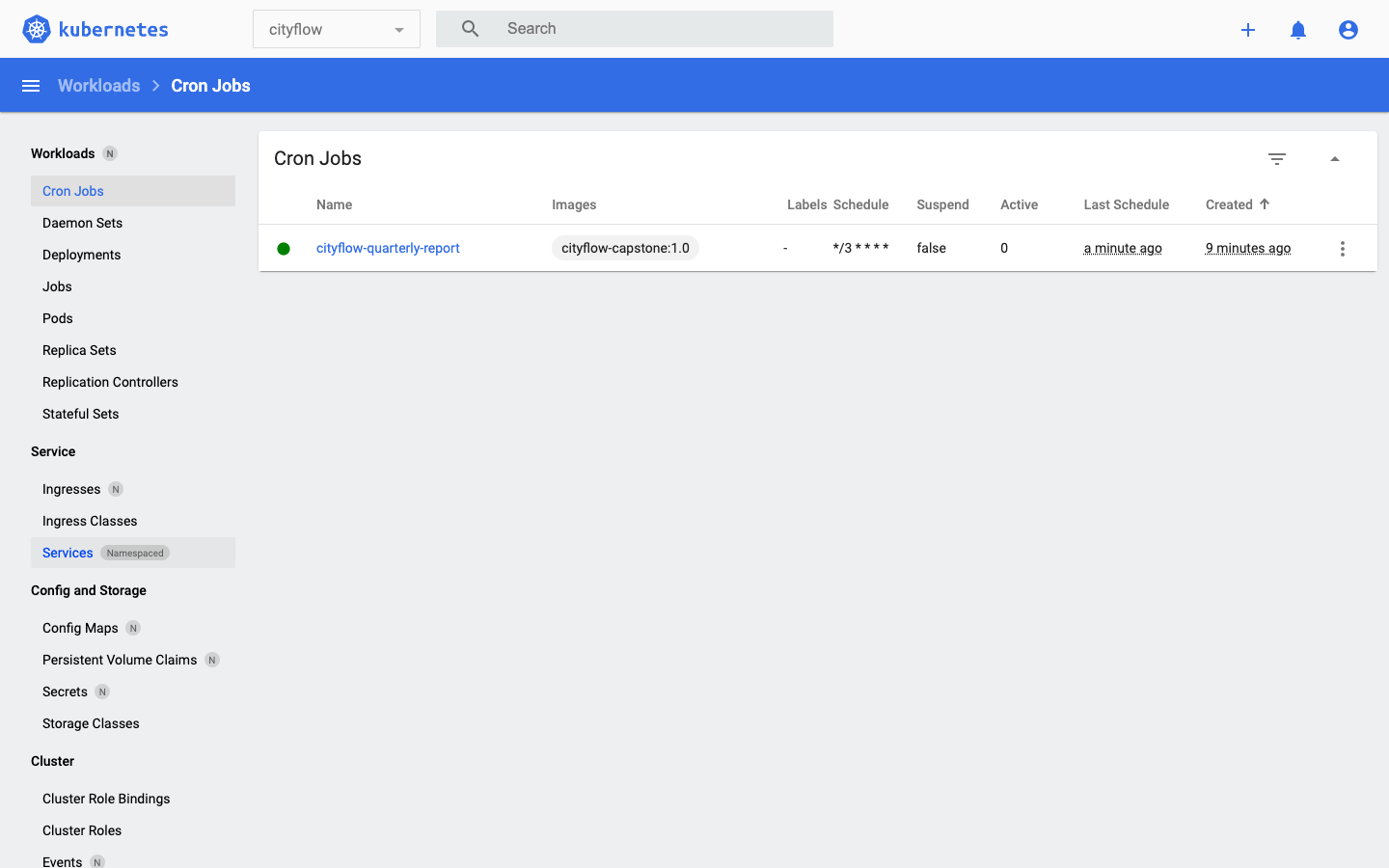
*/3 * * * *, not suspended, its last real firing a minute earlier.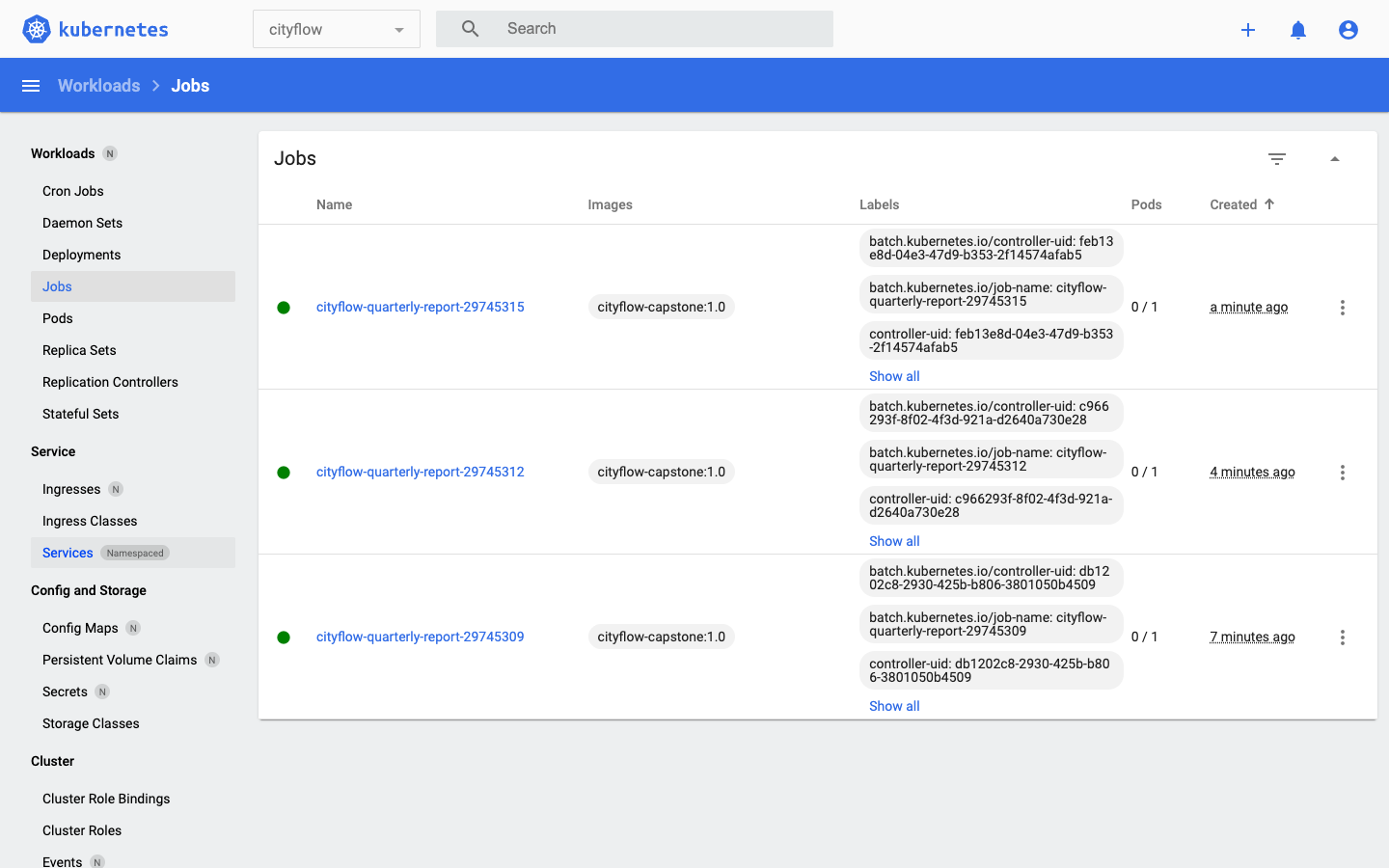
successfulJobsHistoryLimit: 3 — the same real pruning behavior Module 6 Lesson 4 proved, this time on a job that actually does something.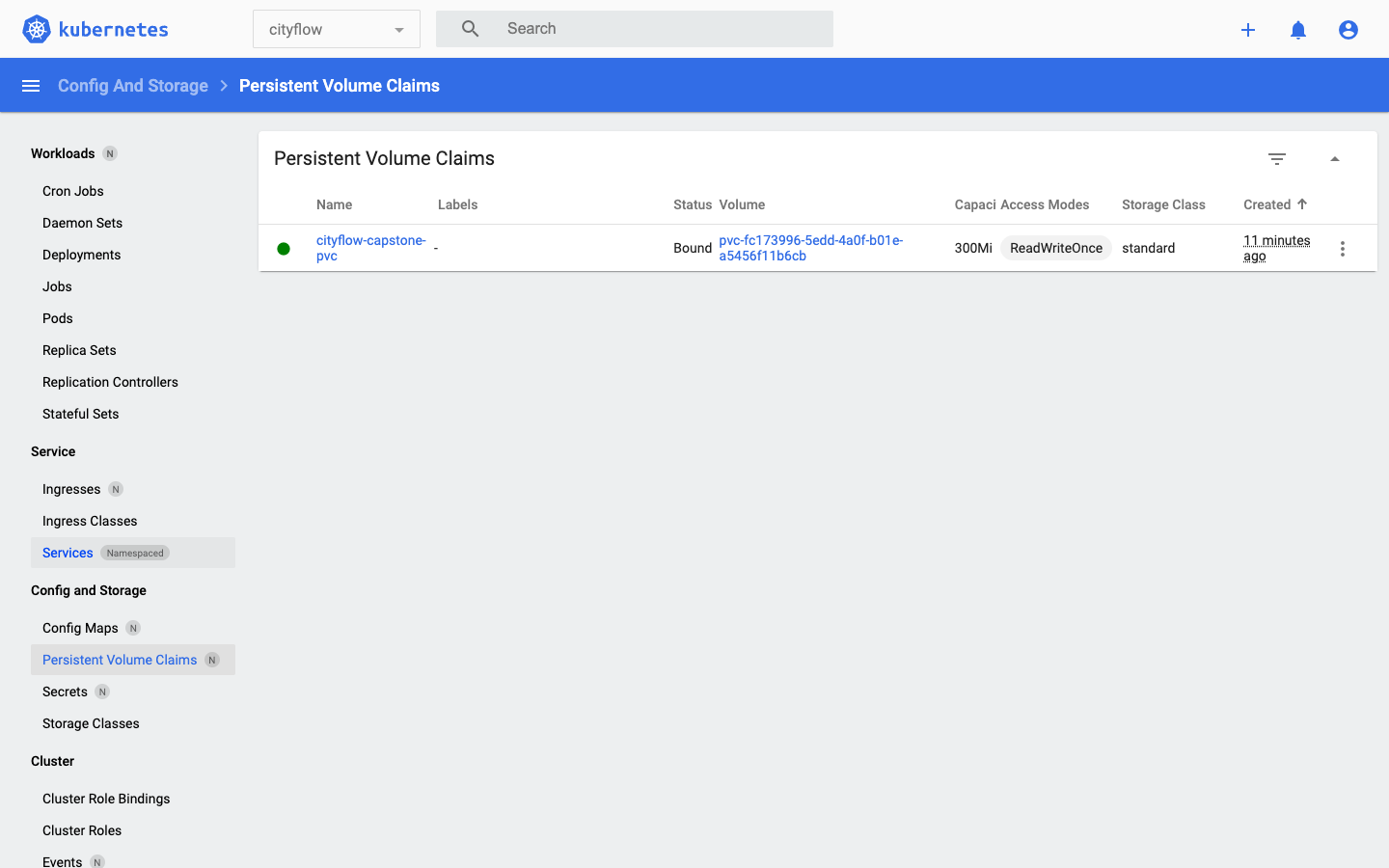
Bound at 300Mi — the same object all three Jobs shared without ever touching each other's pods.The final proof is the one Module 6 Lesson 2 first demonstrated with a checkpoint file: delete every pod that touched this data, and confirm a completely separate pod can still read the result. First, suspend the schedule so nothing fires mid-check, then delete all three Jobs the CronJob created:
kubectl patch cronjob cityflow-quarterly-report -n cityflow -p '{"spec":{"suspend":true}}'
kubectl delete job cityflow-quarterly-report-29745309 cityflow-quarterly-report-29745312 cityflow-quarterly-report-29745315 -n cityflow
kubectl get pods -n cityflow
kubectl get pvc -n cityflow
cronjob.batch/cityflow-quarterly-report patched
job.batch "cityflow-quarterly-report-29745309" deleted
job.batch "cityflow-quarterly-report-29745312" deleted
job.batch "cityflow-quarterly-report-29745315" deleted
No resources found in cityflow namespace.
NAME STATUS VOLUME CAPACITY ACCESS MODES STORAGECLASS AGE
cityflow-capstone-pvc Bound pvc-fc173996-5edd-4a0f-b01e-a5456f11b6cb 300Mi RWO standard 9m47sEvery pod that ever wrote this report is gone. The PVC is still Bound, completely unaffected. A fresh reader pod, mounted read-only, never having run a line of cityflow_quarterly_etl.py:
kubectl apply -f reader-pod.yaml
kubectl wait --for=condition=Ready pod/report-reader -n cityflow --timeout=60s
kubectl logs report-reader -n cityflow
pod/report-reader created
pod/report-reader condition met
{
"run_at_utc": "2026-07-22T11:15:02.520117+00:00",
"source_files": [
"yellow_tripdata_2024-01.parquet",
"yellow_tripdata_2024-02.parquet",
"yellow_tripdata_2024-03.parquet"
],
"window_start": "2024-01-01",
"window_end": "2024-04-01",
"source_rows": 9554778,
"zone_hour_buckets": 240917,
"trips_kept": 9554757,
"quarantined": 21,
"total_revenue": 256692373.14,
"busiest_zone": 79,
"busiest_hour": "2024-02-25T01",
"busiest_trips": 846,
"elapsed_seconds": 1.19
}Byte-for-byte the report the third run wrote, read back by a pod that had nothing to do with producing it. This is the whole point of a PersistentVolumeClaim, closing a loop this course opened in Module 4 with a single Docker volumes: line: the data outlives any one process that touches it, and a report a scheduler produced unattended at 2 a.m. is still there for whoever reads it hours later.
kubectl delete pod report-reader -n cityflow
kubectl delete namespace cityflow
kubectl get all -A
kubectl get configmaps,secrets,pvc,jobs,cronjobs -A
docker rmi cityflow-capstone:1.0
docker exec datatweets-docker-k8s-control-plane crictl rmi docker.io/library/cityflow-capstone:1.0
pod "report-reader" deleted
namespace "cityflow" deleted
Untagged: cityflow-capstone:1.0
Deleted: docker.io/library/cityflow-capstone:1.0One kubectl delete namespace removed the ConfigMap, the PVC and its backing PersistentVolume, and every trace of the CronJob and its Jobs, in one command — leaving only the pre-existing control plane, CoreDNS, kindnet, local-path-provisioner, and the Dashboard itself, exactly as every earlier module’s cleanup has confirmed.
Add yellow_tripdata_2024-04.parquet’s URL to the ConfigMap’s DATA_URLS and re-apply. Confirm the next firing shows three cache hits and one cache miss (only the new file), and that the report’s totals grow to reflect four months instead of three.
Hint
ensure_cached() checks each URL’s file independently — adding a fourth URL doesn’t invalidate the first three cache entries, since each one is looked up by its own basename.
After the CronJob has fired at least once, run kubectl get jobs -n cityflow --watch in one terminal and do nothing else for a full schedule interval. Confirm a new Job appears with no command typed anywhere.
Hint
This is the same proof Module 6 Lesson 4 built for its heartbeat CronJob — the only thing that should be running is kubectl get --watch, which only observes, never causes, a new Job to appear.
Delete only /var/cityflow/cache/yellow_tripdata_2024-02.parquet from inside a temporary pod mounting the PVC, then let the CronJob fire again. Confirm the log shows a cache miss for February specifically while January and March still show cache hits — and that the final report is still correct.
Hint
ensure_cached() is called once per URL, independently — deleting one cached file only forces a re-fetch of that one file; it doesn’t touch the other two, which is exactly the granularity a real caching layer needs to be useful.
This capstone assembled every module of Docker & Kubernetes for Data Engineering into one scheduled pipeline. CityFlow’s zone-hour ETL, containerized in Module 3 and packaged for Kubernetes in Module 7, was scaled from one month to the full first quarter of 2024 and given one new capability: a PersistentVolumeClaim that caches its own downloaded input, so a repeatedly-firing CronJob pays the real cost of fetching 160 MB across three files exactly once — measured directly, 121.08 seconds on the first firing and roughly 1.1 seconds on every firing after. Its resource requests/limits of 160Mi/320Mi came from a real measured memory boundary — fails at 124 MiB, succeeds at 128 MiB — found by sweeping this exact three-month job, not guessed from an earlier module’s smaller one. A CronJob on a */3 * * * * schedule (an honest stand-in for a production hourly cadence) fired three real, successive times with no command typed after the first apply, its successfulJobsHistoryLimit: 3 keeping exactly three completed Jobs at every point, confirmed in both kubectl and the Kubernetes Dashboard. And the report itself — 240,917 zone-hour buckets, 9,554,757 trips, $256,692,373.14 in revenue, busiest zone-hour zone 79 at 2024-02-25T01 with 846 trips — matched Course 1’s and Course 2’s own verified anchor exactly, read back through a completely separate pod after every Job that had touched it was deleted.
*/3 * * * * here stands in for an hourly or daily production cadence, chosen so the lesson could observe real, repeated firings; the mechanics are identical at any interval.Every real batch pipeline eventually needs to run on a schedule instead of on command, and the moment it does, decisions that didn’t matter for a one-off Job start to matter a great deal: whether it re-does expensive work it already finished, whether its resource limits were sized for the job it has today or the smaller one from last month, and whether its output can be trusted to still be there when someone reads it hours after the run that produced it. This project is the shape that real answer takes — not a new mechanism, but every mechanism this course already taught, applied with the same discipline to a job that finally runs the way production jobs actually do: unattended, repeatedly, and correctly.
Look back at the whole course. Module 1 was docker run hello-world and a promise that one container could run identically anywhere. Eight modules later, that promise holds for something real: a genuine data pipeline, its own image, a multi-service Compose stack, a real local Kubernetes cluster, its config and storage handled properly, and now a schedule that runs it without you. Every number in this final project — the 438 MB image, the 124/128 MiB boundary, the 121-second first run and the 1-second repeats, the 240,917 buckets and $256,692,373.14 — was measured on your own machine, against real data, the same discipline this entire path has insisted on from Course 1 onward.
This is also where Docker & Kubernetes for Data Engineering ends, but not where the Data Engineering path ends. Scaling Python for Data Engineering taught you to make one machine do far more than it looks capable of. PySpark for Data Engineering took the same ideas across a cluster’s worth of executors. This course made both of those pipelines reproducible and deployable anywhere Docker and Kubernetes run, rather than laptop-bound. What is left is the piece every one of this course’s CronJobs was quietly missing: a real orchestrator that knows the difference between a job that failed and a job that is still running, that retries one and pages a human for the other, and that can wire this exact container into a DAG alongside the Spark job Course 2 built. Orchestrating Data Pipelines with Airflow, the fourth and final course in this path, is where CityFlow’s pipeline stops being something you schedule by hand and becomes something that runs itself.
Keep DATATWEETS free. Help fund practical data, AI, and engineering lessons for learners worldwide.
