Title here
Summary here
Every pod Module 5 ran had its behavior fixed at build time — nginx:alpine serves the same welcome page no matter what, and CityFlow’s own zone-lookup API always answered from the exact same 265-zone file baked into its image. That’s fine for a demo, but it’s a real limitation: a production service usually needs to behave differently across environments — a different feature flag, a different downstream URL, a different access token — without a new image for every variation. This lesson gives you the two Kubernetes objects that solve that: ConfigMaps for ordinary settings, and Secrets for anything you don’t want sitting in plain text.
By the end of this lesson, you will be able to:
kubectl get secret -o yaml shows base64 rather than the real value — and why that is not encryption.kubectl apply silently writing a Secret’s plaintext into an annotation on the object itself.Both objects use the exact same delivery mechanism into a pod — this lesson builds one small service and drives it with both, so the contrast is concrete rather than abstract.
The service is a small extension of Module 5’s zone_api.py: an HTTP server over CityFlow’s real 265-zone NYC taxi lookup table, but now reading two things from its environment instead of having them fixed in code.
# gate: skip
"""CityFlow's zone-report service - the same small HTTP service pattern
Module 5 used, extended to read its behavior from injected configuration
(BOROUGH_FILTER, a ConfigMap value) and to gate its real endpoint behind a
token that must come from a Secret (API_TOKEN), never baked into the image.

Endpoints:
  GET /healthz  -> "ok" plus the currently active borough_filter (no auth)
  GET /report   -> the real zone report for the configured borough, but only
                   if the request's X-API-Token header matches API_TOKEN
"""
import csv
import json
import os
from http.server import BaseHTTPRequestHandler, ThreadingHTTPServer

DATA_PATH = os.environ.get("ZONE_DATA", "taxi_zone_lookup.csv")
BOROUGH_FILTER = os.environ.get("BOROUGH_FILTER", "ALL")
API_TOKEN = os.environ.get("API_TOKEN", "")


def load_zones(path):
    zones = []
    with open(path, newline="", encoding="utf-8") as f:
        for row in csv.DictReader(f):
            zones.append(row)
    return zones


ZONES = load_zones(DATA_PATH)


class Handler(BaseHTTPRequestHandler):
    def _json(self, code, payload):
        body = json.dumps(payload).encode("utf-8")
        self.send_response(code)
        self.send_header("Content-Type", "application/json")
        self.send_header("Content-Length", str(len(body)))
        self.end_headers()
        self.wfile.write(body)

    def do_GET(self):
        if self.path == "/healthz":
            self._json(200, {"status": "ok", "borough_filter": BOROUGH_FILTER, "zones_loaded": len(ZONES)})
            return
        if self.path == "/report":
            token = self.headers.get("X-API-Token", "")
            if not API_TOKEN or token != API_TOKEN:
                self._json(401, {"error": "missing or invalid X-API-Token"})
                return
            if BOROUGH_FILTER == "ALL":
                matched = ZONES
            else:
                matched = [z for z in ZONES if z["Borough"] == BOROUGH_FILTER]
            self._json(200, {
                "borough_filter": BOROUGH_FILTER,
                "zone_count": len(matched),
                "sample_zones": [z["Zone"] for z in matched[:5]],
            })
            return
        self._json(404, {"error": "not found"})

    def log_message(self, fmt, *args):
        print(f"{self.address_string()} - {fmt % args}", flush=True)


def main():
    port = int(os.environ.get("PORT", "8000"))
    print(f"CityFlow zone-report starting - borough_filter={BOROUGH_FILTER}, {len(ZONES)} zones loaded", flush=True)
    server = ThreadingHTTPServer(("0.0.0.0", port), Handler)
    server.serve_forever()


if __name__ == "__main__":
    main()
Two values come from the environment: BOROUGH_FILTER — an ordinary setting, fine to see in plain text — and API_TOKEN — a credential that gates the one endpoint returning real data. Everything else (the 265-zone CSV, the HTTP logic) stays exactly the way Module 5 built it, baked into the image. Built and loaded the same way as every service so far:
docker build -t cityflow-zone-report:1.0 .
kind load docker-image cityflow-zone-report:1.0 --name datatweets-docker-k8s
writing image sha256:ba69c2056bb880c03ea8ba0b824c1a1f2e7dd75645ad2bca7d185039923243bc done
naming to docker.io/library/cityflow-zone-report:1.0 done
Image: "cityflow-zone-report:1.0" with ID "sha256:ba69c2056bb880c03ea8ba0b824c1a1f2e7dd75645ad2bca7d185039923243bc" not yet present on node "datatweets-docker-k8s-control-plane", loading...A ConfigMap holds non-sensitive configuration as plain key-value data, decoupled from any pod that uses it:
apiVersion: v1
kind: ConfigMap
metadata:
  name: cityflow-report-config
  namespace: default
data:
  BOROUGH_FILTER: "Manhattan"
kubectl apply -f configmap.yaml
kubectl get configmap cityflow-report-config -n default -o yamlconfigmap/cityflow-report-config created
apiVersion: v1
data:
BOROUGH_FILTER: Manhattan
kind: ConfigMap
metadata:
creationTimestamp: "2026-07-21T21:27:53Z"
name: cityflow-report-config
namespace: default
resourceVersion: "60563"
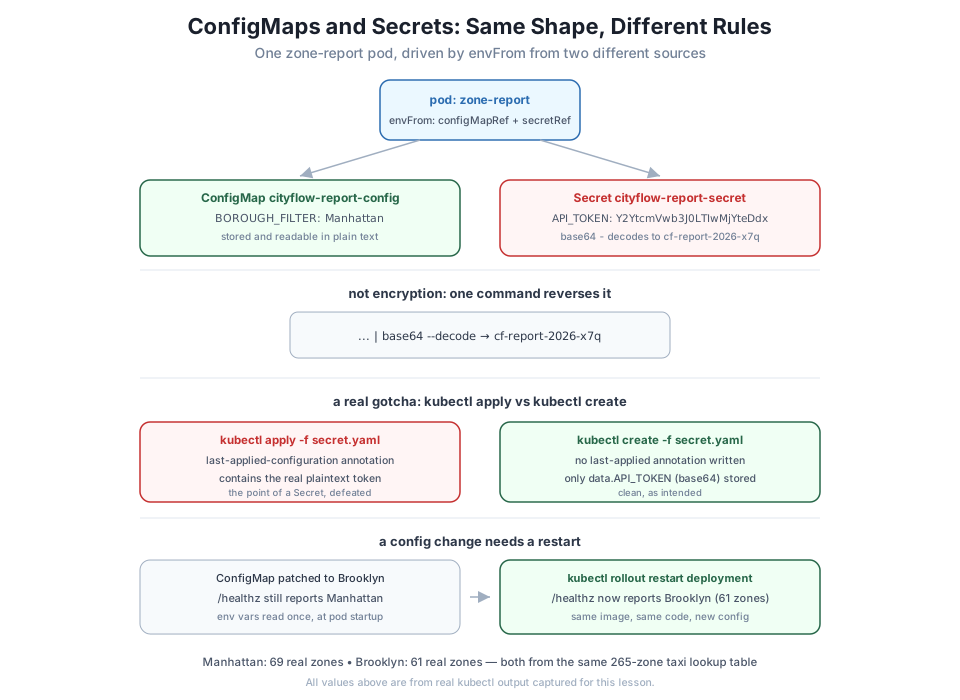
uid: 46b00aa1-2d28-473f-9d8d-48bc98be2c27Exactly what you’d expect: BOROUGH_FILTER: Manhattan, in the clear, for anyone who can read ConfigMaps in this namespace. That’s correct behavior for a setting like this one — there’s nothing here worth hiding, and being able to read it at a glance (for debugging, for a teammate reviewing the cluster) is a feature, not a risk.
A Secret looks almost identical to a ConfigMap, but its values live under data (or stringData for plain-text convenience when writing the manifest) and Kubernetes handles the object differently:
apiVersion: v1
kind: Secret
metadata:
  name: cityflow-report-secret
  namespace: default
type: Opaque
stringData:
  API_TOKEN: "cf-report-2026-x7q"
Applying this file with the same command you’d use for anything else reveals a real, easy-to-hit mistake:
kubectl apply -f secret.yaml
kubectl get secret cityflow-report-secret -n default -o yaml
secret/cityflow-report-secret created
apiVersion: v1
data:
API_TOKEN: Y2YtcmVwb3J0LTIwMjYteDdx
kind: Secret
metadata:
annotations:
kubectl.kubernetes.io/last-applied-configuration: |
{"apiVersion":"v1","kind":"Secret","metadata":{"annotations":{},"name":"cityflow-report-secret","namespace":"default"},"stringData":{"API_TOKEN":"cf-report-2026-x7q"},"type":"Opaque"}
creationTimestamp: "2026-07-21T21:27:53Z"
name: cityflow-report-secret
namespace: default
resourceVersion: "60564"
uid: abf196c3-7f6a-4864-971d-5b7d2a487dca
type: OpaqueLook closely at the kubectl.kubernetes.io/last-applied-configuration annotation: it’s the exact plain-text manifest you applied, cf-report-2026-x7q included, stored right there on the object — kubectl apply writes it so a future apply can compute a three-way diff. For a ConfigMap that’s harmless. For a Secret, it quietly defeats the entire point: anyone who can read the object’s annotations gets the real value with no decoding needed at all.
kubectl apply on a Secret
The fix is simple: use kubectl create -f secret.yaml for Secrets instead of apply — create never writes a last-applied-configuration annotation, so nothing beyond the intended data field is stored. This is exactly the kind of naming/tooling choice a gate can’t catch for you; it has to be a habit.
Recreate it the right way and check again:
kubectl delete secret cityflow-report-secret -n default
kubectl create -f secret.yaml
kubectl get secret cityflow-report-secret -n default -o yaml
secret "cityflow-report-secret" deleted
secret/cityflow-report-secret created
apiVersion: v1
data:
API_TOKEN: Y2YtcmVwb3J0LTIwMjYteDdx
kind: Secret
metadata:
creationTimestamp: "2026-07-21T21:28:08Z"
name: cityflow-report-secret
namespace: default
resourceVersion: "60585"
uid: eec08ecb-4449-43f0-abcd-6b345d772084
type: OpaqueClean now: only data.API_TOKEN, and it’s base64, not the plaintext you wrote. Prove that to yourself directly:
kubectl get secret cityflow-report-secret -n default -o jsonpath='{.data.API_TOKEN}' | base64 --decodecf-report-2026-x7qOne command, no key, no password — the original value, back in full. Base64 is an encoding, not encryption. Anyone who can run kubectl get secret -o yaml (or -o jsonpath) in this namespace can reverse it exactly as easily as you just did.
If decoding is this trivial, what does calling it a “Secret” actually buy you? Three real things, none of which a ConfigMap gives you by default:
get/list on configmaps broadly (for debugging, dashboards, CI) while restricting get on secrets to a much smaller set of roles — the kind of the object is the unit RBAC rules match on, so teams routinely lock down one and not the other.EncryptionConfiguration that encrypts secrets before they’re written to etcd — the cluster’s backing datastore — so a leaked etcd snapshot or disk doesn’t hand over plaintext credentials. ConfigMaps have no equivalent expectation; nothing in Kubernetes treats their contents as sensitive.kubectl apply’s annotation behavior above is worth knowing specifically for this object type, not a general Kubernetes gotcha.None of that makes base64 encryption. It means a Secret is the object Kubernetes and its ecosystem assume is sensitive and build tooling around — a ConfigMap makes the opposite assumption. Put a real token in a ConfigMap and every one of those protections silently doesn’t apply.
apiVersion: apps/v1
kind: Deployment
metadata:
  name: zone-report
  namespace: default
spec:
  replicas: 1
  selector:
    matchLabels:
      app: zone-report
  template:
    metadata:
      labels:
        app: zone-report
    spec:
      containers:
        - name: zone-report
          image: cityflow-zone-report:1.0
          imagePullPolicy: IfNotPresent
          ports:
            - containerPort: 8000
          envFrom:
            - configMapRef:
                name: cityflow-report-config
            - secretRef:
                name: cityflow-report-secret
          readinessProbe:
            httpGet:
              path: /healthz
              port: 8000
            initialDelaySeconds: 1
            periodSeconds: 2
envFrom with both a configMapRef and a secretRef injects every key from each as an environment variable — BOROUGH_FILTER and API_TOKEN both land in the container’s environment, from two entirely different Kubernetes objects, with no code in zone_report.py needing to know or care which source each one came from.
kubectl apply -f deployment.yaml
kubectl apply -f service.yaml
kubectl wait --for=condition=Available deployment/zone-report -n default --timeout=60s
deployment.apps/zone-report created
service/zone-report-svc created
deployment.apps/zone-report condition metVerify from a client pod, the same way Module 5 verified zone-api-svc:
kubectl exec -n default report-client -- wget -qO- http://zone-report-svc/healthz
kubectl exec -n default report-client -- wget -qO- http://zone-report-svc/report
kubectl exec -n default report-client -- wget -qO- --header="X-API-Token: wrong" http://zone-report-svc/report
kubectl exec -n default report-client -- wget -qO- --header="X-API-Token: cf-report-2026-x7q" http://zone-report-svc/report
{"status": "ok", "borough_filter": "Manhattan", "zones_loaded": 265}
wget: server returned error: HTTP/1.0 401 Unauthorized
wget: server returned error: HTTP/1.0 401 Unauthorized
{"borough_filter": "Manhattan", "zone_count": 69, "sample_zones": ["Alphabet City", "Battery Park", "Battery Park City", "Bloomingdale", "Central Harlem"]}/healthz needs no token and reports the ConfigMap’s value; /report with no token or the wrong one is a real 401; with the correct token — the same value you just decoded from the Secret — it’s a real 200 with 69 real Manhattan zones, matching the borough count Module 5’s own zone data already established.
Edit the ConfigMap to a different borough, with no touch to the Deployment or the image at all:
kubectl patch configmap cityflow-report-config -n default --type merge -p '{"data":{"BOROUGH_FILTER":"Brooklyn"}}'
kubectl exec -n default report-client -- wget -qO- http://zone-report-svc/healthz
configmap/cityflow-report-config patched
{"status": "ok", "borough_filter": "Manhattan", "zones_loaded": 265}Still Manhattan. This is the detail worth remembering: envFrom copies a ConfigMap’s values into the container’s environment once, at pod startup — editing the ConfigMap afterward changes the stored object, but the already-running process never re-reads it. Nothing is broken; this is exactly how environment variables work in any process, Kubernetes or not. A rollout restart is what actually applies it:
kubectl rollout restart deployment/zone-report -n default
kubectl rollout status deployment/zone-report -n default --timeout=60s
kubectl exec -n default report-client -- wget -qO- http://zone-report-svc/healthz
kubectl exec -n default report-client -- wget -qO- --header="X-API-Token: cf-report-2026-x7q" http://zone-report-svc/report
deployment.apps/zone-report restarted
deployment "zone-report" successfully rolled out
{"status": "ok", "borough_filter": "Brooklyn", "zones_loaded": 265}
{"borough_filter": "Brooklyn", "zone_count": 61, "sample_zones": ["Bath Beach", "Bay Ridge", "Bedford", "Bensonhurst East", "Bensonhurst West"]}61 real Brooklyn zones — the exact same image, the exact same code, a different real result, purely because the injected configuration changed and the pod restarted to pick it up.
kubectl delete deployment zone-report -n default
kubectl delete service zone-report-svc -n default
kubectl delete configmap cityflow-report-config -n default
kubectl delete secret cityflow-report-secret -n default
kubectl delete pod report-client -n default
docker rmi cityflow-zone-report:1.0
docker exec datatweets-docker-k8s-control-plane crictl rmi docker.io/library/cityflow-zone-report:1.0
deployment.apps "zone-report" deleted
service "zone-report-svc" deleted
configmap "cityflow-report-config" deleted
secret "cityflow-report-secret" deleted
pod "report-client" deleted
Untagged: cityflow-zone-report:1.0
Deleted: docker.io/library/cityflow-zone-report:1.0Create a Secret with kubectl apply -f (not create), then run kubectl get secret <name> -o yaml and confirm the plaintext value really does appear in metadata.annotations. Delete it, recreate with kubectl create -f, and confirm it doesn’t.
Hint
Look specifically at the kubectl.kubernetes.io/last-applied-configuration annotation — it only appears after apply, never after create.
Add a second key to cityflow-report-config, e.g. MAX_SAMPLE: "10", and extend zone_report.py to use it (increase how many sample zones /report returns). Re-apply, restart the Deployment, and confirm the new key actually changed the response.
Hint
Every key under a ConfigMap’s data: becomes its own separate environment variable when consumed via envFrom — you don’t need a second ConfigMap object for a second setting.
This lesson consumed the ConfigMap as environment variables via envFrom. Kubernetes also supports mounting a ConfigMap as a volume (files inside the container, one per key). Research how that consumption method behaves when the ConfigMap changes — does it need a pod restart the same way envFrom did?
Hint
A volume-mounted ConfigMap’s files do get updated on a live pod within roughly a minute (the kubelet’s periodic sync), unlike environment variables — but the running process still has to notice the file changed and re-read it itself; Kubernetes doesn’t restart your process for you either way.
This lesson took one small, original service and drove it two different ways with no image rebuild: a ConfigMap for its ordinary BOROUGH_FILTER setting, readable in plain text by design, and a Secret for its API_TOKEN, stored as base64 — an encoding you decoded in one command, proving it is not encryption on its own. Along the way you hit a real, easy mistake: kubectl apply on a Secret writes the plaintext value into a last-applied-configuration annotation, defeating the point entirely, fixed by using kubectl create -f instead. You deployed both into the same pod via envFrom, verified the real 401/200 behavior a missing or correct token produces, and confirmed the concrete difference between editing a ConfigMap and that change actually taking effect — a restart is required, because environment variables are read once at container startup.
kubectl create -f vs apply -f for Secrets — apply writes a last-applied-configuration annotation containing the full plaintext manifest; create does not.envFrom — injects every key of a ConfigMap or Secret as environment variables in one line, from as many sources as a pod spec lists.kubectl rollout restart is what makes an edited ConfigMap or Secret actually take effect.Almost no real service can ship with its configuration frozen into the image — different environments need different settings, and credentials should never be baked into something as widely distributed and cacheable as a container image. This lesson gave you the two real mechanisms Kubernetes provides for exactly that, and — just as importantly — a clear-eyed view of what a Secret actually protects against and what it doesn’t. Believing base64 is encryption is a genuinely common, genuinely dangerous misunderstanding; you’ve now decoded one yourself and seen precisely why the distinction still matters anyway.
Configuration now lives outside the image. The next gap is storage: everything this lesson’s pod held — and every pod in Module 5 — vanishes the moment the pod is deleted, exactly like Module 4’s Postgres container before it got a volume. Lesson 2 gives Kubernetes its own answer to that problem: PersistentVolumes and PersistentVolumeClaims, watched surviving a real pod deletion and recreation.
Keep DATATWEETS free. Help fund practical data, AI, and engineering lessons for learners worldwide.
