Title here
Summary here
Every pod so far in this course has stored anything it wrote inside its own container filesystem — and every one of those pods has been disposable by design. Delete a pod, and whatever it wrote disappears with it, the same way Module 4 showed a Postgres container losing its data the moment its writable layer was removed. This lesson gives Kubernetes its own version of that lesson’s fix: not a single volumes: line this time, but three real objects working together, plus a StorageClass this cluster already has running.
By the end of this lesson, you will be able to:
Delete reclaim policy actually deletes, and when.A StorageClass describes how to provision storage — which underlying system to use and with what parameters. Kind ships one by default, already running on this cluster since before this course began:
kubectl get storageclassNAME PROVISIONER RECLAIMPOLICY VOLUMEBINDINGMODE ALLOWVOLUMEEXPANSION AGE
standard (default) rancher.io/local-path Delete WaitForFirstConsumer false 23hstandard is backed by local-path-provisioner — a real, small controller (you’ve seen its pod in every kubectl get all -A this course has run) that carves out actual directories on the node’s disk on demand. WaitForFirstConsumer matters enough to demonstrate directly below: this StorageClass deliberately delays creating real storage until a pod is ready to use it, rather than the instant you ask for it.
A PersistentVolumeClaim (PVC) is a namespaced request for storage — “give me 100Mi, read-write by one pod at a time.” A PersistentVolume (PV) is the real storage Kubernetes provisions to satisfy that request. You’ll create the PVC; the PV appears on its own.
apiVersion: v1
kind: PersistentVolumeClaim
metadata:
  name: cityflow-data-pvc
  namespace: default
spec:
  accessModes:
    - ReadWriteOnce
  resources:
    requests:
      storage: 100Mi
kubectl apply -f pvc.yaml
kubectl get pvc cityflow-data-pvc -n defaultpersistentvolumeclaim/cityflow-data-pvc created
NAME STATUS VOLUME CAPACITY ACCESS MODES STORAGECLASS VOLUMEATTRIBUTESCLASS AGE
cityflow-data-pvc Pending standard <unset> 0sPending, no VOLUME yet. This is WaitForFirstConsumer doing exactly what its name says — the StorageClass won’t provision a real PersistentVolume until it knows where it needs to exist, which it can’t know until a pod using this claim gets scheduled to a specific node. On a real multi-node cluster this matters a lot: provisioning storage on the wrong node before scheduling happens would make that node’s storage useless to a pod scheduled elsewhere.
apiVersion: v1
kind: Pod
metadata:
  name: checkpoint-writer
  namespace: default
spec:
  restartPolicy: Never
  containers:
    - name: writer
      image: nginx:alpine
      command: ["sh", "-c", "echo 'written before recreate' > /data/checkpoint.txt && cat /data/checkpoint.txt && sleep 3600"]
      volumeMounts:
        - name: cityflow-data
          mountPath: /data
  volumes:
    - name: cityflow-data
      persistentVolumeClaim:
        claimName: cityflow-data-pvc
kubectl apply -f writer-pod.yaml
kubectl wait --for=condition=Ready pod/checkpoint-writer -n default --timeout=60s
kubectl get pvc cityflow-data-pvc -n default
kubectl get pvpod/checkpoint-writer created
pod/checkpoint-writer condition met
NAME STATUS VOLUME CAPACITY ACCESS MODES STORAGECLASS VOLUMEATTRIBUTESCLASS AGE
cityflow-data-pvc Bound pvc-08551135-127d-403b-b967-feff8eb6f8b0 100Mi RWO standard <unset> 5s
NAME CAPACITY ACCESS MODES RECLAIM POLICY STATUS CLAIM STORAGECLASS VOLUMEATTRIBUTESCLASS REASON AGE
pvc-08551135-127d-403b-b967-feff8eb6f8b0 100Mi RWO Delete Bound default/cityflow-data-pvc standard <unset> 2sThe instant a pod that mounts cityflow-data-pvc needed to be scheduled, local-path-provisioner created a real PersistentVolume — pvc-08551135-127d-403b-b967-feff8eb6f8b0 — and bound the claim to it. Notice RECLAIM POLICY: Delete: whatever happens to this PV later is tied to what happens to the claim, a detail this lesson comes back to at the end. Confirm the write actually happened:
kubectl logs checkpoint-writer -n defaultwritten before recreateThe exact same checkpoint string Module 4’s volumes lesson used for its Postgres row — same idea, same wording, now written to a Kubernetes-managed volume instead of a Docker one.
This is the actual test: delete the pod that wrote the file, the same way Module 4 removed and recreated its Postgres container.
kubectl delete pod checkpoint-writer -n default
kubectl get pvc cityflow-data-pvc -n default
kubectl get pv
pod "checkpoint-writer" deleted
NAME STATUS VOLUME CAPACITY ACCESS MODES STORAGECLASS VOLUMEATTRIBUTESCLASS AGE
cityflow-data-pvc Bound pvc-08551135-127d-403b-b967-feff8eb6f8b0 100Mi RWO standard <unset> 41s
NAME CAPACITY ACCESS MODES RECLAIM POLICY STATUS CLAIM STORAGECLASS VOLUMEATTRIBUTESCLASS REASON AGE
pvc-08551135-127d-403b-b967-feff8eb6f8b0 100Mi RWO Delete Bound default/cityflow-data-pvc standard <unset> 38sThe pod is gone, but the PVC and its PV are completely unaffected — still Bound, same volume, same age counting up. A pod is not where Kubernetes storage lives; the claim is. Now create a different pod — new name, new spec — mounting the exact same claim:
apiVersion: v1
kind: Pod
metadata:
  name: checkpoint-reader
  namespace: default
spec:
  restartPolicy: Never
  containers:
    - name: reader
      image: nginx:alpine
      command: ["sh", "-c", "cat /data/checkpoint.txt && sleep 3600"]
      volumeMounts:
        - name: cityflow-data
          mountPath: /data
  volumes:
    - name: cityflow-data
      persistentVolumeClaim:
        claimName: cityflow-data-pvc
kubectl apply -f reader-pod.yaml
kubectl wait --for=condition=Ready pod/checkpoint-reader -n default --timeout=60s
kubectl logs checkpoint-reader -n defaultpod/checkpoint-reader created
pod/checkpoint-reader condition met
written before recreateStill there. checkpoint-writer no longer exists — you deleted it yourself, minutes ago — and checkpoint-reader never ran a single line of the code that wrote that file. The only thing connecting them is the claim, cityflow-data-pvc, mounted at /data in both. This is exactly the guarantee Module 4’s named volume gave a Postgres container, expressed in Kubernetes’ own objects: the data outlives any one pod that touches it.
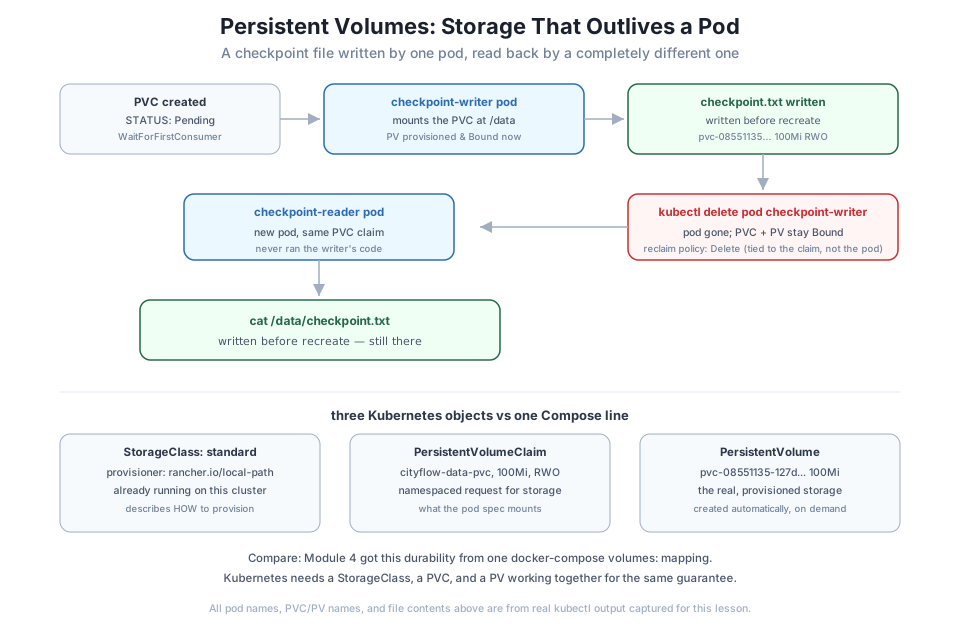
Every PV this lesson created reported RECLAIM POLICY: Delete. Confirm what that actually means by deleting the claim, not just a pod:
kubectl delete pod checkpoint-reader -n default
kubectl delete pvc cityflow-data-pvc -n default
kubectl get pv
kubectl get pvc -n default
pod "checkpoint-reader" deleted
persistentvolumeclaim "cityflow-data-pvc" deleted
No resources found
No resources found in default namespace.With Delete as the reclaim policy, removing the claim removes the PersistentVolume with it — and, for local-path-provisioner, the real directory on the node’s disk backing it. This is the opposite of docker compose down’s behavior toward a named volume: Compose deliberately keeps a volume after down unless you pass -v; a Kubernetes PVC with Delete (the default local-path-provisioner uses) throws its backing storage away the moment the claim goes. A production PVC holding data you can’t lose would typically use a StorageClass with Retain instead — this lesson’s Delete is the right choice for a demo you want to leave no trace of.
Create your own PVC, a writer pod that writes a file of your choosing, delete that pod, and confirm a fresh reader pod on the same PVC reads the file back correctly.
Hint
Watch kubectl get pvc right after creating it, before any pod uses it — you should see the same Pending state this lesson did, proof that WaitForFirstConsumer is really delaying provisioning.
Instead of deleting checkpoint-writer before creating checkpoint-reader, try applying the reader pod while the writer pod is still running, both on this single-node cluster. Observe whether it schedules.
Hint
ReadWriteOnce allows the claim to be mounted read-write by pods on one node at a time, not strictly one pod — on this single-node Kind cluster, two pods can often both mount it, unlike a genuine multi-node cluster where ReadWriteOnce would keep a second pod pending on a different node. This distinction won’t show up until you look at a real multi-node cluster in practice.
Recreate the PVC, but this time patch the resulting PV’s persistentVolumeReclaimPolicy to Retain before deleting the claim: kubectl patch pv <name> -p '{"spec":{"persistentVolumeReclaimPolicy":"Retain"}}'. Delete the claim and see what state the PV ends up in.
Hint
With Retain, deleting the claim leaves the PV behind in a Released state — not Bound, but also not deleted — because Kubernetes now requires a human to decide what to do with the data before it can be reused or removed.
This lesson built the Kubernetes-native equivalent of Module 4’s Docker volume lesson, using three real objects instead of one Compose line. The standard StorageClass, backed by local-path-provisioner, already runs on this cluster; a PersistentVolumeClaim requesting 100Mi stayed Pending until a real pod needed it, proving WaitForFirstConsumer genuinely delays provisioning; and a PersistentVolume was created and bound the moment that pod scheduled. A checkpoint file written by one pod survived that pod’s deletion completely intact, read back correctly by a second, unrelated pod mounting the same claim — the exact durability guarantee Module 4 proved for Postgres, now expressed through Kubernetes’ own storage objects. Deleting the claim, with the default Delete reclaim policy, removed the PersistentVolume and its backing storage in the same step.
standard class uses local-path-provisioner.WaitForFirstConsumer — delays provisioning a PV until a pod that needs it is actually scheduled, so storage lands on the right node.Delete removes the PV (and its real storage) when its claim is deleted; Retain leaves it behind for a human to handle.Every real database, message queue, or search index a Kubernetes-hosted data pipeline depends on needs exactly this guarantee: data that survives a pod being rescheduled, restarted, or replaced, because pods in Kubernetes are treated as disposable by design — Module 5 proved that with self-healing Deployments, and this lesson proved storage has to be handled deliberately for that same disposability not to mean data loss. Lesson 5’s guided project leans on this directly: a batch job’s output has to survive long after the pod that produced it is gone.
Configuration is externalized, and storage now survives a pod’s death. The next question is about the pods themselves: every one you’ve run in this course so far is meant to run forever, restarted if it dies. Lesson 3 introduces the opposite kind of workload — a Kubernetes Job, built to run once, finish, and report Complete rather than Running forever, with real retry behavior when it fails instead.
Keep DATATWEETS free. Help fund practical data, AI, and engineering lessons for learners worldwide.
