Title here
Summary here
Every workload this course has run on Kubernetes so far has been meant to run forever: a Deployment’s whole job, since Module 5, has been keeping a pod (or several) Running continuously, replacing anything that disappears. A batch task — an ETL run, a nightly report, exactly the kind of thing Module 3’s cityflow-etl-job did as a bare docker run — is the opposite shape of problem. It should run once, finish, and be done. This lesson introduces the object built for exactly that: a Job.
By the end of this lesson, you will be able to:
Complete status and duration.backoffLimit and watch a genuinely failing Job retry a bounded number of times before giving up.Failed condition and the BackoffLimitExceeded event behind it.apiVersion: batch/v1
kind: Job
metadata:
name: cityflow-report-job
namespace: default
spec:
backoffLimit: 2
template:
spec:
restartPolicy: Never
containers:
- name: report
image: nginx:alpine
command: ["sh", "-c", "echo 'CityFlow nightly report: 265 zones checked, 0 anomalies' && exit 0"]Two details separate this from every Deployment so far: restartPolicy: Never (a Job’s pod is not meant to be restarted in place — the Job controller decides whether to create a new pod instead) and no replicas — a Job’s completion count is about how many times its pod needs to succeed, not how many copies need to stay running.
kubectl apply -f job-success.yaml
kubectl wait --for=condition=Complete job/cityflow-report-job -n default --timeout=60s
kubectl get jobs -n default
kubectl get pods -n default -l job-name=cityflow-report-job
job.batch/cityflow-report-job created
job.batch/cityflow-report-job condition met
NAME STATUS COMPLETIONS DURATION AGE
cityflow-report-job Complete 1/1 3s 3s
NAME READY STATUS RESTARTS AGE
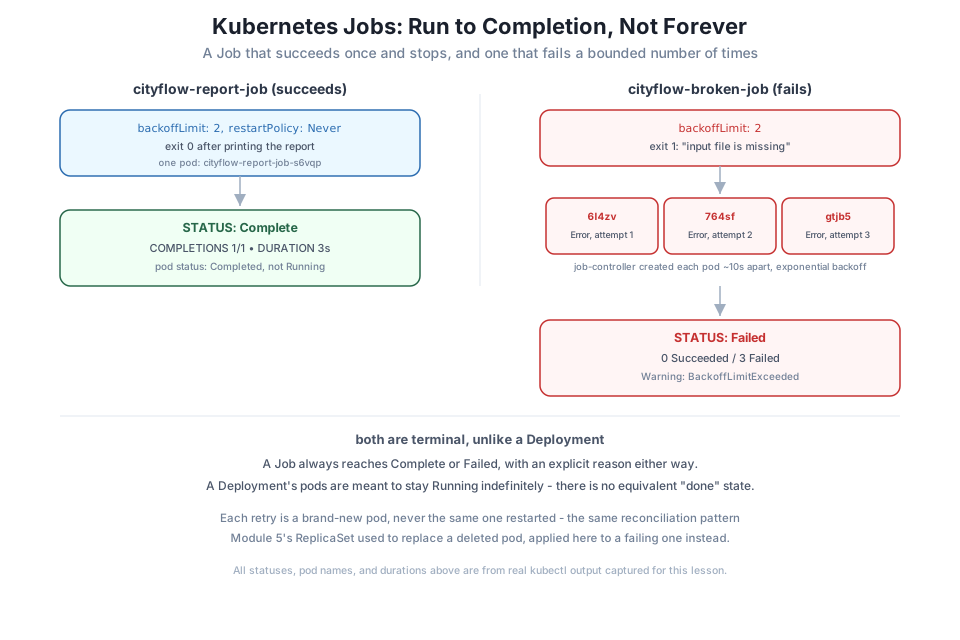
cityflow-report-job-s6vqp 0/1 Completed 0 3sSTATUS: Complete, COMPLETIONS: 1/1, DURATION: 3s. Compare that pod’s status, Completed, with every Deployment-managed pod you’ve seen report Running indefinitely — this one finished its work and stopped, on purpose, and the Job controller has nothing left to do because the desired outcome (one successful run) already happened.
kubectl logs -n default -l job-name=cityflow-report-jobCityFlow nightly report: 265 zones checked, 0 anomaliesThe real output the container produced before exiting 0 — a genuine success, not a guess based on the pod disappearing quietly.
Note
kubectl describe job cityflow-report-job -n default reports Pods Statuses: 0 Active (0 Ready) / 1 Succeeded / 0 Failed — a Job tracks success and failure counts explicitly, not just “is something running right now,” which is the whole reason it can answer “did this actually finish” at all.
backoffLimitReal batch jobs fail: a missing input file, a downstream service that’s down, a bad row of data. A Job’s backoffLimit controls exactly how many times it retries before giving up:
apiVersion: batch/v1
kind: Job
metadata:
  name: cityflow-broken-job
  namespace: default
spec:
  backoffLimit: 2
  template:
    spec:
      restartPolicy: Never
      containers:
        - name: report
          image: nginx:alpine
          command: ["sh", "-c", "echo 'attempting report, but the input file is missing' && exit 1"]
backoffLimit: 2 means: try once, and if it fails, retry up to 2 more times — 3 attempts total — with an increasing delay between each (Kubernetes’ standard exponential backoff, the same pattern behind a crashing container’s CrashLoopBackOff).
kubectl apply -f job-failing.yaml
kubectl get pods -n default -l job-name=cityflow-broken-job
job.batch/cityflow-broken-job created
NAME READY STATUS RESTARTS AGE
cityflow-broken-job-6l4zv 0/1 Error 0 9sWatched over the next roughly 40 seconds, three distinct pods appear, one at a time, each a genuine new attempt:
kubectl get pods -n default -l job-name=cityflow-broken-jobNAME READY STATUS RESTARTS AGE
cityflow-broken-job-6l4zv 0/1 Error 0 41s
cityflow-broken-job-764sf 0/1 Error 0 30s
cityflow-broken-job-gtjb5 0/1 Error 0 10sEach has a different name — just like a ReplicaSet replacing a deleted pod in Module 5, a Job’s retry is always a brand-new pod, never the same one restarted, even though restartPolicy: Never is set on the pod template. Once the third attempt also fails, the Job gives up for good:
kubectl get job cityflow-broken-job -n default
kubectl describe job cityflow-broken-job -n default
NAME STATUS COMPLETIONS DURATION AGE
cityflow-broken-job Failed 0/1 41s 41sBackoff Limit: 2
Pods Statuses: 0 Active (0 Ready) / 0 Succeeded / 3 Failed
Events:
Type Reason Age From Message
---- ------ ---- ---- -------
Normal SuccessfulCreate 42s job-controller Created pod: cityflow-broken-job-6l4zv
Normal SuccessfulCreate 31s job-controller Created pod: cityflow-broken-job-764sf
Normal SuccessfulCreate 11s job-controller Created pod: cityflow-broken-job-gtjb5
Warning BackoffLimitExceeded 8s job-controller Job has reached the specified backoff limitSTATUS: Failed, 3 Failed pods, and a real BackoffLimitExceeded warning event — the Job controller’s own account of exactly why it stopped trying. This is the honest failure mode a batch job needs: not silently stuck retrying forever, and not silently giving up after one bad run either, but a bounded, observable number of attempts with a clear final signal either way.
kubectl logs cityflow-broken-job-6l4zv -n defaultattempting report, but the input file is missingThe real reason this particular job would have failed in production — logged from the first attempt, identical across all three, since nothing about the underlying problem changed between retries.
kubectl delete job cityflow-report-job cityflow-broken-job -n defaultjob.batch "cityflow-report-job" deleted
job.batch "cityflow-broken-job" deletedDeleting a Job removes every pod it created, successful or not — all three of cityflow-broken-job’s attempts disappear in the same command, the same cascading-delete behavior a Deployment’s ReplicaSet already showed you in Module 5.
backoffLimit and predict the pod countChange cityflow-broken-job’s backoffLimit to 0, re-apply, and predict how many pods you’ll see before it reports Failed. Confirm with kubectl get pods -l job-name=cityflow-broken-job.
Hint
backoffLimit: 0 means no retries at all — one attempt, and if it fails, the Job is Failed immediately with exactly one pod, not three.
Add completions: 3 to cityflow-report-job’s spec (alongside backoffLimit) and re-apply. Watch how many pods run, and whether they run one at a time or together.
Hint
By default a Job with completions: 3 and no parallelism set runs one pod at a time, sequentially, until 3 have succeeded — set parallelism: 3 too and compare.
activeDeadlineSecondsAdd activeDeadlineSeconds: 5 to a Job whose container sleeps for 30 seconds before exiting successfully. Observe what happens to the Job well before that sleep would finish.
Hint
activeDeadlineSeconds is a hard wall-clock timeout for the whole Job, independent of backoffLimit — once it’s hit, the Job is terminated and marked Failed with reason DeadlineExceeded, even if the container was still running and might eventually have succeeded.
A Job is Kubernetes’ object for work that’s supposed to finish, not run forever. cityflow-report-job proved the contrast directly: it ran once, exited 0, and reported STATUS: Complete with COMPLETIONS: 1/1 — a state no Deployment-managed pod ever reaches, because a Deployment’s whole job is keeping pods Running indefinitely. cityflow-broken-job, with backoffLimit: 2, showed the other real outcome: three genuine attempts, each a brand-new pod, each failing for the same real reason, ending in a Failed status and an explicit BackoffLimitExceeded event — a bounded, observable number of retries rather than an infinite loop or a silent single failure.
restartPolicy: Never (or OnFailure) — required on a Job’s pod template; the Job controller, not the kubelet, decides whether to create a replacement pod.backoffLimit — the maximum number of retries (as new pods) before a Job gives up and reports Failed.Complete / Failed — a Job’s two real terminal states, each with its own event trail explaining how it got there.CrashLoopBackOff.Almost every real data pipeline has both shapes of workload: a long-running API or dashboard that should never stop, and a batch step — an ETL run, an aggregation, a report — that should run once, succeed or fail cleanly, and be done. Using a Deployment for the second kind of work would mean a “finished” batch job gets restarted forever, mistaken for a crash loop. A Job gives you the honest semantics that kind of work actually needs, with real, bounded retry behavior when things go wrong — exactly the primitive Lesson 4’s CronJob builds on to run that same kind of work on a schedule.
You can now run one batch task to real completion, with retries that give up cleanly instead of looping forever. Lesson 4 adds the missing piece for anything that needs to happen on a schedule rather than once: a CronJob, watched creating several real, successive Job runs of its own.
Keep DATATWEETS free. Help fund practical data, AI, and engineering lessons for learners worldwide.
