Title here
Summary here
Lesson 3’s Job ran once, on command, the moment you applied it. A lot of real batch work — a nightly aggregation, an hourly ingest check, a periodic cleanup — needs to run on a schedule instead, with nobody around to type kubectl apply at 2 a.m. A CronJob is exactly that: a template for creating Jobs, on a real cron schedule, that Kubernetes itself keeps firing indefinitely.
By the end of this lesson, you will be able to:
apply.successfulJobsHistoryLimit does, and watch it actually prune an old run.Real production schedules are usually hourly or daily — this lesson uses a schedule fast enough to actually watch fire more than once while reading it, rather than take on faith:
apiVersion: batch/v1
kind: CronJob
metadata:
  name: cityflow-heartbeat
  namespace: default
spec:
  schedule: "*/1 * * * *"
  successfulJobsHistoryLimit: 3
  failedJobsHistoryLimit: 1
  jobTemplate:
    spec:
      backoffLimit: 0
      template:
        spec:
          restartPolicy: Never
          containers:
            - name: heartbeat
              image: nginx:alpine
              command: ["sh", "-c", "date -u +'%Y-%m-%dT%H:%M:%SZ CityFlow heartbeat OK'"]
schedule: "*/1 * * * *" is standard five-field cron syntax — minute, hour, day-of-month, month, day-of-week — meaning “every minute, every hour, every day.” Everything under jobTemplate.spec is a real Job spec, the exact same shape Lesson 3 used directly; a CronJob is, quite literally, a Job factory with a clock attached.
kubectl apply -f cronjob.yaml
kubectl get cronjob cityflow-heartbeat -n default
cronjob.batch/cityflow-heartbeat created
NAME SCHEDULE TIMEZONE SUSPEND ACTIVE LAST SCHEDULE AGE
cityflow-heartbeat */1 * * * * <none> False 0 <none> 0sLAST SCHEDULE: <none> — nothing has fired yet. This is a real, live schedule; the first run happens at the next minute boundary the cluster’s clock crosses, not the instant you apply the manifest.
Polling this cluster for several minutes shows exactly what a CronJob does on its own:
kubectl get cronjob cityflow-heartbeat -n default
kubectl get jobs -n default
At t+8s after the first minute boundary:
NAME                 SCHEDULE      TIMEZONE   SUSPEND   ACTIVE   LAST SCHEDULE   AGE
cityflow-heartbeat   */1 * * * *   <none>     False     0        8s              41s
NAME                          STATUS     COMPLETIONS   DURATION   AGE
cityflow-heartbeat-29744495   Complete   1/1           3s         8s
A real Job, cityflow-heartbeat-29744495, already Complete — created, run, and finished with no command typed after the original apply. A full minute later, a second, completely separate Job appears:
NAME                 SCHEDULE      TIMEZONE   SUSPEND   ACTIVE   LAST SCHEDULE   AGE
cityflow-heartbeat   */1 * * * *   <none>     False     0        9s              102s
NAME                          STATUS     COMPLETIONS   DURATION   AGE
cityflow-heartbeat-29744495   Complete   1/1           3s         69s
cityflow-heartbeat-29744496   Complete   1/1           3s         9s
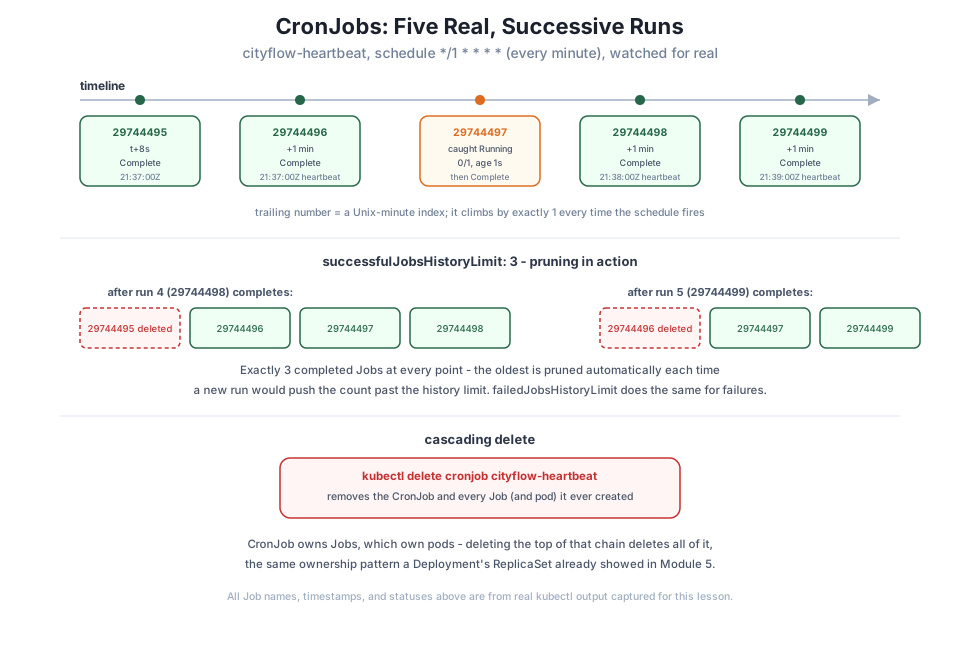
...29744495 and ...29744496 — the trailing number is a Unix-minute index the CronJob controller uses to name each run uniquely, which is exactly why it climbs by one every time the schedule fires. A third run appears a minute after that:
NAME                          STATUS     COMPLETIONS   DURATION   AGE
cityflow-heartbeat-29744495   Complete   1/1           3s         2m1s
cityflow-heartbeat-29744496   Complete   1/1           3s         61s
cityflow-heartbeat-29744497   Running    0/1           1s         1s
Caught mid-flight this time — STATUS: Running, 0/1 completions, age 1 second — the actual moment a scheduled run is executing, a few seconds before it too reports Complete. Three real, independent Job objects, each with its own pod, its own logs, its own completion time, created by nothing but the passage of real time against this CronJob’s schedule.
kubectl logs cityflow-heartbeat-29744497-d6lpq -n default
kubectl logs cityflow-heartbeat-29744498-8lwmm -n default
kubectl logs cityflow-heartbeat-29744499-2mhlk -n default
2026-07-21T21:37:00Z CityFlow heartbeat OK
2026-07-21T21:38:00Z CityFlow heartbeat OK
2026-07-21T21:39:00Z CityFlow heartbeat OKReal, distinct UTC timestamps, each landing right on a minute boundary — the schedule genuinely firing once per minute, not an artifact of how fast the pods happened to run.
successfulJobsHistoryLimit in actionThis CronJob’s successfulJobsHistoryLimit: 3 caps how many completed Jobs it keeps around at once. Watched across five real runs, that limit visibly kicks in:
kubectl get jobs -n defaultOnce a fourth run (...29744498) completes, the oldest one is already gone:
NAME                          STATUS     COMPLETIONS   DURATION   AGE
cityflow-heartbeat-29744496   Complete   1/1           3s         2m13s
cityflow-heartbeat-29744497   Complete   1/1           3s         73s
cityflow-heartbeat-29744498   Complete   1/1           3s         13s
...29744495 — the very first run this lesson watched fire — has been deleted automatically, because keeping it would have meant 4 completed Jobs for a limit of 3. One run later, the same thing happens again to ...29744496:
NAME                          STATUS     COMPLETIONS   DURATION   AGE
cityflow-heartbeat-29744497   Complete   1/1           3s         2m4s
cityflow-heartbeat-29744498   Complete   1/1           3s         64s
cityflow-heartbeat-29744499   Complete   1/1           3s         4s
At every point in this sequence there are exactly 3 completed Jobs, never more — old runs quietly pruned as new ones land, so a schedule left running for weeks doesn’t accumulate an unbounded pile of finished Job objects. failedJobsHistoryLimit does the identical thing for failed runs, kept separately (and usually smaller, since a failing schedule is something you want to notice and fix rather than let scroll by).
kubectl delete cronjob cityflow-heartbeat -n default
kubectl get jobs -n default
cronjob.batch "cityflow-heartbeat" deleted
No resources found in default namespace.One command removed the CronJob and every Job it had ever created, including the ones still within the history limit — the same cascading-delete behavior a Deployment’s ReplicaSet and a Job’s pods already showed you, one level further up the ownership chain: CronJob owns Jobs, which own pods, and deleting the top of that chain deletes all of it.
Apply this lesson’s CronJob yourself and run kubectl get jobs -n default every 20-30 seconds for about 3 minutes. Confirm you see at least two separate Job names, each ending in a climbing Unix-minute index.
Hint
The first run won’t appear instantly — it fires at the next minute boundary the cluster’s clock crosses, which could be anywhere from a few seconds to just under a minute after you apply it.
Change successfulJobsHistoryLimit to 1 and re-apply. After two or three more runs, confirm kubectl get jobs -n default never shows more than one completed Job at a time.
Hint
A change to successfulJobsHistoryLimit only affects pruning going forward — it won’t retroactively delete Jobs already kept under the old, higher limit until enough new runs happen to trigger cleanup.
Patch this lesson’s CronJob with kubectl patch cronjob cityflow-heartbeat -n default -p '{"spec":{"suspend":true}}', wait a couple of minutes, and confirm no new Jobs appear even though the CronJob object itself still exists.
Hint
suspend: true is the correct way to pause a schedule temporarily without losing its configuration or completed-Job history — kubectl get cronjob will still show it, just with new runs no longer firing until you set suspend back to false.
A CronJob is a Job factory with a real schedule attached — cityflow-heartbeat, on */1 * * * *, created five genuinely separate Job objects over five real minutes with no command from you after the initial apply, each with its own pod, its own real UTC-timestamped log line, and its own completion. Watching it across those five runs also showed successfulJobsHistoryLimit: 3 actually working: the oldest completed Job was deleted automatically each time a new one would have pushed the count past 3, keeping the object list bounded no matter how long the schedule keeps running. Deleting the CronJob cascaded to remove every Job it had created in one command.
schedule — standard five-field cron syntax (minute, hour, day-of-month, month, day-of-week).successfulJobsHistoryLimit / failedJobsHistoryLimit — cap how many completed/failed Jobs a CronJob keeps around, pruning the oldest automatically.Almost every real data pipeline has at least one thing that has to happen on a schedule — an hourly ingest, a nightly rollup, a periodic cleanup — and running it by hand or from an external cron daemon outside the cluster means one more system to keep alive and one more place a schedule can silently stop firing without anyone noticing. A CronJob puts that scheduling logic inside Kubernetes itself, next to everything else this course has built, observable with the same kubectl get/describe/logs commands you already know. Lesson 5’s guided project uses exactly this mechanism — a real, original CityFlow batch task — to tie every piece of this module together on one real example.
You’ve now seen a CronJob create real, successive Job runs on its own and prune its own history automatically. The guided project brings ConfigMaps, Secrets, storage, and Jobs together on one real CityFlow batch task: a job whose parameters come from a ConfigMap, that processes the real NYC taxi data this course has used since Course 1, and whose output survives on a PersistentVolumeClaim long after its own pod is gone.
Keep DATATWEETS free. Help fund practical data, AI, and engineering lessons for learners worldwide.
