Title here
Summary here
This project ties together everything Module 6 taught, on one original, run-for-real batch task. CityFlow needs a nightly fare report over its real trip data — the same kind of aggregation Module 3’s cityflow-etl-job and Module 4’s loader service both ran, but this time as a proper Kubernetes Job: its parameters (which dataset, what counts as a “high fare”) come from a ConfigMap, not hardcoded; its output is written to a PersistentVolumeClaim so the report survives long after the Job’s own pod is gone; and it runs to real completion rather than staying Running forever. You’ll build it, run it, delete the pod that produced the report, and prove the report is still there.
By the end of this project, you will be able to:
# gate: skip
"""CityFlow's batch fare report - a small, original run-to-completion job that
ties Module 6 together: its parameters come from a ConfigMap (DATA_URL,
FARE_THRESHOLD), it downloads the real NYC taxi trip sample CityFlow has used
since Course 1, aggregates it, and writes its report to a PersistentVolumeClaim
so the result survives long after this Job's pod is gone.

Stdlib only - csv, json, urllib - so the image needs no pip install at all,
the same reasoning Module 5's zone_api.py used.
"""
import csv
import io
import json
import os
import time
import urllib.request

DATA_URL = os.environ["DATA_URL"]
FARE_THRESHOLD = float(os.environ.get("FARE_THRESHOLD", "50"))
OUTPUT_PATH = os.environ.get("OUTPUT_PATH", "/output/report.json")


def fetch_csv(url):
    # A default urllib User-Agent gets a real 403 from Cloudflare on this
    # site's own datasets host - a browser-like one is required, verified
    # while building this lesson.
    req = urllib.request.Request(url, headers={"User-Agent": "Mozilla/5.0 (compatible; CityFlowBatchJob/1.0)"})
    with urllib.request.urlopen(req, timeout=60) as r:
        return r.read().decode("utf-8")


def main():
    start = time.time()
    print(f"CityFlow batch report starting - DATA_URL={DATA_URL} FARE_THRESHOLD={FARE_THRESHOLD}", flush=True)

    raw = fetch_csv(DATA_URL)
    reader = csv.DictReader(io.StringIO(raw))

    trip_count = 0
    total_revenue = 0.0
    total_distance = 0.0
    high_fare_count = 0
    by_payment_type = {}

    for row in reader:
        trip_count += 1
        total_revenue += float(row["total_amount"])
        total_distance += float(row["trip_distance"])
        if float(row["fare_amount"]) > FARE_THRESHOLD:
            high_fare_count += 1
        pt = row["payment_type"]
        by_payment_type[pt] = by_payment_type.get(pt, 0) + 1

    report = {
        "data_url": DATA_URL,
        "fare_threshold": FARE_THRESHOLD,
        "trip_count": trip_count,
        "total_revenue": round(total_revenue, 2),
        "average_trip_distance": round(total_distance / trip_count, 4),
        "high_fare_trip_count": high_fare_count,
        "trips_by_payment_type": by_payment_type,
        "elapsed_seconds": round(time.time() - start, 2),
    }

    os.makedirs(os.path.dirname(OUTPUT_PATH), exist_ok=True)
    with open(OUTPUT_PATH, "w", encoding="utf-8") as f:
        json.dump(report, f, indent=2)

    print(f"Report written to {OUTPUT_PATH}:", flush=True)
    print(json.dumps(report, indent=2), flush=True)


if __name__ == "__main__":
    main()
Nothing about the dataset, the threshold, or where the report lands is fixed in this code — every one of those comes from the environment, which Kubernetes will fill in from a ConfigMap. Tested directly first, against the real, live dataset URL, before any container is involved:
DATA_URL="https://datatweets.com/datasets/nyc-taxi/yellow_tripdata_sample.csv" FARE_THRESHOLD="50" OUTPUT_PATH="/tmp/report.json" python3 batch_report.pyCityFlow batch report starting - DATA_URL=https://datatweets.com/datasets/nyc-taxi/yellow_tripdata_sample.csv FARE_THRESHOLD=50.0
Report written to /tmp/report.json:
{
"data_url": "https://datatweets.com/datasets/nyc-taxi/yellow_tripdata_sample.csv",
"fare_threshold": 50.0,
"trip_count": 200000,
"total_revenue": 5343779.62,
"average_trip_distance": 3.582,
"high_fare_trip_count": 12675,
"trips_by_payment_type": {
"1": 156378,
"2": 29522,
"0": 9511,
"4": 3235,
"3": 1354
},
"elapsed_seconds": 4.69
}total_revenue: 5343779.62 is the exact same figure Module 4’s local-data-stack guided project measured aggregating this identical 200,000-trip sample — real, independent confirmation that this script’s aggregation logic is correct before a single Kubernetes object gets involved.
Note
Fetching this course’s own dataset host with Python’s default urllib User-Agent returns a real 403 Forbidden from Cloudflare — this script’s Request sets a browser-like one instead, which is why that header is there rather than a plain urlopen(url) call.
Packaged the same stdlib-only way Module 5’s zone_api.py was — no requirements.txt, nothing to pip install:
FROM python:3.13-slim

WORKDIR /app

COPY batch_report.py ./

CMD ["python", "batch_report.py"]
docker build -t cityflow-batch-report:1.0 .
kind load docker-image cityflow-batch-report:1.0 --name datatweets-docker-k8swriting image sha256:f24f9757bd912a5aa4b618660ebc35e69052311451239eeae43dcb9b2dd4ec4c done
naming to docker.io/library/cityflow-batch-report:1.0 done
Image: "cityflow-batch-report:1.0" with ID "sha256:f24f9757bd912a5aa4b618660ebc35e69052311451239eeae43dcb9b2dd4ec4c" not yet present on node "datatweets-docker-k8s-control-plane", loading...apiVersion: v1
kind: Namespace
metadata:
name: cityflowapiVersion: v1
kind: ConfigMap
metadata:
name: cityflow-batch-config
namespace: cityflow
data:
DATA_URL: "https://datatweets.com/datasets/nyc-taxi/yellow_tripdata_sample.csv"
FARE_THRESHOLD: "50"
OUTPUT_PATH: "/output/report.json"apiVersion: v1
kind: PersistentVolumeClaim
metadata:
name: cityflow-batch-output-pvc
namespace: cityflow
spec:
accessModes:
- ReadWriteOnce
resources:
requests:
storage: 100MiapiVersion: batch/v1
kind: Job
metadata:
name: cityflow-batch-job
namespace: cityflow
spec:
backoffLimit: 2
template:
spec:
restartPolicy: Never
containers:
- name: batch-report
image: cityflow-batch-report:1.0
imagePullPolicy: IfNotPresent
envFrom:
- configMapRef:
name: cityflow-batch-config
volumeMounts:
- name: output
mountPath: /output
volumes:
- name: output
persistentVolumeClaim:
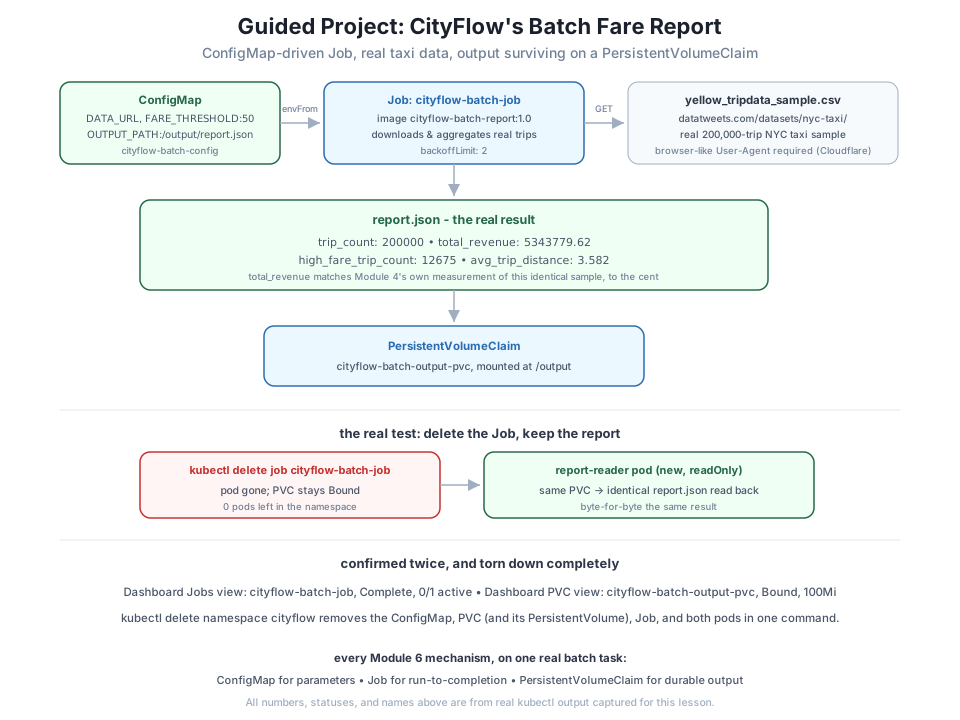
claimName: cityflow-batch-output-pvcEvery mechanism from Lessons 1-3, in one Job: envFrom injects the ConfigMap’s three values as environment variables (Lesson 1), the PVC gives /output a durable home (Lesson 2), and backoffLimit: 2 bounds retries if the download or parse ever fails (Lesson 3).
kubectl apply -f namespace.yaml
kubectl apply -f configmap.yaml
kubectl apply -f pvc.yaml
kubectl apply -f job.yaml
kubectl wait --for=condition=Complete job/cityflow-batch-job -n cityflow --timeout=120s
kubectl get jobs -n cityflow
namespace/cityflow created
configmap/cityflow-batch-config created
persistentvolumeclaim/cityflow-batch-output-pvc created
job.batch/cityflow-batch-job created
job.batch/cityflow-batch-job condition met
NAME STATUS COMPLETIONS DURATION AGE
cityflow-batch-job Complete 1/1 7s 7skubectl logs -n cityflow -l job-name=cityflow-batch-jobCityFlow batch report starting - DATA_URL=https://datatweets.com/datasets/nyc-taxi/yellow_tripdata_sample.csv FARE_THRESHOLD=50.0
Report written to /output/report.json:
{
"data_url": "https://datatweets.com/datasets/nyc-taxi/yellow_tripdata_sample.csv",
"fare_threshold": 50.0,
"trip_count": 200000,
"total_revenue": 5343779.62,
"average_trip_distance": 3.582,
"high_fare_trip_count": 12675,
"trips_by_payment_type": {
"1": 156378,
"2": 29522,
"0": 9511,
"4": 3235,
"3": 1354
},
"elapsed_seconds": 6.2
}The exact same 200,000 trips, $5,343,779.62 total revenue this project’s local test already confirmed — now produced by a real Job, driven entirely by ConfigMap values, running inside the cluster.
This is the test the whole project has been building to. Delete the Job — its pod goes with it — and confirm the report is still readable through a completely separate pod on the same PVC:
kubectl delete job cityflow-batch-job -n cityflow
kubectl get pods -n cityflow
kubectl get pvc -n cityflow
job.batch "cityflow-batch-job" deleted
No resources found in cityflow namespace.
NAME STATUS VOLUME CAPACITY ACCESS MODES STORAGECLASS VOLUMEATTRIBUTESCLASS AGE
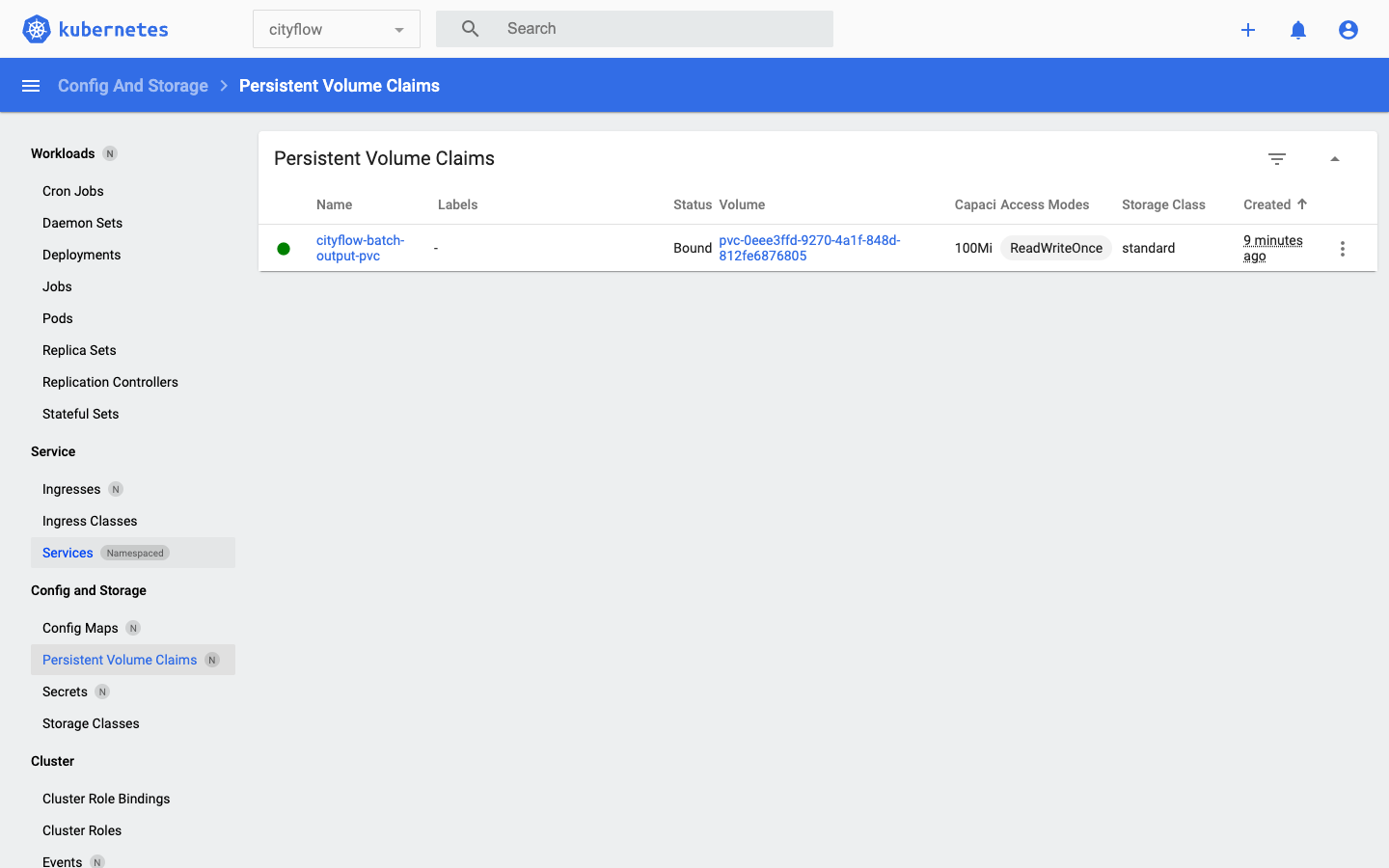
cityflow-batch-output-pvc Bound pvc-0eee3ffd-9270-4a1f-848d-812fe6876805 100Mi RWO standard <unset> 24sZero pods left in the namespace — the Job and everything it created is genuinely gone — but the PVC is still Bound, exactly the guarantee Lesson 2 proved. A fresh reader pod, never involved in producing the report, mounts the same claim:
apiVersion: v1
kind: Pod
metadata:
  name: report-reader
  namespace: cityflow
spec:
  restartPolicy: Never
  containers:
    - name: reader
      image: nginx:alpine
      command: ["sh", "-c", "cat /output/report.json && sleep 3600"]
      volumeMounts:
        - name: output
          mountPath: /output
          readOnly: true
  volumes:
    - name: output
      persistentVolumeClaim:
        claimName: cityflow-batch-output-pvc
kubectl apply -f reader-pod.yaml
kubectl wait --for=condition=Ready pod/report-reader -n cityflow --timeout=60s
kubectl logs report-reader -n cityflowpod/report-reader created
pod/report-reader condition met
{
"data_url": "https://datatweets.com/datasets/nyc-taxi/yellow_tripdata_sample.csv",
"fare_threshold": 50.0,
"trip_count": 200000,
"total_revenue": 5343779.62,
"average_trip_distance": 3.582,
"high_fare_trip_count": 12675,
"trips_by_payment_type": {
"1": 156378,
"2": 29522,
"0": 9511,
"4": 3235,
"3": 1354
},
"elapsed_seconds": 6.2
}Byte-for-byte the same report, read by a pod that never ran a line of batch_report.py, mounted readOnly: true for good measure. The Job that produced this data has been gone since before this pod even existed — only the claim connects them.
kubectl delete namespace cityflownamespace "cityflow" deletedkubectl get all -A
kubectl get configmaps,secrets,pvc,jobs,cronjobs -AOnly the same pre-existing cluster infrastructure every module in this course has left in place — the control plane, coredns, kindnet, local-path-provisioner, and the Dashboard itself. Deleting the namespace removed the ConfigMap, the PVC (and, with the default Delete reclaim policy, the PersistentVolume backing it), the Job, and both pods, in one command.
Remove the built image too, from both the host and the node it was loaded into:
docker rmi cityflow-batch-report:1.0
docker exec datatweets-docker-k8s-control-plane crictl rmi docker.io/library/cityflow-batch-report:1.0
Untagged: cityflow-batch-report:1.0
Deleted: docker.io/library/cityflow-batch-report:1.0Build, load, and run this Job yourself. Confirm your own report shows the same 200,000 trips and $5,343,779.62 total revenue, and that a fresh reader pod can read it back after you delete the Job.
Hint
If the Job’s pod reports an error instead of completing, check kubectl logs -n cityflow -l job-name=cityflow-batch-job first — a 403 there almost always means the User-Agent header got dropped or changed.
Edit configmap.yaml’s FARE_THRESHOLD to 100, re-apply the ConfigMap, delete the old Job, and re-apply job.yaml (Jobs, unlike Deployments, don’t support in-place updates to a running spec). Confirm high_fare_trip_count in the new report is smaller than this lesson’s 12675.
Hint
A higher threshold means fewer trips count as “high fare,” so the count should go down, not up — if it goes up, double-check the ConfigMap actually updated before the Job ran.
Using Lesson 4’s CronJob shape, wrap this project’s Job spec in a jobTemplate with a schedule of your choosing, so CityFlow’s fare report regenerates automatically instead of running once.
Hint
Since this Job’s output path is fixed (/output/report.json), each scheduled run will simply overwrite the previous report on the same PVC — a real design decision worth noticing, since a production version might instead want a timestamped filename per run.
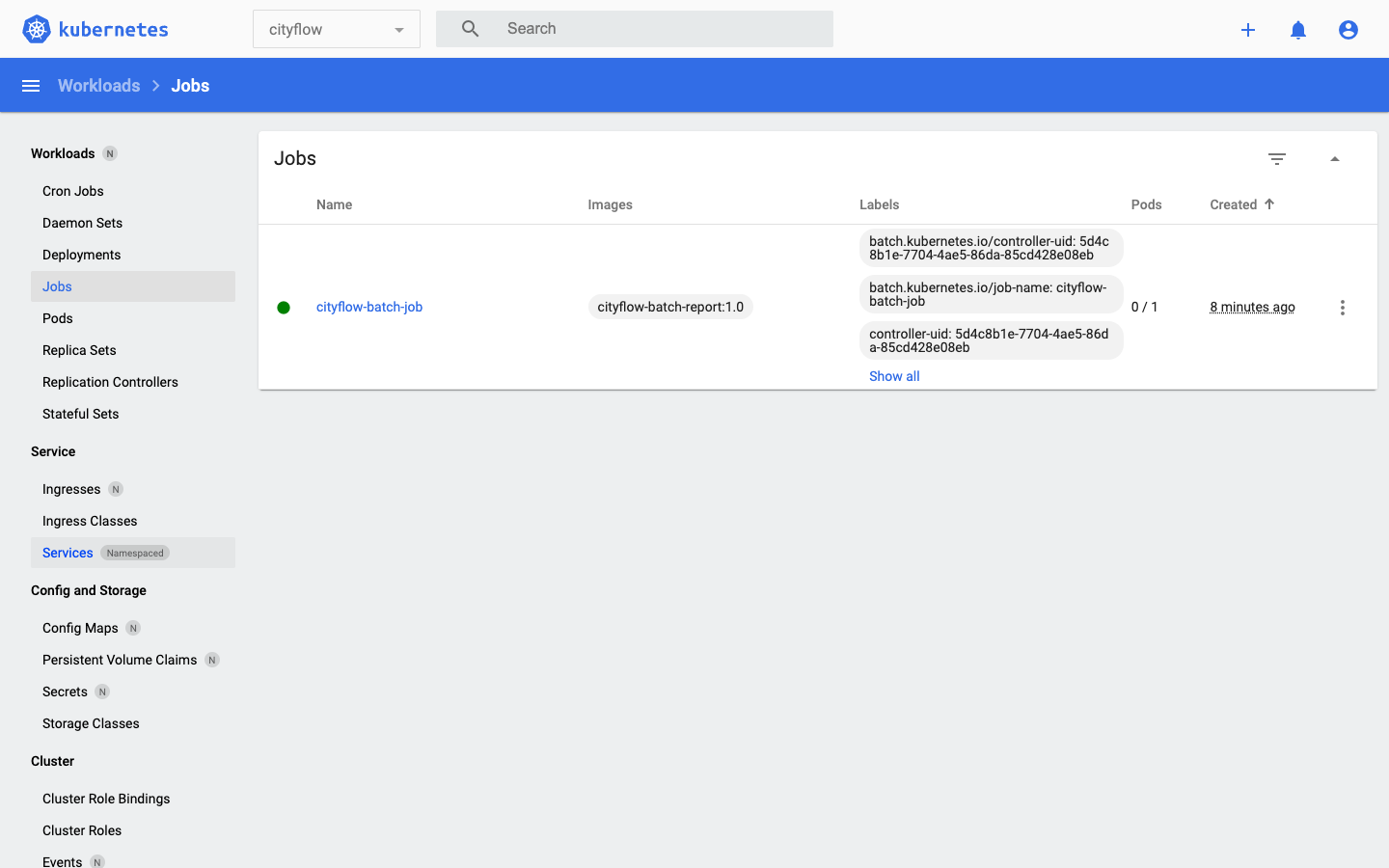
This project put every mechanism Module 6 taught to work on one original, real batch task. A ConfigMap held CityFlow’s fare-report parameters — dataset URL, fare threshold, output path — with the exact same stdlib-only image usable for any combination of them. A Job ran that report to real completion against the real 200,000-trip NYC taxi sample, reproducing Module 4’s own measured total revenue, $5,343,779.62, to the cent. Its output landed on a PersistentVolumeClaim, and survived deleting the Job entirely: a completely separate reader pod, mounting the same claim read-only, read back the identical report after the Job that produced it was gone. Two independent confirmations — real kubectl logs output and real Kubernetes Dashboard screenshots of both the Job and the PVC — backed the same result, and kubectl delete namespace cityflow removed every trace of it in one command.
envFrom, reusable for a different dataset or threshold with no rebuild.This is the actual, minimal shape of a real Kubernetes batch job — not a toy that prints a string and exits, but a parameterized, run-to-completion task processing real data, with output that outlives its own execution. Every later module in this course builds directly on this shape: Module 7 packages CityFlow’s actual ETL job the same way, and Module 8’s capstone schedules it as a CronJob against Course 1’s own verified numbers. The mechanisms are no longer new; what’s left is applying them to CityFlow’s real pipeline, end to end.
That completes Module 6: Config, Storage & Batch Jobs. You externalized a real service’s configuration with a ConfigMap and Secret, gave storage a durability guarantee that survives a pod’s death, ran real run-to-completion Jobs with genuine retry behavior, watched a CronJob fire several real successive times on its own, and brought all four together on an original CityFlow batch task whose output survived its own Job being deleted.
Next comes Module 7: Running a Data Job on Kubernetes, where CityFlow’s actual ETL job — the one Module 3 first containerized and Module 4 ran through Compose — gets translated into real Kubernetes manifests, with resource requests and limits, real kubectl logs/describe/events debugging, and a guided project verified end to end against Course 1’s own real numbers.
Keep DATATWEETS free. Help fund practical data, AI, and engineering lessons for learners worldwide.
