Title here
Summary here
Module 1’s guided project ran three containers by hand: a network you created yourself, a Postgres database attached to it, and two disposable clients that connected to that database purely by container name. It worked, but every piece of the setup — the network name, the database’s container name, the -e flags — had to match exactly across every single docker run command, typed by hand, in the right order. This lesson rebuilds a version of that exact setup two ways: first by hand again, so the cost is fresh, then as one Compose file, so you feel the difference rather than just read about it.
By the end of this lesson, you will be able to:
docker-compose.yml that declares two services and their relationship.depends_on gotcha that catches almost everyone the first time, and know why it happens.Let’s start with the version you already know how to do.
CityFlow needs the same small job every module in this course has used: a Postgres database seeded with five real trips, and a report over them. This time it’s one script that does both — create the table, seed it, and print the report — run against a Postgres container by a second, disposable container:
-- CityFlow reporter: create the table if needed, seed five real trips
-- (the same five trips from Module 1's guided project), then report.
CREATE TABLE IF NOT EXISTS trips (
    pickup_ts       TIMESTAMP,
    dropoff_ts      TIMESTAMP,
    passenger_count NUMERIC,
    trip_distance   NUMERIC,
    pu_zone         INTEGER,
    do_zone         INTEGER,
    payment_type    INTEGER,
    fare_amount     NUMERIC,
    tip_amount      NUMERIC,
    total_amount    NUMERIC
);

TRUNCATE trips;

INSERT INTO trips VALUES
    ('2023-12-31 23:56:46', '2024-01-01 00:12:06', 2,    2.38, 236, 142, 1, 15.60, 1.00, 21.60),
    ('2023-12-31 23:58:35', '2024-01-01 00:13:06', 6,    8.39, 138, 217, 2, 33.10, 0.00, 42.35),
    ('2024-01-01 00:00:17', '2024-01-01 00:07:46', 1,    2.35, 161,  75, 1, 12.10, 3.42, 20.52),
    ('2024-01-01 00:01:39', '2024-01-01 01:02:53', 1,    2.59, 161, 246, 2, 47.10, 0.00, 52.10),
    ('2024-01-01 00:02:21', '2024-01-01 00:18:59', NULL, 6.40,  48, 116, 0, 28.90, 5.09, 38.99);

SELECT COUNT(*) AS trips, ROUND(AVG(fare_amount), 2) AS avg_fare,
       ROUND(AVG(trip_distance), 2) AS avg_distance,
       ROUND(SUM(total_amount), 2) AS total_revenue
FROM trips;
Save this as combined.sql. Two containers need to run this scenario: db, a long-running Postgres instance, and reporter, a short-lived container that connects to db by name and executes the script above.
Here’s the setup done the way Module 1 taught it — a network, a database attached to it, and a client that runs the script:
docker network create cf-why-compose-net
docker run -d --name cf-why-compose-db --network cf-why-compose-net \
  -e POSTGRES_PASSWORD=cityflow -e POSTGRES_DB=cityflow \
  postgres:16-alpine
sleep 3
docker run --rm --network cf-why-compose-net \
  -v "$(pwd)/combined.sql:/sql/combined.sql:ro" -e PGPASSWORD=cityflow \
  postgres:16-alpine psql -h cf-why-compose-db -U postgres -d cityflow -f /sql/combined.sql
efaf1ef995a26d88a7b6fd789e907360938da3c86823d6b4181003dbd37c2173
1e1ad55861c307836a5851335ab3c5b0aca7062aaf1cfdfe8a8e737152e6d05d
CREATE TABLE
TRUNCATE TABLE
INSERT 0 5
trips | avg_fare | avg_distance | total_revenue
-------+----------+--------------+---------------
5 | 27.36 | 4.42 | 175.56
(1 row)docker rm -f cf-why-compose-db
docker network rm cf-why-compose-netcf-why-compose-db
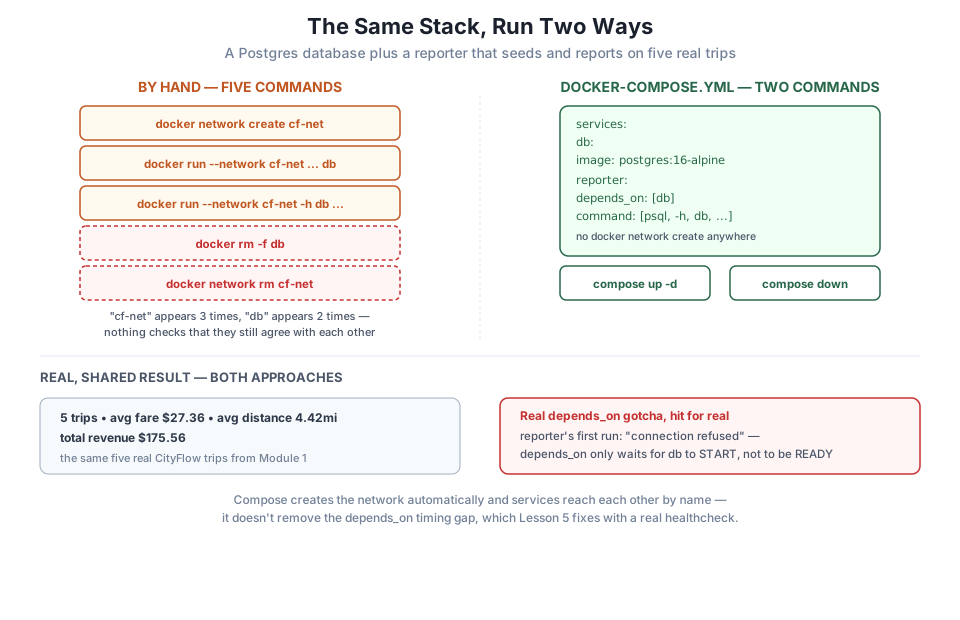
cf-why-compose-netThat’s five separate commands, and the string cf-why-compose-net has to appear, character for character, in three of them — once when you create it, and again in every docker run that needs to join it. The container name cf-why-compose-db has to match too, between the --name flag that creates it and the -h flag that connects to it. Nothing here checks that these strings agree with each other; a typo in any one of them fails silently or loudly, and you find out only when a container can’t reach another one it should be able to.
This isn’t a large example, and it’s still five commands with matching state spread across them. A real data stack — a database, a job that writes to it, maybe a second job that reads from it, environment variables for all three — multiplies that same problem by however many pieces the stack has.
Here’s the identical stack as a Compose file — one YAML document naming both services and how they relate:
services:
  db:
    image: postgres:16-alpine
    environment:
      POSTGRES_PASSWORD: cityflow
      POSTGRES_DB: cityflow

  reporter:
    image: postgres:16-alpine
    depends_on:
      - db
    environment:
      PGPASSWORD: cityflow
    volumes:
      - ./combined.sql:/sql/combined.sql:ro
    command: ["psql", "-h", "db", "-U", "postgres", "-d", "cityflow", "-f", "/sql/combined.sql"]
Save this as docker-compose.yml, alongside combined.sql from above. Notice what’s gone: there’s no docker network create anywhere in this file, and no --network flag repeated on each service. Compose creates a private network for the stack automatically, and every service you declare joins it by default — you’ll see exactly what that network looks like in Lesson 3. Notice too that reporter reaches the database with -h db, the service name from the YAML, not a container name you typed by hand twice and hoped stayed in sync.
Bring the whole stack up with one command:
docker compose -p cf-why-compose up -d Network cf-why-compose_default Creating
Network cf-why-compose_default Created
Container cf-why-compose-db-1 Creating
Container cf-why-compose-db-1 Created
Container cf-why-compose-reporter-1 Creating
Container cf-why-compose-reporter-1 Created
Container cf-why-compose-db-1 Starting
Container cf-why-compose-db-1 Started
Container cf-why-compose-reporter-1 Starting
Container cf-why-compose-reporter-1 StartedOne command created the network, created both containers, and started both — in the right order, db before reporter, because depends_on: [db] said so. Compare that to remembering, yourself, that the database has to exist before anything tries to connect to it.
The -p flag names the stack
-p cf-why-compose sets Compose’s project name, which prefixes every resource it creates: the network becomes cf-why-compose_default, the containers become cf-why-compose-db-1 and cf-why-compose-reporter-1. Without -p, Compose derives the project name from the current directory instead — explicit here so the resources in this lesson stay easy to identify and clean up.
Check what actually happened to reporter:
docker compose -p cf-why-compose ps -aNAME IMAGE COMMAND SERVICE CREATED STATUS
cf-why-compose-db-1 postgres:16-alpine "docker-entrypoint.s…" db 20 seconds ago Up 19 seconds
cf-why-compose-reporter-1 postgres:16-alpine "docker-entrypoint.s…" reporter 20 seconds ago Exited (2) 19 seconds agoreporter already exited — with an error:
docker compose -p cf-why-compose logs reporterreporter-1 | psql: error: connection to server at "db" (172.26.0.2), port 5432 failed: Connection refused
reporter-1 | Is the server running on that host and accepting TCP/IP connections?This is real, and it’s the single most common Compose surprise. depends_on: [db] guarantees Compose starts db’s container before reporter’s — but “started” and “ready to accept connections” are different moments. Postgres’s own container takes a second or two after it starts to finish initializing before it will accept a connection, and plain depends_on has no idea about that gap. reporter started the instant db’s container process began, found nothing listening on port 5432 yet, and failed.
Confirm db really was ready shortly after:
docker compose -p cf-why-compose logs dbdb-1 | 2026-07-21 13:15:09.155 UTC [1] LOG: listening on IPv4 address "0.0.0.0", port 5432
db-1 | 2026-07-21 13:15:09.160 UTC [1] LOG: listening on Unix socket "/var/run/postgresql/.s.PGSQL.5432"
db-1 | 2026-07-21 13:15:09.167 UTC [57] LOG: database system was shut down at 2026-07-21 13:15:08 UTC
db-1 | 2026-07-21 13:15:09.170 UTC [1] LOG: database system is ready to accept connectionsNow re-run just the reporter service, on its own, against the db that’s had time to finish starting:
docker compose -p cf-why-compose run --rm reporter Container cf-why-compose-db-1 Running
Container cf-why-compose-reporter-run-c35553f763f4 Creating
Container cf-why-compose-reporter-run-c35553f763f4 Created
CREATE TABLE
TRUNCATE TABLE
INSERT 0 5
trips | avg_fare | avg_distance | total_revenue
-------+----------+--------------+---------------
5 | 27.36 | 4.42 | 175.56
(1 row)The identical report — 5 trips, $27.36 average fare, 4.42-mile average distance, $175.56 total revenue — the same numbers as the hand-run version above, and the same numbers Module 1’s guided project produced from these same five trips. docker compose run --rm <service> starts a fresh, one-off container for a single service and removes it when it finishes, which is exactly the tool for re-running a job that failed for a timing reason rather than a real bug.
This is exactly what Lesson 5 fixes properly
Retrying by hand works for a lesson demo, but it’s not something you want to rely on in a real pipeline. Lesson 5’s guided project replaces plain depends_on: [db] with a healthcheck-based condition — depends_on: {db: {condition: service_healthy}} — so Compose itself waits for Postgres to prove it’s actually ready before starting the next service, no manual retry required. Keep this failure in mind; you’re about to watch it get solved for real.
docker compose -p cf-why-compose down Container cf-why-compose-reporter-1 Stopping
Container cf-why-compose-reporter-1 Stopped
Container cf-why-compose-reporter-1 Removing
Container cf-why-compose-reporter-1 Removed
Container cf-why-compose-db-1 Stopping
Container cf-why-compose-db-1 Stopped
Container cf-why-compose-db-1 Removing
Container cf-why-compose-db-1 Removed
Network cf-why-compose_default Removing
Network cf-why-compose_default RemovedOne command stopped and removed both containers and the network Compose created for them — the same three things docker rm -f cf-why-compose-db and docker network rm cf-why-compose-net did by hand above, except this time nothing had to be named twice for it to work.
docker compose -p cf-why-compose ps -aNAME IMAGE COMMAND SERVICE CREATED STATUS PORTSNothing left behind. That’s docker compose down’s whole job: undo everything up created, using the same file as the single source of truth for what “everything” means.
Run the manual, five-command version first, confirm the report, clean it up, then write and run the docker-compose.yml version. Confirm you hit the same depends_on failure on the first up -d, and that docker compose run --rm reporter succeeds once db has had time to start.
Hint
If your reporter run doesn’t fail on the first try, that’s not wrong — it just means your machine started Postgres fast enough to beat reporter’s connection attempt this time. The failure is a race, not a guarantee; running docker compose up -d a few times in a row (with down between attempts) should reproduce it.
Go back through the five-command manual version and list every place cf-why-compose-net and cf-why-compose-db each appear. Then do the same for the Compose file. Count them.
Hint
The network name appears three times by hand (create, then two --network flags) and zero times in the Compose file — it’s implicit. The database’s name/hostname appears twice by hand (--name and -h) and once in the Compose file (-h db, matching the service key, which you only ever type once).
In your docker-compose.yml, change depends_on: [db] to remove it entirely, then run docker compose -p cf-why-compose up -d again. Explain, from what you saw in this lesson, why removing depends_on doesn’t actually make the failure any more likely than it already was.
Hint
depends_on without a health condition only controls start order — it does not add a wait for readiness either way. You already saw that with depends_on present, reporter still started before db was ready. Removing it removes the order guarantee too, so reporter could now start before db’s container even exists, which is a strictly worse (not new) version of the same problem.
You rebuilt the exact same two-container CityFlow stack twice: once by hand, with a network name and a container name each retyped across three and two commands respectively, and once as a single docker-compose.yml, where the network is created automatically and services address each other by name. Both produced the identical real report — 5 trips, $27.36 average fare, 4.42-mile average distance, $175.56 total revenue. Along the way you hit a real depends_on failure: Compose started db before reporter as promised, but “started” isn’t “ready,” and reporter’s first connection attempt failed for exactly that reason — a genuine gotcha, not a contrived one, and the reason Lesson 5 reaches for a proper healthcheck instead of hoping the timing works out.
docker-compose.yml — one file declaring every service in a stack, replacing a sequence of individually-typed docker run commands.docker network create needed.reporter reaches db with -h db, the service’s key in the YAML, not a hand-typed container name.docker compose up -d / down — bring up or tear down every resource the file declares, in one command each.depends_on without a condition only orders startup — it does not wait for the dependency to be ready, a real gap this lesson demonstrated rather than just described.Every real data stack is more than one container: a database, one or more jobs that read or write to it, sometimes a queue or a cache between them. Doing that by hand doesn’t just take more typing — it takes more correct typing, every single time, with no tool checking that a network name or a hostname you meant to match actually did. Compose turns that stack into one file you can read top to bottom, hand to a teammate, or commit to version control, and it’s the foundation every remaining lesson in this module builds directly on top of.
You’ve felt the core trade Compose makes: one declarative file instead of several commands that all have to agree with each other, at the cost of a subtlety — depends_on timing — you now know to watch for. Next, in Lesson 2, you’ll turn to a different question entirely: what happens to the data inside a Postgres container when that container gets removed and recreated, and how a volume changes the answer from “gone” to “still there.”
Keep DATATWEETS free. Help fund practical data, AI, and engineering lessons for learners worldwide.
