Title here
Summary here
Every stack so far in this module has used the official postgres:16-alpine image on both sides — a database and a psql client wearing different hats. This lesson brings in something new: a service built from your own Dockerfile, using everything Module 3 taught about packaging a real Python data job, running alongside Postgres in the same docker-compose.yml. This is the shape almost every real local data stack takes — one or more services from official images, one or more services that are your own code — and it’s the direct foundation Lesson 5’s guided project builds on.
By the end of this lesson, you will be able to:
build: service to a Compose file, alongside an image: service, in the same stack.docker compose ps output that shows one service still running and another correctly exited.Two services this time: db, Postgres with a named volume (Lesson 2’s technique, carried forward — this data should survive a restart); and loader, a Python job built from your own Dockerfile, that aggregates real trip data and writes the result into db.
services:
  db:
    image: postgres:16-alpine
    environment:
      POSTGRES_PASSWORD: cityflow
      POSTGRES_DB: cityflow
    volumes:
      - cf-data-stack-pgdata:/var/lib/postgresql/data

  loader:
    build: .
    depends_on:
      - db
    environment:
      DB_HOST: db
    volumes:
      - ./trips.csv:/data/trips.csv:ro

volumes:
  cf-data-stack-pgdata:
Save this as docker-compose.yml. The one new line is build: . on loader — instead of image: <name>, this tells Compose to build an image from the Dockerfile in the current directory before starting the service. Everything else — the named volume, the environment variable, the read-only mount, depends_on — is exactly what you’d expect from the last three lessons.
FROM python:3.13-slim

WORKDIR /app

COPY requirements.txt .
RUN pip install --no-cache-dir -r requirements.txt

COPY loader.py .

CMD ["python", "loader.py"]
Save this as Dockerfile, cache-friendly per Module 2’s Lesson 2 — dependencies before code. The dependency list uses psycopg2-binary rather than Module 3’s plain psycopg2: this lesson isn’t about compiling a dependency, and a prebuilt wheel keeps the build fast so the lesson stays focused on orchestration.
pandas==2.2.3
psycopg2-binary==2.9.10
Save that as requirements.txt. The job itself reads the real 200,000-row CityFlow teaching sample, aggregates it by pickup zone, and loads the summary into Postgres:
# gate: skip
"""CityFlow's local-stack loader - reads real trip data mounted at
/data/trips.csv, aggregates it by pickup zone, and loads the result into
Postgres. Retries the database connection with backoff instead of
assuming it's ready the instant this container starts."""
import os
import sys
import time

import pandas as pd
import psycopg2

DB_HOST = os.environ.get("DB_HOST", "db")
DATA_PATH = os.environ.get("DATA_PATH", "/data/trips.csv")


def connect_with_retry(attempts=10, delay=2):
    last_err = None
    for attempt in range(1, attempts + 1):
        try:
            conn = psycopg2.connect(
                host=DB_HOST, port=5432, dbname="cityflow",
                user="postgres", password="cityflow",
            )
            print(f"connected to {DB_HOST} on attempt {attempt}")
            return conn
        except psycopg2.OperationalError as e:
            last_err = e
            print(f"attempt {attempt}/{attempts}: {DB_HOST} not ready yet ({e.__class__.__name__}), retrying in {delay}s")
            time.sleep(delay)
    print(f"ERROR: could not connect to {DB_HOST} after {attempts} attempts: {last_err}", file=sys.stderr)
    sys.exit(1)


def main():
    df = pd.read_csv(DATA_PATH, usecols=["PULocationID", "fare_amount", "total_amount"])
    summary = (
        df.groupby("PULocationID")
        .agg(trips=("fare_amount", "size"), revenue=("total_amount", "sum"))
        .reset_index()
        .rename(columns={"PULocationID": "zone"})
    )
    print(f"aggregated {len(df):,} real trips into {len(summary):,} zones")

    conn = connect_with_retry()
    cur = conn.cursor()
    cur.execute("""
        CREATE TABLE IF NOT EXISTS zone_summary (
            zone INTEGER PRIMARY KEY,
            trips INTEGER NOT NULL,
            revenue NUMERIC NOT NULL
        );
    """)
    cur.execute("TRUNCATE zone_summary;")
    rows = list(summary.itertuples(index=False, name=None))
    cur.executemany("INSERT INTO zone_summary (zone, trips, revenue) VALUES (%s, %s, %s);", rows)
    conn.commit()

    cur.execute("SELECT zone, trips, ROUND(revenue, 2) FROM zone_summary ORDER BY trips DESC LIMIT 5;")
    print("top 5 busiest zones (by trip count):")
    for zone, trips, revenue in cur.fetchall():
        print(f"  zone {zone:>3}: {trips:,} trips, ${revenue:,.2f} revenue")

    cur.execute("SELECT COUNT(*), SUM(trips), ROUND(SUM(revenue), 2) FROM zone_summary;")
    zones, total_trips, total_revenue = cur.fetchone()
    print(f"loaded {zones} zones, {total_trips:,} trips, ${total_revenue:,.2f} total revenue")

    cur.close()
    conn.close()
    print("loader finished successfully")


if __name__ == "__main__":
    main()
Save this as loader.py. Notice connect_with_retry — after everything Lessons 1 and 3 demonstrated about depends_on only guaranteeing start order, this job doesn’t leave readiness to chance. It attempts a real connection, catches the specific error Postgres raises when nothing is listening yet, waits, and tries again, up to ten times. That’s a genuine, working alternative to the healthcheck-based fix Lesson 5 introduces — a job that takes responsibility for its own dependency being slow to start, rather than requiring the orchestrator to solve it.
Copy the real CityFlow teaching sample into the same folder as trips.csv (datatweets.com/datasets/nyc-taxi/yellow_tripdata_sample.csv, 200,000 real trips), matching the dataset every course in this path uses.
docker compose -p cf-data-stack up --build -d Image cf-data-stack-loader Building
#9 [4/5] RUN pip install --no-cache-dir -r requirements.txt
#9 37.00
#9 37.01 Successfully installed numpy-2.5.1 pandas-2.2.3 psycopg2-binary-2.9.10 python-dateutil-2.9.0.post0 pytz-2026.2 six-1.17.0 tzdata-2026.3
#9 DONE 41.6s
Image cf-data-stack-loader Built
Network cf-data-stack_default Creating
Network cf-data-stack_default Created
Volume cf-data-stack_cf-data-stack-pgdata Creating
Volume cf-data-stack_cf-data-stack-pgdata Created
Container cf-data-stack-db-1 Creating
Container cf-data-stack-db-1 Created
Container cf-data-stack-loader-1 Creating
Container cf-data-stack-loader-1 Created
Container cf-data-stack-db-1 Starting
Container cf-data-stack-db-1 Started
Container cf-data-stack-loader-1 Starting
Container cf-data-stack-loader-1 Started--build tells Compose to build the loader image before starting anything — one flag, where Lesson 5’s guided project earlier (via Module 3) needed a separate docker build command run by hand first. Check what loader actually did:
docker compose -p cf-data-stack logs loaderloader-1 | aggregated 200,000 real trips into 235 zones
loader-1 | attempt 1/10: db not ready yet (OperationalError), retrying in 2s
loader-1 | connected to db on attempt 2
loader-1 | top 5 busiest zones (by trip count):
loader-1 | zone 132: 9,815 trips, $753,441.19 revenue
loader-1 | zone 161: 9,761 trips, $229,687.79 revenue
loader-1 | zone 237: 9,490 trips, $185,628.47 revenue
loader-1 | zone 236: 9,198 trips, $184,587.27 revenue
loader-1 | zone 186: 7,244 trips, $171,875.86 revenue
loader-1 | loaded 235 zones, 200,000 trips, $5,343,779.62 total revenue
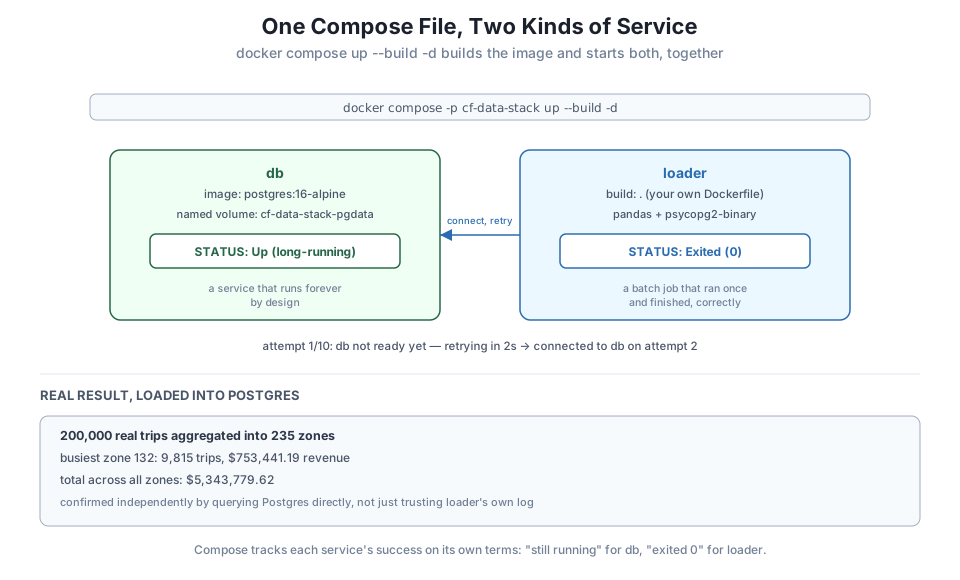
loader-1 | loader finished successfullyReal numbers, off the real file: 200,000 trips aggregated into 235 zones, zone 132 (Manhattan’s Upper East Side South, JFK’s LocationID neighbor in the real TLC lookup) the busiest by trip count at 9,815 trips, and $5,343,779.62 in total revenue across all 235 zones. And look at what happened right after the aggregation printed: attempt 1/10: db not ready yet, then connected to db on attempt 2. The exact race Lesson 1 and Lesson 3 both hit — loader started before Postgres was ready to accept connections — happened again here, and this time the job itself absorbed it instead of failing outright.
docker compose -p cf-data-stack ps -aNAME IMAGE COMMAND SERVICE CREATED STATUS
cf-data-stack-db-1 postgres:16-alpine "docker-entrypoint.s…" db 26 seconds ago Up 25 seconds
cf-data-stack-loader-1 cf-data-stack-loader "python loader.py" loader 26 seconds ago Exited (0) 20 seconds agoBoth lines are correct, and they’re correct for different reasons. db is a long-running service — Up 25 seconds is exactly what success looks like for it. loader is a batch job — Module 3’s Lesson 4 exit-code convention applies here too, and Exited (0) means it ran its one task and finished cleanly, the same as any batch job in this course. A stack can mix both shapes of service, and Compose tracks each one’s success on its own terms rather than expecting every service to look the same.
Confirm the data landed by querying db directly:
docker exec cf-data-stack-db-1 psql -U postgres -d cityflow -c \
  "SELECT COUNT(*) AS zones, SUM(trips) AS total_trips, ROUND(SUM(revenue),2) AS total_revenue FROM zone_summary;"
zones | total_trips | total_revenue
-------+-------------+---------------
235 | 200000 | 5343779.62
(1 row)The same three numbers loader’s own log reported — 235 zones, 200,000 trips, $5,343,779.62 — confirmed independently by querying Postgres directly, not just trusting the job’s own printout.
docker compose -p cf-data-stack down -v Container cf-data-stack-loader-1 Stopping
Container cf-data-stack-loader-1 Stopped
Container cf-data-stack-loader-1 Removing
Container cf-data-stack-loader-1 Removed
Container cf-data-stack-db-1 Stopping
Container cf-data-stack-db-1 Stopped
Container cf-data-stack-db-1 Removing
Container cf-data-stack-db-1 Removed
Network cf-data-stack_default Removing
Volume cf-data-stack_cf-data-stack-pgdata Removing
Volume cf-data-stack_cf-data-stack-pgdata Removed
Network cf-data-stack_default RemovedEvery container, the network, and the named volume — gone in one command. The built loader image itself isn’t removed by down; that’s expected, since an image isn’t part of a running stack’s state the way a container or volume is. Remove it separately with docker rmi cf-data-stack-loader if you want the disk space back.
Build and run this stack yourself against the real dataset. Confirm your own loader logs show the same 235 zones and $5,343,779.62 total revenue (the busiest-zone ordering should match too, since it’s the same real file), and confirm the connection-retry log line appears at least once.
Hint
If your connection succeeds on attempt 1 with no retry message at all, that’s not wrong — like Lesson 1’s depends_on race, this is timing-dependent. Postgres started faster on your machine than loader needed to reach it, which is a fine outcome too.
Temporarily rewrite connect_with_retry to attempt the connection exactly once, with no retry. Rebuild and rerun the stack a few times. Confirm loader sometimes fails outright now, and connect that back to why the retry loop existed in the first place.
Hint
docker compose ps -a will show loader as Exited (1) on a run where it failed — check docker compose logs loader on that run and confirm the traceback is the same psycopg2.OperationalError you saw handled gracefully earlier in this lesson.
Change loader.py to aggregate by DOLocationID (drop-off zone) instead of PULocationID (pickup zone), rename the resulting table to dropoff_summary, and rerun the stack. Confirm the total trip count still matches (200,000) even though the busiest-zone ranking changes.
Hint
The total across all zones has to stay 200,000 either way — every real trip has exactly one pickup zone and exactly one drop-off zone, so grouping by either column partitions the same 200,000 rows completely, just differently.
You brought a service built from your own Dockerfile into a Compose stack for the first time, alongside an official-image Postgres service, and ran both together with one docker compose up --build -d. The job aggregated 200,000 real CityFlow trips into 235 zones and loaded the result into Postgres, hitting — and this time handling gracefully, through its own connection-retry loop — the exact depends_on timing gap Lessons 1 and 3 already surfaced. docker compose ps -a showed the two services succeeding in two different, correct ways: db still running, loader cleanly exited at code 0, and the loaded data was confirmed independently by querying Postgres directly: 235 zones, 200,000 trips, $5,343,779.62 in revenue.
build: . in a service — Compose builds an image from a local Dockerfile before starting that service, alongside other services using image:.--build on docker compose up — rebuilds any service with a build: key as part of bringing the stack up.Up) and a batch job (Exited (0)) coexist correctly in the same stack; success looks different for each.This is the actual shape of most local data stacks: a database, and one or more jobs that read from or write to it, built from your own code rather than an off-the-shelf image. You’ve now run that shape for real, with a real dataset and a real, honest connection race handled rather than hidden. Lesson 5’s guided project is this exact pattern one step further — CityFlow’s real ETL job from Module 3, not a lesson-sized loader, running as a proper Compose service against Postgres, with the readiness problem solved the way Compose itself intends rather than through a retry loop inside the job.
You’ve now used every piece this module teaches — a declarative file, persistent data, automatic service-name networking, and a custom-built job service — together in one real stack. Lesson 5’s guided project brings CityFlow’s actual containerized ETL job from Module 3 into a Compose stack of its own, this time with a proper healthcheck-based depends_on, closing the loop on the exact timing gap you’ve now seen three different times in this module.
Keep DATATWEETS free. Help fund practical data, AI, and engineering lessons for learners worldwide.
