Title here
Summary here
Module 3 ended with CityFlow’s first real Dockerfile: a genuine slice of the zone-hour ETL pipeline, run with a bare docker run -v ... against the real January 2024 trip data. This project brings that exact same job into a Compose stack — alongside a real Postgres service, with the exact depends_on timing gap this module has surfaced three times now (Lessons 1, 3, and 4) finally solved the way Compose itself intends: a real HEALTHCHECK and a condition: service_healthy dependency, not a fixed sleep and not a job-side retry loop. The ETL job’s report, previously only printed, now lands in the database too.
By the end of this project, you will be able to:
HEALTHCHECK for a Postgres service inside a Compose file.depends_on: { <service>: { condition: service_healthy } } so a dependent service only starts once its dependency has actually proven it’s ready.This is the identical chunked, row-group-at-a-time aggregation from Module 3’s guided project — stream the file a row group at a time, keep 3 of 19 columns, aggregate into a per-zone, per-hour report — with one addition: the finished report is written into a real Postgres table, not only printed.
# gate: skip
"""CityFlow's zone-hour ETL job, as a Compose service - the same chunked
row-group aggregation from Module 3's guided project, extended to write its
report into Postgres instead of stdout alone. DATA_PATH must point at a
mounted file (never baked into the image, per Module 3 Lesson 5). DB_HOST
defaults to "db", the service name Compose resolves automatically.

Exit codes follow the same batch-job convention as Module 3:
  0  success            - report computed and written to Postgres
  2  no input available - nothing mounted at DATA_PATH
  3  validation failed  - the file parsed but produced zero in-window trips
"""
import datetime as dt
import os
import sys

import numpy as np
import pandas as pd
import psycopg2
import pyarrow.parquet as pq

DATA_PATH = os.environ.get("DATA_PATH", "/data/trips.parquet")
DB_HOST = os.environ.get("DB_HOST", "db")
KEEP = ["tpep_pickup_datetime", "PULocationID", "total_amount"]
WIN_LO = dt.datetime(2024, 1, 1)
WIN_HI = dt.datetime(2024, 2, 1)


def ensure_data():
    if os.path.exists(DATA_PATH):
        print(f"using mounted data at {DATA_PATH}", flush=True)
        return DATA_PATH
    print(f"ERROR: no file mounted at {DATA_PATH}", file=sys.stderr)
    sys.exit(2)


def aggregate_row_group(path, rg):
    tbl = pq.ParquetFile(path).read_row_group(rg, columns=KEEP)
    ts = tbl.column(0).to_numpy(zero_copy_only=False)
    keep = (ts >= np.datetime64(WIN_LO)) & (ts < np.datetime64(WIN_HI))
    hour = ts[keep].astype("datetime64[h]").astype("int64")
    zone = tbl.column(1).to_numpy()[keep]
    amt = tbl.column(2).to_numpy(zero_copy_only=False)[keep]
    part = (
        pd.DataFrame({"zone": zone, "hour": hour, "amt": amt})
        .groupby(["zone", "hour"], sort=False)
        .agg(trips=("amt", "size"), revenue=("amt", "sum"))
        .reset_index()
    )
    return part, int((~keep).sum())


def write_report(report):
    conn = psycopg2.connect(
        host=DB_HOST, port=5432, dbname="cityflow", user="postgres", password="cityflow",
    )
    cur = conn.cursor()
    cur.execute("""
        CREATE TABLE IF NOT EXISTS zone_hour_report (
            zone     INTEGER NOT NULL,
            hour     BIGINT  NOT NULL,
            trips    INTEGER NOT NULL,
            revenue  NUMERIC NOT NULL,
            PRIMARY KEY (zone, hour)
        );
    """)
    cur.execute("TRUNCATE zone_hour_report;")
    rows = list(report[["zone", "hour", "trips", "revenue"]].itertuples(index=False, name=None))
    cur.executemany(
        "INSERT INTO zone_hour_report (zone, hour, trips, revenue) VALUES (%s, %s, %s, %s);",
        rows,
    )
    conn.commit()
    cur.close()
    conn.close()


def main():
    path = ensure_data()
    pf = pq.ParquetFile(path)
    parts, quarantined = [], 0
    for rg in range(pf.metadata.num_row_groups):
        part, q = aggregate_row_group(path, rg)
        parts.append(part)
        quarantined += q

    agg = pd.concat(parts, ignore_index=True)
    report = (
        agg.groupby(["zone", "hour"], sort=False)
        .agg(trips=("trips", "sum"), revenue=("revenue", "sum"))
        .reset_index()
    )

    if len(report) == 0 or report["trips"].sum() == 0:
        print("ERROR: zero in-window trips after aggregation", file=sys.stderr)
        sys.exit(3)

    write_report(report)

    print("CityFlow zone-hour ETL - January 2024 (Compose)")
    print("-------------------------------------------------")
    print(f"source rows (on disk):       {pf.metadata.num_rows:,}")
    print(f"zone-hour buckets:           {len(report):,}")
    print(f"trips kept:                  {int(report['trips'].sum()):,}")
    print(f"quarantined (out-of-window): {quarantined}")
    print(f"total revenue:               ${report['revenue'].sum():,.2f}")

    top = report.loc[report["trips"].idxmax()]
    hour_str = str(np.array(int(top["hour"]), dtype="datetime64[h]"))
    print(
        f"busiest zone-hour:           zone {int(top['zone'])} at {hour_str}, "
        f"{int(top['trips'])} trips"
    )
    print("report written to Postgres: zone_hour_report")
    print("ETL completed successfully")
    sys.exit(0)


if __name__ == "__main__":
    main()
Save this as cityflow_etl.py, with a Dockerfile that carries forward Module 3’s slim, cache-friendly shape:
FROM python:3.13-slim

WORKDIR /app

COPY requirements.txt .
RUN pip install --no-cache-dir -r requirements.txt

COPY cityflow_etl.py .

CMD ["python", "cityflow_etl.py"]
pandas==2.2.3
pyarrow==19.0.0
psycopg2-binary==2.9.10Save that as requirements.txt alongside a Dockerfile with the same content shown above.
Three times now — Lessons 1, 3, and 4 — you’ve watched depends_on without a health condition start a dependent service too early, because “the container started” and “Postgres is ready to accept connections” are different moments. This lesson solves that gap properly:
services:
  db:
    image: postgres:16-alpine
    environment:
      POSTGRES_PASSWORD: cityflow
      POSTGRES_DB: cityflow
    volumes:
      - cf-etl-stack-pgdata:/var/lib/postgresql/data
    healthcheck:
      test: ["CMD-SHELL", "pg_isready -U postgres -d cityflow"]
      interval: 2s
      timeout: 3s
      retries: 10

  etl:
    build: .
    depends_on:
      db:
        condition: service_healthy
    environment:
      DB_HOST: db
      DATA_PATH: /data/trips.parquet
    volumes:
      - ./yellow_tripdata_2024-01.parquet:/data/trips.parquet:ro

volumes:
  cf-etl-stack-pgdata:
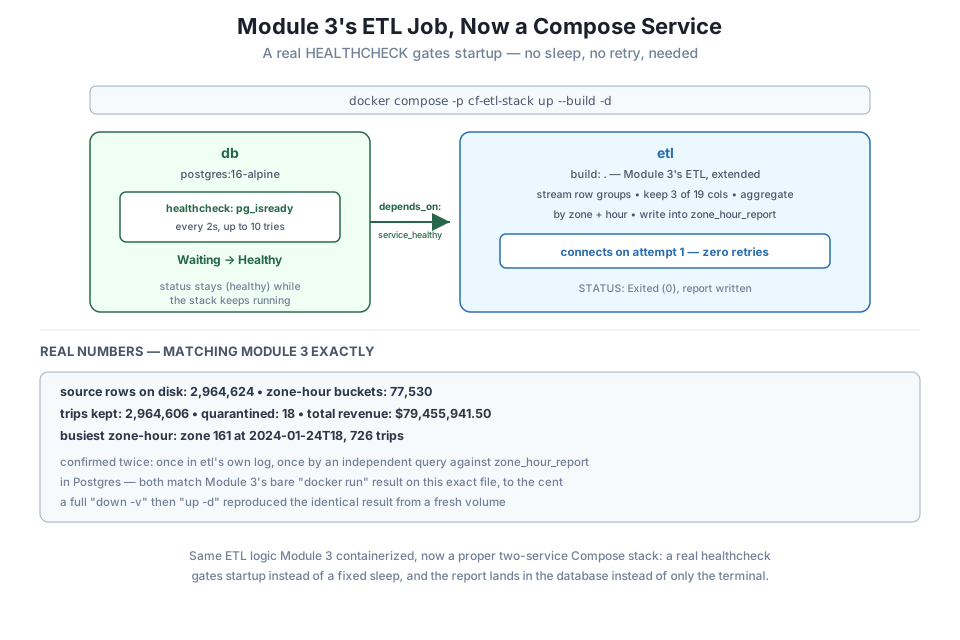
Save this as docker-compose.yml. Two things are new here. First, db now has a healthcheck: block, running pg_isready — Postgres’s own real readiness probe, the same tool Module 1 taught you to reach for by hand — every 2 seconds, up to 10 times, with a 3-second timeout per attempt. Second, etl’s depends_on is no longer a plain list; it’s { db: { condition: service_healthy } }, telling Compose not just to start db first, but to wait until db’s own healthcheck reports healthy before starting etl at all.
Download the real January 2024 trip data next to this file, matching every course in this path (d37ci6vzurychx.cloudfront.net/trip-data/yellow_tripdata_2024-01.parquet, the official NYC TLC source, exactly as Module 3 used).
docker compose -p cf-etl-stack up --build -d Image cf-etl-stack-etl Building
#9 [4/5] RUN pip install --no-cache-dir -r requirements.txt
#9 105.5 Successfully installed numpy-2.5.1 pandas-2.2.3 psycopg2-binary-2.9.10 pyarrow-19.0.0 python-dateutil-2.9.0.post0 pytz-2026.2 six-1.17.0 tzdata-2026.3
#9 DONE 107.7s
Image cf-etl-stack-etl Built
Network cf-etl-stack_default Creating
Network cf-etl-stack_default Created
Volume cf-etl-stack_cf-etl-stack-pgdata Creating
Volume cf-etl-stack_cf-etl-stack-pgdata Created
Container cf-etl-stack-db-1 Creating
Container cf-etl-stack-db-1 Created
Container cf-etl-stack-etl-1 Creating
Container cf-etl-stack-etl-1 Created
Container cf-etl-stack-db-1 Starting
Container cf-etl-stack-db-1 Started
Container cf-etl-stack-db-1 Waiting
Container cf-etl-stack-db-1 Healthy
Container cf-etl-stack-etl-1 Starting
Container cf-etl-stack-etl-1 StartedRead the last four lines closely: db-1 Starting, db-1 Started, db-1 Waiting, db-1 Healthy — and only then etl-1 Starting. Compose started db’s container, then genuinely waited while pg_isready kept failing internally, until the healthcheck reported success, and only then started etl. Compare that to Lesson 1’s reporter, Lesson 3’s client, and Lesson 4’s loader, every one of which started immediately and either failed outright or had to retry on its own. This is the difference a real healthcheck makes.
Check etl’s log:
docker compose -p cf-etl-stack logs etletl-1 | using mounted data at /data/trips.parquet
etl-1 | CityFlow zone-hour ETL - January 2024 (Compose)
etl-1 | -------------------------------------------------
etl-1 | source rows (on disk): 2,964,624
etl-1 | zone-hour buckets: 77,530
etl-1 | trips kept: 2,964,606
etl-1 | quarantined (out-of-window): 18
etl-1 | total revenue: $79,455,941.50
etl-1 | busiest zone-hour: zone 161 at 2024-01-24T18, 726 trips
etl-1 | report written to Postgres: zone_hour_report
etl-1 | ETL completed successfullyNo connection-refused error, no retry log line, no attempt 1/10 message anywhere. etl connected to Postgres and wrote its report on the very first try, because by the time it started, db genuinely was ready — not probably ready, not ready-after-a-guessed-sleep, but proven ready by its own pg_isready healthcheck. And the numbers are the same real numbers Module 3 measured on this exact file: 2,964,624 rows on disk, 77,530 zone-hour buckets, 2,964,606 trips kept, 18 quarantined, $79,455,941.50 total revenue, busiest zone-hour zone 161 at 2024-01-24T18 with 726 trips — the same ETL logic, the same real data, now running as a proper Compose service instead of a bare docker run.
docker exec cf-etl-stack-db-1 psql -U postgres -d cityflow -c \
  "SELECT COUNT(*) AS buckets, SUM(trips) AS total_trips, ROUND(SUM(revenue),2) AS total_revenue FROM zone_hour_report;"
buckets | total_trips | total_revenue
---------+-------------+---------------
77530 | 2964606 | 79455941.50Independent confirmation, straight from the database etl wrote to: 77,530 buckets, 2,964,606 trips, $79,455,941.50 — matching etl’s own printed log exactly, and matching Module 3’s bare docker run result exactly. The report isn’t just printed anymore; it’s a real, queryable table another service — a dashboard, a second job, a person running psql — could read from right now.
docker compose -p cf-etl-stack ps -aNAME IMAGE COMMAND SERVICE CREATED STATUS
cf-etl-stack-db-1 postgres:16-alpine "docker-entrypoint.s…" db 18 seconds ago Up 18 seconds (healthy)
cf-etl-stack-etl-1 cf-etl-stack-etl "python cityflow_etl…" etl 18 seconds ago Exited (0)db shows (healthy) directly in its status column now — the healthcheck isn’t a one-time gate at startup, it’s an ongoing check Docker keeps running. etl shows the same Exited (0) batch-job success Module 3 taught, exactly as expected for a job whose work is done.
docker compose -p cf-etl-stack down -v Container cf-etl-stack-etl-1 Stopping
Container cf-etl-stack-etl-1 Stopped
Container cf-etl-stack-etl-1 Removing
Container cf-etl-stack-etl-1 Removed
Container cf-etl-stack-db-1 Stopping
Container cf-etl-stack-db-1 Stopped
Container cf-etl-stack-db-1 Removing
Container cf-etl-stack-db-1 Removed
Network cf-etl-stack_default Removing
Volume cf-etl-stack_cf-etl-stack-pgdata Removing
Volume cf-etl-stack_cf-etl-stack-pgdata Removed
Network cf-etl-stack_default Removeddocker compose -p cf-etl-stack up -d Network cf-etl-stack_default Creating
Network cf-etl-stack_default Created
Volume cf-etl-stack_cf-etl-stack-pgdata Creating
Volume cf-etl-stack_cf-etl-stack-pgdata Created
Container cf-etl-stack-db-1 Creating
Container cf-etl-stack-db-1 Created
Container cf-etl-stack-etl-1 Creating
Container cf-etl-stack-etl-1 Created
Container cf-etl-stack-db-1 Starting
Container cf-etl-stack-db-1 Started
Container cf-etl-stack-db-1 Waiting
Container cf-etl-stack-db-1 Healthy
Container cf-etl-stack-etl-1 Starting
Container cf-etl-stack-etl-1 Starteddocker compose -p cf-etl-stack logs etl | tail -3etl-1 | busiest zone-hour: zone 161 at 2024-01-24T18, 726 trips
etl-1 | report written to Postgres: zone_hour_report
etl-1 | ETL completed successfullyDown with -v, back up from nothing — a fresh volume, a fresh database, and the exact same real result, because the source data was mounted, never baked in, and the ETL logic is fully deterministic over it. One command tears the whole thing down; one command brings it all back, correctly ordered, every time.
Build and run this stack yourself against the real January 2024 file. Confirm etl’s log shows zero retry messages (the healthcheck should mean it connects on the first attempt), and confirm the report in zone_hour_report matches both etl’s own log and Module 3’s original bare-docker run numbers.
Hint
If you still see a connection issue on etl’s first attempt, check docker compose ps -a for db’s health status — a healthcheck that’s still (starting) rather than (healthy) when etl launches means the depends_on condition didn’t hold, which would point at a typo in the condition: service_healthy block rather than a fundamental problem with the approach.
Change the healthcheck’s test to check the wrong database name (pg_isready -U postgres -d nonexistent) and rerun the stack. Watch what happens to etl — does it ever start?
Hint
condition: service_healthy means Compose will wait for the retries count to be exhausted and then give up, rather than starting etl anyway — check docker compose ps -a for db’s status (unhealthy after enough failed checks) and confirm etl never even reaches Created.
Add a third, one-off service to the Compose file — another postgres:16-alpine client, like Lesson 1’s reporter — that queries zone_hour_report for the single busiest zone-hour and prints it. Run it with docker compose run --rm <service-name> after the stack is up, and confirm it returns zone 161 without needing to touch etl at all.
Hint
SELECT zone, hour, trips FROM zone_hour_report ORDER BY trips DESC LIMIT 1; — this is exactly the value of writing the report into Postgres instead of only printing it: any number of other services can read it independently, on their own schedule, without re-running the ETL.
Module 3’s containerized ETL job became a proper Compose service in this project: a real Postgres HEALTHCHECK using pg_isready, and depends_on: { db: { condition: service_healthy } } on the etl service, closing the exact depends_on timing gap this module surfaced in Lessons 1, 3, and 4 — this time with zero retries needed, because Compose itself waited for real readiness before starting the dependent service. The job’s report — 77,530 zone-hour buckets, 2,964,606 trips, $79,455,941.50 revenue, busiest zone-hour zone 161 at 2024-01-24T18 with 726 trips — matched Module 3’s original bare-docker run result exactly, and this time it was written into a real zone_hour_report table in Postgres, confirmed by an independent query, not just printed to a terminal that closes when the container exits. One docker compose up --build -d and one docker compose down -v brought the whole two-service, healthcheck-gated stack up and down, and a full teardown-and-rebuild reproduced the identical result from nothing.
healthcheck: on a service — a real, repeated command (pg_isready here) that Docker uses to decide whether a service is actually ready, not just started.depends_on: { <service>: { condition: service_healthy } } — the Compose-native fix for the timing gap plain depends_on leaves open; the dependent service only starts once the healthcheck reports healthy.docker compose down -v then up -d — a full, reproducible rebuild from nothing, the real test of whether a stack’s data flow is actually deterministic.This project closes the loop this module opened in Lesson 1: a fixed sleep, a job-side retry loop, and a real healthcheck are three different ways to handle the same problem, and you’ve now used all three, on real jobs, and can explain honestly which one actually belongs in a stack meant to run unattended. CityFlow’s ETL job is no longer a demo that prints numbers to a terminal someone has to be watching — it’s a real, two-service pipeline that starts correctly, writes its result somewhere durable, and tears down cleanly, which is the actual shape of a production data job long before Kubernetes enters the picture in Module 5.
That completes Module 4: Docker Compose. You went from five hand-typed commands that all had to agree with each other, to a single declarative file; you learned exactly where a container’s data lives and how to keep it durable across a restart; you inspected the network Compose creates automatically and proved service-name resolution for real; you brought a custom-built job service into a stack alongside Postgres; and in this project, you closed the depends_on timing gap properly with a real healthcheck, on CityFlow’s actual ETL logic.
Next comes Module 5: Kubernetes Concepts on Kind, where the same containers you’ve been orchestrating by hand with Compose get their first taste of real orchestration: a local Kubernetes cluster running in Docker, self-healing Deployments, and the vocabulary — Pods, ReplicaSets, Services — that every later module in this course builds on.
Keep DATATWEETS free. Help fund practical data, AI, and engineering lessons for learners worldwide.
