Title here
Summary here
Every image you’ve run so far in this course — hello-world, nginx:alpine, postgres:16-alpine — was built by someone else. That’s about to change. CityFlow’s rider-support team needs a small command-line tool of their own, and by the end of this lesson you’ll have packaged it into an image you built yourself, from a file you wrote yourself: a Dockerfile.
A Dockerfile is nothing exotic — it’s a short, plain-text list of instructions, read top to bottom, that tells Docker exactly how to assemble an image. This lesson covers the four instructions that appear in nearly every Dockerfile on earth: FROM, COPY, RUN, and CMD. Learn what each one actually does — not just what it looks like — and you can read almost any Dockerfile you’ll ever encounter.
By the end of this lesson, you will be able to:
FROM, COPY, RUN, and CMD each do when Docker builds an image.docker build.docker history to see that each instruction produced its own layer, with its own real size.Let’s write one.
CityFlow’s rider-support agents field fare disputes constantly — a rider says a trip cost more than it should have, and an agent needs a quick sanity check before escalating. Here’s a small, original script that does exactly that, using a simple, illustrative formula (not CityFlow’s real production pricing):
"""CityFlow's fare estimator - a tiny CLI the rider-support team runs to
sanity-check a fare a rider is disputing, before escalating it further.

Formula: base fare + a per-mile rate + a per-minute rate, rounded to cents.
These rates are illustrative, not CityFlow's real production formula.
"""
import sys

BASE_FARE = 3.00
PER_MILE = 1.75
PER_MINUTE = 0.35


def estimate_fare(distance_miles: float, duration_minutes: float) -> float:
    raw = BASE_FARE + distance_miles * PER_MILE + duration_minutes * PER_MINUTE
    return round(raw, 2)


def main():
    args = sys.argv[1:]
    if len(args) >= 2:
        distance, duration = float(args[0]), float(args[1])
    else:
        distance, duration = 3.2, 14.0  # a typical short CityFlow trip

    fare = estimate_fare(distance, duration)
    print("CityFlow fare estimate")
    print("-----------------------")
    print(f"distance:  {distance:.2f} mi")
    print(f"duration:  {duration:.2f} min")
    print(f"estimate:  ${fare:.2f}")


if __name__ == "__main__":
    main()
Save this as fare_estimate.py. Run it directly with a local Python install and it works fine — python fare_estimate.py prints an estimate for a default trip, and python fare_estimate.py 5.0 20 prints one for a 5-mile, 20-minute trip. That’s exactly the problem: it only works if whoever runs it has a compatible Python installed. Package it as an image, and that stops being a requirement.
Create a new file named exactly Dockerfile (no extension) in the same folder as fare_estimate.py:
FROM python:3.13-slim

WORKDIR /app

COPY fare_estimate.py .

RUN echo "Built for CityFlow rider support" > BUILD_INFO.txt

CMD ["python", "fare_estimate.py"]
Five lines, four of which you’ll use in almost every Dockerfile you ever write. Go through them one at a time.
FROM — pick a starting pointFROM python:3.13-slimEvery Dockerfile starts with FROM, and it does exactly what it looks like: it picks an existing image as the foundation everything else builds on top of. python:3.13-slim — the same official image you used in Lesson 2 of Module 1 — already has Python 3.13 installed on a minimal Debian filesystem. You are not starting from an empty disk; you’re starting from someone else’s finished, tested image and adding to it.
WORKDIR — set where you’ll be workingWORKDIR /appWORKDIR sets the working directory inside the image for every instruction that follows, and creates that directory if it doesn’t already exist. It’s the Dockerfile equivalent of cd /app before running everything else — worth knowing, even though it isn’t one of this lesson’s four headline instructions.
COPY — bring a file in from the hostCOPY fare_estimate.py .COPY takes a file (or directory) from your build context — the folder you run docker build from — and copies it into the image’s filesystem. fare_estimate.py . copies that one file into the current WORKDIR (/app, thanks to the line above). After this instruction, the image contains a real, permanent copy of the script — not a link back to your host’s copy, and not something that needs to be mounted in later.
RUN — execute a command while buildingRUN echo "Built for CityFlow rider support" > BUILD_INFO.txtRUN executes a shell command at build time, inside the image being constructed, and whatever that command changes on disk becomes part of the image permanently. Here it’s a one-line echo that writes a small text file — intentionally simple, so the effect is easy to see and verify. In real Dockerfiles, RUN most often installs dependencies (RUN pip install ...), which Lesson 2 puts to real, measured use.
CMD — the default command at run timeCMD ["python", "fare_estimate.py"]CMD is different in kind from the other three: it doesn’t run now, while building. It records the command Docker should run later, every time someone runs a container from this image without specifying their own command. Write it as a JSON-style array of strings — ["python", "fare_estimate.py"], not a bare shell string — which is the form Docker’s own documentation recommends, since it runs the program directly rather than through an extra shell.
From the folder containing both files, build the image and give it a name and tag:
docker build -t cityflow-fare-estimator:1.0 .#1 [internal] load build definition from Dockerfile
#1 transferring dockerfile: 198B done
#1 DONE 0.0s
#4 [1/4] FROM docker.io/library/python:3.13-slim
#4 DONE 0.0s
#6 [2/4] WORKDIR /app
#6 DONE 0.0s
#7 [3/4] COPY fare_estimate.py .
#7 DONE 0.0s
#8 [4/4] RUN echo "Built for CityFlow rider support" > BUILD_INFO.txt
#8 DONE 0.3s
#9 exporting to image
#9 writing image sha256:70123bd3d06e71af5120f3f9598276c25fb6b0ae6ffd60a7cf3255dd72f3e643 done
#9 naming to docker.io/library/cityflow-fare-estimator:1.0 doneLook at the numbered steps: [1/4], [2/4], [3/4], [4/4] — four steps, one for every instruction after FROM itself (which counts as step zero, the starting point rather than a build step). That numbering is your first real clue that each instruction is a distinct, individually-tracked unit of work — not just a line of documentation.
The image now has a default command, so running it with no arguments uses exactly what CMD specified:
docker run --rm cityflow-fare-estimator:1.0CityFlow fare estimate
-----------------------
distance: 3.20 mi
duration: 14.00 min
estimate: $13.50Now append a command after the image name, and watch CMD get replaced entirely rather than merged with:
docker run --rm cityflow-fare-estimator:1.0 python fare_estimate.py 5.0 20CityFlow fare estimate
-----------------------
distance: 5.00 mi
duration: 20.00 min
estimate: $18.75CMD is a default, not a fixed instruction
CMD ["python", "fare_estimate.py"] in the Dockerfile only ever runs when docker run <image> is given with nothing after the image name. The moment you add anything after the image name — python fare_estimate.py 5.0 20 here — Docker runs that instead, in full, and the Dockerfile’s CMD is simply never used for this particular run. This is exactly why you saw two different, correct outputs above from the identical image.
You can also confirm the RUN step actually happened, by asking the container to print the file it created:
docker run --rm cityflow-fare-estimator:1.0 cat BUILD_INFO.txtBuilt for CityFlow rider supportdocker historyEvery instruction after FROM produced its own layer — a distinct, individually stored slice of the image’s filesystem. docker history lists them, most recent first, together with each one’s real size:
docker history cityflow-fare-estimator:1.0IMAGE CREATED CREATED BY SIZE COMMENT
70123bd3d06e Less than a second ago CMD ["python" "fare_estimate.py"] 0B buildkit.dockerfile.v0
<missing> Less than a second ago RUN /bin/sh -c echo "Built for CityFlow ride… 33B buildkit.dockerfile.v0
<missing> Less than a second ago COPY fare_estimate.py . # buildkit 1.03kB buildkit.dockerfile.v0
<missing> 13 minutes ago WORKDIR /app 0B buildkit.dockerfile.v0
<missing> 7 days ago CMD ["python3"] 0B buildkit.dockerfile.v0
<missing> 7 days ago RUN /bin/sh -c set -eux; for src in idle3 p… 36B buildkit.dockerfile.v0
<missing> 7 days ago RUN /bin/sh -c set -eux; savedAptMark="$(a… 38.8MB buildkit.dockerfile.v0
<missing> 7 days ago ENV PYTHON_SHA256=639e43243c620a308f968213df… 0B buildkit.dockerfile.v0
<missing> 7 days ago ENV PYTHON_VERSION=3.13.14 0B buildkit.dockerfile.v0
<missing> 7 days ago ENV GPG_KEY=7169605F62C751356D054A26A821E680… 0B buildkit.dockerfile.v0
<missing> 7 days ago RUN /bin/sh -c set -eux; apt-get update; a… 3.86MB buildkit.dockerfile.v0
<missing> 7 days ago ENV PATH=/usr/local/bin:/usr/local/sbin:/usr… 0B buildkit.dockerfile.v0
<missing> 8 days ago # debian.sh --arch 'arm64' out/ 'trixie' '@1… 100MB debuerreotype 0.17Read the top four rows — those are yours. CMD recorded 0B, because it only stores metadata about what to run later; it changes nothing on disk. RUN’s echo cost 33B — the exact size of BUILD_INFO.txt’s one line of text. COPY cost 1.03kB — fare_estimate.py’s real file size. Below your four rows, everything else is python:3.13-slim itself: the Debian base filesystem, Python’s own install, and the environment variables the official image sets — layers you didn’t create, but that your image reuses without paying to rebuild them.
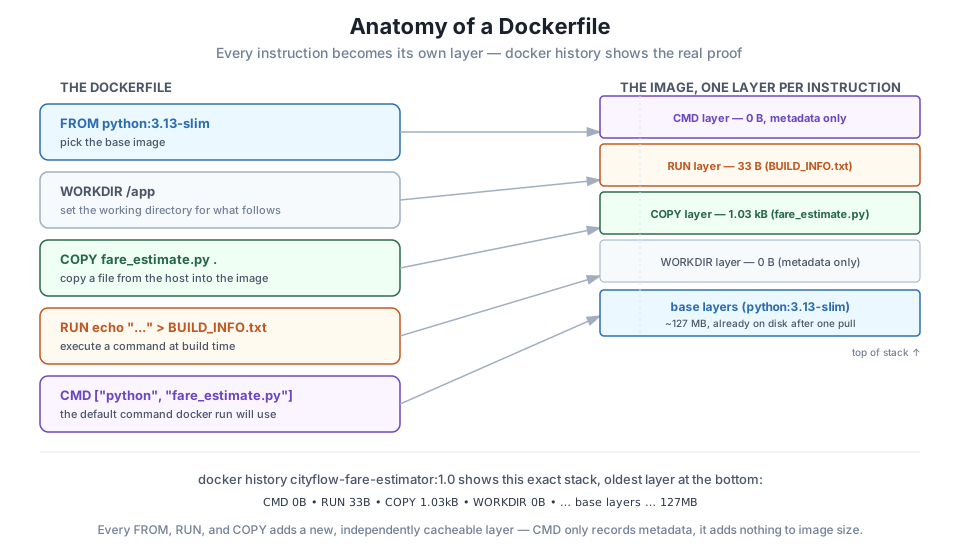
Why does CMD show 0B?
CMD doesn’t run anything and doesn’t touch the filesystem — it just records, in the image’s metadata, which command to use by default at docker run time. That’s why it costs nothing in docker history, and also why you were able to completely override it on the command line a moment ago: it was never “code that ran,” only an instruction saved for later.
Save fare_estimate.py and the Dockerfile exactly as shown, build the image, and run docker run --rm cityflow-fare-estimator:1.0 and docker run --rm cityflow-fare-estimator:1.0 python fare_estimate.py 8.0 25. Confirm both give correct estimates using the formula in this lesson.
Hint
3.00 + 8.0 * 1.75 + 25 * 0.35 = 3.00 + 14.00 + 8.75 = $25.75. Check your output against this by hand before trusting the container’s answer.
Add a second RUN instruction to the Dockerfile — for example, RUN echo "v1.0" >> BUILD_INFO.txt — right after the first one. Rebuild, then run docker history again and confirm a new layer appears for it, with its own small size, without changing any of the layers above WORKDIR.
Hint
Each RUN is its own instruction and therefore its own layer, no matter how small the change. You should see two separate RUN rows in docker history afterward, each with a real (tiny) size of its own.
Before running it, write down what you expect docker history to show if you swap the order of the COPY and RUN lines in the Dockerfile. Then make the swap, rebuild, and check docker history to see if you were right.
Hint
The rows in docker history always mirror the Dockerfile’s instruction order, most recent (last instruction) at the top. Swapping two instructions swaps their rows — this becomes a lot more than a cosmetic detail once you get to Lesson 2.
You wrote and built your first Docker image from scratch, using only FROM, COPY, RUN, and CMD — the four instructions that make up the overwhelming majority of Dockerfiles you’ll ever read. FROM picked python:3.13-slim as a starting point; COPY brought your script into the image permanently; RUN executed a real build-time command and left its result on disk; and CMD recorded a default command that docker run uses only when you don’t specify your own. docker history proved every one of those instructions produced a real, independently sized layer — not an abstraction, a fact you can measure.
Dockerfile — a plain-text, ordered list of instructions describing how to build an image.FROM — sets the base image everything else builds on top of.COPY — copies a file or directory from the build context into the image, permanently.RUN — executes a shell command at build time; anything it changes on disk becomes part of the image.CMD — records the default command a container runs, used only when docker run isn’t given an explicit command of its own.docker history — lists an image’s layers, one per instruction (after FROM), each with its real size.Every image you build for the rest of this course — a slimmed data-job image in Module 3, a multi-service Compose stack in Module 4, a Kubernetes deployment far past that — is still fundamentally this same idea: a FROM, some COPY/RUN instructions, and a CMD, just with more of each and more thought given to their order. Understanding what each instruction actually does to the image, rather than pattern-matching Dockerfiles you find online, is what lets you read someone else’s Dockerfile and know exactly what it will produce before you ever run docker build.
Your Dockerfile works, but you haven’t yet asked the question that separates a slow team from a fast one: does the order of these instructions matter? In Lesson 2, you’ll build the same functional image twice, with two of its instructions swapped, and measure — not guess — exactly how much that reordering costs or saves on a real rebuild.
Keep DATATWEETS free. Help fund practical data, AI, and engineering lessons for learners worldwide.
