Title here
Summary here
Every container in this course so far has worked. That’s about to change on purpose. In this lesson you’re going to run a small CityFlow service with a genuine bug in it — not staged output, a real crash caused by real code — and diagnose exactly what went wrong using the three tools you’ll reach for constantly once you’re running containers for real: docker logs, docker exec, and docker inspect.
By the end of this lesson, you will be able to:
docker logs and connect it to the exact line of code that caused it.docker exec to inspect a container’s filesystem while it’s still alive.docker inspect to check a container’s exit code programmatically, not just by eye.CityFlow’s dashboard needs pickup-zone IDs translated into human-readable names before they reach a rider-facing screen. Here’s a small worker that does that, processing a short batch of incoming trips one at a time:
# gate: skip
"""CityFlow's zone-enrichment worker - a tiny long-running loop that takes
raw pickup-zone IDs off a (simulated) queue and prints the human-readable
zone name for each one, using the real NYC TLC zone lookup.

Bug: this version looks the zone ID up with a plain dict subscript,
zones[zone_id], which assumes every incoming ID is a real, known zone.
Real CityFlow trip data disagrees - the TLC's own dictionary reserves
LocationID 264 for "Unknown", and it genuinely shows up in real trips.
"""
import json
import time

with open("zones.json") as f:
    ZONES = json.load(f)

# A small batch of incoming trips, arriving one at a time - trip 4 carries
# the real TLC "Unknown" sentinel zone ID, which is not a key in ZONES.
INCOMING_TRIPS = [
    {"trip_id": 1, "pu_zone": 236},
    {"trip_id": 2, "pu_zone": 142},
    {"trip_id": 3, "pu_zone": 138},
    {"trip_id": 4, "pu_zone": 264},
    {"trip_id": 5, "pu_zone": 161},
]

for trip in INCOMING_TRIPS:
    zone_id = str(trip["pu_zone"])
    zone_name = ZONES[zone_id]
    print(f"trip {trip['trip_id']}: pickup zone {zone_id} -> {zone_name}", flush=True)
    time.sleep(2)

print("all trips enriched", flush=True)
Alongside it, a small lookup file with real zone names drawn from the NYC TLC’s own published zone table:
{
  "138": "LaGuardia Airport",
  "142": "Lincoln Square East",
  "161": "Midtown Center",
  "236": "Upper East Side North"
}
Save these as enrich_worker.py and zones.json, and package them with a small Dockerfile using exactly the instructions from Lesson 1:
FROM python:3.13-slim

WORKDIR /app

COPY enrich_worker.py .
COPY zones.json .

CMD ["python", "-u", "enrich_worker.py"]
Notice python -u — it disables Python’s output buffering, so print() reaches docker logs immediately instead of waiting for the process to exit. This matters for a long-running service you intend to watch live; without it, you’d see nothing in the logs until the whole thing finished or crashed.
docker build -t cityflow-enrich:1.0 .
docker run -d --name cityflow-enrich cityflow-enrich:1.0
While it’s still running, check on it with docker exec — running a brand-new command inside the already-live container, the same tool you first used in Module 1’s Lesson 4:
docker exec cityflow-enrich ls -la /apptotal 16
drwxr-xr-x 1 root root 4096 Jul 21 05:23 .
drwxr-xr-x 1 root root 4096 Jul 21 05:23 ..
-rw-r--r-- 1 root root 1164 Jul 21 05:22 enrich_worker.py
-rw-r--r-- 1 root root 126 Jul 21 05:22 zones.jsonBoth files are exactly where they should be — the image was built correctly. Check progress with docker logs a couple of seconds in:
docker logs cityflow-enrichtrip 1: pickup zone 236 -> Upper East Side North
trip 2: pickup zone 142 -> Lincoln Square EastSo far, so good — two real trips enriched. Wait a few more seconds, then check whether it’s still running:
docker ps -a --filter "name=cityflow-enrich"CONTAINER ID IMAGE COMMAND CREATED STATUS PORTS NAMES
4354060d55a6 cityflow-enrich:1.0 "python -u enrich_wo…" 9 seconds ago Exited (1) 3 seconds ago cityflow-enrichExited (1) — a nonzero exit code. The container is dead, and something went wrong. This is exactly the weakest, first-pass claim from Module 1’s layered verification: it tells you something failed, but nothing yet about what.
docker logs: read the actual tracebackdocker logs cityflow-enrichtrip 1: pickup zone 236 -> Upper East Side North
trip 2: pickup zone 142 -> Lincoln Square East
trip 3: pickup zone 138 -> LaGuardia Airport
Traceback (most recent call last):
File "/app/enrich_worker.py", line 28, in <module>
zone_name = ZONES[zone_id]
~~~~~^^^^^^^^^
KeyError: '264'That’s the entire story, right there. Three trips enriched correctly, then trip 4 — pickup zone 264 — raised a KeyError, because '264' is not a key in zones.json. The worker’s own container stdout is a full Python traceback, exactly as if you’d run the script directly on your host; docker logs never modifies or summarizes it.
docker inspect: confirm the exit code programmaticallydocker inspect cityflow-enrich --format 'ExitCode={{.State.ExitCode}} StartedAt={{.State.StartedAt}} FinishedAt={{.State.FinishedAt}}'ExitCode=1 StartedAt=2026-07-21T05:23:06.176088757Z FinishedAt=2026-07-21T05:23:12.397555635Zdocker inspect returns a container’s full metadata as JSON; the --format flag with Go template syntax pulls out just the fields you care about. ExitCode=1 confirms, in a form a script or a monitoring system can check automatically, exactly what docker ps -a’s Exited (1) already showed you by eye. This is the tool you’d reach for if you were writing an automated check for “did last night’s batch job actually succeed” rather than reading logs by hand.
The bug is zone_name = ZONES[zone_id] — a plain dict subscript that assumes every incoming zone ID is a key that already exists. Real CityFlow trip data disagrees: 264 is the NYC TLC’s own real “Unknown” sentinel zone code, reserved for trips where the pickup zone genuinely couldn’t be determined, and it shows up in real data, not just edge-case testing. The fix is a one-line change — use .get() with a fallback instead of a subscript that can raise. Here’s the difference on a minimal example, run for real:
zones = {"236": "Upper East Side North", "142": "Lincoln Square East"}

# The pattern that crashed the worker: a missing key raises immediately.
try:
    zones["264"]
except KeyError as e:
    print(f"zones['264'] raised: KeyError{e}")

# The fix: .get() with a default never raises.
print("zones.get('264', 'Unknown'):", zones.get("264", "Unknown"))
zones['264'] raised: KeyError'264'
zones.get('264', 'Unknown'): UnknownApply the same change to enrich_worker.py — zone_name = ZONES.get(zone_id, "Unknown") in place of the subscript — rebuild, and rerun:
docker rm -f cityflow-enrich
docker build -t cityflow-enrich:1.1 .
docker run --name cityflow-enrich cityflow-enrich:1.1
trip 1: pickup zone 236 -> Upper East Side North
trip 2: pickup zone 142 -> Lincoln Square East
trip 3: pickup zone 138 -> LaGuardia Airport
trip 4: pickup zone 264 -> Unknown
trip 5: pickup zone 161 -> Midtown Center
all trips enrichedAll five trips now process correctly, including trip 4 — labeled Unknown, exactly as it should be, rather than crashing the entire worker. Confirm with docker inspect one more time:
docker inspect cityflow-enrich --format 'ExitCode={{.State.ExitCode}}'ExitCode=0ExitCode=0 — the same tool that confirmed the failure now confirms the fix, which is exactly the point: you didn’t just eyeball better-looking output, you checked the same objective signal before and after.
A real bug your data almost certainly has too
This isn’t a contrived example. Any real-world dimension table — zone lookups, product categories, customer segments — tends to have “unknown,” “other,” or “N/A” sentinel values that a naive dict lookup or join will choke on the first time it meets one. .get() with a sensible default, or an explicit check before the lookup, is the standard fix, and it’s worth applying by default any time you’re indexing into a dictionary built from a real, messy dataset rather than one you fully control.
Save enrich_worker.py, zones.json, and the Dockerfile exactly as shown, build and run the buggy version, and use docker logs to find the exact KeyError and docker inspect to confirm the exit code. Apply the fix, rebuild, and confirm ExitCode=0.
Hint
Give the container a few seconds to run before checking docker ps -a — it needs to process three successful trips (about 4 seconds, at 2 seconds each) before it reaches the one that crashes it.
Modify zones.json so it’s missing a different zone ID instead of 264 — for example, remove "138" and change trip 3’s pu_zone to 138. Rebuild, rerun, and confirm docker logs shows a KeyError for '138' instead, at a different point in the batch.
Hint
The crash always happens on whichever trip is first to reference a missing key — the traceback’s line number stays the same, but which trip triggers it, and what KeyError value it reports, changes with your data.
Run the buggy version again, and in the roughly four-second window before it crashes, use docker exec to run cat /app/zones.json inside the still-alive container. Confirm you can read the file’s real contents from inside a container that’s about to crash for an unrelated reason.
Hint
docker exec cityflow-enrich cat /app/zones.json — you have to be quick, since the whole batch finishes or crashes in well under 15 seconds. This is the same “the container has to still be running” constraint that made docker exec different from docker logs in Module 1.
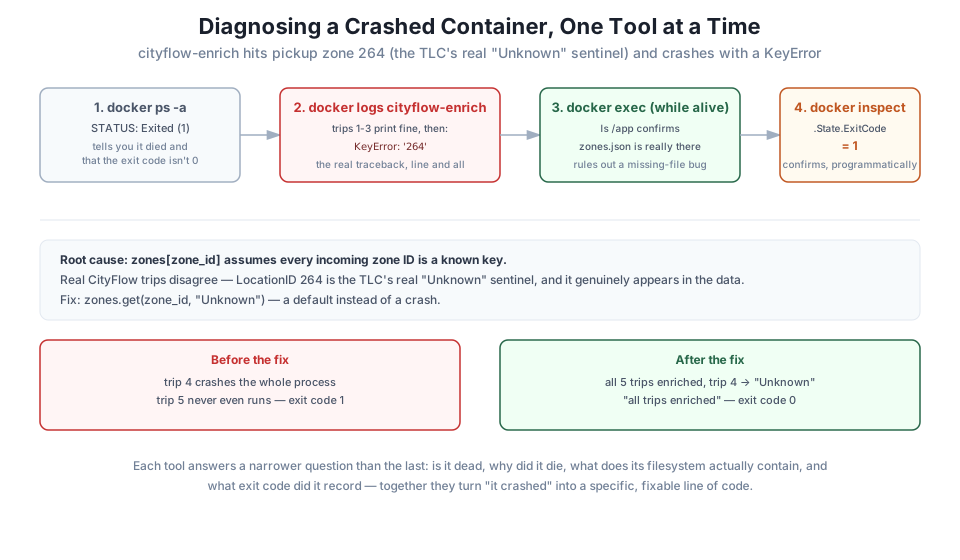
You built a container with a real, undisguised bug, watched it crash, and diagnosed exactly why using three tools that each answer a narrower question than the last: docker ps -a told you it died and recorded a nonzero exit code; docker logs showed the real traceback, KeyError: '264', pointing straight at the broken line; docker exec, run while the container was still alive, confirmed the image itself was built correctly and the bug was purely in the code’s logic; and docker inspect confirmed the exit code programmatically, both before and after the fix. The root cause — a dict lookup with no fallback for the NYC TLC’s real “Unknown” zone sentinel — is exactly the kind of bug real, messy data produces, and .get() with a default is exactly the fix.
docker logs — shows a container’s stdout/stderr, including a full crash traceback, unmodified.docker exec — runs a new command inside an already-running container; requires the container to still be alive.docker inspect --format — extracts specific fields (like .State.ExitCode) from a container’s full metadata, in a form scripts can check.dict.get(key, default) — the standard fix for a lookup that must handle a key that might not exist, rather than assuming it always will.Production data jobs fail on real, messy data far more often than they fail on bad code — an unexpected sentinel value, a null where one wasn’t expected, a category nobody accounted for. The debugging sequence you just practiced — is it dead, why did it die, what does its filesystem actually contain, what exit code did it record — is exactly what you’ll do when a real CityFlow batch job fails at 3 a.m., and it’s the same layered thinking Module 7’s kubectl logs, kubectl exec, and kubectl describe extend to a Kubernetes pod later in this course.
You now have all four skills this module set out to teach: writing a Dockerfile, building it efficiently, moving an image through a registry, and diagnosing a container that crashes. The Guided Project puts all four to work on one small, original image — built, tagged twice, pushed to your local registry, pulled back down, and run, with a real report as the proof it all actually worked.
Keep DATATWEETS free. Help fund practical data, AI, and engineering lessons for learners worldwide.
