Title here
Summary here
Across this module you’ve written your first Dockerfile, measured a real build-cache difference, pushed and pulled through a registry, and diagnosed a genuine crash. This project runs all four skills back to back on one small, original scenario: CityFlow’s trip-count auditor — a self-contained image that audits eight real trips and prints the same report no matter where it’s run.
You’ll build the image, give it two tags, push it to your local registry, remove every local copy, pull it back down, and run it — proving, end to end, that the image itself is the portable unit, not your machine’s current state.
By the end of this project, you will be able to:
FROM, RUN, COPY, and CMD into a complete, original image from scratch.docker inspect’s exit code, not just by reading its output.The auditor embeds a small, real slice of CityFlow’s own teaching dataset — eight trips, distinct from the five used in Module 1’s guided project — baked directly into the image at build time:
tpep_pickup_datetime,tpep_dropoff_datetime,passenger_count,trip_distance,PULocationID,DOLocationID,payment_type,fare_amount,tip_amount,total_amount
2024-01-01 20:50:16,2024-01-01 21:21:17,2.0,20.25,132,238,1,70.0,24.28,106.97
2024-01-01 20:50:24,2024-01-01 21:05:20,2.0,1.7,142,164,2,14.9,0.0,19.9
2024-01-01 20:50:35,2024-01-01 21:03:03,2.0,1.9,90,4,1,12.8,3.55,21.35
2024-01-01 20:50:36,2024-01-01 20:58:58,1.0,1.99,236,74,1,11.4,2.46,18.86
2024-01-01 20:50:49,2024-01-01 20:57:16,1.0,1.86,186,125,2,9.3,0.0,14.3
2024-01-01 20:50:52,2024-01-01 21:21:25,2.0,20.24,132,231,1,70.0,7.58,83.33
2024-01-01 20:51:01,2024-01-01 20:57:12,1.0,2.09,263,233,1,10.0,2.0,17.0
2024-01-01 20:51:11,2024-01-01 20:57:14,3.0,1.13,161,233,1,7.9,3.23,16.13
Save this as trips.csv. Alongside it, the auditor script itself:
# gate: setup: printf 'tpep_pickup_datetime,tpep_dropoff_datetime,passenger_count,trip_distance,PULocationID,DOLocationID,payment_type,fare_amount,tip_amount,total_amount\n2024-01-01 20:50:16,2024-01-01 21:21:17,2.0,20.25,132,238,1,70.0,24.28,106.97\n2024-01-01 20:50:24,2024-01-01 21:05:20,2.0,1.7,142,164,2,14.9,0.0,19.9\n2024-01-01 20:50:35,2024-01-01 21:03:03,2.0,1.9,90,4,1,12.8,3.55,21.35\n2024-01-01 20:50:36,2024-01-01 20:58:58,1.0,1.99,236,74,1,11.4,2.46,18.86\n2024-01-01 20:50:49,2024-01-01 20:57:16,1.0,1.86,186,125,2,9.3,0.0,14.3\n2024-01-01 20:50:52,2024-01-01 21:21:25,2.0,20.24,132,231,1,70.0,7.58,83.33\n2024-01-01 20:51:01,2024-01-01 20:57:12,1.0,2.09,263,233,1,10.0,2.0,17.0\n2024-01-01 20:51:11,2024-01-01 20:57:14,3.0,1.13,161,233,1,7.9,3.23,16.13\n' > trips.csv
# gate: teardown: rm -f trips.csv
"""CityFlow's trip-count auditor - a small, self-contained image for this
module's guided project. It ships with its own tiny slice of eight real
CityFlow trips baked in at build time (COPY, not a runtime mount or a
network call), and prints a short audit report on every run - the same
report, wherever the image is run from.
"""
import pandas as pd

df = pd.read_csv("trips.csv")

print("CityFlow trip-count audit")
print("--------------------------")
print(f"trips audited:     {len(df)}")
print(f"avg fare:           ${df['fare_amount'].mean():.2f}")
print(f"avg distance:        {df['trip_distance'].mean():.2f} mi")
print(f"total revenue:      ${df['total_amount'].sum():.2f}")

top = df.loc[df["fare_amount"].idxmax()]
print(
    f"highest fare trip:  zone {int(top['PULocationID'])} -> "
    f"{int(top['DOLocationID'])}, ${top['fare_amount']:.2f}"
)
Save this as audit.py, and a requirements.txt with the one dependency it needs:
pandas==2.2.3Put Lesson 2’s lesson to work immediately: dependencies before application code.
FROM python:3.13-slim

WORKDIR /app

COPY requirements.txt .
RUN pip install --no-cache-dir -r requirements.txt

COPY trips.csv audit.py .

CMD ["python", "audit.py"]docker build -t cityflow-trip-auditor:1.0 .
docker run --rm cityflow-trip-auditor:1.0CityFlow trip-count audit
--------------------------
trips audited: 8
avg fare: $25.79
avg distance: 6.39 mi
total revenue: $297.84
highest fare trip: zone 132 -> 238, $70.00Eight real trips, a real average fare of $25.79, a real average distance of 6.39 miles, $297.84 in total revenue, and the single highest-fare trip correctly identified — zone 132 to zone 238, $70.00 — all computed by pandas from the exact CSV baked into this image, with no mount and no network call involved.
Why bake the data in, instead of mounting it?
Lesson 2 of Module 1 mounted zone_check.py into a container with -v, precisely because that lesson was about the host’s Python version, not the file. This project makes the opposite, equally deliberate choice: COPY trips.csv audit.py . bakes both the code and the data permanently into the image, so the report this auditor produces is a property of the image itself — identical everywhere it runs, with nothing that has to be supplied separately at run time. Whether to mount or bake in data is a real design decision you’ll keep making: mount when the data changes independently of the code (Module 4’s Compose volumes); bake in when the whole point is a fixed, reproducible artifact, exactly like an audit report needs to be.
An image can have more than one name pointing at the same underlying layers. Add a :latest tag alongside :1.0:
docker tag cityflow-trip-auditor:1.0 cityflow-trip-auditor:latest
docker images cityflow-trip-auditor
IMAGE ID DISK USAGE CONTENT SIZE EXTRA
cityflow-trip-auditor:1.0 f7f7ea873644 305MB 0B
cityflow-trip-auditor:latest f7f7ea873644 305MB 0B Same IMAGE ID, same real disk usage, listed twice — tagging doesn’t copy or rebuild anything, it just gives an existing image a second name.
Start Lesson 3’s registry, tag the image for it, and push:
docker run -d -p 5000:5000 --name local-registry registry:2
docker tag cityflow-trip-auditor:1.0 localhost:5000/cityflow-trip-auditor:1.0
docker push localhost:5000/cityflow-trip-auditor:1.0
The push refers to repository [localhost:5000/cityflow-trip-auditor]
40b80d951936: Pushed
ee525c32493e: Pushed
4e6fee325600: Pushed
79c8021a56ea: Pushed
1.0: digest: sha256:d715c72ba480a7421b37a5487a927ef55f0fe499db5312f37b38aa2e6244b59a size: 1991This is the step that actually proves portability rather than assuming it. Remove all three tags pointing at this image, then pull it back down purely from the registry:
docker rmi cityflow-trip-auditor:1.0 cityflow-trip-auditor:latest localhost:5000/cityflow-trip-auditor:1.0Untagged: cityflow-trip-auditor:1.0
Untagged: cityflow-trip-auditor:latest
Untagged: localhost:5000/cityflow-trip-auditor:1.0
Untagged: localhost:5000/cityflow-trip-auditor@sha256:d715c72ba480a7421b37a5487a927ef55f0fe499db5312f37b38aa2e6244b59a
Deleted: sha256:f7f7ea873644832eacbfdef99151c558c3b0128bb36b9490e7e89f4d641dcf89docker images | grep trip-auditorNo output — genuinely gone. Now pull it back, exactly as a fresh machine would:
docker pull localhost:5000/cityflow-trip-auditor:1.0Digest: sha256:d715c72ba480a7421b37a5487a927ef55f0fe499db5312f37b38aa2e6244b59a
Status: Downloaded newer image for localhost:5000/cityflow-trip-auditor:1.0
localhost:5000/cityflow-trip-auditor:1.0docker run --name cityflow-trip-auditor localhost:5000/cityflow-trip-auditor:1.0CityFlow trip-count audit
--------------------------
trips audited: 8
avg fare: $25.79
avg distance: 6.39 mi
total revenue: $297.84
highest fare trip: zone 132 -> 238, $70.00Identical output — the exact same eight numbers, from an image that, moments ago, existed nowhere but inside local-registry. Confirm it succeeded the way Lesson 4 taught you, not just by reading the printed report:
docker inspect cityflow-trip-auditor --format 'ExitCode={{.State.ExitCode}}'ExitCode=0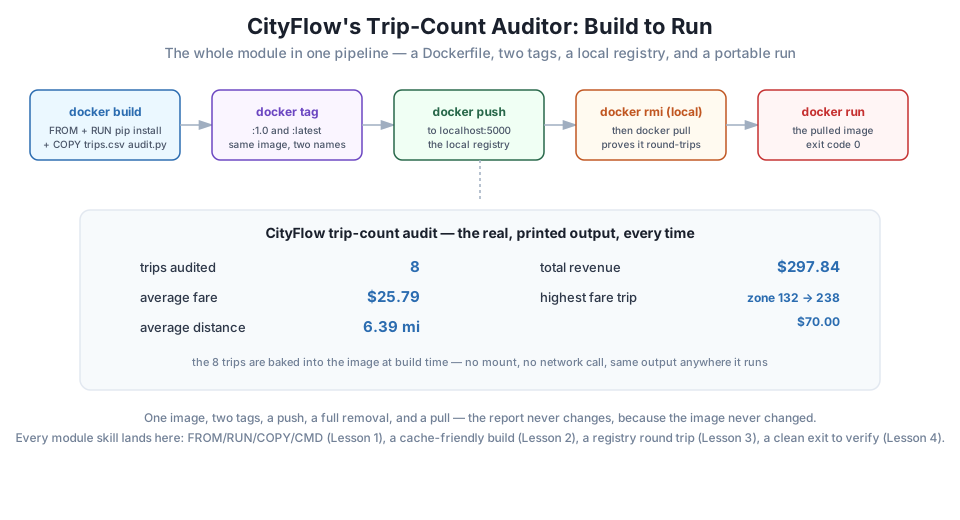
docker rm -f cityflow-trip-auditor local-registry
docker rmi -f localhost:5000/cityflow-trip-auditor:1.0
Nothing from this project should remain running or reachable once you’re done with it.
Trace the six steps back to the four lessons that led here. Lesson 1 gave you the vocabulary to read and write the Dockerfile itself — FROM, RUN, COPY, CMD, each producing its own real layer. Lesson 2 is why the Dockerfile installs pandas before copying audit.py: exactly the ordering that keeps a future code change from forcing a full reinstall. Lesson 3 is the entire push-remove-pull sequence — the registry is what turned “an image on your machine” into “an image anywhere your machine can reach.” And Lesson 4’s docker inspect --format is what confirmed success as a fact, not an impression, at the very end.
Run all seven steps yourself, in order, on your own machine. Confirm your docker run output matches the real numbers in this lesson exactly: 8 trips, $25.79 average fare, 6.39 mi average distance, $297.84 total revenue, and the highest-fare trip at zone 132 to 238.
Hint
If your numbers don’t match, the most likely cause is a typo in trips.csv — copy it character-for-character from this lesson, since the report is only as correct as the data baked into the image.
Add one more real-looking row to trips.csv with a fare higher than $70.00, rebuild the image with a new tag (:1.1), and confirm the report now shows 9 trips audited and identifies your new row as the highest-fare trip.
Hint
Because COPY requirements.txt . and RUN pip install come before COPY trips.csv audit.py . in this Dockerfile, editing only trips.csv should rebuild almost instantly — the same cache-friendly ordering from Lesson 2, doing real work for you here.
Stop the local-registry container, then try to docker push localhost:5000/cityflow-trip-auditor:1.0 anyway. Read the resulting error, then use docker inspect on nothing running to see what information is and isn’t available once a container you’d normally check no longer exists.
Hint
Expect a connection error — docker push needs a reachable registry, the same requirement that made -p 5000:5000 necessary back in Lesson 3. docker inspect on a removed container’s name returns “No such object,” which is itself a useful, checkable signal that something no longer exists.
You built and ran a complete, original project tying together every skill from this module: a cache-friendly Dockerfile combining FROM, RUN, COPY, and CMD; an image given two tags without duplicating any data; a full push through a real local registry; a genuine removal and pull-back proving the image is portable, not just present; and a verified ExitCode=0 confirming success as a checkable fact. Every number was real: 8 trips, a $25.79 average fare, a 6.39-mile average distance, $297.84 in total revenue, computed identically before the push and after the pull.
docker tag adds a name; it never copies or rebuilds the underlying layers.docker inspect --format '{{.State.ExitCode}}' — the objective check that a container actually succeeded, independent of its printed output.This project is a complete, miniature version of how a real image moves through a real team: build it, tag it meaningfully, push it somewhere shared, and let anyone with access pull and run the exact same thing you built. Module 3 takes this same shape and applies it to CityFlow’s actual ETL job, with multi-stage builds and measured size reductions; Module 5 pulls an image into a real Kubernetes cluster using this exact docker tag / docker push / docker pull pattern, just aimed at a different kind of puller.
That completes Module 2: Docker Fundamentals. You can write a Dockerfile from first principles, order its instructions so the build cache works for you, move an image through a registry, and diagnose — and fix — a container that crashes.
Next comes Module 3: Building Images for Data Jobs, where CityFlow’s real ETL script gets its first Dockerfile: choosing between python:slim and a full base image, splitting a build into multiple stages, and measuring exactly how many megabytes a genuinely slimmed-down image saves.
Keep DATATWEETS free. Help fund practical data, AI, and engineering lessons for learners worldwide.
