Title here
Summary here
Lesson 1 proved Docker works. This lesson answers a different question: why bother? “Works on my machine” is one of the oldest complaints in software, usually said with a shrug, as if it’s just something everyone lives with. You’re not going to take that on faith. In this lesson you’re going to cause the bug, on purpose, on real software, and watch it fail — and then watch the exact same file succeed without a single character changed.
By the end of this lesson, you will be able to:
Let’s start with the bug.
Someone on the CityFlow team wrote a tiny helper to validate a value before it goes into a report — is this pickup or drop-off zone a plain integer code, or a text label like "JFK"? Either is fine; anything else should be rejected. Here it is, in full:
"""CityFlow's zone-validation helper.

Confirms a pickup/dropoff zone ID is either a plain integer code or a
string label before it goes into a report. Written and tested on a
teammate's machine running a recent Python.
"""


def is_valid_zone(value):
    return isinstance(value, int | str)


if __name__ == "__main__":
    print("zone 142 valid:", is_valid_zone(142))
    print("zone 'JFK' valid:", is_valid_zone("JFK"))
Nothing exotic here. The one detail to notice is int | str inside isinstance() — writing a “this type or that type” check using the | operator directly on the built-in types, without importing anything from typing. It’s plain, modern Python, and it ran perfectly for the person who wrote it. Save this file as zone_check.py and you’re ready to hand it to a teammate.
Suppose a teammate pulls this file down to their own laptop and runs it with whatever Python their operating system happens to ship. On the machine used to write this lesson, that’s the Python that comes pre-installed on macOS:
/usr/bin/python3 --version
/usr/bin/python3 zone_check.py
Python 3.9.6
Traceback (most recent call last):
File "zone_check.py", line 14, in <module>
print("zone 142 valid:", is_valid_zone(142))
File "zone_check.py", line 10, in is_valid_zone
return isinstance(value, int | str)
TypeError: unsupported operand type(s) for |: 'type' and 'type'That’s a genuine crash, not a staged one. zone_check.py was never edited between the author’s machine and this one — the only thing that differs is which Python interpreter reads it. The X | Y union syntax for types was added in Python 3.10; this system’s pre-installed Python is 3.9.6, one minor version too old, and isinstance() refuses to evaluate int | str on it. The error message — unsupported operand type(s) for |: 'type' and 'type' — is Python 3.9 telling you, correctly, that it has no idea what to do with two types joined by a pipe.
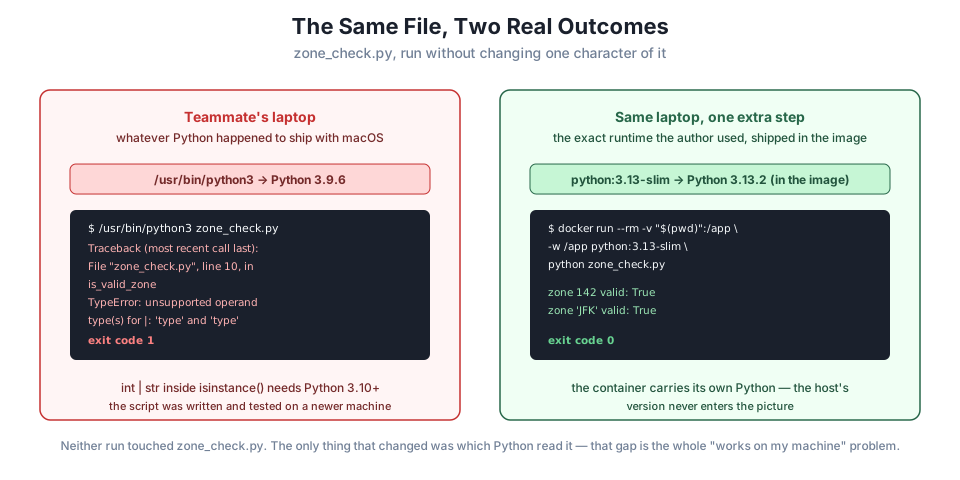
This is the whole problem in one screenful. The script is correct. The author’s environment was correct. But correctness on one machine says nothing about correctness on the next one, because “the script” was never really the whole deliverable — “the script plus the exact runtime it assumes” was, and only the first half got shared.
This isn’t a contrived toy bug
Version-gated language features are one of the most common real sources of “works on my machine” reports. Teams routinely develop on a newer Python than their servers run, or than a teammate’s freshly reimaged laptop has, and a feature that’s been stable and unremarkable for a year on the author’s machine turns into a production incident somewhere else. The fix is never “tell everyone to upgrade Python” — that doesn’t scale past a handful of people, and it says nothing about the dozens of other things that can silently differ: a different version of a library, a missing system package, a different operating system entirely.
Now watch what happens when, instead of relying on whatever Python the machine happens to have, you ask Docker for a specific, pinned Python runtime and run the same unedited file inside it.
docker pull python:3.13-slim3.13-slim: Pulling from library/python
59f54fbcd984: Already exists
54458c5d39fe: Pull complete
84b4dbf55b0b: Pull complete
a4e661f6acc9: Pull complete
Digest: sha256:6771159cd4fa5d9bba1258caf0b82e6b73458c694d178ad97c5e925c2d0e1a91
Status: Downloaded newer image for python:3.13-slim
docker.io/library/python:3.13-slimpython:3.13-slim is an official image published by the Python project: a minimal Linux filesystem with Python 3.13 already installed on it. Pulling it downloads that entire environment — interpreter and all — onto your machine, separate from whatever Python your operating system ships. Now run the file inside it:
docker run --rm -v "$(pwd)":/app -w /app python:3.13-slim python zone_check.pyzone 142 valid: True
zone 'JFK' valid: TrueIt works — and zone_check.py was not touched. Two new pieces appeared in that command, and both matter:
-v "$(pwd)":/app mounts your current directory into the container at /app, so the container can see zone_check.py on disk without it being baked into an image. (-v for volume; you’ll use this flag constantly.)-w /app sets that mounted directory as the container’s working directory, so python zone_check.py finds the file.--rm tells Docker to delete the container the instant it finishes — you wanted the output, not a container sitting around afterward.The container has its own Python 3.13.2, completely independent of the host’s 3.9.6. int | str is valid syntax there because 3.13 is well past the 3.10 cutoff, so isinstance() evaluates it exactly as the original author intended — because, in every way that matters, this is an environment close to the one they wrote it on.
It’s worth being precise about this, because it’s the core idea of the whole course. Nothing about the code changed between the failing run and the successful one. What changed was the answer to the question “which Python reads this file?” — and a container makes that answer a property of the command you run, not a property of whatever happens to already be installed on the machine you happen to be sitting at.
That’s the guarantee a container gives you that a shared script alone cannot: not just the code, but the exact runtime the code depends on, specified once and reproduced identically everywhere docker run is available. Your teammate on their machine, the CI server running your tests, and the production server all get python:3.13-slim — not “whatever Python happened to be there.”
Why not just tell everyone to install Python 3.13?
Because Python is rarely the only dependency. A real CityFlow job depends on specific versions of pandas, psycopg2, system libraries, and often other services entirely (you’ll run one — Postgres — in Lesson 4). “Install the right version of everything, by hand, on every machine that will ever run this” is exactly the coordination problem that doesn’t scale — and it’s the problem a container image solves by packaging the answer once and shipping it as a single, runnable artifact.
On your own machine, save zone_check.py exactly as shown above. Find your system’s default Python with python3 --version (on macOS, try /usr/bin/python3 --version specifically) and run the script with it. Then run it again with docker run --rm -v "$(pwd)":/app -w /app python:3.13-slim python zone_check.py. Confirm you see a failure in the first case and success in the second — or, if your system Python is already 3.10+, explain why you wouldn’t see the bug locally and what that itself demonstrates.
Hint
If your system Python is already recent enough that the script succeeds locally too, that’s not a failed exercise — it’s proof of the same point from the other direction: your specific version happened to line up with what the code needed, which is exactly the kind of luck a container removes the need for.
Modify zone_check.py to add a line using another Python 3.10+-only feature: a match statement (structural pattern matching) that prints "integer" or "text" depending on the type of value. Run your modified script against /usr/bin/python3 (or your system’s oldest available Python) and against python:3.13-slim, and compare the two results.
Hint
A minimal match block looks like:
value = 142
match value:
    case int():
        print("integer")
    case str():
        print("text")
match was also introduced in Python 3.10, so it should fail with a SyntaxError on 3.9 — a different, earlier kind of failure than the TypeError you saw with int | str, worth noticing.
Run zone_check.py inside python:3.9-slim instead of python:3.13-slim (you’ll need to docker pull it first). Predict what will happen before you run it, then run it and check your prediction.
Hint
A container doesn’t make code correct — it makes the runtime controllable and reproducible. python:3.9-slim genuinely has Python 3.9 inside it, so this should reproduce the exact same TypeError you saw on the host’s system Python, just inside a container this time. That’s an important, easy-to-miss point: Docker doesn’t fix bugs, it fixes which environment you’re guaranteed to be running in.
You watched an unmodified script produce two different, real outcomes depending on nothing but which Python interpreter read it: a TypeError on the host’s Python 3.9.6, and clean, correct output on a container running Python 3.13.2. That’s “works on my machine” made concrete rather than anecdotal. You then saw precisely what a container adds that a shared file alone doesn’t: a pinned, reproducible runtime that travels with the run command itself, so the question “which environment is this actually running in?” stops being a guess.
python:3.13-slim gives you Python 3.13.2 regardless of what your host machine has installed — the same image, the same interpreter, on any machine that can run Docker.docker run -v ... -w ... <image> <command> — mount your code into a container and run it there, without baking it into an image first.--rm — remove the container automatically once its command finishes, useful for one-off runs like this.Every real data pipeline eventually runs somewhere other than the machine it was written on — a teammate’s laptop, a CI runner, a production server, a Kubernetes pod. The gap between “works here” and “works there” is exactly what you just watched happen and then close. From here on, every technique in this course — building your own images, running services, composing multi-container stacks, deploying to Kubernetes — is really one long answer to the same question you just asked yourself: how do I make sure the environment travels with the code, instead of hoping it matches?
You’ve now seen a container fix a real problem, but you’ve only used containers other people built (hello-world, python:3.13-slim). In Lesson 3, you’ll build the core mental model that makes everything from here forward click into place: exactly what an image is, exactly what a container is, and the small handful of commands — pull, run, ps, stop, rm — that move between them. You’ll run, inspect, and clean up containers deliberately, not just once, so the vocabulary stops being new by the time Lesson 4 asks you to run a real, long-lived service.
Keep DATATWEETS free. Help fund practical data, AI, and engineering lessons for learners worldwide.
